Setting up Jeep seat memory can make every drive more comfortable. Imagine stepping into your Jeep and your seat, mirrors, and even steering wheel move perfectly into place—no more readjusting after someone else has driven. This feature is available in many recent Jeep models, but many owners never use it to its full potential. Here’s a simple, step-by-step guide to help you set your seat memory quickly and avoid common mistakes.
What Is Jeep Seat Memory?
Jeep seat memory is a system that stores driver preferences for seat position, mirrors, and sometimes steering wheel settings. With the press of a button, these return to your favorite positions. Most Jeep models allow two or three settings, so multiple drivers can each have their own.
Key Benefits
- Convenience: Instantly recall your seat and mirror settings.
- Safety: Ensures you always have the best view.
- Personalization: Each driver can save their unique settings.
Which Jeep Models Offer Seat Memory?
Not every Jeep has this feature. Usually, it’s found in higher trims or as part of luxury packages. Here’s a quick comparison to help:

| Model | Seat Memory Availability |
|---|---|
| Jeep Grand Cherokee | Yes (select trims) |
| Jeep Cherokee | Yes (higher trims) |
| Jeep Wrangler | Rarely (newest trims only) |
| Jeep Compass/Renegade | No |
Always check your owner’s manual to confirm your Jeep’s features.
Preparing To Set Seat Memory
Before setting up, make sure:
- Your Jeep is in Park.
- Ignition is ON, but engine running is not required.
- All drivers who want to save their settings are present.
Some Jeeps require a key fob or a specific “Set” button. Have your key ready, especially if you want to link the memory to a key fob.
Step-by-step: How To Set Jeep Seat Memory
Follow these steps for most Jeep models from 2014 onward. If your buttons look different, check your manual.
1. Adjust The Seat
Move your seat forward/back, up/down, and adjust the backrest until comfortable.
2. Set The Mirrors
Adjust both side mirrors for the best view.
3. Adjust The Steering Wheel (if Available)
Set the tilt and telescoping to your liking.
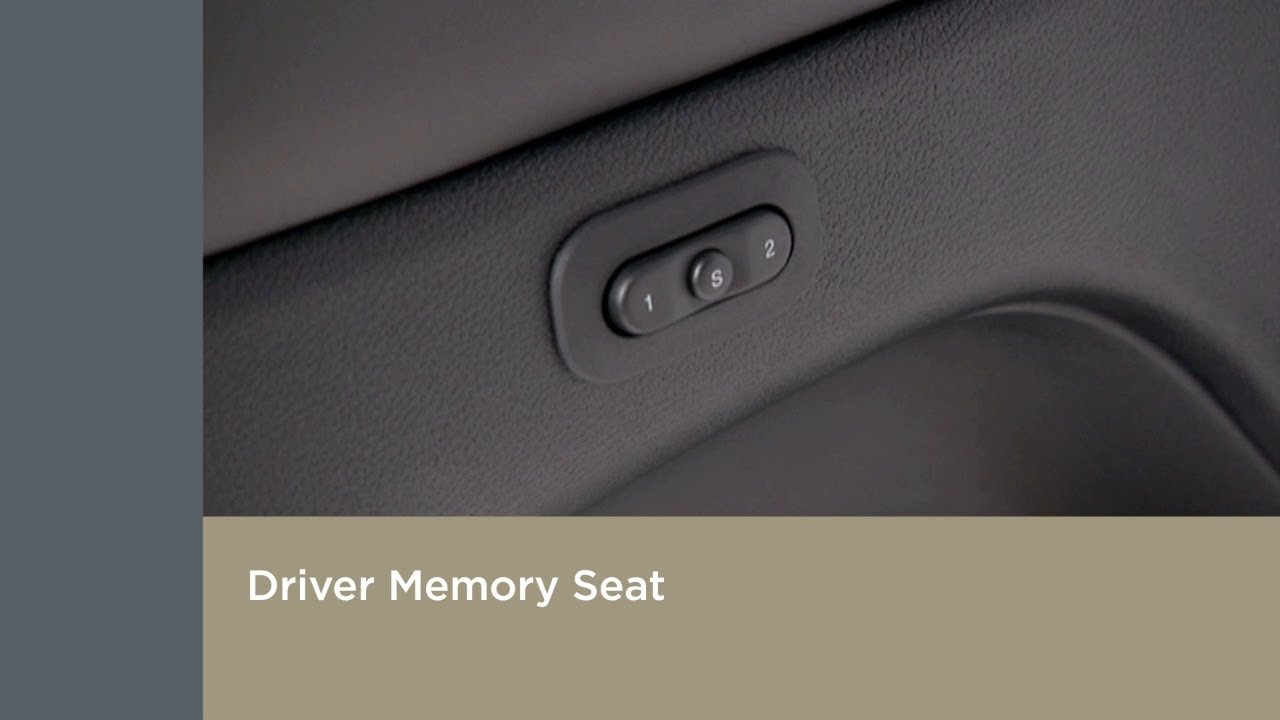
Usually located on the driver’s door panel.
5. Choose A Memory Position
Within five seconds, press and hold either “1” or “2” (or “S” then “1”/“2”), depending on your Jeep. Wait for a chime or light blink this confirms the setting is saved.
6. (optional) Link To Key Fob
Some models let you save your settings to your key fob. After setting memory, hold the desired memory button and the “Lock” button on your key fob at the same time. Release when you hear a beep.
Example
If your Jeep Grand Cherokee has two buttons labeled “1” and “2”:
- Adjust your seat and mirrors, press “Set,” then “1.”
- For a second driver, repeat with “Set,” then “2.”
Common Mistakes To Avoid
Many users make simple errors that prevent proper seat memory setup. Here are common pitfalls:
| Mistake | How to Avoid |
|---|---|
| Not in Park | Always shift to Park before programming |
| Waiting too long between steps | Press memory buttons within 5 seconds |
| Key fob not present | Have your fob nearby if linking to it |
| Not pressing buttons firmly | Hold until you hear a beep or see a light |
Many drivers miss the chime or light that confirms the setting is saved. If you don’t get a signal, repeat the steps.
Restoring And Clearing Seat Memory
To recall your settings, just press “1” or “2” (or use your linked key fob when unlocking). The seat and mirrors will move automatically.
If you need to clear a setting, repeat the save steps with a new seat position. The old memory will be overwritten.
Useful Tips For Jeep Seat Memory
- Set memory after every big seat or mirror change.
- Clean the memory buttons—dirt can block signals.
- Always check your child safety locks before adjusting settings if you have kids.
- If your seat moves slowly, your Jeep’s battery may be low.
A surprising feature in some Jeeps: seat memory can also adjust pedal positions or headrests. Explore your owner’s manual for these extra options.
Troubleshooting Seat Memory Problems
If your seat memory isn’t working:
- Check for blown fuses related to seat controls.
- Inspect seat wiring under the seat for loose connections.
- Make sure your door panel buttons are not stuck.
- Some models require a software reset if memory features fail after a battery change.
If you’ve tried all steps and still have issues, your Jeep dealer can run a diagnostic.
Frequently Asked Questions
How Many Memory Positions Can I Save In My Jeep?
Most Jeeps allow two or three memory positions. Check your model’s manual for the exact number.
Can I Link Seat Memory To More Than One Key Fob?
Yes, for Jeeps that support it, you can link each key fob to a different memory setting. This way, the seat adjusts automatically for whoever unlocks the car.
Does Seat Memory Include Mirror And Steering Wheel Settings?
In most recent Jeeps, seat memory saves seat, mirrors, and sometimes steering wheel positions. Some models even adjust pedals.
Will My Settings Be Lost If My Jeep’s Battery Dies?
Usually, seat memory settings are stored even if the battery is disconnected. However, in rare cases, you might need to reset them.
Where Can I Find More Information About My Jeep’s Seat Memory?
The best resource is your owner’s manual. For more technical details, you can also check the official Jeep website.
Jeep seat memory isn’t just a small luxury it saves time and makes every drive more comfortable and safe. Once you set it up, you’ll wonder how you ever lived without it.



















