Setting the clock on your Jeep Patriot might seem like a small task, but it can make a big difference in your daily drive.
Whether you just bought your vehicle, experienced a power reset, or daylight saving time changed, knowing how to adjust the clock saves you from confusion.
Many Jeep Patriot owners find this process confusing, especially since the controls can differ slightly based on model year or radio type. This guide will help you set your clock correctly, avoid common mistakes, and understand the steps for different Patriot models.
Why Setting The Clock Matters
A correct clock keeps you on schedule and can reduce stress, especially if you rely on your vehicle for work or school. For some Jeep Patriot trims, the clock is linked to other vehicle systems, like reminders or service schedules.
If the time is wrong, you might miss important alerts.
Understanding Your Jeep Patriot’s Clock System
Most Jeep Patriots use either a basic radio interface or a touchscreen unit. The way you set the clock depends on which system you have.
Common Radio Types
- Basic AM/FM Radio (no touch screen)
- Uconnect Touchscreen
- Navigation System (with GPS clock sync)
Below is a quick comparison of these radio types and how clock setting works:
| Radio Type | Clock Setting Method | Model Years |
|---|---|---|
| Basic AM/FM | Manual (button press) | 2007-2016 |
| Uconnect | Touchscreen menu | 2011-2017 |
| Navigation | GPS auto-sync/manual | 2014-2017 |
If you’re not sure which radio you have, look for a touchscreen or extra “NAV” button.
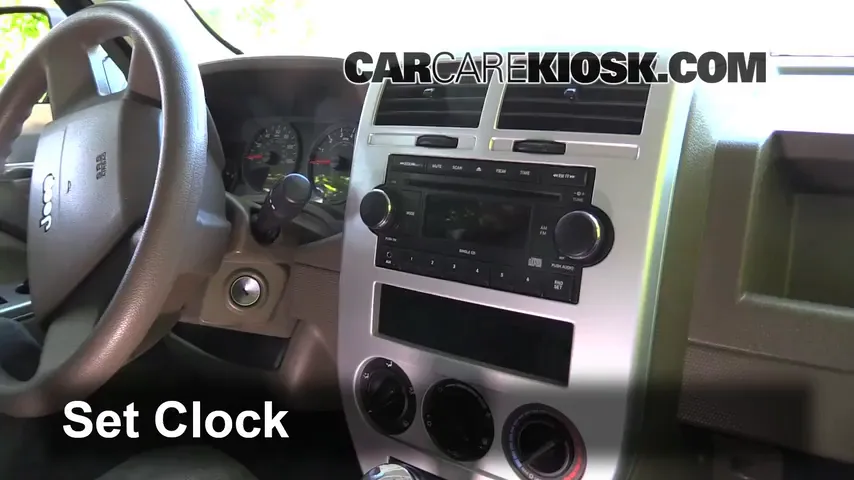
How To Set The Clock: Step-by-step
The process is different for each system. Follow the instructions that match your Jeep Patriot.
For Basic Am/fm Radios (most Common)
- Turn the ignition to ACC or ON (you don’t need to start the engine).
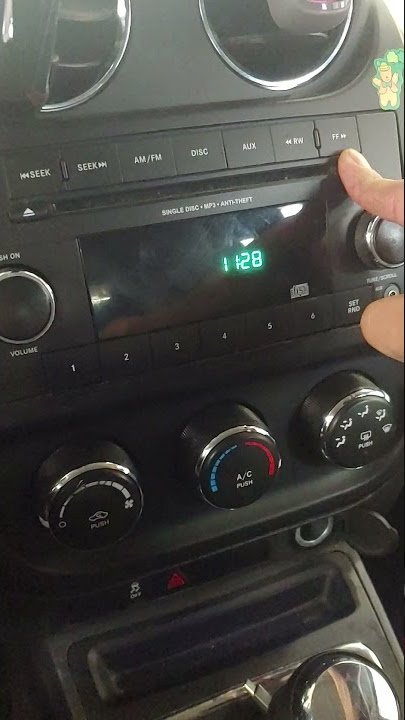
- Press and hold the ‘Time’ button (sometimes labeled “Clock” or with a small clock icon) until the display blinks.
- Use the ‘Seek’ or ‘Tune’ buttons to adjust the hours. Press up or down until the correct hour appears.
- Press the ‘Time’ button again to switch to minutes.
- Adjust the minutes using the ‘Seek’ or ‘Tune’ buttons.
- Press the ‘Time’ button once more to finish. The display will stop blinking.
Tip: If you have a 12/24-hour format option, check your owner’s manual for details. Some Patriots let you switch formats by holding the ‘Time’ button longer.
For Uconnect Touchscreen Radios
- Turn on your radio and tap ‘Menu’.
- Select ‘System Setup’ or ‘Clock Setup’.
- Tap ‘Set Time’ or ‘Adjust Time’.
- Use the plus/minus arrows to change the hour and minute.
- Save your changes by tapping ‘Done’ or ‘Save’.
Insight: Uconnect systems sometimes lose settings after a battery change. If your clock resets often, check your battery terminals for corrosion or loose connections.
- Go to the ‘Settings’ menu from your home screen.
- Find ‘Clock’ or ‘Time’ settings.
- If “Sync with GPS” is ON, your clock adjusts automatically. If not, you can set it manually.
- Adjust time zone if needed. Make sure daylight saving is correct.
Non-obvious tip: Some GPS units require the vehicle to be outside for a few minutes to get a satellite signal. If your clock is stuck, drive to an open area and wait.
Troubleshooting Common Problems
Even when you follow all the steps, you might face problems. Here’s how to handle the most common ones.
| Problem | Possible Cause | Solution |
|---|---|---|
| Clock resets every drive | Weak battery or poor connection | Check battery and terminals |
| Buttons not responding | Sticky or damaged buttons | Clean or gently press longer |
| Can’t find clock setting | Different radio model or hidden menu | Consult owner’s manual or dealer |
Extra Insight: Some owners accidentally adjust the radio preset instead of the clock. Always look for the blinking time display before making changes.

When To Seek Help
If your clock won’t set or loses time every day, there could be an electrical issue. It’s best to visit a certified Jeep technician if:
- The display is blank or flickering
- Clock settings disappear after short trips
- Other dashboard lights are malfunctioning
These signs can mean more than just a clock problem.
Keeping Your Jeep Patriot Up-to-date
Setting your clock is a small but important part of regular car care. If you plan to sell your Patriot or drive long distances, it’s a good idea to check the clock every few months.
Small details like this can even affect resale value, since they show the vehicle is well maintained.
Pro tip: If your radio has software updates available, these can sometimes fix clock or display bugs. Ask your dealer about updates during routine service.
Frequently Asked Questions
How Do I Know Which Radio System My Jeep Patriot Has?
The easiest way is to look at your dashboard. If you see a touchscreen, you likely have Uconnect or Navigation.
If your radio has only physical buttons and no screen, it’s a basic AM/FM unit. Your owner’s manual will also list the radio model.
Why Does My Jeep Patriot Clock Keep Resetting?
This usually happens after a battery change or if the battery is weak. Loose or corroded battery terminals can also cause frequent resets.
If your clock resets often, have your battery and connections checked by a mechanic.
Can I Set The Clock While Driving?
For safety, it’s best to set the clock while parked. Some Patriot models disable clock-setting features while the car is moving, especially those with a touchscreen. Always park first.
My Clock Is Off By An Hour After Daylight Saving Time. What Should I Do?
You’ll need to adjust the clock manually on most Patriot models. For GPS units, make sure the correct time zone and daylight saving options are selected.
If it still shows the wrong time, try toggling GPS sync off and on.
Where Can I Find My Jeep Patriot Owner’s Manual Online?
You can download official manuals from the Mopar Jeep owner’s site. This resource offers manuals for all model years and extra tips on using your vehicle’s features.
Setting the clock on your Jeep Patriot is quick once you know the steps. With a little attention to detail, your dashboard will always show the right time, making every drive smoother and more enjoyable.



















