Setting the clock on your Jeep Compass might seem simple, but many drivers find it confusing, especially with different model years and features. Having the correct time is more than just convenience—it helps with scheduled reminders, time-based navigation, and a sense of control over your driving environment. Whether you drive an older Compass or the latest model with a touchscreen, this guide will help you set your clock quickly and accurately. You’ll also learn helpful tips and what to do if you run into trouble.
Understanding Jeep Compass Clock Types
Jeep Compass models have two main types of clock interfaces: manual button-based and touchscreen digital. The way you set the clock depends on your model year and trim. Older models (pre-2017) usually have manual buttons, while newer models feature a digital interface.
| Model Year | Clock Type | Setting Method |
|---|---|---|
| 2011–2016 | Manual (Button) | Physical buttons below radio |
| 2017–2023 | Touchscreen (Uconnect) | Digital touchscreen interface |
| 2024+ | Advanced Touchscreen | Enhanced Uconnect system |
If you aren’t sure about your model, check your owner’s manual or look at your dashboard display.
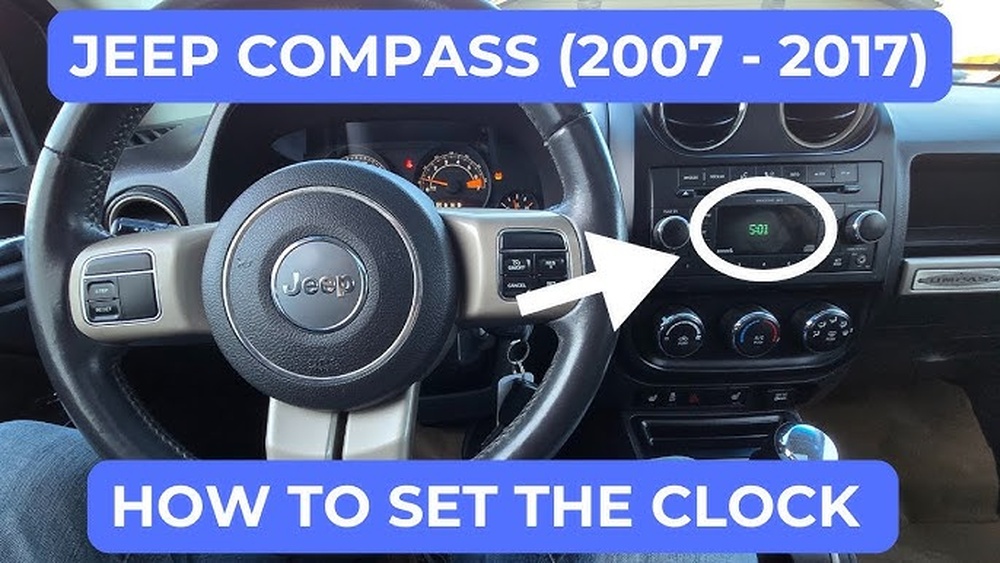
Step-by-step Guide: Setting The Clock
Setting the clock on your Jeep Compass is straightforward once you know your interface. Here’s how to do it for each type.
- Turn on the ignition but keep the engine off.
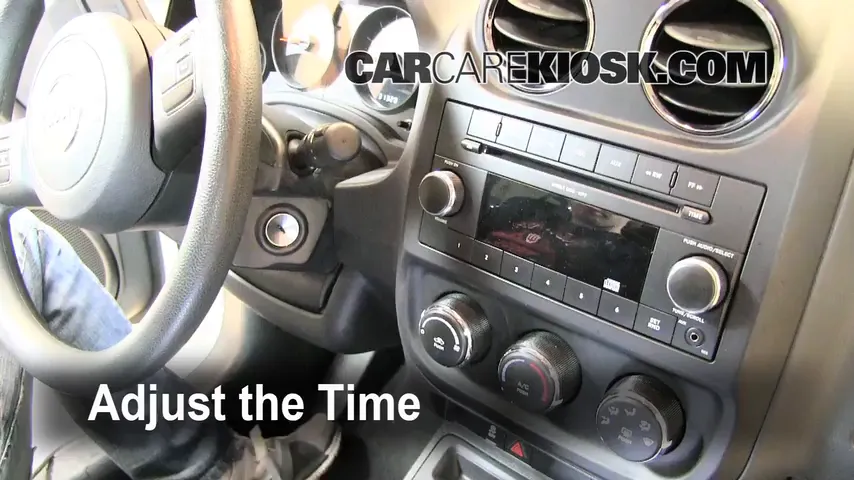
- Locate the “Clock” or “Time” button near the radio display.
- Press and hold the button until the hour digits blink.
- Use the “Seek” or “Tune” buttons to adjust the hour.
- Press the “Clock” button again; now the minutes will blink.
- Adjust the minutes as before.
- Press the “Clock” button one final time to save.
Tip: If your radio has a combined display, you might need to cycle through settings by holding the button longer.
For Touchscreen Models (2017–2023)
- Power on the vehicle’s dashboard.
- Tap the “Settings” icon on the Uconnect touchscreen.
- Select “Clock & Date” from the menu.
- Tap “Set Time”.
- Use the on-screen arrows or dial to set hour and minute.
- Confirm by tapping “Save” or “OK”.
Tip: Some touchscreens allow you to sync time automatically with GPS. If available, toggle the “Sync Time with GPS” option.
Advanced Uconnect (2024+)
- Start the vehicle and access the main menu.
- Choose “Settings” > “System” > “Clock & Date”.
- Select “Automatic Time Adjustment” for GPS sync or “Manual Set” to input time.
- Adjust as needed, confirm, and exit.
| Setting Type | Manual Steps | Automatic Option |
|---|---|---|
| Manual Button | Press/hold, adjust hour/minute | Not available |
| Touchscreen | Tap, select, adjust, confirm | Sync with GPS |
| Advanced Uconnect | Navigate menus, set manually | Automatic time sync |

Common Problems And Solutions
Sometimes, the clock doesn’t update or buttons don’t respond. Here’s how to fix common issues:
- Clock won’t save: Double-check you’re pressing the right button sequence. On touchscreen models, make sure you hit “Save.”
- Buttons not working: Try restarting the ignition. Sometimes, the buttons lock up after battery changes.
- Touchscreen freezes: Restart Uconnect by turning off the car, waiting one minute, then restarting.
- Time drifting: If your Compass loses time often, your battery might be weak, or the system needs a software update.
Non-obvious insight: Many drivers don’t realize that after a battery replacement, clock settings may reset. Always check your clock after service.
Extra Tips For Accurate Clock Setting
- Check AM/PM: Some interfaces default to 24-hour format. Make sure you select the right period.
- Daylight Saving Time: If your area observes DST, set your clock forward or backward when needed.
- Sync with Phone: If your Uconnect allows Bluetooth pairing, sometimes the clock can sync automatically with your smartphone’s time.
- Backup Battery: If your clock keeps resetting, your vehicle’s backup battery could be failing.
Example: After a battery swap, it’s common for the clock to revert to midnight. Double-check your clock every time you get your car serviced.
| Issue | Possible Cause | Solution |
|---|---|---|
| Clock resets after service | Battery replaced | Manually re-set clock |
| Time drifts by hours | Weak battery | Replace battery |
| Touchscreen doesn’t respond | Software glitch | Restart system |
Why Accurate Time Matters
A correctly set clock isn’t just about knowing the time. The Jeep Compass uses the clock for scheduled maintenance reminders, trip logs, and navigation. Accurate time is also important for safety. If you rely on the car’s clock for appointments or travel, even a small error can cause problems.
Non-obvious insight: Navigation systems may give wrong ETA if the clock is incorrect. Always verify your clock after software updates.
Frequently Asked Questions
How Do I Change The Clock On My Jeep Compass If I Don’t Have A Touchscreen?
Use the physical Clock or Time button near your radio. Follow the sequence: press and hold, adjust hour, press again for minute, then save.
Can My Jeep Compass Clock Sync Automatically?
Yes, newer models with Uconnect may have an option for syncing with GPS or your smartphone. Look for “Sync Time with GPS” in the settings.
Why Does My Clock Keep Resetting?
This often happens after battery replacement or if your battery is weak. Check the battery health and manually reset the clock.
Is There A Way To Use 24-hour Time Format?
Some Jeep Compass models allow switching between 12-hour and 24-hour formats in the clock settings. Check your Uconnect menu or owner’s manual.
Where Can I Find More Detailed Instructions For My Specific Jeep Compass Model?
Visit the official Jeep website or check your owner’s manual. The official Jeep Owner’s Manual has step-by-step guides for all models.
Having your Jeep Compass clock set correctly will help you stay organized and avoid confusion. If you ever have trouble, your dealership or the Jeep support site can provide extra help. Just remember, each model has its own method, and checking your manual is always a smart move.



















