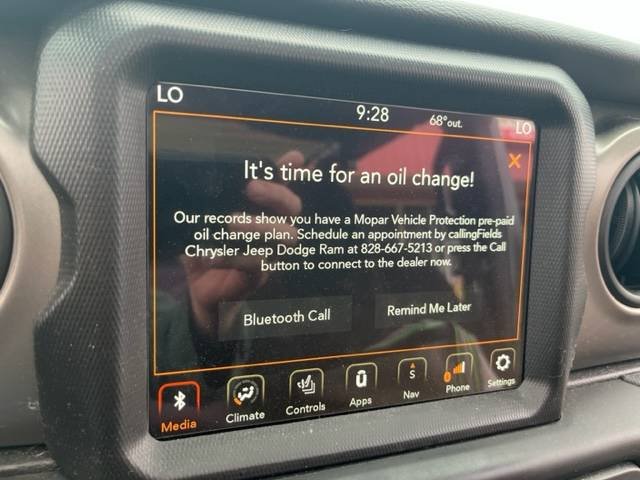
Resetting the oil change reminder on your Jeep Gladiator is a simple process, but many owners overlook small steps that make a big difference.
If you ignore the oil change message, it keeps popping up every time you start your vehicle, which can be distracting and make it harder to spot new alerts.
Whether you just changed your oil yourself or had it done at a shop, knowing how to reset the system helps you keep track of maintenance and protect your engine. This article guides you step-by-step, explains why proper resetting matters, and covers common mistakes and extra tips for Jeep Gladiator owners.

Why Resetting The Oil Change Reminder Is Important
The oil change reminder is not just a light—it’s a tracking tool for your engine health. When you reset it after every oil change, you keep accurate records of when maintenance was performed. If you skip the reset, the system won’t alert you correctly for future oil changes, which can lead to engine wear or reduced performance.
Some owners think the reminder turns off automatically. It doesn’t. You must manually reset it to clear the old interval and start the new countdown. Here’s how the oil change interval system works:
| Interval Type | Duration (Miles) | Reminder Behavior |
|---|---|---|
| Factory Default | 7,500 | Appears at interval |
| Manual Reset | Custom (user set) | Resets only if manually done |
| No Reset | Unknown | Reminder persists |
Step-by-step Guide: How To Reset Oil Change On Jeep Gladiator
Resetting the oil change message is easy, but a few details matter. Follow these steps for a complete reset:
1. Turn Ignition On
Insert your key or press the start button without starting the engine. All dashboard lights should come on.
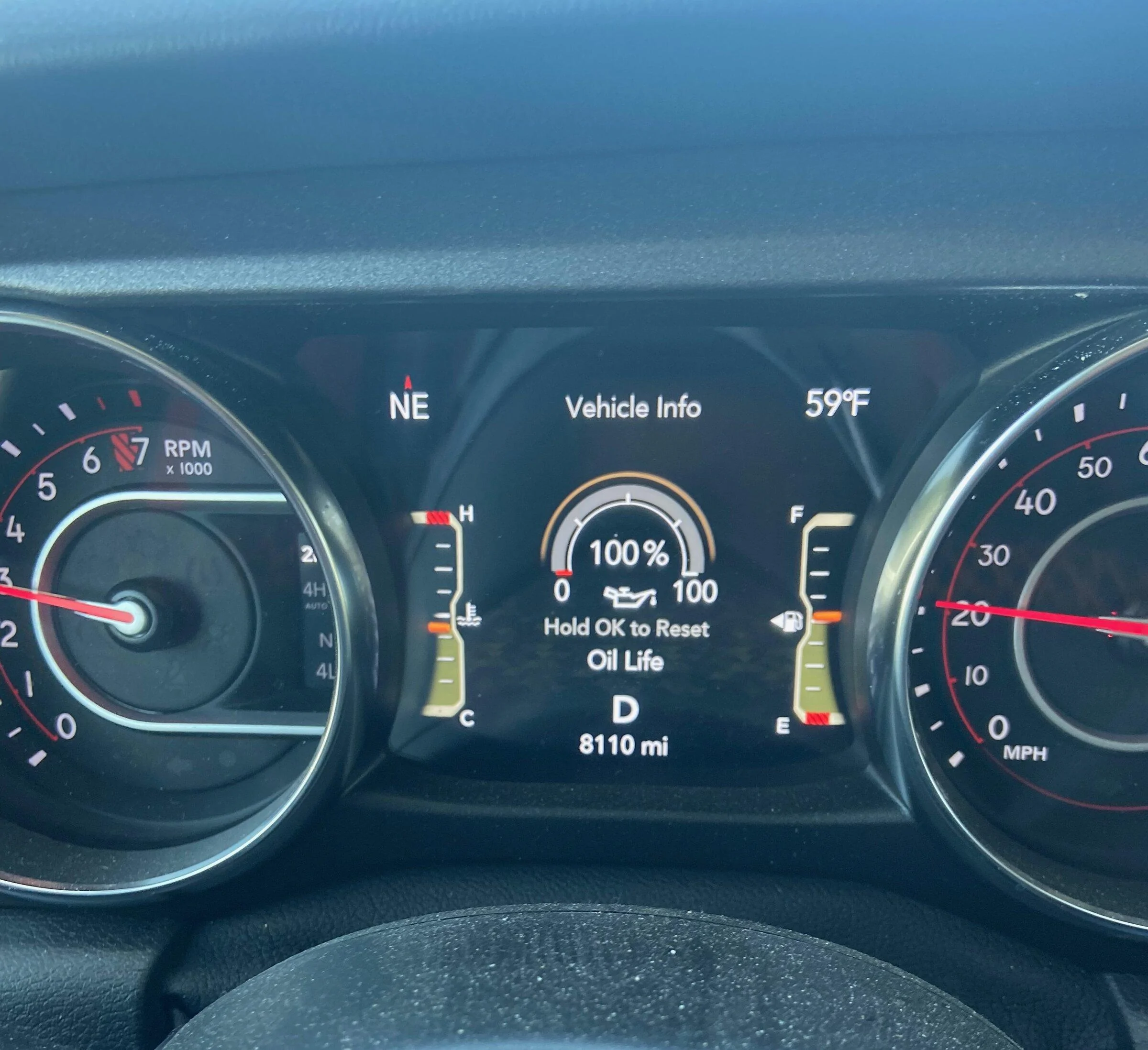
Use the steering wheel buttons to scroll through the dashboard menu. Look for “Vehicle Info” or “Oil Life”.
3. Select Oil Life Option
Press the OK or right arrow button until you see the oil life percentage displayed.
4. Reset Oil Life
Press and hold the OK button for about 5 seconds. You’ll see the oil life change to 100% and the reminder disappears.
5. Turn Off The Ignition
Switch off the vehicle. Wait a few seconds, then restart to make sure the reset worked.
Many drivers miss step 4 holding the button long enough. If you press too briefly, the system won’t reset.
Extra Tip: Confirm The Reset
After restarting, check the oil life display again. If it’s still at the old percentage, repeat steps 3 and 4.
Some Gladiator models need the ignition to be ON, not running. Others may require you to cycle the ignition twice.
What Happens If You Don’t Reset?
If you skip the reset, the oil change reminder will stay active, even if your oil is new. This leads to confusion and could make you miss the next scheduled change. Your Jeep Gladiator uses a computer to track oil life based on mileage, engine hours, and driving style. Resetting recalibrates this system.
Here’s a quick comparison between vehicles with and without regular resets:
| Reset Status | Maintenance Tracking | Potential Engine Risks |
|---|---|---|
| Regular Reset | Accurate | Low |
| No Reset | Unreliable | Higher |
Common Mistakes And How To Avoid Them
Many Jeep Gladiator owners make small mistakes that keep the oil change reminder active. Here are the most common issues:
You must press and hold for at least five seconds. A quick tap won’t work.
Some drivers reset the wrong menu (like tire pressure) by mistake. Always choose “Oil Life”.
3. Ignition Not Properly Set
The reset won’t work if the engine is running. Make sure ignition is ON, not START.
4. Skipping Confirmation
After the reset, always check that oil life shows 100%. If not, try again.
5. Using Aftermarket Oil
Some aftermarket oils may trigger extra reminders. Always use recommended oil for best results.
| Mistake | Impact | Solution |
|---|---|---|
| Short Button Press | Reminder stays | Hold longer |
| Wrong Menu | No reset | Select Oil Life |
| Engine Running | No reset | Ignition ON only |

Practical Tips For Jeep Gladiator Owners
- Always reset the oil change reminder immediately after service.
- Record the mileage and date after each reset for easy tracking.
- Use the Jeep owner’s manual to double-check the correct steps for your model year.
- If you notice the reminder reappearing soon after a reset, check for software updates at your dealership.
- Avoid using oils not recommended by Jeep, as they can trigger false reminders.
A non-obvious insight: Some Jeep Gladiator models have software glitches that cause the oil change reminder to reappear. If you see this, a dealership can update your system.
Frequently Asked Questions
How Often Should I Change The Oil On A Jeep Gladiator?
Most Jeep Gladiator models recommend an oil change every 7,500 miles under normal driving. If you drive in harsh conditions, you may need to change it sooner. Always check your owner’s manual.
Can I Reset The Oil Change Reminder Without Changing The Oil?
Yes, you can reset the reminder anytime. But it’s not recommended unless you actually changed the oil. Resetting without service can lead to engine damage if you forget regular maintenance.
Will Resetting The Oil Life Affect My Vehicle Warranty?
No. Resetting the oil life is a normal process and will not void your warranty.
However, you must keep records of actual oil changes for warranty claims.
What If The Oil Change Reminder Won’t Reset?
If your reminder won’t reset, double-check the steps: ignition ON, correct menu, hold button long enough. If it still doesn’t work, your Gladiator may need a software update. Visit your dealership for help.
Where Can I Find More Information About Jeep Gladiator Maintenance?
You can find detailed maintenance guidelines and oil recommendations on the official Jeep website: Jeep Gladiator Official.
Resetting your Jeep Gladiator’s oil change reminder is a small but important task. It keeps your maintenance schedule accurate, protects your engine, and prevents annoying alerts.
By following these steps and tips, you’ll keep your vehicle running smoothly and confidently handle future oil changes.