If your Jeep’s Uconnect system starts acting strange, freezes, or isn’t connecting to your phone, you’re not alone. Many Jeep owners face these issues, and a reset often solves the problem.
Resetting Uconnect isn’t complicated, but knowing the right steps can save you time and frustration. In this guide, you’ll learn practical ways to reset Uconnect, when each method works best, and how to avoid mistakes that could cost you more trouble.
What Is Jeep Uconnect And Why Might You Need A Reset?
The Uconnect system is Jeep’s multimedia and connectivity hub. It controls features like navigation, Bluetooth, audio, and even climate settings in newer models. Over time, Uconnect can run into glitches—software bugs, connection failures, or frozen screens. Common signs you need a reset include:
- Touchscreen not responding
- Bluetooth won’t connect
- Navigation errors
- Audio issues
- Random reboots
A reset can fix these problems without visiting a dealer. Sometimes, a simple reboot works. Other times, a deeper reset is needed.
Types Of Uconnect Resets
Resetting Uconnect isn’t always a one-step process. There are three main reset methods, each with its own purpose. Here’s a quick overview:
| Reset Type | When to Use | Effect |
|---|---|---|
| Soft Reset | Minor glitches, frozen screen | Restarts system, keeps settings |
| Hard Reset | Major issues, persistent bugs | Restores factory settings, erases personal data |
| Power Cycle | Temporary problems, after battery change | Resets all electronics, may fix minor errors |
Understanding which reset to use saves you time and protects your data.

How To Perform A Soft Reset On Jeep Uconnect
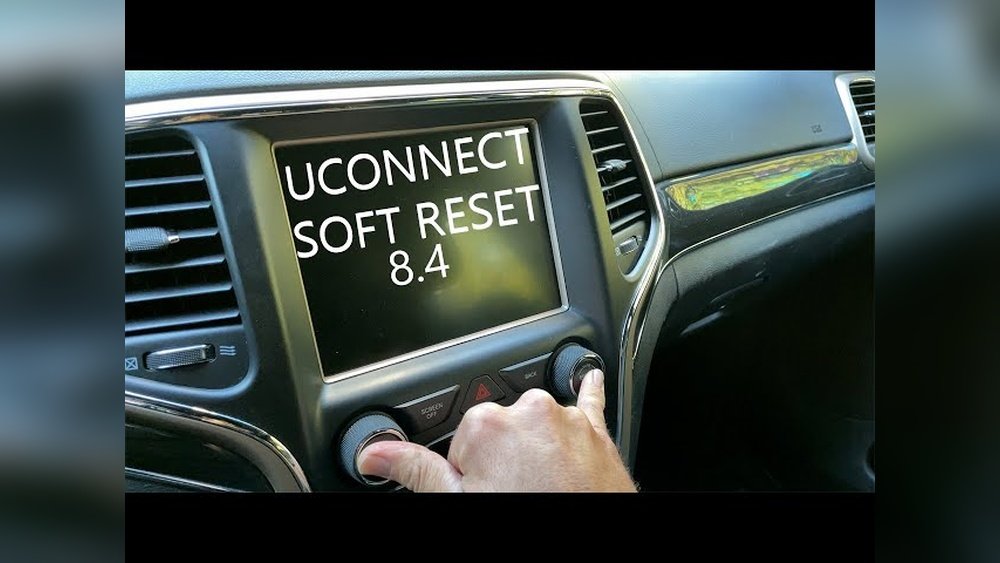
A soft reset is the safest and quickest method. It works for most minor issues, like a frozen screen or laggy response.
- Turn your Jeep on. The engine should be running, not just in accessory mode.
- Press and hold the ‘Volume’ and ‘Tune’ buttons (usually located below the touchscreen) at the same time.
- Wait for the screen to go black—this takes about 10 seconds.
- Release the buttons. The system will reboot automatically. All your settings stay unchanged.
Most people don’t know you can do this without disconnecting the battery or visiting a dealership.
Common Mistakes During Soft Reset
- Pressing only one button instead of both.
- Trying this when the car is off or in accessory mode.
- Not waiting long enough (screen may take 10–15 seconds to turn off).
How To Perform A Hard Reset (factory Reset)
If your Uconnect system has serious issues, or if you’re selling your Jeep and want to wipe all your data, a hard reset is needed. This erases saved locations, paired phones, and custom settings.
- Turn on the ignition.
- Go to the Uconnect menu. Tap “Settings” on the touchscreen.
- Select ‘System Information’ or ‘Factory Reset’ (wording may vary by model).
- Confirm your selection. You’ll see a warning—accept it.
- System restarts. All personal data and customizations are erased.
Some Jeep models require entering a PIN. Check your owner’s manual if you don’t see the option.
| Model Year | Menu Path | PIN Required? |
|---|---|---|
| 2018–2020 | Settings → System Information → Factory Reset | No |
| 2021+ | Settings → Reset → Factory Reset | Yes |
Hard Reset Warnings
- Backup your contacts and addresses before resetting.
- Remove all paired devices if you plan to sell the car.
- Hard reset is permanent—you can’t undo it.

How To Power Cycle Uconnect
Sometimes, glitches are tied to the car’s electronics, not just the Uconnect software. A power cycle can help.
- Turn off the engine.
- Open the driver’s door.
- Wait at least 2 minutes—this lets all systems fully shut down.
- Close the door and restart the car.
This simple trick solves odd bugs after battery changes or jump starts. Most people skip waiting, but patience here matters.
Troubleshooting After A Reset
Resetting Uconnect doesn’t always fix everything. If problems continue, try these steps:
- Update Uconnect software: Old software causes bugs. Check for updates on Jeep’s official site.
- Check fuse connections: Loose or blown fuses can cause Uconnect failure.
- Contact Jeep customer service if resets don’t work.
Some rare issues need professional help, especially if the touchscreen stays black or the system won’t boot.
Real-world Example: Bluetooth Not Pairing
A Jeep owner struggled for weeks to pair a phone. After a soft reset, Bluetooth still didn’t work.
A hard reset erased all paired devices and fixed the issue. This shows a soft reset doesn’t always solve deeper problems.
Key Differences Between Reset Methods
To make it easier, here’s a quick comparison:
| Reset Type | Duration | Data Loss | Best For |
|---|---|---|---|
| Soft Reset | 1 minute | No | Minor glitches |
| Hard Reset | 3–5 minutes | Yes | Major bugs, selling car |
| Power Cycle | 2–3 minutes | No | Electrical faults |

Extra Tips For Smooth Uconnect Operation
- Always keep your software updated—new updates fix bugs and add features.
- Avoid connecting too many devices at once.
- Don’t use aftermarket chargers or cables—they can cause interference.
- If your Uconnect is slow, delete unused apps and old paired phones.
For more details, visit the official Jeep Uconnect support at Jeep Uconnect.
Frequently Asked Questions
How Often Should I Reset My Jeep Uconnect?
You don’t need to reset Uconnect regularly. Only reset when you notice problems like freezing, connection errors, or after software updates.
A soft reset keeps your favorites. A hard reset erases all personal data, including navigation favorites and paired devices.
Can I Reset Uconnect While Driving?
It’s not safe to reset Uconnect while driving. Wait until you are parked, as the screen may turn off and you’ll lose access to controls.
What If My Uconnect Screen Stays Black After A Reset?
If the screen stays black, check the fuse box and battery connections. If the problem continues, contact a Jeep dealer or certified mechanic.
Is There A Way To Update Uconnect Without Visiting The Dealer?
Yes, you can download updates from the official Jeep website and install them using a USB drive. Follow the instructions carefully to avoid errors.
Resetting your Jeep’s Uconnect can be simple, but knowing the right steps and methods makes all the difference. Whether you need a quick fix or a factory reset, this guide helps you restore your system and stay connected on the road.



















