Is your Jeep key fob acting up or not responding like it used to? It might be time to replace the battery.
Don’t worry changing the battery in your Jeep key fob is easier than you think, and you can do it yourself in just a few simple steps. Imagine saving time and money by avoiding a trip to the dealership or locksmith.
In this guide, you’ll learn exactly how to open your key fob, swap out the old battery, and get back to unlocking your Jeep hassle-free.
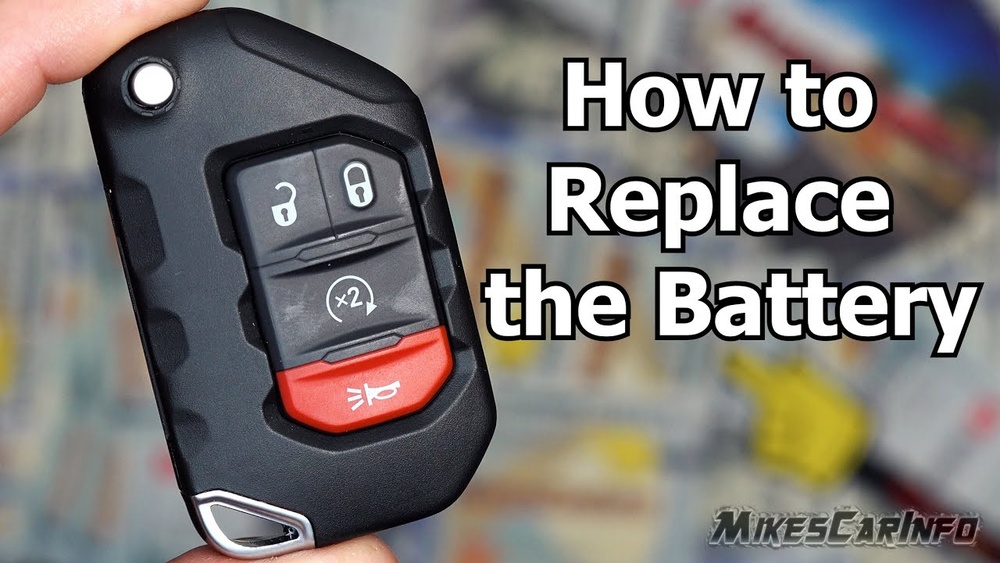
Keep reading to find out how to give your key fob a quick and easy new lease on life!
Identify Your Jeep Key Fob Model
Knowing your Jeep key fob model helps in choosing the right battery. Each model may have a different size or type of battery. Identifying the model first saves time and effort. It also prevents damage to the key fob during replacement.
Jeep key fobs vary by model and year. The design, shape, and button layout can give clues. Some common models include the Compass, Renegade, Grand Cherokee, and Wrangler. Check your vehicle’s manual or the fob itself for model details.
Look at your key fob’s shape. Is it rectangular, oval, or square? Count the buttons and note their icons. Some fobs have lock, find, panic, and remote start buttons. The arrangement can help identify the model.
Look For Model Number Or Code
Flip the key fob and look for any numbers or codes. These may be engraved or printed on the back or inside the battery compartment. Write down any numbers you find. This information is useful when buying a replacement battery.
Compare With Online Images
Search for images of Jeep key fobs online. Match your key fob’s design with pictures. Use your Jeep model and year in the search. Confirming the exact model helps find the correct battery and instructions.
Consult Your Jeep Owner’s Manual
The owner’s manual often lists the key fob type. It may include battery specifications and replacement tips. If you lost the manual, check Jeep’s official website. Manuals are a reliable source for key fob details.
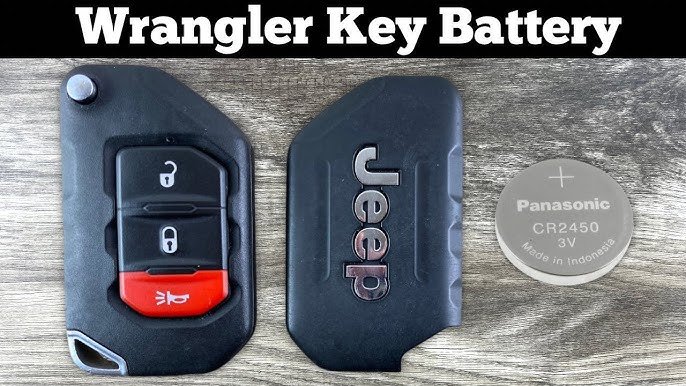
Gather Necessary Tools And Materials
Before replacing the battery in your Jeep key fob, gather all necessary tools and materials. Having everything ready makes the process smooth and quick. It also helps avoid frustration or mistakes during replacement.
Most Jeep key fob battery replacements require only a few simple tools. You do not need advanced skills or special equipment. The right materials ensure your key fob works properly after the new battery is installed.
Battery Type
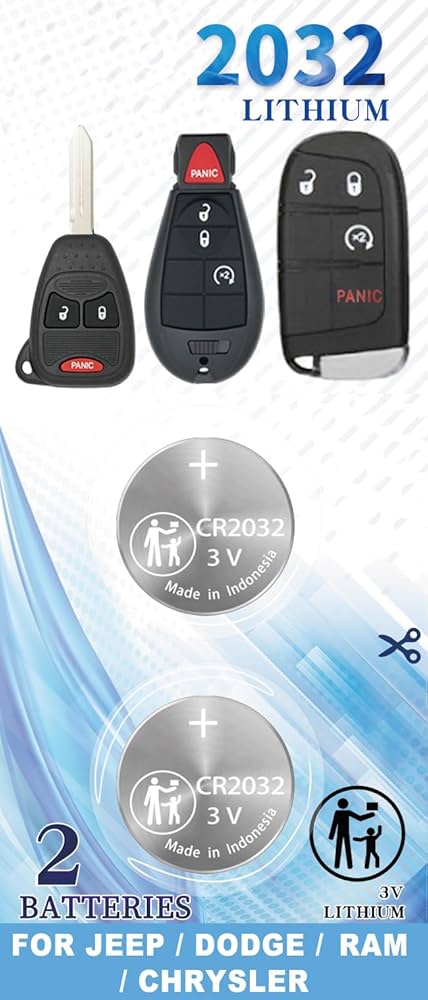
Identify the correct battery for your Jeep key fob. Most models use a CR2032 coin cell battery. Check the old battery or your owner’s manual to confirm the type. Using the wrong battery can damage the fob or cause it to malfunction.
Small Flathead Screwdriver
A small flathead screwdriver helps pry open the key fob casing. It fits into the seam or notch between the two halves. Use gentle pressure to avoid breaking the plastic parts.
Clean Cloth
Keep a clean cloth nearby to hold the key fob while working. It prevents scratches and protects the buttons. You can also use it to clean any dirt inside the casing before inserting the new battery.
Optional: Tweezers
Tweezers can help remove and place the battery safely. They give better control, especially in tight spaces. Use plastic or anti-static tweezers to avoid damaging the battery or fob components.
Remove Mechanical Key
Removing the mechanical key is the first step to replace a Jeep key fob battery. The mechanical key is hidden inside the fob. It allows access to the battery compartment.
Without removing this key, you cannot open the key fob casing. The process is simple and requires no special tools. Follow the steps carefully to avoid damage.
Locate And Release The Mechanical Key
Look for a small release button or slide pin on the fob’s side or back. Press or slide this to find the mechanical key. Pull the key out gently from the fob slot.
Open The Key Fob Casing
Insert the mechanical key tip or a flathead screwdriver into the notch at the fob’s base. Twist or pry upward carefully to separate the two plastic halves. Avoid using too much force to prevent cracking.
Remove And Replace The Battery
Use a small flathead screwdriver to pop the old battery out of its clip. Insert the new battery with the positive (+) side facing down, as marked inside the casing. Ensure it sits securely in place.
Align the front and back halves of the fob. Press them firmly together until they snap closed. Slide the mechanical key back into its slot. Test the key fob to confirm it works correctly.

Open The Key Fob Case
Opening the key fob case is the first step to replace its battery. The case protects the battery and internal components. Careful handling prevents damage during the process.
This step requires attention and simple tools. A small release button or mechanical key usually unlocks the case. The process varies slightly by Jeep model but remains straightforward.
Locate And Release The Mechanical Key
Look for a small button or slide pin on the back or side of the fob. Press or slide it to find the hidden metal key. Pull the mechanical key out gently from the fob.
Separate The Key Fob Halves
Insert the tip of the mechanical key or a flathead screwdriver into the notch at the fob’s base. Twist or pry upwards carefully to split the plastic casing. Avoid using too much force to prevent cracks.
Remove The Old Battery
Use a small flathead screwdriver to pop out the old battery from its holder. Take note of the battery’s orientation before removal. This helps place the new battery correctly later.
Insert The New Battery And Reassemble
Place the new battery in the holder with the positive (+) side facing the right way. Align the two halves of the fob and press them firmly until they snap together. Slide the mechanical key back into its slot securely.
Take Out The Old Battery
Taking out the old battery is the first step to replace your Jeep key fob battery. This process requires care to avoid damaging the key fob. Follow each step closely to remove the battery safely.
Remove The Mechanical Key
Look for the small release button or slide pin on the key fob’s side or back. Press or slide this button to release the hidden metal mechanical key. Pull the mechanical key out gently from the fob.
Insert the tip of the mechanical key or a flathead screwdriver into the seam or notch at the fob’s base. Twist or pry gently upward to separate the two halves of the plastic casing. Take care not to break or crack the plastic during this step.
Pop Out The Old Battery
Use a small flathead screwdriver to carefully lift the old battery from its clip. Note the battery’s orientation before removal. Usually, the positive (+) side faces down inside the case. Remove the battery slowly to avoid damage.
Insert The New Battery
Place the new battery into the key fob with the positive side facing the correct direction. Press it gently until it fits securely in the clip.
Make sure the battery sits flat before closing the fob.
Position The New Battery Correctly
Place the new battery into the slot carefully. Make sure the positive (+) side faces the right direction. Usually, the positive side faces down, but check the markings inside the fob.
Incorrect battery placement can stop the key fob from working. Take your time to align it properly in the holder.
Secure The Battery In Place
Push the battery gently into the clip or holder. It should fit snugly without moving. Avoid using too much force to prevent damage.
Use a small flathead screwdriver if needed to help seat the battery fully. Be gentle to avoid bending the contacts.
Check Battery Contact Points
Make sure the metal contacts touch the battery terminals firmly. Clean the contacts if they look dirty or corroded. This ensures a good electrical connection.
Use a dry cloth or a soft brush to clean contacts. Do not use water or liquids that can cause damage.
Reassemble The Key Fob
Reassembling the key fob is the final step in replacing your Jeep key fob battery. This step ensures the key fob works properly and stays secure. Handle each piece with care to avoid damage. Follow these simple instructions to put your key fob back together perfectly.
Align The Key Fob Halves
Hold the two halves of the key fob close together. Make sure the battery and internal parts stay in place. Check that the edges line up evenly before pressing them together.
Snap The Key Fob Together
Press the halves firmly until you hear a click or snap. This sound means the casing is securely closed. Avoid using too much force to prevent breaking the plastic.
Reinsert The Mechanical Key
Slide the metal mechanical key back into its slot. Push it in until it clicks or feels secure. The key should fit flush with the fob’s surface.
Test The Key Fob
Press the buttons on your key fob to check its function. Test locking and unlocking your Jeep from a short distance. Confirm the battery replacement was successful.
Test The Key Fob Functions
Testing the key fob functions is a important step after replacing the battery. It confirms the new battery works and the fob operates correctly. This step ensures your Jeep key fob can lock, find, and start your vehicle without issues.
Begin by standing near your Jeep with the key fob in hand. Press each button to check its response. Pay attention to any delay or failure in response, which may indicate a problem.
Press the lock button first and listen for the locking sound. Watch for the lights to flash or the doors to lock. Next, press the find button to confirm the doors find and the lights flash again.
Test The Panic Alarm
Hold the panic button to activate the alarm. Make sure the horn sounds and the lights flash. Release the button to stop the alarm. This confirms the panic function is working properly.
Verify Remote Start Function (if Applicable)
If your Jeep has a remote start feature, press the remote start button. The engine should start, and the vehicle’s lights may flash. This test confirms the remote start works with the new battery.
Press the trunk release button to open the rear hatch. The trunk should find or pop open. This test ensures all key fob buttons function as intended.
Where To Buy Replacement Batteries
Knowing where to buy a replacement battery is essential for changing your Jeep key fob’s power source. The right battery keeps your key fob working smoothly. You need a reliable place that sells the exact type your key fob requires.
Choosing the right store ensures you get a fresh, quality battery. This step saves time and prevents problems from using the wrong battery. Several options are available, each with benefits. Here’s where to find your replacement battery.
Auto Parts Stores
Auto parts stores often stock batteries for many key fobs. They carry common sizes and brands. You can ask staff for help selecting the correct battery. Most stores sell batteries that fit Jeep key fobs.
Visiting in person lets you check the battery type physically. You can avoid buying the wrong one. Auto parts stores are usually near you. They offer quick service and advice.
Electronics Retailers
Electronics shops sell small batteries used in key fobs. These stores have a wide battery selection. Staff can assist with finding the right size and brand. Electronics retailers often provide affordable prices.
They may also offer tools for battery replacement. This helps if you need extra help changing the battery.
Online Marketplaces
Online stores provide a convenient way to buy replacement batteries. You can search by your Jeep model or key fob type. Many websites offer detailed product descriptions and reviews. This helps you make a good choice.
Prices online can be competitive. You can order from home and get delivery fast. Just confirm the battery matches your key fob before buying.
Supermarkets And Pharmacies
Some large supermarkets and pharmacies carry small batteries. They may not have all key fob sizes but often stock popular ones. These stores are easy to access. They offer quick purchase options.
Check the battery type carefully before buying. This option works if you need a battery quickly nearby.
Tips To Extend Battery Life
Extending the battery life of your Jeep key fob saves time and money. Simple habits help keep the battery working longer. Small changes in usage make a big difference. Follow these easy tips to get more life from your key fob battery.
Turn Off The Key Fob When Not In Use
Some Jeep key fobs have a power-saving mode. Turn it off when you do not need it. This reduces the battery drain during long periods of inactivity. Check your manual to see if your fob has this feature.
Pressing buttons many times drains the battery faster. Only use the buttons when necessary. Try to avoid testing the range too often. This practice limits unnecessary battery use.
Keep The Key Fob Dry And Clean
Moisture and dirt can harm the battery and contacts. Store the key fob in a dry place. Wipe it clean regularly with a soft cloth. Good care helps prevent battery issues.
Replace The Battery Promptly
Do not wait for your key fob to stop working. Replace the battery as soon as you notice weak signals or delays. A fresh battery ensures the key fob performs well and lasts longer.
Troubleshooting Common Issues
Troubleshooting common issues after replacing your Jeep key fob battery helps ensure it works properly. Some problems may appear even with a new battery installed. These issues can often be fixed with simple checks and fixes. Keep these tips handy to avoid frustration and save time.
Checking Battery Orientation
Battery placement is a common source of problems. Make sure the battery’s positive side faces the correct way. Look for a plus (+) sign inside the fob. Wrong placement stops the fob from powering on. Remove the battery and reinsert it correctly if needed.
Inspecting Battery Contact Points
Dirty or damaged contacts can block power flow. Check the metal clips holding the battery. Clean them gently with a cotton swab and rubbing alcohol. Avoid bending or breaking the contacts. Proper contact ensures a strong connection to the battery.
Resetting The Key Fob
Sometimes the key fob needs a reset after battery replacement. Remove the battery and press all buttons for 30 seconds. This helps drain leftover power. Reinsert the battery and test the fob again. Resetting can restore normal function.
Testing The Battery Voltage
A new battery might still be weak or dead. Use a multimeter to check its voltage. The reading should match the battery’s rating, usually 3 volts. Replace the battery if the voltage is low. Always use fresh, high-quality batteries for best results.
Verifying Key Fob Programming
The key fob may lose programming after battery replacement. This means the car won’t recognize it. Check your Jeep’s manual for reprogramming steps. Some models need a dealer or locksmith to reprogram the fob. Confirm programming to restore full function.
When To Seek Professional Help
Replacing the battery in a Jeep key fob is usually simple. Most owners can do it themselves. Still, some situations call for a professional’s help. Knowing when to seek expert support saves time and avoids damage.
Difficulty Opening The Key Fob
Some Jeep key fobs are hard to open. Using too much force can break the plastic casing. If the case does not separate easily, a professional can open it safely. They use tools designed for key fobs.
Battery Replacement Does Not Fix The Issue
Changing the battery does not always solve the problem. If the key fob still does not work after a new battery, there may be another issue. Professionals can diagnose and fix electrical or programming problems.
Lost Or Damaged Mechanical Key
The mechanical key is part of the fob. Losing or damaging it affects access to your vehicle. A locksmith or dealer can provide a replacement key or repair the fob properly.
Uncertainty About Battery Type Or Installation
Using the wrong battery type can harm the key fob. Incorrect installation may cause damage. Professionals know the exact battery model and how to install it without risk.
Key Fob Programming Required
Some Jeep key fobs need programming after battery replacement. This step requires special equipment. Professionals at dealerships or locksmiths can program the fob correctly so it works with your car.
<!– wp:rank-math/faq-block {"questions":[{"id":"faq-question-e7a757fa9850","title":"What Battery Is Used In A Jeep Key Fob?","content":"Jeep key fobs typically use a CR2032 lithium coin battery. This battery powers remote locking and unlocking functions.
nnnnYou can find CR2032 batteries at most automotive and hardware stores for easy replacement. Always check your specific Jeep model’s manual to confirm the correct battery type.
“,”visible”:true},{“id”:”faq-question-56bef3cbf90e”,”title”:”How Do I Pop Open A Jeep Key Fob?”,”content”:”Locate the release button or slide pin on the fob's side or back. Press it to remove the mechanical key.
nnnnInsert the key or flathead screwdriver into the seam. Gently twist to pry open the fob.
nnnnReplace the battery, then snap the casing back together.
“,”visible”:true},{“id”:”faq-question-cfd61b44307d”,”title”:”Can I Replace The Key Fob Battery Myself?”,”content”:”Yes, you can replace the key fob battery yourself. Pry open the fob, remove the old battery, and insert a new one. Ensure correct battery orientation and snap the fob closed. Test the buttons before use.
“,”visible”:true},{“id”:”faq-question-23ab604fc4fc”,”title”:”How Much Does It Cost To Replace The Battery In A Jeep Key Fob?”,”content”:”Replacing a Jeep key fob battery typically costs between $5 and $15 for the battery. Some dealers may charge up to $50 for replacement service. Many owners save money by replacing the battery themselves using common coin cell batteries like CR2032.
“,”visible”:true}]} –>What Battery Is Used In A Jeep Key Fob?
Jeep key fobs typically use a CR2032 lithium coin battery. This battery powers remote locking and unlocking functions.
You can find CR2032 batteries at most automotive and hardware stores for easy replacement. Always check your specific Jeep model’s manual to confirm the correct battery type.
How Do I Pop Open A Jeep Key Fob?
Locate the release button or slide pin on the fob's side or back. Press it to remove the mechanical key.
Insert the key or flathead screwdriver into the seam. Gently twist to pry open the fob.
Replace the battery, then snap the casing back together.
Can I Replace The Key Fob Battery Myself?
Yes, you can replace the key fob battery yourself. Pry open the fob, remove the old battery, and insert a new one. Ensure correct battery orientation and snap the fob closed. Test the buttons before use.
How Much Does It Cost To Replace The Battery In A Jeep Key Fob?
Replacing a Jeep key fob battery typically costs between $5 and $15 for the battery. Some dealers may charge up to $50 for replacement service. Many owners save money by replacing the battery themselves using common coin cell batteries like CR2032.
Conclusion
Replacing a Jeep key fob battery is simple and quick. Follow the steps carefully to avoid damage.
Use the right battery type for your model. Test the fob after replacing the battery to ensure it works well.
Keep a spare battery handy to avoid surprises.
Doing this yourself saves time and money. Your Jeep key fob will stay reliable with regular battery checks.



















