Getting WiFi in your Jeep can change your driving experience. Whether you’re on a road trip, camping, or just want to stay connected, in-car WiFi gives you internet access wherever you go.
But how do you get reliable WiFi in a Jeep?
Let’s look at the best options, costs, and setup steps so you can pick what works best for your needs.

Main Ways To Get Wifi In Your Jeep
You have several ways to add WiFi connectivity to your Jeep. Each has its pros and cons, so your choice will depend on your budget, how often you need WiFi, and how many devices you want to connect.
1. Built-in Jeep Wifi Systems
Many newer Jeep models, like the Jeep Wrangler and Jeep Grand Cherokee, offer built-in WiFi as part of their infotainment systems. This is usually called Uconnect WiFi.
- How it works: The car has a built-in cellular modem. You buy a data plan from a provider (often AT&T in the US).
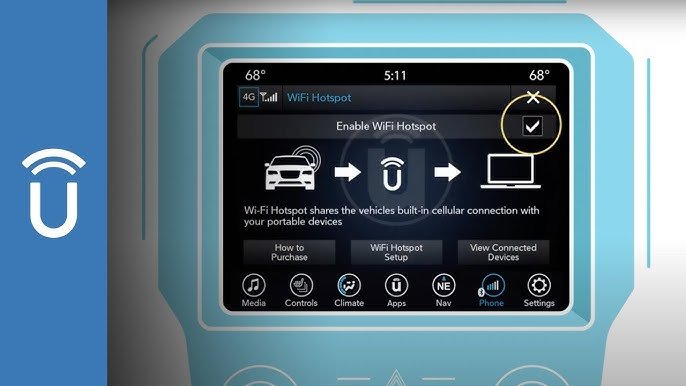
- Setup: Usually, just activate the service via the Uconnect app or on your Jeep’s touchscreen.
- Best for: Owners of newer Jeeps who want a seamless, factory-supported solution.
Data Example: Uconnect WiFi can connect up to 8 devices at once and typically covers up to 50 feet from your vehicle.
2. Mobile Hotspot Devices
You can use a portable WiFi hotspot (sometimes called a “MiFi” device) from companies like Verizon, AT&T, or T-Mobile.
- How it works: These are small devices with their own SIM card and data plan.
- Setup: Charge the device, turn it on in your Jeep, and connect your phones, tablets, or laptops.
- Best for: People with older Jeeps or those who want to use the hotspot outside the vehicle too.
3. Smartphone As A Hotspot
Nearly all modern smartphones can act as a WiFi hotspot.
- How it works: Your phone uses its cellular data to create a WiFi network.
- Setup: Turn on the hotspot feature in your phone’s settings and connect other devices.
- Best for: Occasional use or if you don’t want to pay for a separate data plan.
4. Aftermarket Wifi Routers
Some companies offer WiFi routers you can install in your Jeep. These use a SIM card, just like a phone or hotspot device.
- How it works: The router is hardwired to your Jeep’s power and provides WiFi whenever the car is on.
- Setup: Professional installation is usually needed.
- Best for: People who want a permanent, always-on solution.
Comparing Wifi Options For Your Jeep
Here’s a quick comparison of the main WiFi options:
| Option | Setup Difficulty | Monthly Cost | Device Limit | Best For |
|---|---|---|---|---|
| Built-in Uconnect | Easy | $20–$30 | Up to 8 | Newer Jeeps |
| Mobile Hotspot | Very Easy | $10–$50 | Varies (5–15) | All Jeeps |
| Smartphone Hotspot | Very Easy | Usually Included* | 5–10 | Light Use |
| Aftermarket Router | Moderate–Hard | $20–$50 | 10+ | Heavy Use |
*Some carriers may charge extra for hotspot use.
Costs To Expect
Cost is a big factor. Here’s what you should plan for:
- One-time equipment cost: $0–$300 (factory system is built-in; mobile hotspots and routers cost extra)
- Monthly data plan: $10–$50 depending on provider and data amount
A hidden cost is data overage fees. If you stream a lot of video or connect many devices, check your data limit. Some plans slow down your speed after a certain usage.
How To Set Up Wifi In Your Jeep
The setup steps depend on which solution you choose. Here’s how to get started with the three most common options:
Using Built-in Uconnect Wifi
- Confirm Compatibility: Make sure your Jeep has a Uconnect system with WiFi. Most models from 2018 or later have this.
- Buy a Data Plan: Go to the Uconnect website or your Jeep’s touchscreen to purchase a plan.
- Activate Service: Follow the on-screen instructions. Sometimes, you’ll need to restart the infotainment system.
- Connect Devices: Search for the Jeep’s WiFi network on your phone or laptop, enter the password, and you’re online.
Using A Mobile Hotspot Device
- Buy the Device: Pick a reputable brand like Verizon Jetpack, Netgear, or T-Mobile.
- Insert SIM Card: Many devices come with one; otherwise, get one from your carrier.
- Activate Data Plan: Set up the plan online or in-store.
- Power Up in Your Jeep: Place the hotspot where it has good signal (often near a window).
- Connect Devices: Use the network name and password on the device.
Using Your Smartphone Hotspot
- Check Your Plan: Make sure your phone’s plan allows hotspot use.
- Enable Hotspot: On iPhone, go to Settings > Personal Hotspot. On Android, Settings > Network & Internet > Hotspot & tethering.
- Set Password: Choose a strong password so strangers can’t connect.
- Connect Devices: Find your phone’s network and enter the password.
Coverage And Speed: What To Expect
In-car WiFi depends on cellular networks. If you’re in a city or along a highway, speeds are usually good—often 10–50 Mbps, enough for streaming and video calls. In remote areas, signal can drop or disappear. No solution works everywhere.
Some Jeep owners install cellular signal boosters to improve reception, especially for off-road trips. These devices can double your signal strength but add to the cost.
Practical Tips For Reliable Wifi
- Place hotspots near windows for better signal.
- Download music or maps before long trips to save data.
- Turn off unused devices to avoid slow speeds.
- Monitor your data usage to avoid extra charges.
- Some hotspots and routers support external antennas for stronger reception.
Many beginners forget that using WiFi for streaming video or large downloads will burn through data quickly. Also, not all chargers provide enough power for certain hotspot devices check the power rating before buying.
Security Considerations
Public WiFi can be risky, but your Jeep’s private network is safer. Still:
- Change default passwords on all hotspot devices.
- Enable WPA2 encryption if available.
- Avoid sharing your WiFi password with strangers.
Example: Family Road Trip
A family with two kids wants WiFi for streaming and games during a long drive. They choose a mobile hotspot with a 20GB/month plan for $30. Their kids connect tablets, and parents use laptops. Everyone is happy—until the data runs out mid-trip. Solution: They upgrade to a 40GB plan and download movies before leaving.

Frequently Asked Questions
How Much Does Jeep Wifi Cost Per Month?
The monthly cost ranges from $20 to $50 depending on your plan and provider. Uconnect WiFi usually costs $20–$25 for unlimited data, but check with your dealer or AT&T for exact prices.
Can I Install Wifi In An Older Jeep?
Yes, you can use a mobile hotspot device or smartphone hotspot in any Jeep, old or new. Aftermarket routers are also an option, but they require installation.
Is Jeep Wifi As Fast As Home Internet?
No, Jeep WiFi uses cellular networks, which are usually slower than home broadband. In cities, speeds of 10–50 Mbps are common. In rural areas, speeds may be much lower or unavailable.
How Many Devices Can Connect To Jeep Wifi?
Most systems, like Uconnect WiFi, support up to 8 devices. Mobile hotspots vary—some support 5, others 10 or more. Check your device’s manual for the limit.
Is It Safe To Use Wifi In My Jeep?
Yes, as long as you use a private password-protected network. Avoid sharing the password. For extra safety, keep your software updated and don’t connect to open networks.
For more about in-car WiFi technology, see this Wikipedia article.
Getting WiFi in your Jeep isn’t hard. Choose the right solution for your needs and budget, and you’ll stay connected wherever the road takes you.



















