Connecting your phone to your Jeep Patriot Bluetooth is a simple way to enjoy hands-free calls and music while driving. Many drivers struggle with the setup, but following clear steps can make the process easy. Whether you own a 2014 Jeep Patriot or another model year with Bluetooth capability, knowing exactly how to connect can save time and avoid frustration. This guide will help you get connected smoothly, highlight important tips, and clear up common mistakes.
Understanding Jeep Patriot Bluetooth Features
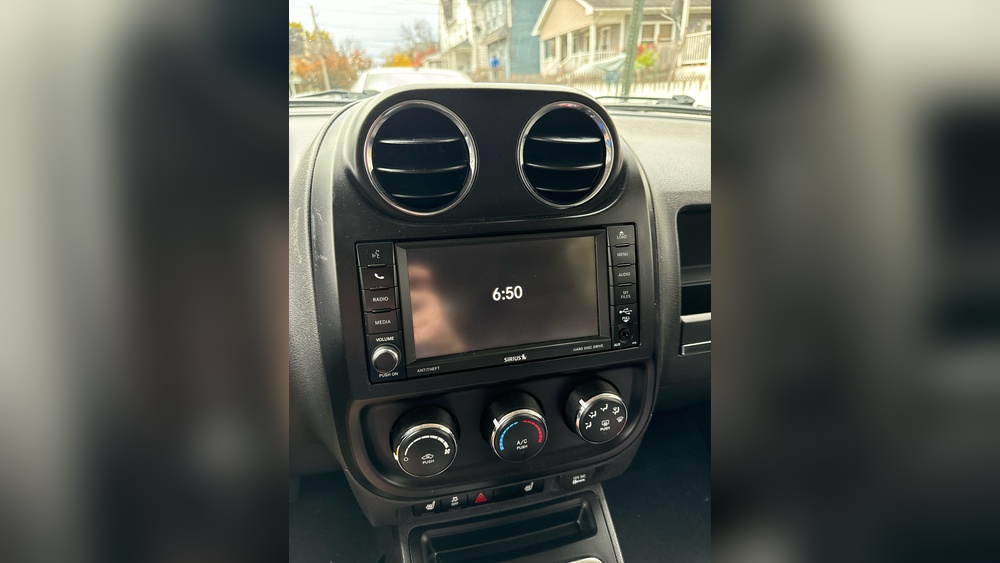
Most Jeep Patriots from 2011 and later offer Bluetooth connectivity. This feature allows you to link your smartphone to the car’s audio system for calls and streaming audio. Some Patriots use the Uconnect system, while others have a basic Bluetooth module.
Key features include:
- Hands-free calling
- Wireless audio streaming
- Access to phone contacts through the car’s interface
If your Jeep Patriot does not have Bluetooth, some models allow you to add aftermarket systems. Always check your owner’s manual or look for the Uconnect logo near your radio display.
Bluetooth Compatibility Table
To help you know if your Jeep Patriot model supports Bluetooth, check this quick reference:
| Model Year | Bluetooth Standard | Factory Bluetooth | Uconnect Supported |
|---|---|---|---|
| 2011 | Bluetooth 2.0 | Optional | Yes |
| 2012-2014 | Bluetooth 2.1 | Standard | Yes |
| 2015-2017 | Bluetooth 4.0 | Standard | Yes |
If your Patriot is older or lacks Bluetooth, consider adding a plug-and-play module.
Step-by-step: Connecting Your Phone
Follow these steps to connect your phone to the Jeep Patriot Bluetooth system:
- Turn on your vehicle and keep it in park.
- Locate the Uconnect or Bluetooth button on your radio or steering wheel.
- On your phone, go to Settings > Bluetooth and make sure Bluetooth is turned on.
- Press the Bluetooth or Uconnect button. The system will say “Ready” or display a Bluetooth menu.
- Select “Pair a Device” or follow the on-screen instructions.
- Your Patriot’s system will show a device name (e.g., “Uconnect” or “Jeep”).
- On your phone, select the matching device name.
- Enter the PIN shown on the car display into your phone. Common PINs are “0000” or “1234.”
- Wait for confirmation. The system will say “Pairing successful” or your phone will show as connected.
If your phone does not connect, restart both the phone and car system and try again.
Common Bluetooth Connection Mistakes
Many beginners make errors during Bluetooth setup. Here are two problems that are easy to miss:
- Pairing multiple phones at once: The Jeep Patriot system usually supports only one main device at a time. Make sure only one phone is in pairing mode.
- Bluetooth visibility: Some phones require you to set Bluetooth as “visible” before pairing. If your phone is hidden, the Jeep system cannot find it.

Troubleshooting Connection Problems
Bluetooth can be unpredictable. Here are solutions for common issues:
- System not found: If your Jeep isn’t showing up on your phone, turn off Bluetooth, wait 10 seconds, and turn it back on.
- Pairing failed: Delete old paired devices from both your phone and car system. Try again with a fresh connection.
- Audio issues: Sometimes calls connect but audio does not play. Make sure your phone’s Bluetooth settings allow for both “Calls” and “Audio.”
- Software updates: Outdated phone software can cause pairing problems. Update your phone’s operating system to the latest version.
Comparing Troubleshooting Methods
Here’s a quick comparison of common fixes:
| Problem | Quick Fix | Time Needed |
|---|---|---|
| Device not found | Restart Bluetooth | 30 seconds |
| Pairing fails | Delete old devices | 1-2 minutes |
| No audio | Check phone settings | 1 minute |
| Frequent drops | Update software | 5 minutes |
Advanced Tips For Stable Bluetooth
To ensure a reliable connection, try these advanced tips:
- Keep your phone’s Bluetooth updated: Manufacturers fix bugs in new versions.
- Limit paired devices: Too many paired devices can confuse the system.
- Avoid Wi-Fi interference: Using Wi-Fi and Bluetooth together can cause issues. Turn off Wi-Fi if you notice drops.
- Charge your phone: Low battery can affect Bluetooth performance.
If you use Bluetooth for music, make sure your audio app is compatible with car systems. Some streaming apps may not work perfectly, so test before a long drive.

What To Do If Your Jeep Patriot Has No Bluetooth
Not every Jeep Patriot has Bluetooth. If yours is missing this feature, you have options:
- Install a Bluetooth adapter: Plug into your AUX port for hands-free calls and streaming.
- Upgrade to a Uconnect system: This costs more but gives full Bluetooth integration.
- Use a Bluetooth FM transmitter: These broadcast audio from your phone to your car radio.
Adapter Comparison Table
Here’s how different Bluetooth solutions compare:
| Type | Price Range | Features | Ease of Install |
|---|---|---|---|
| Aux Bluetooth adapter | $20-$40 | Calls & audio | Easy |
| FM transmitter | $15-$30 | Audio only | Very easy |
| Uconnect upgrade | $200-$500 | Full integration | Professional |
If you’re unsure which to choose, consider how often you’ll use Bluetooth and your budget.
Safety And Privacy Considerations
Bluetooth connections are convenient but remember these safety tips:
- Never pair while driving. Set up Bluetooth before you start moving.
- Delete paired devices when selling or trading your Jeep Patriot.
- Do not share your PIN with others. This protects your privacy.
- Disable Bluetooth if you won’t use it for long periods to avoid battery drain.
Frequently Asked Questions
How Many Phones Can I Pair With My Jeep Patriot Bluetooth?
Most Patriots allow pairing up to eight devices, but only one can be active at a time.
Can I Stream Music From Any App Through Jeep Patriot Bluetooth?
Yes, most apps like Spotify and Apple Music work, but some older Patriots may only support calls and basic audio.
What Is The Usual Pin For Jeep Patriot Bluetooth Pairing?
The common PINs are 0000 or 1234. If you see a different code on your car screen, use that instead.
My Phone Connects But Drops The Signal Often. What Should I Do?
Try updating your phone software, deleting old devices, and limiting Wi-Fi use. If problems continue, check for updates to your Jeep Patriot’s audio system.
Can I Install Bluetooth If My Jeep Patriot Does Not Have It?
Yes, you can use an aux adapter, FM transmitter, or upgrade to the Uconnect system for full Bluetooth features.
Connecting your phone to your Jeep Patriot Bluetooth system is not difficult if you follow the right steps. Take your time, check compatibility, and use the tips above to avoid common mistakes. With a stable connection, you can enjoy safer hands-free driving and music on every trip. For more details on Bluetooth technology in cars, visit Wikipedia.


















