Changing the time on your Jeep Patriot is a simple task, but many drivers overlook important details that can make the process confusing. Whether you’ve switched time zones, adjusted for daylight saving, or just want your clock to match your phone, setting the correct time matters. Inaccurate time can affect your schedule and even your vehicle’s resale value. This guide covers everything you need, including step-by-step instructions, tips for different model years, and answers to common questions.
Understanding Your Jeep Patriot Clock
The Jeep Patriot uses either a digital or analog clock, depending on model year and trim. Most Patriots from 2007 to 2017 have a digital clock in the radio display. Some base models feature an analog dash clock. Knowing which type you have is the first step.
| Model Year | Clock Type | Adjustment Method |
|---|---|---|
| 2007-2010 | Digital (radio) | Radio button |
| 2011-2017 | Digital (radio) | Touchscreen or radio button |
| Base Models | Analog | Dash knob |
Many owners miss the fact that the radio clock controls the time for the entire display. On newer Patriots with touchscreens, the process is slightly different. Let’s break down the steps for each type.
Step-by-step: Changing Time On Digital Clock
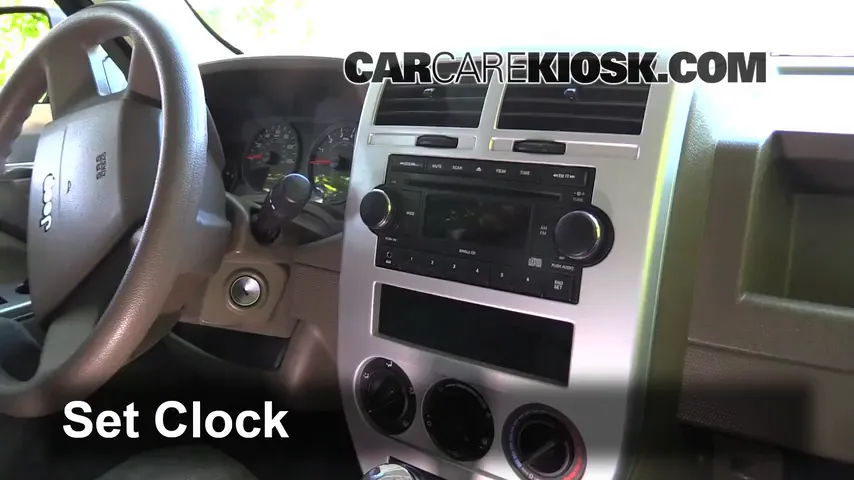
For Patriots with a digital radio clock, follow these steps:
- Turn on the ignition. The radio display must be powered.
- Press and hold the ‘Clock’ button (sometimes labeled ‘Time’ or ‘Set’) until the hour digits flash.
- Use the ‘Tune’ knob or arrow buttons to set the hour. Make sure to pay attention to AM/PM if shown.
- Press the ‘Clock’ button again. The minutes digits will flash.
- Adjust the minutes using the same knob or buttons.
- Press ‘Clock’ once more to save and exit.
If your Patriot has a touchscreen, tap the Menu or Settings button, select ‘Clock’, then adjust hours and minutes with on-screen controls.
| Step | Action | Common Mistake |
|---|---|---|
| 1 | Turn ignition on | Trying to change clock when car is off |
| 2 | Hold ‘Clock’ button | Pressing instead of holding button |
| 3 | Adjust hour | Skipping AM/PM |
| 4 | Adjust minutes | Not pressing button again for minutes |
| 5 | Save changes | Not exiting properly |
Non-obvious tip: If your radio display resets often, check your battery terminals. Weak battery connections can cause clock resets.
Changing Time On Analog Clock
If your Jeep Patriot has an analog clock, the process is even simpler:
- Locate the clock knob on the dash, near the clock face.
- Turn the knob gently to adjust the hour and minute hands.
- Release the knob when the correct time is set.
Many forget to turn the knob slowly. Quick movements can damage the mechanism. Always adjust gradually.
Daylight Saving And Time Zone Tips
Changing time for daylight saving or time zones is easy, but some Patriots may not update automatically. You must manually reset the clock when:
- You travel across time zones
- Daylight saving starts or ends
- The battery is disconnected
Example: If you drive from New York to Chicago, remember to subtract one hour from your display. Always check your clock after a battery replacement.

Troubleshooting Common Problems
Clock adjustment should be smooth, but issues can occur:
- Button not working: Dirt or debris may block the button. Clean gently with compressed air.
- Clock won’t save: Weak battery or faulty radio can prevent saving. Test your battery voltage.
- Display not showing: Fuse may be blown. Check your fuse box and replace if needed.
Non-obvious insight: Some Patriots have a hidden reset function. If nothing works, disconnect your battery for 10 minutes, then reconnect. This can reset the radio clock.
Comparison: Jeep Patriot Vs Other Jeep Models
Changing the time on a Patriot is similar to other Jeep models, but there are differences.
| Model | Clock Adjustment | Unique Feature |
|---|---|---|
| Patriot | Radio button or dash knob | Analog clock in base models |
| Jeep Cherokee | Touchscreen only | Automatic daylight saving update |
| Jeep Wrangler | Radio button | Manual only, no analog clock |
| Jeep Grand Cherokee | Touchscreen or radio button | GPS-linked clock |

Practical Advice For Jeep Patriot Owners
- Set your clock every time you change your battery.
- If your Patriot has a touchscreen, check for software updates. Updated radios can have easier time controls.
- Don’t ignore a faulty clock; it can signal deeper electrical issues.
Many drivers never realize that a wrong clock can affect resale value. Dealers prefer vehicles with working displays, so keep yours accurate.
For more detailed information, you can visit the official Jeep support page: Jeep Owners.
Frequently Asked Questions
If your buttons don’t work, try using the touchscreen if available. For older models, replacing the radio may be the only option.
Does The Jeep Patriot Clock Adjust For Daylight Saving Automatically?
No, most Patriots require manual adjustment for daylight saving. Only newer Jeep models with GPS clocks update automatically.
Why Does My Clock Keep Resetting After Changing The Time?
Frequent resets often mean a weak battery or poor connection. Check your battery terminals and fuse box for any issues.
Is There A Way To Set The Clock Without Turning On The Ignition?
No, the radio display needs power. Always turn the ignition to the accessory or on position before adjusting the clock.
Can I Set The Clock Using My Phone Or Bluetooth?
No, the Patriot’s clock is not linked to your phone or Bluetooth. You must use the radio or dash controls to set the time.
Getting your Jeep Patriot clock set correctly takes only a few minutes, but doing it right avoids frustration and helps keep your vehicle in top shape. With these steps, you’ll never have to worry about being late or confused by your dashboard time again.



















