A Jeep Liberty offers reliable performance and comfort, but sometimes the clock needs adjusting—especially after a battery change or daylight saving time. If your clock shows the wrong time, fixing it is simple once you know the right steps. Many owners are surprised at how easy this is, and you don’t need advanced tech skills. You only need to follow a few key actions, and the process is almost the same for most model years.
Understanding The Jeep Liberty Clock System
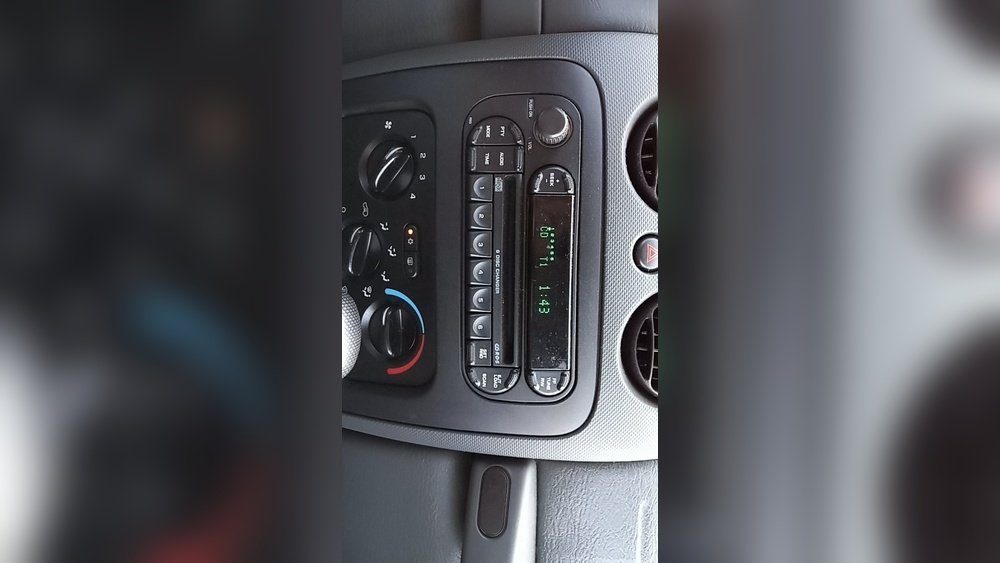
The Jeep Liberty clock is usually located in the radio display. Most models from 2002–2012 use a basic digital clock integrated with the audio system. Some newer radios may have touchscreen controls, while older ones rely on physical buttons. The system is designed for quick manual adjustment, but the interface can be confusing if you haven’t changed the time before.
Here’s a quick overview of typical Jeep Liberty clock setups:
| Year Range | Clock Location | Adjustment Method |
|---|---|---|
| 2002–2007 | Radio panel | Physical buttons |
| 2008–2012 | Radio (some touchscreens) | Buttons or touchscreen |
Even if your radio has extra features, the clock setting steps are similar. One thing many owners miss: the clock is not always linked to the car’s main computer. This means you have to set the time separately, even if other vehicle settings update automatically.
Step-by-step: How To Change Time On Jeep Liberty
Changing the time on a Jeep Liberty is straightforward. Follow these steps, based on the most common radio designs.
1. Turn On The Ignition
Start by turning the ignition to the “on” position. You don’t need to start the engine, but the radio must be powered.
Look for a button labeled “Clock”, “Menu”, or “Set” on your radio. If you don’t see these, check your radio’s manual or look for a small button combination.
- On older models, the “Clock” button is usually near the display.
- Newer radios may require you to press and hold the “Menu” button.
3. Enter Clock Setting Mode
Press and hold the clock or menu button until the display starts blinking or shows “Set Time.” This signals you’re in clock adjustment mode.
4. Adjust Hours And Minutes
Use the Tuning or Seek buttons to set the hour. Press the button once for each hour you want to change. Repeat for minutes, usually by pressing another button or by toggling left/right.
- Example: On a 2006 Jeep Liberty, press “Clock,” then use “Tuning” for hours and “Seek” for minutes.
5. Confirm And Exit
Once the correct time is set, press the clock or menu button again to save. The display should return to normal, showing your new time.
If your radio has a touchscreen, follow the on-screen prompts instead.
Here’s a comparison of button vs touchscreen adjustment:
| Adjustment Method | Ease of Use | Common Issues |
|---|---|---|
| Physical buttons | Simple | Button labels fade; unclear controls |
| Touchscreen | Intuitive | Screen freezes; software lag |

Common Problems And Solutions
Some Jeep Liberty owners face issues when setting the time. Here are a few frequent problems and how to fix them:
- Buttons not responding: If pressing “Clock” or “Menu” doesn’t work, the radio may be locked or the buttons are worn out. Try cleaning the buttons or check fuse connections.
- Display won’t blink: Not entering clock mode often means you’re pressing the wrong button, or holding it for too short a time. Hold the button for at least 2–3 seconds.
- Time resets after battery change: This is normal in older models; you’ll need to set the clock again each time the battery is disconnected.
- AM/PM confusion: Some radios show a 24-hour format (military time). Check your display—if you see “13:00,” that’s 1 PM.
Here’s a quick troubleshooting guide:
| Issue | Possible Cause | Solution |
|---|---|---|
| Buttons don’t work | Worn out, dirty, or locked radio | Clean buttons, check manual, reset radio |
| Time keeps resetting | Battery disconnected | Set clock after every battery change |
| Incorrect AM/PM | 24-hour setting | Convert to 12-hour format if possible |
Tips For Accurate Time Setting
- Double-check the minutes and hours after setting.
- If your radio displays 24-hour time, convert to 12-hour for easier reading.
- Set the clock to a few minutes ahead to avoid running late.
- For daylight saving, update the time twice a year.
- If you travel across time zones, remember to reset the clock.
Many owners forget to adjust for daylight saving, which can lead to confusion. Also, setting the clock slightly ahead helps avoid accidental lateness, a trick used by experienced drivers.

When To Seek Professional Help
If you can’t change the time after several attempts, or if the radio display is malfunctioning, consult a Jeep dealer or car audio specialist. Some issues—like software bugs or a broken radio—require expert attention. In rare cases, the clock is linked to the car’s internal computer and may need a scan tool for adjustment.
For official instructions and troubleshooting, you can check the Jeep Liberty owner’s manual or visit Jeep Official Site.
Frequently Asked Questions
How Do I Change The Time On A 2006 Jeep Liberty?
Press the “Clock” button on the radio. Use the “Tune” knob to set the hour, then the “Seek” button for minutes. Press “Clock” again to save.
Check for a “Menu” or “Set” button. If not, consult your radio’s manual. Some aftermarket radios require a different combination of buttons.
Does The Jeep Liberty Clock Update Automatically?
No. The clock must be set manually, especially after a battery change or when crossing time zones.
Can I Set The Clock While Driving?
It’s possible, but not recommended. Setting the clock while stopped is safer and prevents distraction.
Why Does My Clock Reset After Battery Replacement?
Older Jeep Liberty models lose clock settings when the battery is disconnected. Reset the time after any battery change.
Setting the time on your Jeep Liberty is a simple task once you know the steps. Whether you use physical buttons or a touchscreen, following these tips ensures your clock stays accurate. Now you can enjoy your drive, confident that your Jeep Liberty displays the correct time.




















