If you’ve recently moved or simply want to update your saved home address, changing the Home location on your Jeep’s navigation system is a smart move. An up-to-date address saves time, improves route suggestions, and helps with quick directions.
Whether you own a Cherokee, Grand Cherokee, Wrangler, or another model, the process is straightforward. However, there are a few details and tips that can make your experience smoother.
Many Jeep drivers set their home address once and forget it. But if you’ve relocated, or if your navigation often guides you home from work or trips, having the right address is essential.
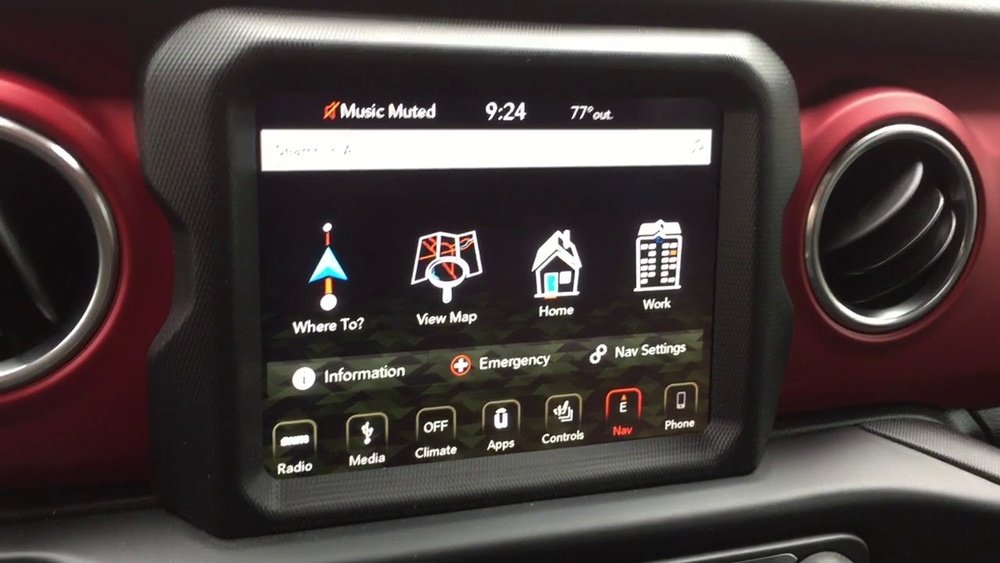
An outdated address can lead to wrong routes, wasted time, or even confusion during emergencies.
Also, the navigation system uses the home address as a reference point for commute times and traffic alerts.
Jeep vehicles come with different infotainment and navigation systems. Knowing which one you have is important because the steps can be slightly different.
| System Name | Screen Size | Main Features |
|---|---|---|
| Uconnect 4 | 7.0″ or 8.4″ | Basic navigation, Bluetooth, voice commands |
| Uconnect 5 | 8.4″ or 10.1″ | Advanced navigation, wireless Apple CarPlay/Android Auto, profiles |
Older models might use Uconnect 3 or a simpler system with fewer features. Most new Jeeps (2018 and later) use Uconnect 4 or 5.
The process to change your home address is similar for most systems, but some screens and buttons may look different. Here’s how to do it:
1. Turn On Your Jeep
Start your vehicle and wait for the navigation system to fully load.
Tap the ‘Nav’ or ‘Navigation’ button on the main screen.
3. Go To Favorites Or Saved Places
Look for ‘Favorites’, ‘Saved Places’, or a star icon. Your current home address is usually listed here.
4. Select Home
Tap on the ‘Home’ entry. You may see options like ‘Edit’, ‘Change’, or a pencil icon.
5. Edit Or Delete Old Address
Most systems let you either edit the address or delete and re-add it. Editing is faster.
6. Enter New Address
Type in your new home address. Use the on-screen keyboard.
Some systems offer voice entry, but typing is often more accurate.
7. Confirm And Save
Double-check the address. Confirm and save your changes.
8. Test Your New Home Address
Exit the menu and try setting a route to ‘Home’ to ensure the update worked.
Example: Uconnect 5 Steps
For drivers with Uconnect 5, the menus are modern and easy to use. After entering navigation, tap ‘Favorites’, press and hold ‘Home’, then choose ‘Edit Address’. Enter your new address, tap ‘Save’, and you’re done.
Common Mistakes And How To Avoid Them
Changing your home address is simple, but these mistakes can cause frustration:
- Forgetting to Save: Always tap ‘Save’ or ‘Confirm’ after entering the new address.
- Typing Errors: Mistyped street numbers or ZIP codes lead to incorrect routes.
- Old Software: Outdated navigation software may not accept new addresses or could behave oddly. Check for updates if you run into trouble.
It’s also easy to overlook that some systems require you to delete the old home address before adding a new one. If you get an error, try removing the old entry first.
Tips For A Smooth Update
- Update Maps Regularly: Outdated maps may not recognize new addresses or developments. Check your Jeep’s settings for map updates.
- Use Full Addresses: Always enter the complete address, including city and ZIP code, to avoid confusion.
- Try Voice Entry: If typing is tough while parked, use the system’s voice command feature. Speak clearly and check the results before saving.
Wondering how Jeep’s navigation compares to others? Here’s a quick overview.
| Feature | Jeep Navigation | Google Maps (Phone) | Built-in Toyota Navigation |
|---|---|---|---|
| Home Address Change | In-vehicle menu, easy steps | App settings, even easier | Menu-driven, similar to Jeep |
| Map Updates | Manual or over-the-air | Automatic | Manual or over-the-air |
| Voice Control | Good (Uconnect 5) | Excellent | Good |
Insight: Some Jeep owners prefer using phone-based navigation like Apple CarPlay or Google Maps. However, the built-in system remains active even when phone signal is weak, which is a major advantage in remote areas.
When To Update Your Home Address
You should change your home address in these situations:
- After moving to a new home
- When lending or selling your Jeep
- If you use a different address for work or family reasons
- After a navigation system reset
Troubleshooting: If You Can’t Change Your Home Address
Sometimes, you may face issues:
- Grayed Out Options: Some settings are locked while driving. Change your address only when the vehicle is in Park.
- Password or PIN Required: Some Jeeps need a security code for changes. Check your owner’s manual.
- System Freezes: If the screen freezes, restart the vehicle or try a soft reset by holding the power button for 10-20 seconds.
If you still have trouble, contact your Jeep dealer or check the official Jeep Uconnect support at Jeep Uconnect.

Frequently Asked Questions
How Do I Know Which Uconnect System My Jeep Has?
You can check the Uconnect version by looking in the system settings, or by checking your owner’s manual. The home screen often shows the version number.
Can I Change My Home Address While Driving?
No, for safety reasons, most systems disable address changes while the Jeep is moving. Always change addresses while parked.
Why Won’t My New Address Save?
Common reasons include typing errors, outdated software, or not confirming the new address. Try deleting the old home entry before adding a new one.
Yes. If your Jeep supports Apple CarPlay or Android Auto, you can use your favorite phone app. But the built-in system works without cell signal.
How Often Should I Update My Maps?
Update your maps at least once a year or after moving. This ensures your navigation has the latest roads and address data.
Updating your home address on your Jeep navigation is a quick job, but it can make a big difference in your daily driving. With these tips, you’ll always have accurate directions and a smoother ride home.


















