Changing the clock on your Jeep Renegade might seem simple, but it can confuse many drivers, especially if you are not used to the infotainment system.
Having the correct time displayed is important—not only does it help keep your daily schedule on track, but it also makes long drives less stressful.
Whether you just changed time zones, switched to daylight saving time, or replaced your battery, setting your clock correctly is a quick task once you know the steps.
Let’s break down how to change the clock on a Jeep Renegade, covering different model years, system types, and common mistakes. By the end, you’ll feel confident adjusting the time, no matter which version of the Renegade you drive.
Understanding Your Jeep Renegade’s Clock System
Before you start, it’s helpful to know which system your Jeep uses. Renegades typically come with one of two main setups:
- Uconnect touch screen system (most common in 2015 and newer models)
- Manual button system (found on basic trims or older models)
If you’re not sure, look at your car’s center console. If you see a touch screen, you likely have Uconnect.
If it’s a basic radio with physical buttons, you’ll be using the manual method.
Here’s a quick comparison of both systems:
| System Type | Model Years | Main Feature | How to Identify |
|---|---|---|---|
| Uconnect Touch Screen | 2015-present | Digital touch interface | Large touch screen in center dash |
| Manual Button | 2015-present (base), older models | Physical clock/radio buttons | No touch screen, basic radio display |
How To Change The Clock On Uconnect Touch Screen
Most Jeep Renegades from 2015 onward use the Uconnect system. The exact steps can vary a little, but the process is usually similar:
1. Turn On The Ignition
Start your car or switch to accessory mode so the Uconnect screen lights up.
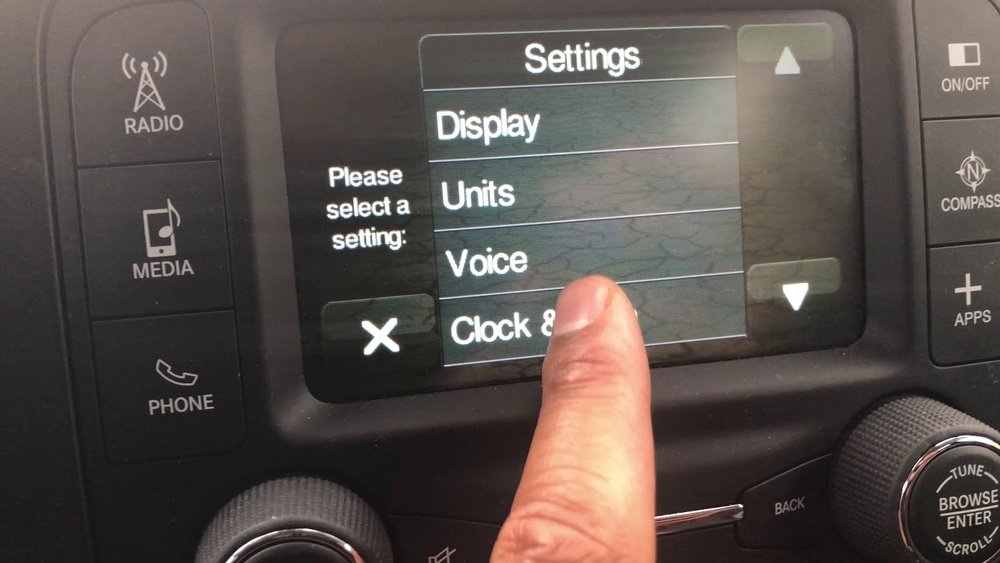
Tap the “Settings” icon on the touch screen. You can usually find it at the bottom or side of the home screen.
3. Select ‘clock & Date’
Scroll through the settings list until you see “Clock & Date” or just “Clock”. Tap to open.
4. Adjust The Time
Use the plus (+) and minus (−) buttons on the screen to set the correct hour and minutes.
- Some versions let you touch the numbers directly.
- You might see a toggle for AM/PM or 24-hour time.
- Save Your Changes
Tap “Save” or “Done” to confirm. Some systems update automatically as you adjust.
6. Check The Display
Return to the main screen to make sure the new time shows correctly.
Here’s a summary for quick reference:
| Step | Action |
|---|---|
| 1 | Ignition On |
| 2 | Open Settings |
| 3 | Select Clock & Date |
| 4 | Adjust Time |
| 5 | Save Changes |
| 6 | Confirm Display |
Non-obvious Insights
- If your Renegade has navigation, you may see an option for automatic time adjustment. This uses GPS to set the clock, but it sometimes lags. Manual correction is faster.
- After a battery change, the clock may reset to factory default. Always check the time after any electrical work.
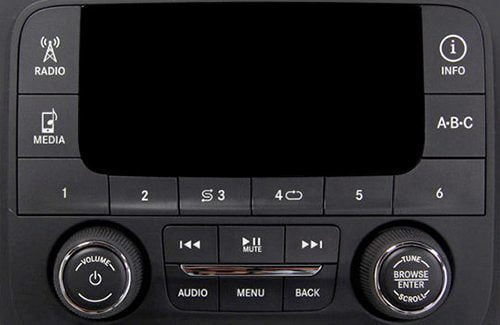
Some base models or older Renegades use a manual clock system. You’ll need to use the radio’s physical buttons:
1. Turn On The Radio
Press the power button to wake the radio.
Look for a button labeled “Clock” or “Time”. If you don’t see one, check your owner’s manual.
3. Press And Hold
Hold the Clock button until the display starts flashing.
- Adjust Hours and Minutes
- Use the Tune/Seek or +/- buttons to change the hour.
- Press the Clock button again to switch to minutes, then adjust.
- Set the Time
Press Clock or Set to finish.
Two things beginners often miss:
- Some radios need you to turn the ignition key to “On” (not just accessory mode) to adjust the clock.
- If the buttons don’t work, try pressing the “Menu” button first, then look for clock settings.
Common Mistakes To Avoid
- Setting the wrong AM/PM or 24-hour format. Double-check before saving.
- Not pressing save or done—some systems don’t update if you just back out.
- Ignoring automatic time zone update. If you travel across time zones, manual settings may be overwritten by GPS unless you turn off auto-update.
Why The Correct Time Matters
A properly set clock does more than show the hour. Many Renegade features depend on the correct time:
- Scheduled maintenance reminders use the clock.
- Navigation system and traffic updates may need accurate time.
- Some Bluetooth features require matching times between your phone and car.
Driving with the wrong time can cause confusion, missed appointments, and even errors with digital features.
Troubleshooting: When The Clock Won’t Change
If the time does not update:
- Check for a software update for your Uconnect system. Old software can cause glitches.
- Make sure the fuse for your radio/infotainment system is not blown.
- If the touch screen is unresponsive, try a soft reset—turn the car off, wait a minute, then restart.
- If you still can’t change the clock, visit a certified Jeep dealer for help.
Sometimes, a factory reset can fix stubborn clock issues, but this will erase radio presets and personal settings.

Frequently Asked Questions
Why Does My Jeep Renegade Clock Keep Resetting?
A clock that resets often points to a battery issue or a loose connection. After battery replacement, the system might lose time settings. If it keeps happening, have your electrical system checked.
How Do I Switch Between 12-hour And 24-hour Format?
Go to Settings > Clock & Date on your Uconnect screen. Look for a toggle or option for 12/24-hour format and select your preference.
Does The Jeep Renegade Clock Update Automatically For Daylight Saving Time?
If you have automatic time adjustment enabled (common in models with navigation), the clock should update by itself. For manual settings, you’ll need to change the time when daylight saving starts or ends.
Some trim levels hide clock settings in a sub-menu or under a different label like “Time & Date”. If you can’t find it, check your owner’s manual or visit the official Jeep support site for help.
Can I Change The Clock While Driving?
For safety, most Uconnect systems lock out clock settings while the car is in motion. Park the vehicle before adjusting the time.
Setting the clock on your Jeep Renegade is a small task, but it makes every drive smoother and less stressful. With these steps, you’ll never have to wonder if you’re running late because of an incorrect car clock again.


















