So, how do you update Uconnect in a Jeep? Keeping your Jeep’s infotainment system updated helps improve performance, fix software bugs, strengthen security, and maintain compatibility with newer smartphones.
An outdated Uconnect system may cause Bluetooth connection issues, touchscreen glitches, navigation errors, or problems with Apple CarPlay and Android Auto. Updating the software often solves these issues without requiring a visit to a repair shop.
The update process depends on your Jeep model, model year, and Uconnect version. Some newer Jeep vehicles receive updates automatically over the air.
Older systems may require a USB drive and a manual installation.
In this guide, you will learn how to check your current Uconnect version, find available updates, install them safely, and avoid common mistakes during the process.
What Is Uconnect And Why Update It?
Uconnect is Jeep’s infotainment system. It controls navigation, music, phone calls, and even climate settings in many models. Updates can add new apps, fix bugs, or improve safety features like emergency calls.
Benefits of updating Uconnect include:
- Access to the latest apps and features
- Improved Bluetooth and Apple CarPlay/Android Auto support
- Security patches for safer driving
- Better system stability and fewer crashes
Many drivers don’t realize that skipping updates can cause problems. For example, your smartphone might not connect properly, or GPS maps could be out of date.
How Uconnect Updates Work
The way you update Uconnect depends on your Jeep’s model year and system version. There are two main methods:
- Over-the-Air (OTA) Updates: For newer Jeeps (usually 2018 and later), updates can be delivered automatically via the vehicle’s cellular connection.
- USB Updates: For older models, you’ll need to download the update on your computer and transfer it using a USB drive.
To check which method your Jeep uses, look in your owner’s manual or visit the official Uconnect website.
Before You Begin: What You Need
Updating Uconnect is simple, but it’s important to prepare:
- Check your Jeep’s VIN: You’ll need the Vehicle Identification Number (VIN) to find the right update.
- Have a USB drive (8GB, 32GB): For manual updates, the drive should be formatted to FAT32.
- A laptop or desktop computer: Needed to download the update if not using OTA.
- Stable internet connection: For downloading large update files.
- Time: Updates can take 15 to 45 minutes. The car must stay in Park with the engine running.
Tip: Never turn off your Jeep or remove the USB drive during the update. This can damage the system.
How To Update Uconnect In Jeep
To update Uconnect in your Jeep, start by ensuring you have a stable internet connection and a compatible USB flash drive with enough storage space. Then, follow the step-by-step guide below:
Step 1: Find Out Your Uconnect Version
- Start your Jeep and turn on the Uconnect system.
- Go to “Settings” > “System Information.”
- Write down the software version.
Step 2: Check For Available Updates
- Visit the official Uconnect software update page: https://www.driveuconnect.com/support/software-update.html
- Enter your VIN.
- The site will tell you if an update is available for your Jeep.
Step 3: Download The Update
If you have an eligible update:
- Download the update file to your computer.
- Unzip the file if needed.
- Copy all files to your blank, FAT32-formatted USB drive (not just the folder).
Step 4: Install The Update In Your Jeep
- Start your Jeep and keep it in Park with the engine running.
- Plug the USB drive into the Uconnect USB port.
- The system will detect the update and prompt you to begin.
- Follow on-screen instructions.
- Wait until the update finishes (usually 20 to 45 minutes).
- Do not turn off the car or remove the USB drive until you see a completion message.
Step 5: Confirm The Update
- Go back to “System Information” to check that the new software version is installed.
Common mistake: Many users remove the USB too soon or turn off the car. This can lead to incomplete installation and possible system errors.
Over-the-air (OTA) Updates Explained
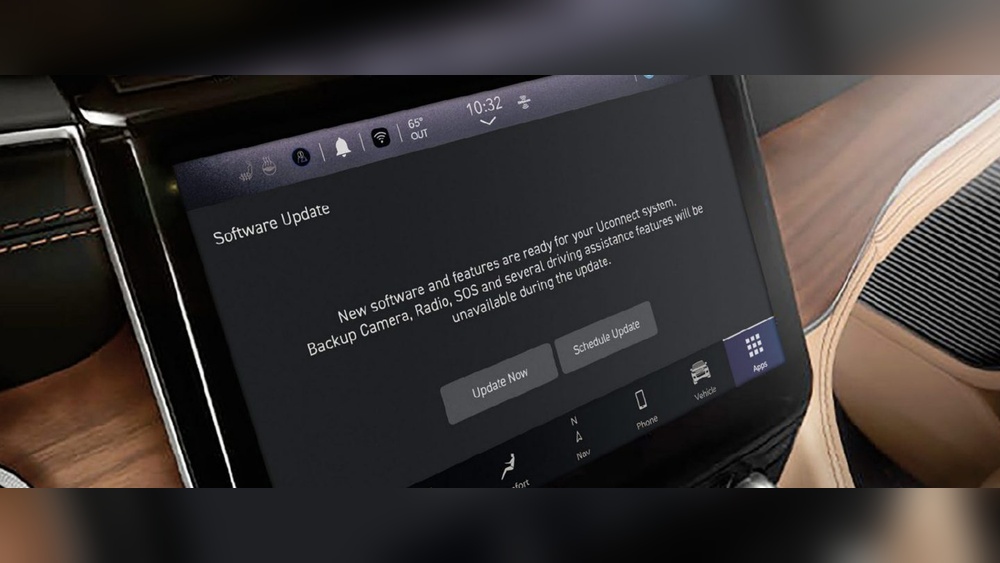
For newer Jeeps, Uconnect updates may happen automatically. Here’s how it works:
- When an update is available, your Uconnect screen will show a notification.
- You can choose to “Install Now” or schedule it for later.
- The car must be in Park and the engine running during installation.
If you miss the notification, Go to “Settings” > “Software Updates” to check manually.
Note: OTA updates are not instant. Sometimes, it takes several weeks for all vehicles to receive the update.
Uconnect Update Process Comparison
To help you understand the differences, see the comparison below:
| Update Method | Applies To | Speed | User Action Needed |
|---|---|---|---|
| USB Update | 2017 and earlier (some 2018) | 20 to 45 min | Manual download, USB transfer |
| OTA Update | 2018 and newer | 15 to 30 min | Simple on-screen approval |
Insight: Many owners think all Jeeps have OTA, but some newer models may still require USB updates, especially if their connectivity module is not active.
What’s New In Recent Uconnect Updates?
Recent Uconnect updates often include:
- Support for new smartphones
- New navigation maps and points of interest
- Interface improvements (faster response, new icons)
- Safety enhancements like better 911 Assist
- Bug fixes for common issues like freezing or random restarts
Example: The 2023 Uconnect update added improved voice recognition and wireless Android Auto support for some Jeep models.
Pros And Cons Of Updating Uconnect
Updating has clear benefits, but some users worry about risks. Here’s an overview:
| Pros | Cons |
|---|---|
| New features and apps | Time-consuming process |
| Improved security | Possible system bugs |
| Better phone and map compatibility | Rare loss of saved settings |
| Fixes for known problems | May require dealer visit if failed |
Non-obvious insight: After an update, you may need to re-pair your Bluetooth devices. Also, some personalized settings (like radio presets) could reset.
What If The Update Fails?
If the update stops or fails:
- Do not keep turning the car on and off. Wait 10 minutes, then try again.
- Check that your USB drive is properly formatted and has only the update files.
- If the system is stuck, contact your Jeep dealer. They can restore the system using factory tools.
Tip: Always use a high-quality USB drive. Cheap or old drives often cause update failures.
Dealer Vs DIY: Should You Pay For The Update?
Most Uconnect updates are free to download and install yourself. However, some owners prefer to pay the dealer for convenience.
Cost Comparison
| Method | Typical Cost | Best For |
|---|---|---|
| DIY (USB/OTA) | Free | Tech-savvy users |
| Dealer Update | $75, $150 | Anyone wanting expert help |
Note: If you update at the dealer, you may get a warranty on the work. This can be helpful if your system is acting up or you’re not comfortable with technology.
Troubleshooting Common Issues
quick solutions if you run into trouble:
- Update won’t start: Check your USB drive’s format (must be FAT32) and make sure all files are in the root directory.
- Update freezes: Wait at least 10 minutes. If it doesn’t progress, restart the process.
- Bluetooth not working after update: Delete your phone from the Uconnect system and re-pair.
- Navigation maps missing: Some updates do not include map data. You may need a separate map update from Jeep.
Expert advice: If you’re unsure, always contact Jeep support or visit an authorized dealer. A failed update can sometimes “brick” the infotainment system, which is expensive to fix.
How To Keep Uconnect Running Smoothly
- Install updates as soon as possible
- Use a good-quality USB drive for manual updates
- Restart your Jeep’s infotainment system occasionally to clear memory
- Back up your settings if possible
Non-obvious insight: Keeping your Uconnect software current can actually help with Jeep resale value, as buyers like to see all systems updated.
Where To Find More Information
For step-by-step videos and official files, always use the official Uconnect support website or your local Jeep dealer. Avoid downloading updates from unofficial forums, as these can contain malware.
For more details, the official resource is Uconnect Support.
How Do I Know If My Jeep Needs A Uconnect Update?
Go to "Settings" > "System Information" on your Uconnect screen. Write down your software version.
Then, check your VIN on the Uconnect website to see if a newer version is available.
Is It Safe To Update Uconnect Myself?
Yes, as long as you follow the instructions closely. Use a reliable USB drive and do not turn off your car during the process.
If you're unsure, ask your dealer for help.
Will Updating Uconnect Erase My Settings?
Most updates keep your settings, but sometimes Bluetooth devices, radio presets, or navigation addresses may reset. It’s a good idea to back up important info before starting.
How Long Does A Uconnect Update Take?
Usually between 15 and 45 minutes. The time depends on your Jeep model and the update size.
OTA updates are often faster than manual USB updates.
What Should I Do If The Update Fails?
First, make sure your USB drive is formatted correctly and contains only the update files. Try the update again.
If it fails twice, contact your dealer they can restore your system safely.
Updating Uconnect in your Jeep is a smart way to enjoy new features, better security, and smooth smartphone connections. For most owners, the process is free and simple, especially with newer models.
Just remember to check your version, follow each step carefully, and use the official update site.
If you’re not comfortable doing it yourself, your Jeep dealer can help for a small fee. Staying updated ensures your driving experience is as smooth and safe as possible.