Setting up Bluetooth in your Jeep Patriot can transform your driving experience. You’ll be able to make hands-free calls, stream music, and stay connected safely.
Many Jeep Patriot owners, especially those new to vehicle technology, find Bluetooth setup confusing. This guide will walk you through the process step by step, highlight common issues, and offer practical tips to ensure your Bluetooth works smoothly.
Understanding Bluetooth In Jeep Patriot
Most Jeep Patriots from 2011 onwards come equipped with Uconnect—the brand’s infotainment system. Uconnect controls your radio, phone, and media connections. Not every Jeep Patriot has Bluetooth, so check your vehicle’s features before starting.
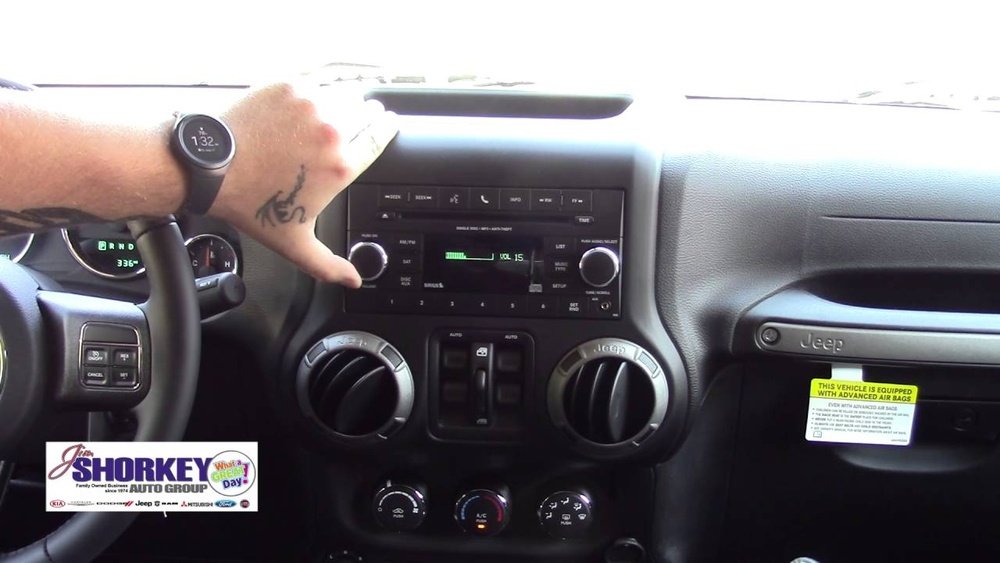
To confirm Bluetooth capability:
- Look for a Uconnect button on the radio or steering wheel.
- Check your owner’s manual for Bluetooth features.
- If you have a touchscreen, Bluetooth is usually included.
If your Patriot lacks Bluetooth, aftermarket kits are available. These can add wireless connectivity, but installation may require professional help.
Comparing Jeep Patriot Bluetooth Models
Some Patriots have different Uconnect versions. Here’s a quick comparison:
| Year | Bluetooth Capability | Uconnect Features |
|---|---|---|
| 2011-2014 | Optional/Standard | Phone, Music, Voice Control |
| 2015-2017 | Standard | Enhanced Media, Navigation, Voice Text |
| Earlier than 2011 | Rare/Aftermarket | Limited or None |
Preparing Your Devices
Before connecting, make sure your smartphone and Jeep Patriot are ready:
- Charge your phone fully.
- Enable Bluetooth on your phone.
- Remove old Bluetooth pairings that may cause conflicts.
Some Android and iOS phones have known compatibility issues. Updating your phone’s software often solves these problems.
Common Phone Compatibility Issues
| Issue | Solution |
|---|---|
| Bluetooth won’t connect | Update phone OS, restart devices |
| Call audio only | Enable media audio in phone Bluetooth settings |
| Device not found | Move closer to the dashboard, check vehicle Bluetooth settings |
Step-by-step Bluetooth Setup
Setting up Bluetooth in your Jeep Patriot is simple if you follow these steps:
- Start your Jeep Patriot and keep it in Park.
- Press the Uconnect button on your radio or steering wheel.
- Select “Phone” or “Settings” from the Uconnect menu.
- Choose “Pair a Device” or “Add Device.”
- On your phone, open Bluetooth settings and search for available devices.
- Select “Uconnect” or your Jeep’s name from the list.
- Enter the PIN shown on your Jeep’s screen into your phone. Usually, it’s a four-digit code.
- Wait for pairing confirmation. Your phone may ask to sync contacts—approve this for full functionality.
If the pairing fails, restart both your phone and your Jeep’s system. Try again, making sure both devices are discoverable.
Troubleshooting Tips
- If you can’t find Uconnect, make sure it’s enabled in your vehicle settings.
- Delete old pairings on both your phone and Jeep before retrying.
- Move your phone closer to the Uconnect system for better signal.
- Check for updates on your phone and Uconnect system.
Using Bluetooth Features
Once connected, you can:
- Make hands-free calls using voice commands.
- Stream music from apps like Spotify or Apple Music.
- Use navigation apps with audio guidance through car speakers.
To access these features:
- Press the Uconnect or Voice Command button.
- Speak clearly and follow on-screen prompts.
- Control music via your phone or Uconnect buttons.
Jeep Patriot Bluetooth Vs Wired Connections
Here’s how Bluetooth compares to traditional wired connections:
| Feature | Bluetooth | Aux/USB Cable |
|---|---|---|
| Hands-free calls | Yes | No |
| Music streaming | Yes | Yes |
| Voice commands | Yes | No |
| Charging | No | Yes |
Bluetooth is best for wireless convenience, but aux and USB cables can charge your device while playing music.

Upgrading Or Repairing Bluetooth
If your Jeep Patriot’s Bluetooth isn’t working, or you want more features, you have options:
- Update Uconnect via official Jeep service centers.
- Install aftermarket Bluetooth kits for older models.
- Replace damaged Uconnect hardware if necessary.
When buying aftermarket kits, check compatibility with your Patriot’s model year. Cheaper kits may lack voice command and contact sync features.
Non-obvious Insights
Most people overlook two key points:
- Pairing Limit: Uconnect can only remember a limited number of devices—usually up to seven. If you’ve paired many phones before, delete old ones to avoid connection issues.
- Privacy Concerns: When syncing contacts, Uconnect stores them locally. If you sell your Jeep, clear all paired devices and contacts from the system to protect your privacy.

Frequently Asked Questions
How Many Phones Can I Pair With My Jeep Patriot?
You can pair up to seven devices with Uconnect. However, only one device can be active at a time for calls and streaming.
Why Isn’t My Bluetooth Connecting Automatically?
If your Bluetooth doesn’t connect automatically, check if your phone’s Bluetooth is turned on and that Uconnect is set to “auto-connect. ” Delete old pairings if needed.
Can I Stream Music From Any App?
Yes, you can stream music from most apps like Spotify, Apple Music, and Pandora. If music doesn’t play, check that “Media Audio” is enabled in your phone’s Bluetooth settings.
Is Bluetooth Available In All Jeep Patriots?
No. Bluetooth is standard in most models from 2011 onward, but older Patriots may not have this feature.
You can add Bluetooth through aftermarket kits if needed.
How Do I Clear My Contacts From Uconnect?
Go to Uconnect settings, select paired devices, and choose “Delete” or “Remove. ” This clears contacts and call history from the system.
Setting up Bluetooth in your Jeep Patriot can seem overwhelming at first, but following these steps will make it easy. Remember to check your vehicle’s compatibility, prepare your phone, and use the right pairing sequence. Bluetooth not only improves convenience but also makes driving safer. If you still face issues, consult your owner’s manual or visit a dealership for help. For more information on Uconnect and Bluetooth compatibility, visit the official Jeep site: Jeep Uconnect. Enjoy your connected drive!



















