Getting Apple CarPlay working in your Jeep Cherokee can transform your driving experience. CarPlay brings your iPhone apps onto your car’s screen, allowing you to use navigation, music, and messaging safely.
But many owners struggle with setup, especially if English isn’t their first language. This guide will help you set up Apple CarPlay step-by-step, highlight key differences with Android Auto, and share practical tips.
Even if you’re a beginner, you’ll learn how to avoid common mistakes and get the most from CarPlay in your Jeep Cherokee.
Compatibility And Requirements
Before you start, you must check if your Jeep Cherokee supports Apple CarPlay. Most models from 2018 onwards have CarPlay built in. Earlier models may not support it, or may need extra hardware.
| Year | CarPlay Support | Uconnect Version |
|---|---|---|
| 2015-2017 | No | Uconnect 5.0/8.4 |
| 2018-2019 | Yes | Uconnect 4 |
| 2020+ | Yes | Uconnect 5 |
Requirements for setup:
- A compatible Jeep Cherokee (2018 or newer).
- An iPhone 5 or later, running iOS 7.1 or higher.
- A genuine Apple Lightning cable (for wired connection).
- Latest Uconnect software (check for updates).
If your Uconnect system is outdated, update it at your dealer or visit the official Jeep website.
Step-by-step Setup Guide
Setting up Apple CarPlay is simple if you follow these steps:
- Start Your Car: Turn on your Jeep and the Uconnect system.
- Connect Your iPhone: Plug your iPhone into the USB port using your Lightning cable. The port is usually in the center console.
- Unlock Your Phone: Unlock your iPhone screen before connecting.
- Allow CarPlay Access: If prompted, tap “Allow” on your iPhone for CarPlay to work while the phone is locked.
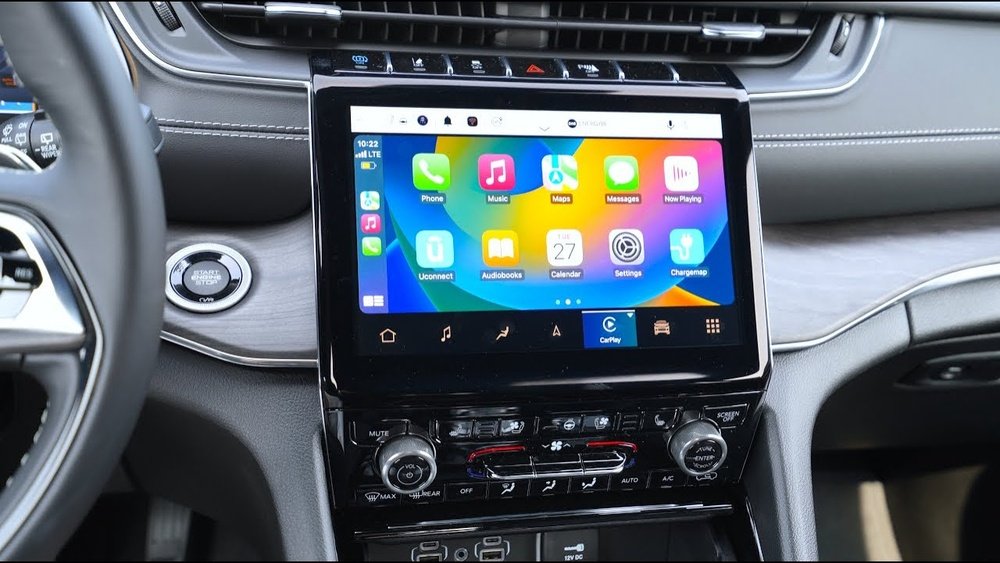
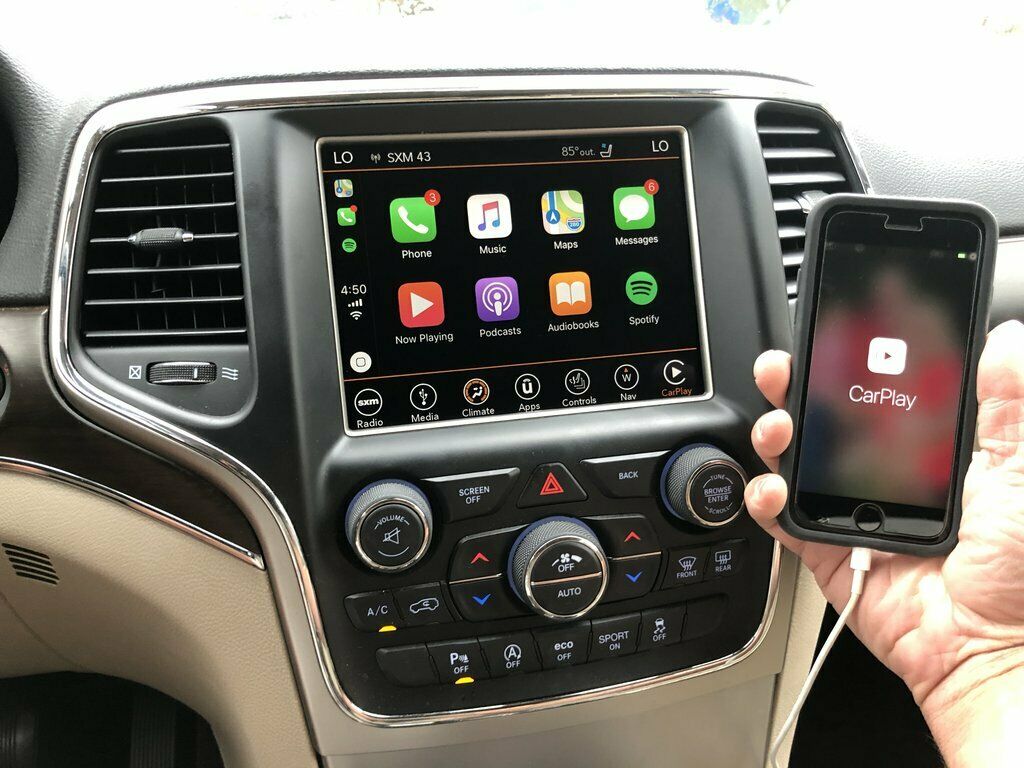
- Uconnect Display: The Uconnect screen will show the CarPlay icon. Tap it to open CarPlay.
- Use Apps Safely: Access apps like Maps, Music, and Messages using touch, voice, or steering wheel controls.
Wireless Carplay Setup
Some newer Jeep Cherokee models support wireless CarPlay. Here’s how to set it up:
- Enable Bluetooth and Wi-Fi on your iPhone.
- Go to Uconnect’s “Phone” menu and pair your device.
- Follow on-screen instructions to set up wireless CarPlay.
Wireless CarPlay is convenient, but wired connections are often more stable. If you notice lag or connection drops, use the cable.

Common Problems And Solutions
Even simple setups can run into issues. Here are some problems Jeep Cherokee owners face, and how to fix them.
- CarPlay not showing up: Check if your iPhone is updated and the Lightning cable is genuine. Cheap cables often fail.
- No sound: Make sure the car’s audio is set to “Media” or “CarPlay”. Restart your iPhone and Uconnect.
- Apps missing: Some apps may not appear in CarPlay if restrictions are set on your iPhone. Go to Settings > Screen Time > Content & Privacy Restrictions.
- Wireless CarPlay issues: Turn off and on Bluetooth and Wi-Fi. Forget and re-pair your device.
Useful Troubleshooting Tips
- Restart both your iPhone and the Uconnect system if CarPlay freezes.
- Make sure Siri is enabled on your iPhone. CarPlay relies on Siri for voice control.
- If CarPlay stops working after a Uconnect update, reset network settings on your iPhone.
Apple Carplay Vs Android Auto In Jeep Cherokee
Many Jeep Cherokee owners ask about the differences between Apple CarPlay and Android Auto. Here’s a comparison to help you decide what’s best for your needs.
| Feature | Apple CarPlay | Android Auto |
|---|---|---|
| Supported Devices | iPhone only | Android phones only |
| Voice Assistant | Siri | Google Assistant |
| Navigation Apps | Apple Maps, Google Maps, Waze | Google Maps, Waze |
| Wireless Support | Available (newer models) | Available (newer models) |
| Interface Style | Simple, iOS-like | Material Design, Android-like |
Both platforms offer safe, hands-free access to your phone’s features. CarPlay is best for iPhone users, while Android Auto is ideal for Android fans.
Making The Most Of Apple Carplay
To get the best experience, consider these tips:
- Customize CarPlay: On your iPhone, go to Settings > General > CarPlay > [Your Car]. Rearrange app icons and remove apps you don’t use.
- Use Siri for Safety: Say “Hey Siri” to control music or navigation without touching the screen.
- Keep Your Phone Updated: Regular updates improve CarPlay’s features and security.
- Try Third-Party Apps: Apps like Spotify, WhatsApp, and Audible work well with CarPlay. Not all apps are supported, so check compatibility.
Non-obvious Insights
- Not all USB ports work for CarPlay: Use the primary port, often labeled with a phone or CarPlay symbol. Secondary ports may only charge.
- Screen mirroring isn’t possible: CarPlay shows only supported apps. You can’t mirror your entire iPhone screen.
Practical Examples
Let’s say you want to use Apple Maps for navigation. After connecting your iPhone, tap the Maps icon on your Uconnect screen. You can search locations by typing or by saying, “Hey Siri, take me to the nearest gas station.” The directions appear on your car’s screen, and you get voice guidance. This keeps your hands on the wheel and eyes on the road.
If you receive a message, Siri can read it aloud and help you reply by voice. You won’t need to pick up your phone, which is safer and follows US driving laws.

Frequently Asked Questions
How Do I Know If My Jeep Cherokee Supports Apple Carplay?
Check your car’s year and Uconnect system. Models from 2018 or later usually support CarPlay.
If unsure, look for the CarPlay icon on your Uconnect screen or read your owner’s manual.
Can I Use Apple Carplay Wirelessly In My Jeep Cherokee?
Wireless CarPlay is available in newer models with Uconnect 5. Enable Bluetooth and Wi-Fi on your iPhone, pair the device, and follow on-screen prompts.
Wired connections are more stable in older models.
Why Isn’t Carplay Working Even After Connecting My Iphone?
Make sure your iPhone is unlocked, the cable is genuine, and the USB port is correct. Update your iPhone and Uconnect system.
If issues persist, restart your devices or reset network settings.
Can I Customize The Apps Shown In Apple Carplay?
Yes, you can rearrange and remove apps in CarPlay settings on your iPhone. Go to Settings > General > CarPlay > [Your Car] to adjust app order and visibility.
Is Apple Carplay Safe To Use While Driving?
Apple CarPlay is designed for safety. You can use voice commands and steering wheel controls.
Avoid touching the screen while driving. Always follow local laws and drive responsibly.
Setting up Apple CarPlay in your Jeep Cherokee can make driving safer and more enjoyable. With the right steps and a bit of troubleshooting, you’ll access your favorite apps, stay connected, and enjoy smooth navigation. If you want detailed compatibility info, visit the official Jeep site at Jeep Uconnect. Enjoy your drive with CarPlay!