Programming the garage door opener in your 2012 Jeep Grand Cherokee can make daily life easier. With just a few steps, you can open or close your garage without leaving your vehicle. Many owners struggle at first, but understanding the process saves time and frustration. This guide explains every detail you need, plus tips and common mistakes to avoid.
Understanding Your Jeep’s Garage Door Opener
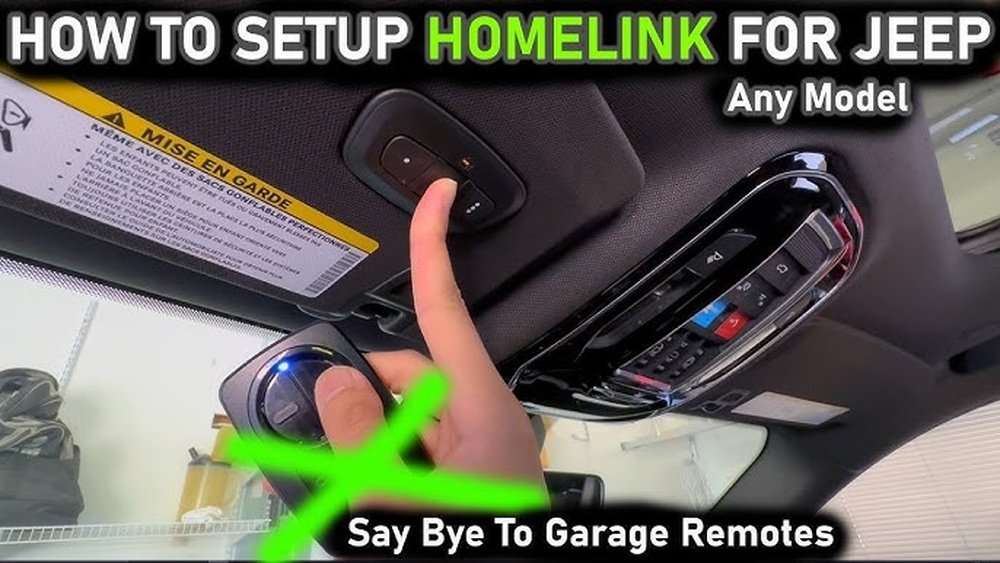
The 2012 Grand Cherokee uses the HomeLink system, which is built into the vehicle’s overhead console. This system can control up to three different garage doors or gates. Before you start, check that your garage door opener is compatible. Most modern openers work, but some older systems may need an additional receiver.
What you need:
- Your Jeep’s key fob
- The garage door remote control
- Access to your garage motor (for some openers)
Preparation Steps
Before you start programming, make sure:
- The vehicle is parked outside the garage, not inside.
- You have fresh batteries in your garage door remote.
- You know where the “Learn” or “Smart” button is on your garage motor (usually on the back or side of the unit).
These small checks can prevent the most common errors, like failed programming or incomplete syncing.

Step-by-step Programming Instructions
1. Clear Previous Codes (if Needed)
If your Jeep is new to you or you want to erase old codes:
- Hold the two outer HomeLink buttons (usually marked with a house icon) for about 20 seconds.
- Release when the indicator light flashes rapidly. This step resets the system.
Pick one of the three HomeLink buttons to control your garage door. Hold your garage remote a few inches away from the Jeep’s HomeLink panel.
- Press and hold your chosen HomeLink button.
- At the same time, press and hold the button on your garage door remote.
- Keep both pressed until the HomeLink indicator light changes from slow to fast blinking (usually 20–30 seconds).
- Release both buttons.
Tip: Sometimes, the light turns solid instead of blinking. This still means programming was successful.
4. Sync With Garage Door Motor (rolling Code Openers)
Many newer garage doors use a rolling code for security. If your system does, you need to sync HomeLink with the garage motor:
- Quickly press the “Learn” button on your garage door opener (you have about 30 seconds to finish the next steps).
- Return to your Jeep and press the programmed HomeLink button three times, holding for two seconds each time.
- The garage door should move on the third press. If not, repeat the steps.
5. Test Your System
Press the HomeLink button you programmed. The garage door should open or close.
If not, repeat the process, checking each step and the garage door motor’s response.
Common Problems And Solutions
Some users find their opener doesn’t respond right away. Here are a few tips:
- Battery Check: Weak remote batteries can prevent proper programming.
- Distance Issue: Hold the remote close to, but not touching, the HomeLink panel.
- Timing: For rolling code openers, you must press the HomeLink button within 30 seconds after pressing the “Learn” button.
Comparison Of Homelink Vs. Traditional Remotes
Using the built-in HomeLink system offers some advantages over traditional garage remotes.
| Feature | HomeLink (Jeep) | Traditional Remote |
|---|---|---|
| Convenience | Integrated in vehicle | Separate device |
| Security | Rolling code support | Varies by model |
| Battery Needed | No | Yes |
Safety And Security Insights
Programming your garage opener in the Jeep is safe if you follow directions. The system uses encryption to prevent hacking.
But, don’t leave your vehicle unlocked; anyone with access could use the HomeLink buttons.
Here’s a quick look at how the Jeep’s HomeLink stacks up against smart garage systems:
| System | Control Method | App Integration | Security Level |
|---|---|---|---|
| HomeLink | In-vehicle | No | High |
| Smart WiFi Opener | Smartphone | Yes | High |
| Standard Remote | Handheld | No | Medium |
Insight for beginners: Rolling code synchronization is where many people get stuck. Unlike the old “static” remotes, rolling code openers need a special sync with the garage motor for security. If your Jeep’s HomeLink is not working, it’s often this step that’s missed.

Helpful Tips For Reliable Setup
- Program during the day, so you can see the indicator lights clearly.
- If your garage uses a multi-door system, label each HomeLink button for easy use.
- Keep your garage remote handy after programming. Some garage systems “forget” paired devices after a power outage and need reprogramming.
- If you move to a new house, clear all codes before selling your Jeep.
When To Seek Professional Help
If you follow all steps and your Jeep still won’t connect, your garage opener may be too old or incompatible. In rare cases, HomeLink modules can fail. Dealers and locksmiths can help, but check your owner’s manual and the official HomeLink website first. For more guidance, you can visit the official HomeLink programming page.
Frequently Asked Questions
How Do I Know If My Garage Door Uses Rolling Code Technology?
Most openers made after 1996 use rolling codes. Look for a “Learn” or “Smart” button on your garage motor.
The color of the button can help you check compatibility in your garage opener’s manual.
Can I Program More Than One Garage Door To My Jeep?
Yes, the 2012 Grand Cherokee supports up to three separate doors or gates. Each HomeLink button can control a different opener.
What If My Homelink System Won’t Program?
Check your remote’s battery, the distance from the panel, and repeat the sync process. If it still fails, your opener may need an external repeater or may not be compatible.
Will Programming Homelink Erase My Existing Remotes?
No, programming HomeLink only adds another controller. Your handheld remotes will still work.
Is It Safe To Program My Garage Opener In A Public Place?
Avoid programming in public. If someone sees which button you use, they could access your garage.
Always program in your driveway or a secure area.
Programming your 2012 Jeep Grand Cherokee’s garage door opener is simple with the right steps. Take your time, follow the guide, and enjoy the convenience of seamless entry every day.



















