Is your Jeep key fob acting up or suddenly not working? It might be time to change the battery.
You don’t need to visit a dealer or pay extra for a simple fix you can do yourself in minutes. Knowing how to change your Jeep key fob battery can save you time, hassle, and keep you in control.
In this guide, you’ll learn easy, step-by-step instructions to replace your key fob battery quickly and correctly.
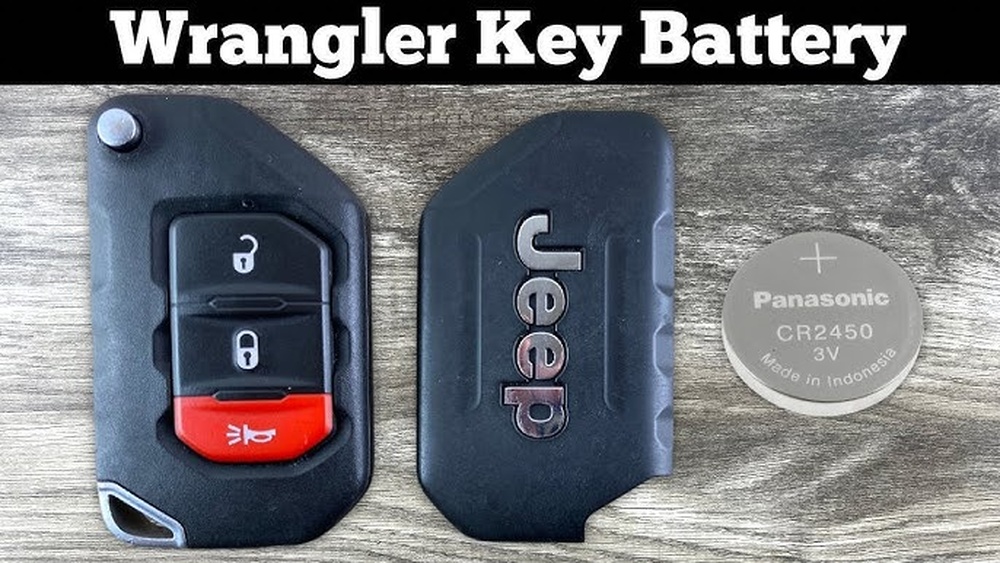
Whether you drive a Jeep Compass, Wrangler, Grand Cherokee, or another model, help you get your key fob back to perfect working order. Keep reading to avoid getting locked out and stay ready for every adventure on the road.
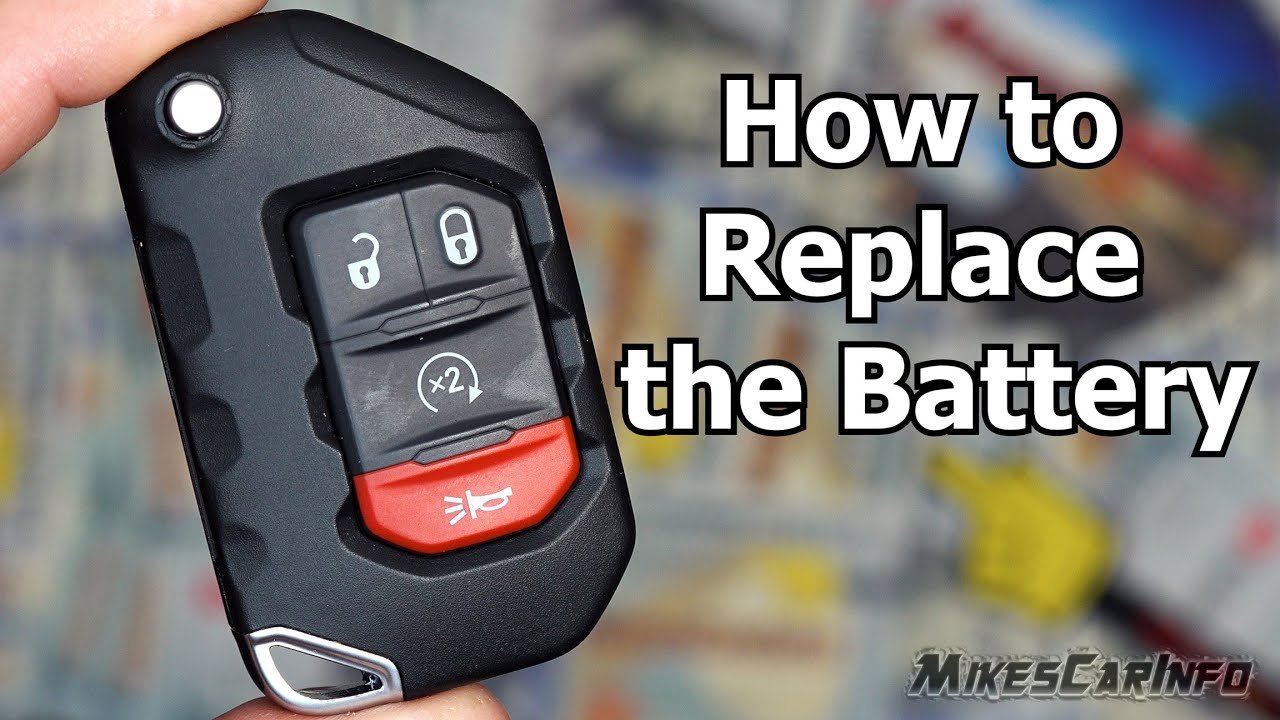
Identify Your Jeep Key Fob Model
Identifying your Jeep key fob model is the first step to change its battery. Each Jeep model may use a different key fob design. Knowing your key fob type helps you find the right battery and tools. help you recognize your Jeep key fob model quickly.
Check The Shape And Size Of Your Key Fob
Look at your key fob’s shape. Some Jeep key fobs are rectangular, while others are oval or square. Size also varies by model year and Jeep type. Compare your fob to images online to find a match. This simple check narrows down your options.
Look For Model Numbers Or Codes
Flip your key fob over and search for numbers or letters. Many key fobs have a model number or code printed inside the case or on the back. This code identifies your key fob precisely. Write it down to find the correct battery size and replacement instructions.
Identify Your Jeep Model And Year
Your Jeep’s make, model, and year also give clues about the key fob. Different Jeep models like the Wrangler, Cherokee, or Compass use distinct key fobs. Newer models often have updated designs. Check your vehicle registration or manual for exact details.
Count the buttons on your key fob. Some have lock, find, panic, and trunk release buttons. Others may have remote start or alarm controls. The number and arrangement of buttons help confirm the key fob model. Use this detail to ensure the right battery replacement.

Gather Necessary Tools And Battery
Before starting the process to change your Jeep key fob battery, gather all necessary tools and the correct replacement battery. Having everything ready makes the task easier and faster. It also helps avoid damage to your key fob during the process.
The most common tools needed are small screwdrivers. These include a flathead or a small Phillips screwdriver. A plastic pry tool can also help open the fob without scratching it.
Choosing the right battery type is important. Most Jeep key fobs use a CR2032 lithium coin battery. Check your key fob or owner’s manual to confirm the exact battery model needed.
Different Jeep models might have slightly different key fobs. Identify your key fob model first. This helps ensure you get the correct battery and tools for your specific key fob.
Gather Small Screwdrivers
Small screwdrivers help open the key fob case. A flathead screwdriver is often useful for prying open the fob. A Phillips screwdriver may be needed if screws hold the fob together.
Purchase The Correct Battery
Most Jeep key fobs use CR2032 batteries. Buy a fresh, high-quality battery for best performance. Avoid cheap batteries to prevent leaks and poor performance.
Optional: Use A Plastic Pry Tool
A plastic pry tool reduces the risk of damaging the fob. It helps safely separate the two halves of the key fob casing. You can find these tools at electronics or automotive stores.
Remove Mechanical Key
Removing the mechanical key is the first step to change your Jeep key fob battery. The mechanical key is hidden inside the key fob. It allows you to open your Jeep door manually if the key fob battery dies. Knowing how to remove this key helps you open the fob safely.
Look on the back or side of your Jeep key fob. Find the small release button or slide pin. Press or slide it gently. Pull out the metal mechanical key carefully. This key fits perfectly inside the fob.
Pull Out The Mechanical Key
Hold the key fob firmly with one hand. Use your thumb to pull the mechanical key out. It should come out easily after pressing the release. Keep the key safe. You will need it later to open your Jeep door.
Open The Key Fob Case
Opening the key fob case is the first step in changing the battery of your Jeep key fob. It requires gentle handling to avoid breaking the plastic casing. Each Jeep key fob has a small release mechanism to access the battery compartment.
Follow these clear steps to open the case carefully and prepare for battery replacement.
Remove The Mechanical Key
Look for the small release button or slide pin on the back or side of the key fob. Press or slide it to find the hidden mechanical key. Pull the key out fully from the fob. This key will help open the case safely.
Separate The Key Fob Halves
Insert the tip of the mechanical key or a small flathead screwdriver into the notch or seam at the base of the fob. Gently twist or pry upward to split the two halves of the plastic case. Take care not to force it to prevent damage.
Remove The Old Battery
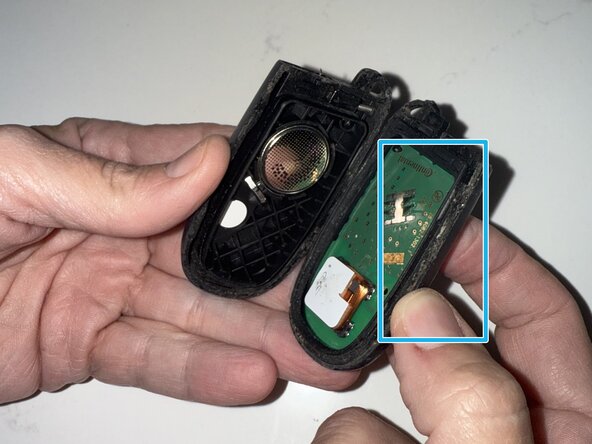
Use a small flathead screwdriver to carefully pop the old battery out of its clip. Avoid scratching the battery or plastic parts. Note the battery’s orientation before removing it for correct replacement.
Prepare For Battery Replacement
With the case open and the old battery removed, you are ready to insert the new battery. Check the battery type and the positive (+) side direction. This ensures the key fob functions properly after reassembly.
Replace The Old Battery
Replacing the old battery in your Jeep key fob is simple and quick. It restores the fob’s function and saves you a trip to the dealer.
Start by opening the key fob carefully. This gives you access to the worn-out battery inside.
Remove The Mechanical Key
Look for the small release button or slide pin on the back or side of the fob. Press or slide it to release, then pull the hidden metal mechanical key out.
Insert the mechanical key tip or a flathead screwdriver into the notch at the base of the fob. Twist gently to separate the two halves. Be careful not to damage the plastic.
Take Out The Old Battery
Use a small flathead screwdriver to pop out the old battery from its clip. Remove it slowly to avoid breaking any parts.
Insert The New Battery
Place the new battery in the clip with the positive (+) side facing the correct direction. Check the label inside the casing to confirm.
Close The Key Fob And Test
Align both halves of the fob and press them together until they snap shut. Put the mechanical key back in. Test the lock and find buttons on your Jeep to ensure it works.
Reassemble The Key Fob
Reassembling the key fob is the final step after replacing the battery. This process ensures the key fob works properly. Handle each part with care to avoid damage.
Make sure the new battery sits firmly in its place. Align the two halves of the key fob case carefully. Press them together until you hear a click, which means they have locked securely.
Do not force the pieces if they do not fit easily. Double-check the battery position if the case feels tight. A misaligned battery can prevent the fob from closing properly.
Align The Key Fob Halves
Hold the front and back parts of the key fob. Match the edges and grooves exactly. This prevents gaps and protects the internal components from dust and moisture.
Press The Key Fob Together
Apply gentle pressure along the edges of the fob. Listen for a snapping sound indicating the case is sealed. Avoid pressing too hard to prevent cracking the plastic.
Reinsert The Emergency Mechanical Key
Slide the metal key back into its slot. Ensure it clicks or locks in place. This key is useful if the fob battery dies or the electronics fail.
Test Your Key Fob
Press the lock and find buttons. Confirm the Jeep responds correctly. A working key fob confirms proper reassembly and battery installation.
Test Your Key Fob Functions
Testing your Jeep key fob functions is vital after changing the battery. It confirms the new battery installation worked correctly. This step helps avoid surprises when you need your key fob the most.
Make sure each button on your key fob responds as expected. This includes locking and unlocking doors, opening the trunk, and activating the panic alarm. Proper function means your key fob is ready for use.
Press the lock button and listen for the sound of the doors locking. Next, press the find button and watch for the doors to find. Both should work smoothly without delay or extra presses.
Press the trunk release button to ensure the trunk opens. Some Jeep models may require holding the button for a few seconds. Confirm the trunk pops open easily without resistance.
Activate The Panic Alarm
Push the panic button briefly to activate the car alarm. The horn should sound, and the lights may flash. Press the button again or the find button to stop the alarm.
Check The Range Of The Key Fob
Walk a short distance from your Jeep and test the key fob buttons again. The signals should reach the vehicle without fading. If the range is very short, the battery might not be installed properly.
Troubleshooting Common Issues
Troubleshooting common issues with your Jeep key fob can save time and frustration. Many problems arise after changing the battery. Knowing simple fixes helps get your key fob working fast.
Below are typical issues and how to solve them step-by-step. This guide ensures your Jeep key fob works like new again.
Checking Battery Orientation And Contact
The most frequent problem is incorrect battery placement. The positive side must face the correct way. Look inside the fob to find battery orientation marks.
Ensure the battery sits firmly in its clip. Loose contact stops the fob from powering on. Press the battery gently to secure it.
Buttons can get stuck or dirty after opening the fob. Press each button several times to free them. Use a dry cloth to clean around the buttons.
Sticky buttons block signals. Cleaning and pressing them repeatedly often restores normal function.
Resetting The Key Fob
Sometimes the key fob needs resetting after a battery change. Hold the lock and find buttons together for 15 seconds. This action resets the internal chip.
Try locking and unlocking your Jeep after the reset. This step often re-establishes communication with the vehicle.
Testing The Key Fob Signal
Use a smartphone camera to check if the fob emits an infrared signal. Press a button while pointing the fob at the camera. A flashing light on the screen shows the fob sends signals.
No light means the fob may need a new battery or professional repair.
Where To Buy Replacement Batteries
Knowing where to buy replacement batteries for your Jeep key fob saves time and hassle. Quality batteries ensure your key fob works properly. Choose batteries that fit your Jeep model. Avoid cheap or generic options that may fail quickly.
Auto Parts Stores
Local auto parts stores often carry key fob batteries. Staff can help you find the right size and type. Many stores have popular battery brands in stock. You can buy the battery and replace it on the spot.
Electronics Retailers
Electronics stores offer a wide range of batteries. They stock common sizes used in key fobs. You can check battery specifications before buying. These stores may also provide tools for battery replacement.
Online Marketplaces
Online shops have many battery options at competitive prices. Read customer reviews to ensure battery quality. Check for fast shipping and return policies. Buying online is convenient and often cheaper.
Jeep Dealerships
Dealerships provide batteries specifically for Jeep key fobs. They guarantee correct fit and quality. You can get professional help if needed. This option may cost more but offers peace of mind.
Tips For Prolonging Key Fob Battery Life
Extending the life of your Jeep key fob battery saves time and money. Simple habits can keep the battery working longer. These tips help avoid frequent battery changes and keep your key fob reliable.
Follow these easy steps to make the battery last as long as possible.
Store Your Key Fob Away From Extreme Temperatures
Heat or cold can drain the battery fast. Avoid leaving the key fob in direct sunlight or freezing places. Keep it in a pocket or bag at room temperature.
Pressing buttons too often uses more battery power. Only press the lock or find buttons when needed. Avoid holding down buttons for too long.
Keep The Key Fob Dry And Clean
Moisture and dirt can damage the battery contacts. Wipe the key fob regularly with a dry cloth. Avoid exposing it to water or liquids.
Remove The Battery If Not Using For A Long Time
If the Jeep will not be used for weeks, remove the battery. This prevents slow battery drain and corrosion inside the key fob.
Replace The Battery Promptly When Low
Do not wait for the key fob to stop working. Replace the battery at the first sign of weakness. This avoids damage to the key fob’s electronic parts.
Frequently Asked Questions
<!– wp:rank-math/faq-block {"questions":[{"id":"faq-question-f272d30f9ce0","title":"Can I Change A Key Fob Battery Myself?","content":"Yes, you can change a key fob battery yourself. Open the fob carefully, replace the battery, and snap it closed. Test the buttons to ensure proper function.
“,”visible”:true},{“id”:”faq-question-2eddefecc4a5″,”title”:”What Kind Of Battery For A Jeep Key Fob?”,”content”:”A Jeep key fob typically uses a CR2032 lithium coin battery. Replace it by opening the fob carefully and inserting the new battery with the positive side facing up. Check your specific Jeep model’s manual to confirm battery type.
“,”visible”:true},{“id”:”faq-question-c1d3801a70b7″,”title”:”Can I Start My Jeep With A Dead Key Fob?”,”content”:”You can start your Jeep using the mechanical key inside the fob if the battery dies. Insert it into the door lock or ignition. Replace the key fob battery promptly for remote functions to work again.
“,”visible”:true},{“id”:”faq-question-cd6b28dc52a1″,”title”:”How Do I Change The Battery In My 2020 Jeep Cherokee Fob?”,”content”:”Press the release button to remove the mechanical key. Pry open the fob casing carefully. Replace the old battery with a new CR2032, positive side facing down. Snap the casing back together and reinsert the mechanical key. Test the fob to ensure proper function.
“,”visible”:true}]} –>Can I Change A Key Fob Battery Myself?
Yes, you can change a key fob battery yourself. Open the fob carefully, replace the battery, and snap it closed. Test the buttons to ensure proper function.
What Kind Of Battery For A Jeep Key Fob?
A Jeep key fob typically uses a CR2032 lithium coin battery. Replace it by opening the fob carefully and inserting the new battery with the positive side facing up. Check your specific Jeep model’s manual to confirm battery type.
Can I Start My Jeep With A Dead Key Fob?
You can start your Jeep using the mechanical key inside the fob if the battery dies. Insert it into the door lock or ignition. Replace the key fob battery promptly for remote functions to work again.
How Do I Change The Battery In My 2020 Jeep Cherokee Fob?
Press the release button to remove the mechanical key. Pry open the fob casing carefully. Replace the old battery with a new CR2032, positive side facing down. Snap the casing back together and reinsert the mechanical key. Test the fob to ensure proper function.
Conclusion
Changing your Jeep key fob battery is simple and quick. Just follow the steps carefully to avoid damage.
Keep a spare battery handy to save time later. This small fix keeps your key fob working well.
Now, you can find and lock your Jeep without trouble.
Regular battery checks help you avoid surprises on the road. Stay prepared and enjoy the convenience of a fully working key fob every day.



















