Is your Jeep key fob acting up or completely unresponsive? It might be time to change the battery.
Knowing how to replace your Jeep key battery yourself can save you time, money, and stress no need to visit a dealer or locksmith. Plus, it’s easier than you think.
In this guide, you’ll find simple, step-by-step instructions to get your key fob working like new again.
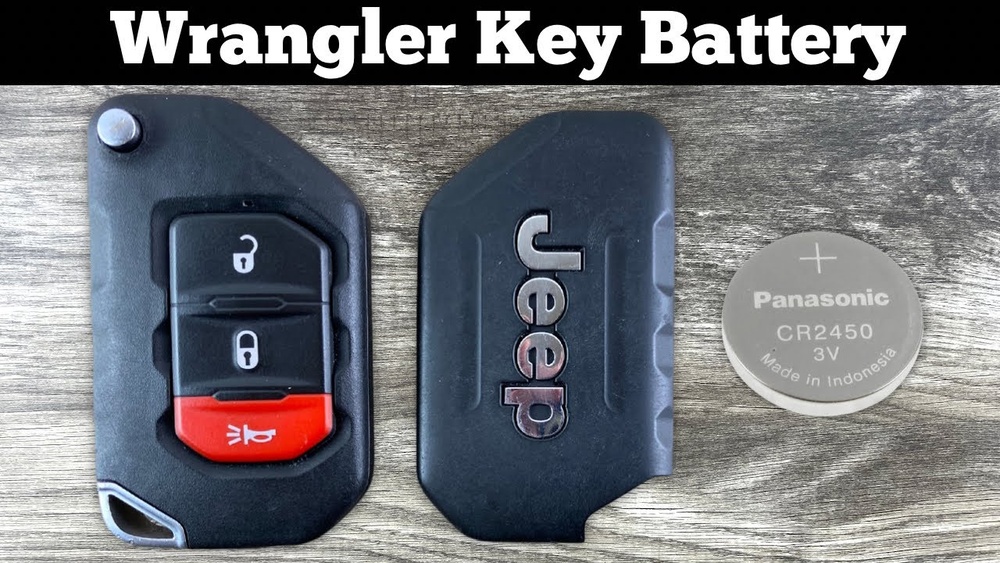
Keep reading to discover how quick and hassle-free this small fix can be, so you never get caught with a dead key again.
Tools Needed
Changing your Jeep key battery requires a few simple tools. Having the right tools ready makes the process smooth and quick. Gathering them before you start saves time and frustration.
Required Screwdrivers
A small flathead screwdriver is essential for opening the key fob. It helps pry apart the two halves without damage. Sometimes, a tiny Phillips screwdriver may be needed. Choose screwdrivers with thin tips for easy access.
Correct Replacement Battery
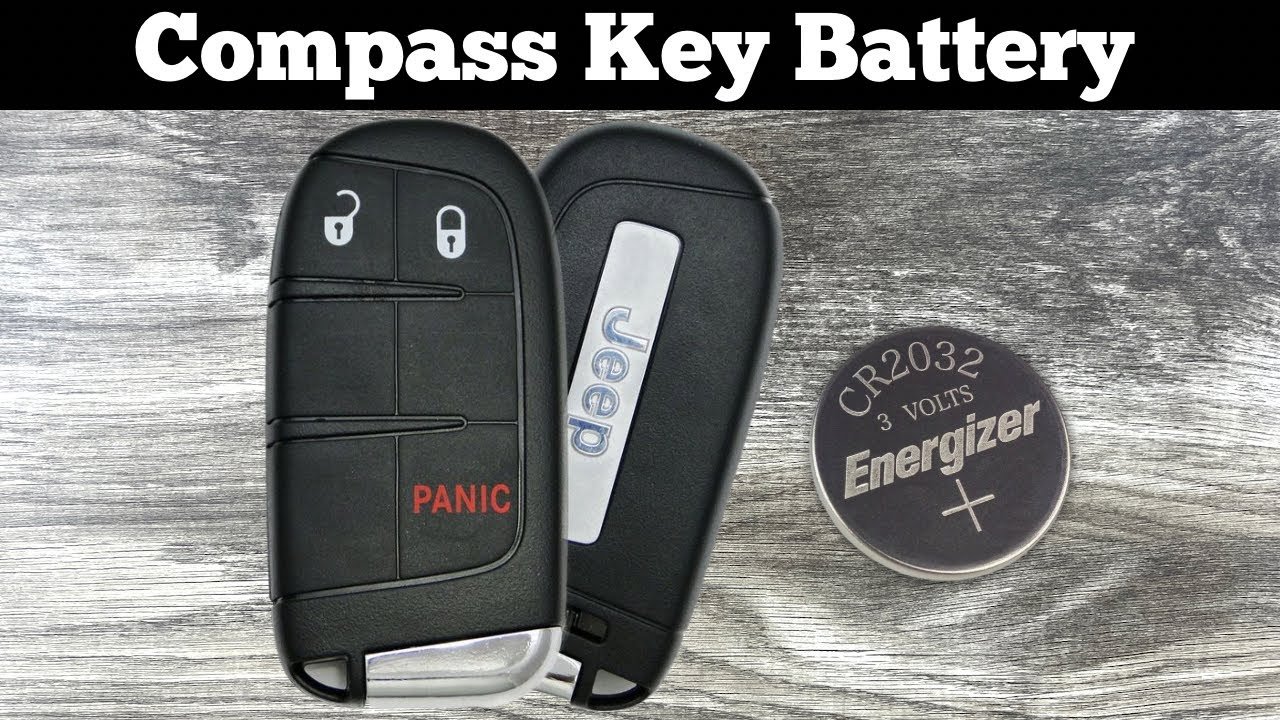
Use the exact battery type designed for your Jeep key fob. Most models use a CR2032 coin battery, but check your old battery to confirm. Using the wrong battery can cause poor performance or damage. Always buy a fresh, high-quality battery for best results.
Optional Accessories
A clean cloth helps protect the fob from scratches during the process. Tweezers can assist in removing the old battery safely. A small container keeps tiny screws and parts secure. These extras make the task easier but are not required.
Remove Emergency Key
Removing the emergency key is the first step in changing your Jeep key battery. This key is hidden inside the fob for convenience and security. You need to take it out carefully to access the battery compartment. Follow these simple steps to remove the emergency key safely.
Look at the back or side of your Jeep key fob. Find the small release button near the edge. This button unlocks the emergency key inside the fob. Press it gently but firmly to find the key. Do not force it to avoid damaging the fob.
Slide Out Metal Key
After pressing the release button, slide the metal key out slowly. Use your thumb to push it from the slot. The key should come out smoothly. Keep the emergency key aside as you will need it later for locking or unlocking your Jeep manually.
Open Key Fob
Opening the key fob is the first step to changing your Jeep key battery. The fob holds the battery inside, so you must carefully open it. Avoid using excessive force to prevent damage. Follow simple steps to open the fob safely and access the battery compartment.
Find The Pry Notch
Start by locating the small pry notch on your key fob. This notch is usually near the spot where the metal emergency key fits. It looks like a tiny gap or indentation. The notch allows you to insert a tool to open the fob without scratching it.
Use Flathead Screwdriver
Use a flathead screwdriver that fits the pry notch. Insert the screwdriver gently into the notch. Apply light pressure and twist the screwdriver slowly. This action will loosen the two halves of the key fob. Do not use too much force to avoid breaking the plastic case.
Separate The Fob Halves
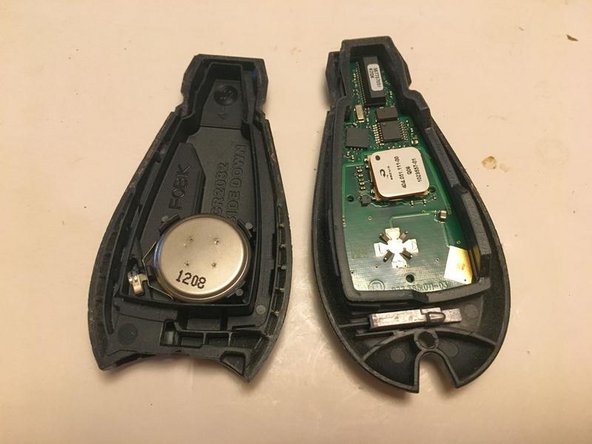
Once the casing begins to separate, use your fingers to carefully pull the two halves apart. Keep the pieces steady to prevent internal parts from falling out. Set the fob halves on a clean surface to prepare for battery replacement. Now the battery compartment is visible and ready for the next step.

Replace Battery
Replacing the battery in your Jeep key is a simple task. It restores the key’s function and saves time and money. Follow these steps carefully to ensure a smooth battery replacement.
Remove Old Battery
First, open the key fob case gently. Use a small flathead screwdriver to pry it apart at the notch. Be careful not to damage the plastic.
Next, take out the old battery carefully. Avoid touching other parts inside the key fob. This prevents damage or misalignment.
Check Battery Orientation
Look closely at how the old battery sits inside the fob. Note the positive (+) and negative (-) sides. This step is important for the new battery to work correctly.
Match the new battery’s orientation exactly to the old one. Incorrect placement can cause the key fob to stop working.
Insert New Battery
Place the new battery gently into the slot. Make sure it fits securely without forcing it. Press it down until it sits flat.
Close the key fob case by pressing the two halves together. Ensure they snap firmly back into place. Test the key fob to confirm it works properly.
Reassemble Key Fob
After replacing the battery in your Jeep key fob, it’s important to reassemble it properly. This step ensures the key fob works correctly and stays protected from dust and moisture. Take your time to fit the parts back together carefully.
Follow these simple steps to put your key fob back in shape and ready to use.
Align Fob Halves
Hold both halves of the key fob gently. Match the edges and buttons to their correct positions. Make sure the battery sits properly inside. Proper alignment prevents damage and ensures a tight fit.
Snap Together Securely
Press the two halves firmly until you hear a click. This sound means the fob is locked in place. Avoid forcing it or pressing too hard. Snapping securely keeps the battery and internal parts safe.
Reinsert Emergency Key
Slide the metal emergency key back into its slot. Push it in until it fits snugly. The emergency key should move smoothly but not fall out. This step finishes your key fob assembly and keeps it complete.
Test New Battery
After replacing the battery in your Jeep key fob, testing it ensures everything works properly. This step confirms the new battery is installed correctly and the remote functions as expected. Follow simple checks to verify your key fob’s performance before using it normally.
Press each button on the key fob to test its response. Start with the lock and find buttons. Make sure the Jeep responds to each command. Try the panic button and the trunk release, if available. A working button means the battery powers the remote correctly. If a button does not work, recheck the battery placement or try a different battery.
Verify Remote Range
Walk away from your Jeep while pressing the lock and find buttons. The key fob should work from a reasonable distance, usually about 30 feet. Check if the remote controls the car from outside this range. If it only works close up, the battery may be weak or installed wrongly. Testing range helps confirm the battery’s strength and the remote’s signal power.
Battery Types For Jeep Keys
Jeep keys use small coin batteries to power their remote functions. These batteries come in different types and sizes. Knowing the correct battery type helps ensure your key works properly after replacement. Most Jeep key fobs use lithium coin cell batteries. These batteries provide long-lasting power in a compact size. Always check your key fob or owner’s manual to confirm the exact battery model before buying a replacement.
Common Battery Models
The most common battery models for Jeep keys include CR2032, CR2025, and CR1632. CR2032 is the most popular choice and fits many Jeep models. Some older or special keys may use CR2025 or CR1632 instead. These batteries are 3 volts and have a flat, round shape. Look for the model number printed on the battery itself. This number helps you find the right replacement quickly.
Where To Buy Batteries
You can purchase Jeep key batteries at many stores and online shops. Major retailers like Walmart, Target, and AutoZone usually carry these batteries. Electronics stores and pharmacies also stock common coin batteries. For convenience, online marketplaces like Amazon offer a wide selection and fast delivery. Always buy from trusted sellers to avoid low-quality or counterfeit batteries. Keep the original battery packaging or your key fob handy to confirm compatibility before purchase.
Tips To Extend Battery Life
Extending the battery life of your Jeep key fob helps avoid frequent replacements. It saves time and keeps your key fob working smoothly. Simple habits can make a big difference in battery longevity. These tips help you protect the battery and maintain the fob’s performance.
Pressing buttons too often drains the battery quickly. Use the buttons only when needed. Avoid holding down buttons for long periods. Repeated or unnecessary presses cause the battery to lose power faster. Treat your key fob gently to save battery life.
Keep Fob Dry And Clean
Water and dirt can damage the key fob and battery. Keep your fob dry at all times. Wipe it clean regularly with a soft cloth. Avoid exposing the fob to moisture or extreme dirt. Cleanliness helps the battery work efficiently and last longer.
Troubleshooting Common Issues
Troubleshooting common issues helps ensure your Jeep key fob works properly after a battery change. Some problems may arise even after installing a new battery. Knowing how to identify and fix these issues saves time and frustration.
Fob Not Responding
Check the battery orientation inside the fob. A reversed battery stops the fob from working. Clean the battery contacts with a dry cloth to remove dirt or corrosion. Dirt can block the connection.
Try resetting the fob by removing the battery, waiting 10 seconds, and reinserting it. If the fob still does not respond, test the new battery with a multimeter to confirm it has charge. A weak or dead battery won’t power the fob.
Inspect the fob for any visible damage. Cracks or water exposure can cause internal failure. If damaged, consider replacing the fob.
Battery Drains Quickly
Battery drains fast if the fob buttons are stuck or pressed constantly. Check for any debris causing buttons to stick. Clean around the buttons gently.
Old or faulty batteries can drain quickly. Use high-quality replacement batteries from trusted brands. Avoid cheap or generic batteries that may have low capacity.
Extreme temperatures affect battery life. Keep the fob away from hot or cold places for long periods. Store it inside your vehicle or in a pocket instead of outside.
Frequently Asked Questions
<!– wp:rank-math/faq-block {"questions":[{"id":"faq-question-175b5361bfa2","title":"How Do I Change The Battery On My Jeep Key?","content":"Remove the emergency key by pressing its release button. Pry open the fob using a flathead screwdriver. Replace the old battery with a new one, matching its orientation. Snap the fob halves back together and reinsert the emergency key.
“,”visible”:true},{“id”:”faq-question-ce079f65d082″,”title”:”How Do I Put A New Battery In My Jeep Key Fob?”,”content”:”Remove the emergency key by pressing the release button. Pry open the fob with a flathead screwdriver. Replace the old battery with a new one, matching its orientation. Snap the fob halves back together and reinsert the emergency key.
“,”visible”:true},{“id”:”faq-question-d28aa0bda63f”,”title”:”What Kind Of Battery Goes In A Jeep Key Fob?”,”content”:”A Jeep key fob typically uses a CR2032 3-volt lithium coin battery. Check your fob’s old battery for exact type.
“,”visible”:true},{“id”:”faq-question-1dfed51f13c2″,”title”:”How Do You Open A Jeep Key Fob?”,”content”:”Press the release button to remove the emergency key. Insert a flathead screwdriver into the slot and twist gently to pry the fob open. Remove or replace the battery, then snap the fob halves back together and reinsert the key.
“,”visible”:true}]} –>How Do I Change The Battery On My Jeep Key?
Remove the emergency key by pressing its release button. Pry open the fob using a flathead screwdriver. Replace the old battery with a new one, matching its orientation. Snap the fob halves back together and reinsert the emergency key.
How Do I Put A New Battery In My Jeep Key Fob?
Remove the emergency key by pressing the release button. Pry open the fob with a flathead screwdriver. Replace the old battery with a new one, matching its orientation. Snap the fob halves back together and reinsert the emergency key.
What Kind Of Battery Goes In A Jeep Key Fob?
A Jeep key fob typically uses a CR2032 3-volt lithium coin battery. Check your fob’s old battery for exact type.
How Do You Open A Jeep Key Fob?
Press the release button to remove the emergency key. Insert a flathead screwdriver into the slot and twist gently to pry the fob open. Remove or replace the battery, then snap the fob halves back together and reinsert the key.
Conclusion
Changing your Jeep key battery is simple and quick with these steps. Keep the right tools and a matching battery handy.
Handle the key fob gently to avoid damage. Regular battery checks help prevent unexpected lockouts.
Now, you can maintain your Jeep key fob yourself with confidence.
Stay prepared and enjoy hassle-free access to your vehicle.



















