Programming your Jeep Grand Cherokee garage door opener can make life much easier. No more fumbling for a separate remote; just press a button inside your Jeep, and your garage door opens.
Many Grand Cherokees come with the HomeLink system, which works with most garage doors built after 1993. While the process might seem tricky the first time, with the right steps, you can set it up in just a few minutes—even if you’re new to car tech.
Understanding Your Jeep’s Garage Door Opener
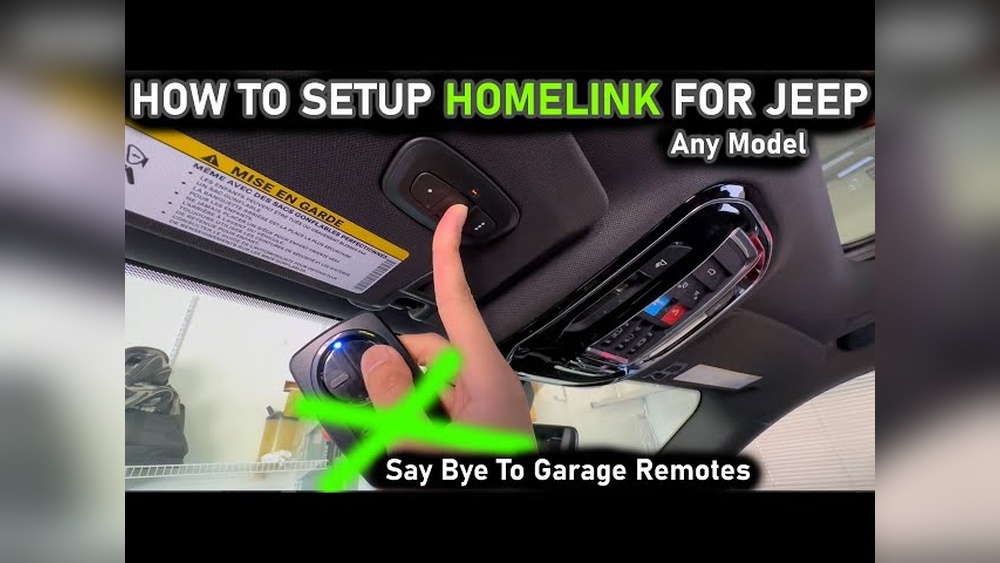
Most Jeep Grand Cherokees use the HomeLink system, which is usually located on the overhead console, near the interior lights. It has three buttons. You can program each button for a different garage door or gate. If you have a newer garage door opener, especially one with rolling codes, the setup is slightly different from older models.
| Model Year | Location of HomeLink | Rolling Code Compatible? |
|---|---|---|
| 2011–2019 | Overhead Console | Yes |
| 2020–2024 | Overhead Console | Yes |
| 2005–2010 | Sun Visor/Console | Some models |
If you’re not sure about compatibility, check your garage door opener’s manual or look for a “Learn” or “Smart” button on the main unit in your garage.
Preparing To Program
Before you start, make sure you have:
- Your garage door remote (the handheld one)
- Access to your garage door opener in the garage
- Your Jeep Grand Cherokee parked outside the garage, but close enough to reach the opener
Tip: Some newer openers have a safety lock feature. If your remote isn’t working at all, check if the opener is locked.

Step-by-step: Programming Your Jeep Grand Cherokee Garage Door Opener
1. Clear Previous Codes (if Needed)
If your Jeep is new to you or you want to start fresh:
- Turn on the ignition (engine not needed, just power on).
- Hold the two outer HomeLink buttons (1 and 3) for about 20 seconds.
- The indicator light will start flashing rapidly. Release the buttons. All previous codes are now erased.
Note: This step is optional if you are programming for the first time.
- Choose the HomeLink button you want to program (1, 2, or 3).
- Hold your garage door remote about 1–3 inches from the HomeLink panel.
- Press and hold both the chosen HomeLink button and the remote’s button at the same time.
- Keep holding until the HomeLink indicator light changes from slow to rapid flashing. This can take up to 30 seconds.
Insight: Some older remotes use a steady indicator light to show programming, while newer models flash. Don’t let go too soon—wait for the rapid blink.
3. Pair With The Garage Door Opener (rolling Code Systems)
If your garage door opener uses rolling codes (most after 1996):
- Go to your garage opener motor unit (usually on the ceiling).
- Press the “Learn” or “Smart” button. The indicator light will turn on and stay lit for 30 seconds.
- Within those 30 seconds, return to your Jeep.
- Press and hold the programmed HomeLink button for 2 seconds, then release. Repeat this up to three times.
If successful, your garage door should move.
Common Mistake: People often wait too long after pressing the “Learn” button. Time yourself, and act quickly.
4. Test The System
Press the HomeLink button you just programmed. The garage door should open or close.
If not, try the pairing process again, making sure to follow the timing closely.
| Step | Action | Expected Result |
|---|---|---|
| Clear Codes | Hold outer buttons | Indicator flashes rapidly |
| Train Button | Hold remote + button | Indicator blinks quickly |
| Pair Opener | Press “Learn,” then HomeLink | Garage door moves |
Troubleshooting Tips
Even if you follow all the steps, problems can happen. Here are some solutions:
- Weak remote battery: Replace the battery in your garage remote if programming fails.
- Distance: Make sure you are close enough to the opener during programming.
- Obstructions: Clear any objects blocking the signal between your Jeep and the opener.
- Reset: If nothing works, clear all HomeLink codes and start again.
Insight: Some garage openers have a limit on how many remotes (including HomeLink) can connect. If you’ve reached the limit, erase one remote from the opener’s memory.
Comparing Homelink With Traditional Remotes
You may wonder if HomeLink is better than your regular remote. Here’s a quick comparison:
| Feature | HomeLink | Traditional Remote |
|---|---|---|
| Power Source | Vehicle battery | Replaceable battery |
| Theft Risk | Lower | Higher (if left in car) |
| Space | Built-in | Extra device |
| Multi-door Support | Up to 3 doors | Usually 1 door |
Extra Tips For A Smooth Setup
- Multiple doors: You can program up to three different doors or gates.
- Vacation mode: Some garage openers have a security/vacation lock. Disable this before programming.
- Manuals: Keep both your Jeep and garage opener manuals handy. Sometimes, unique steps are required for certain brands.
If you want more details, the official HomeLink website provides interactive instructions by car model and garage opener brand.

Frequently Asked Questions
How Do I Know If My Garage Door Opener Uses Rolling Codes?
Most openers made after 1996 use rolling codes for better security. Check for a “Learn” or “Smart” button on the garage unit, or consult your opener’s manual.
Can I Program Homelink Without The Original Remote?
No. You need the original remote to train the HomeLink button. If you lost it, you may need to buy a replacement remote.
Why Won’t My Jeep’s Homelink Program With My Garage Door?
Common reasons include weak remote batteries, standing too far from the opener, or the garage opener memory being full. Start fresh, check distances, and replace remote batteries.
Yes. Hold the button you want to erase until the indicator light changes from solid to flashing. This erases only that button’s code.
Is It Safe To Use Homelink With A Rental Or Leased Jeep?
If you return a rental or lease, clear all HomeLink codes. Hold the two outer buttons for 20 seconds to erase all stored codes before returning the vehicle.
Setting up your Jeep Grand Cherokee garage door opener can be simple if you follow the steps and keep a few tips in mind. You’ll enjoy the convenience every day, and you’ll know your system is set up securely and correctly.