Owning a Jeep Grand Cherokee offers freedom and flexibility, but sometimes the lights can behave in unexpected ways. Whether you want to save battery power, avoid drawing attention, or just prefer a darker cabin, turning off the various lights in your Grand Cherokee is essential knowledge.
Many drivers struggle with this, especially since modern SUVs have automatic systems and advanced controls. This guide will help you confidently turn off interior and exterior lights in your Jeep Grand Cherokee, no matter the model year.
Understanding Jeep Grand Cherokee Lighting Controls
Jeep Grand Cherokee models from 2011 onward feature automatic lighting systems. These systems detect ambient light and switch headlights and interior lights on or off without driver input. Older models have more manual controls. Here’s a quick breakdown:
| Model Year | Lighting Control Type | Common Issues |
|---|---|---|
| 1999-2010 | Manual Switches | Forget to turn off lights |
| 2011-2019 | Automatic & Manual | Lights stay on after engine off |
| 2020-Present | Advanced Auto-Sensing | Harder to override auto controls |
Knowing your model year is the first step. Newer Grand Cherokees have more settings, but sometimes turning lights off is less obvious.
How To Turn Off Exterior Lights
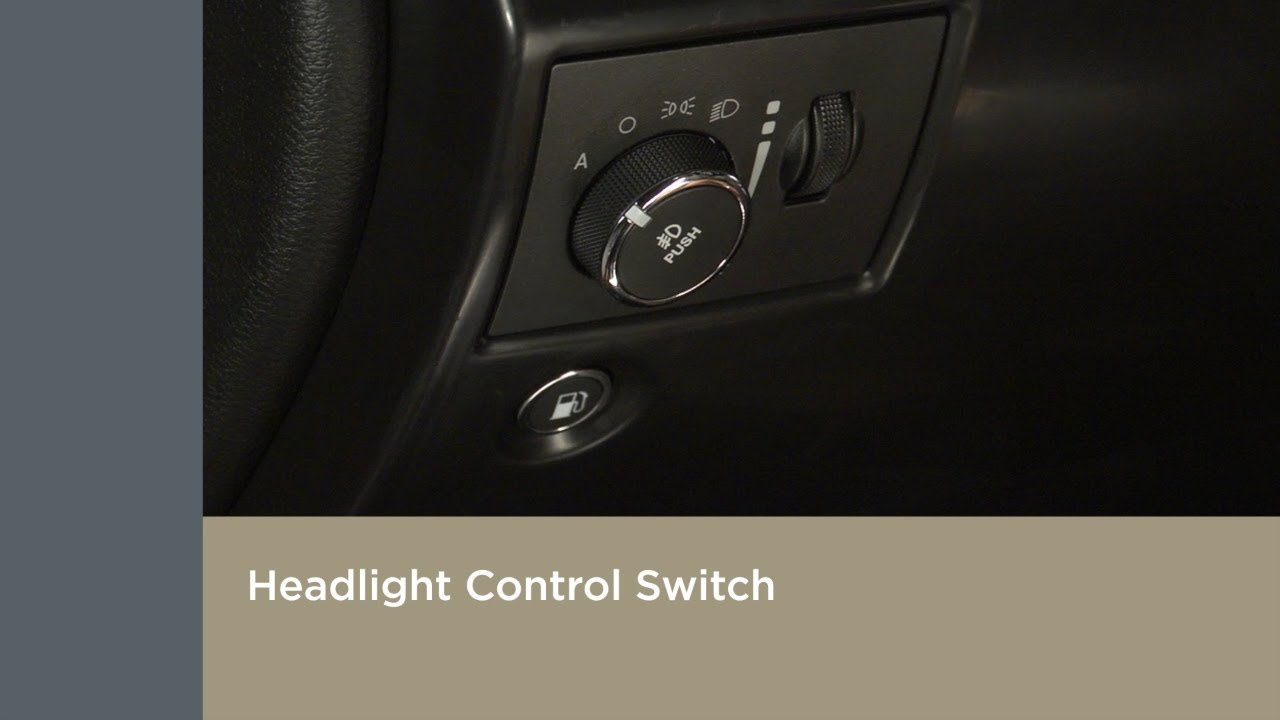
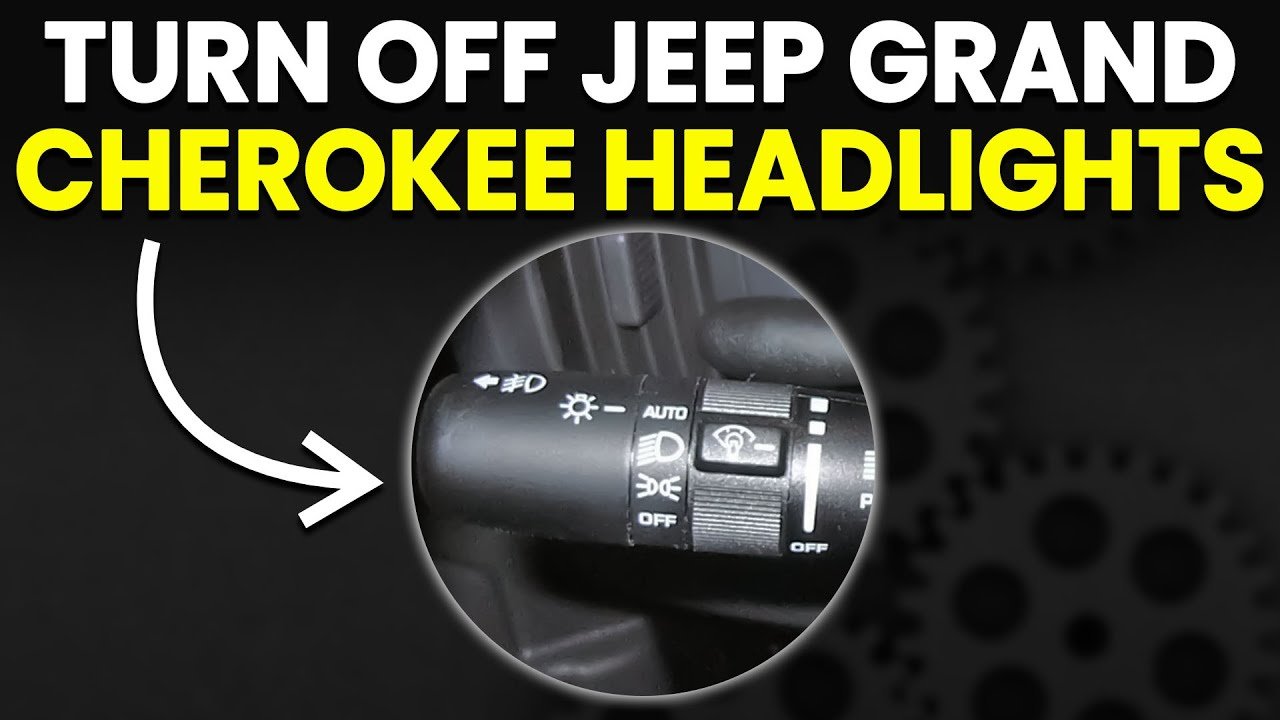
The headlights and parking lights are controlled using a knob or switch, usually left of the steering wheel. Here’s how to turn them off:
- Manual Switch Models (1999–2010):
- Rotate the knob to the “Off” position.
- Check that all light icons disappear from the dashboard.
- Automatic Models (2011–Present):
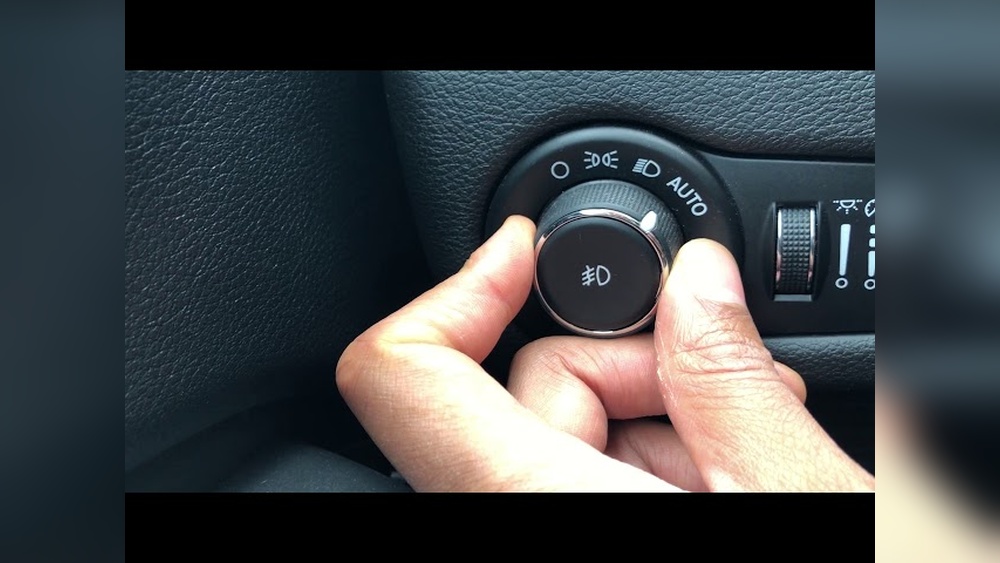
- Find the Auto setting on the control knob.
- To turn off, rotate past “Auto” to “Off” (if available).
- Some models don’t have a true “Off” for headlights; instead, use “Parking Lights” or “Daytime Running Lights” settings.
- Disabling Daytime Running Lights (DRLs):
- DRLs stay on by default in many models.
- For some, pressing the headlight knob and holding for a few seconds disables DRLs temporarily.
- In newer models, you may need to go into the vehicle’s settings menu via the touchscreen to disable DRLs.
- Emergency Override:
- If lights stay on after engine shutdown, open and close the driver’s door. This often signals the system to turn lights off.
- If not, check for a “Delay” setting in the vehicle menu and set to zero.
Exterior Lighting Comparison
| Lighting Type | Switch Location | Auto-Off Feature |
|---|---|---|
| Headlights | Left of steering wheel | Yes (all models) |
| Parking Lights | Left of steering wheel | Yes (newer models) |
| Fog Lights | On headlight knob | No (manual only) |
| DRLs | Settings menu/headlight knob | No (must disable manually) |
Turning Off Interior Lights
The interior lights—including dome, map, and cargo lights—are often triggered by doors, switches, or remote entry. To turn them off:
- Door Switch Method:
- Close all doors completely. If a door is ajar, interior lights stay on.
- Wait 30–60 seconds; most models shut lights off automatically.
- Manual Override:
- Use the dome light switch (usually on the overhead console).
- Slide or press the switch to the “Off” position.
- Dimmer Control Trick:
- On many models, the dashboard dimmer controls also operate interior lights.
- Turn the dimmer all the way down, past the click, to turn off interior lights fully.
- Cargo Area Lights:
- These lights may stay on if the rear liftgate isn’t fully closed.
- Double-check that the liftgate is shut, especially after loading cargo.
Interior Lighting Quick Reference
| Light Location | Control Type | Auto-Off Delay |
|---|---|---|
| Front Dome | Overhead console | 30–60 sec |
| Map Lights | Individual button | Instant |
| Cargo Area | Liftgate switch | 30–60 sec |
Disabling Automatic Lighting Features
Many Grand Cherokees have features that turn lights on automatically. You can disable these for full manual control:
- Settings Menu: On newer models, go to the touchscreen menu, select “Lights,” and turn off auto features like “Headlight Delay” and “Ambient Lighting.”
- Sensor Blocking: Cover the light sensor (usually on the dashboard) with a small cloth. This tricks the system into thinking it’s bright outside, turning off auto headlights. Use this carefully—it’s not recommended for daily use.
- Battery Saving Mode: If lights refuse to turn off, disconnect the battery for 30 seconds to reset the system. This is a last resort and should be used only if lights are draining your battery.

Practical Tips And Common Mistakes
- Always check for door ajar warnings. Even a slightly open door keeps interior lights on.
- Don’t rely on the auto-off feature if you park for long periods. Manual control prevents battery drain.
- Understand that headlights may stay on for up to 90 seconds after shutting off the engine. This is normal for many models.
- If you use remote entry, some lights turn on automatically. Locking the vehicle again usually turns them off.
- Avoid blocking sensors permanently, as this can affect other systems.
Many owners miss the dimmer control trick—turning the dimmer past the click fully disables interior lights. Also, not all models allow the DRLs to be turned off completely; check your manual for specifics.
Frequently Asked Questions
How Do I Turn Off The Headlights When My Jeep Grand Cherokee Is Parked?
Rotate the headlight knob to the “Off” position. If your model has only “Auto,” switch to “Parking Lights” or use the settings menu to disable automatic headlights.
Why Won’t My Interior Lights Turn Off After Shutting The Door?
Check all doors, including the liftgate, for proper closure. Also, check the dome light switch and dimmer control.
If the issue persists, a faulty door sensor may be the cause.
Can I Disable Daytime Running Lights Permanently?
In most models, you can disable DRLs in the settings menu. Older models may require a dealer visit for reprogramming.
Some models allow a temporary override by holding the headlight knob.
Will The Lights Drain My Battery If Left On?
Yes, leaving lights on for long periods can drain your battery, especially interior lights. Use manual controls whenever possible and check for auto-off features.
Where Can I Find More Information About Jeep Grand Cherokee Lighting Systems?
Visit the official Jeep website or consult your owner’s manual. For detailed technical information, the Jeep Official Site provides specifications and troubleshooting guides.
Knowing how to turn off the lights in your Jeep Grand Cherokee keeps your battery safe and your driving experience smoother. Use the controls confidently, and remember to check your manual for model-specific details.
With these steps, your Jeep’s lighting will never be a mystery again.