If your Jeep Patriot is showing warning lights, running rough, or acting strange after a repair, you may need to reset its computer, also called the Engine Control Module (ECM) or Powertrain Control Module (PCM).
This can help clear minor errors, reset learned values, and sometimes solve problems without a trip to the mechanic. This guide explains simple ways to reset your Jeep Patriot computer, common mistakes to avoid, and when you should seek expert help.
Why Reset Your Jeep Patriot Computer?
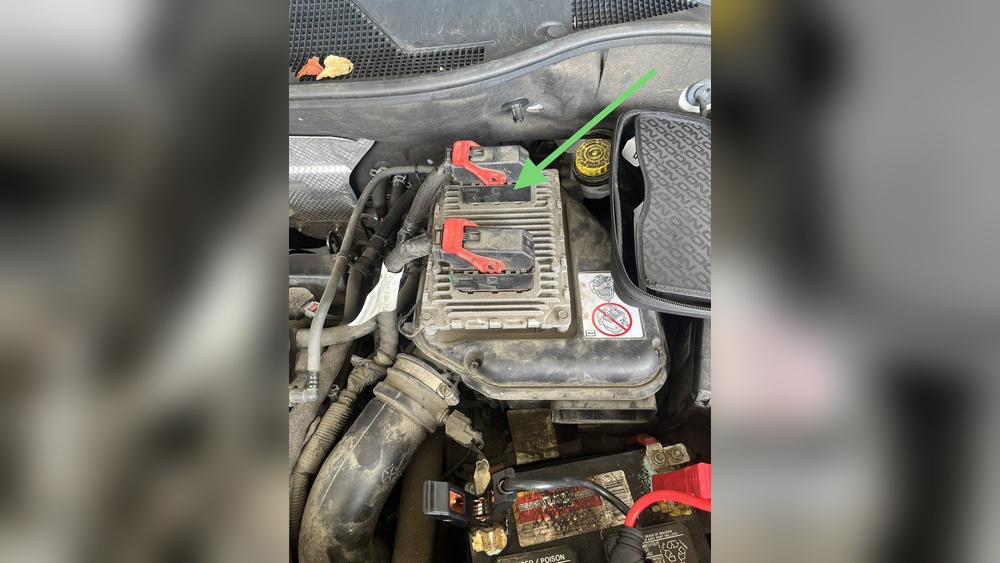
The computer in your Jeep Patriot controls many functions, like engine timing, fuel injection, and emissions. Over time, it stores error codes and adapts to your driving style. This is helpful for performance, but sometimes it keeps old errors or adapts incorrectly after repairs. Resetting the computer can:
- Clear warning lights after fixing the cause
- Erase old error codes from sensors or minor issues
- Help the car relearn new sensors or parts
- Improve idle or shifting after battery replacement
However, resetting does not fix serious mechanical or electrical problems. It simply gives the computer a “fresh start. ”
Methods To Reset The Jeep Patriot Computer
There are a few ways to reset the computer. Choose the method that fits your tools and skills.
1. Battery Disconnect Method
This is the most common and simple method. It works by cutting power to the computer, which erases stored error codes and resets learned values.
- Turn off the ignition and remove the key.
- Open the hood and locate the battery.
- Use a wrench to disconnect the negative (-) battery terminal. Always disconnect the negative first.
- Wait at least 15–30 minutes. For a deeper reset, you can press the brake pedal for 30 seconds to help drain any leftover power.
- Reconnect the negative terminal. Tighten the clamp securely.
- Start the engine. The computer will relearn as you drive.
Tip: You may lose radio presets, clock time, and seat memory with this method.
2. Using An Obd-ii Scanner
A modern and safer way is to use an OBD-II scanner with a “Clear Codes” or “Erase” function. This is especially useful if you have a check engine light.
- Plug the scanner into the OBD-II port (usually under the dashboard, driver’s side).
- Turn the ignition to “On,” but do not start the engine.
- Use the scanner’s menu to read and clear error codes.
- Turn off the ignition, unplug the scanner, and start your Jeep.
Tip: Not all scanners can erase all types of codes. Some codes may return if the problem was not fixed.
3. Fuse Pull Method
Some Jeep Patriots have a PCM/ECM fuse in the fuse box. Pulling this fuse can reset the computer without affecting radio or seat memory.
- Locate the fuse box (usually under the hood).
- Find the PCM/ECM fuse using your owner’s manual.
- Pull the fuse out for 10–15 minutes.
- Reinsert the fuse and start the vehicle.
Caution: Always double-check the correct fuse. Removing the wrong fuse can cause other issues.

What To Expect After Reset
When you reset the computer, your Jeep may act differently for the first few drives. Here’s what usually happens:
- Idle speed may change or feel rough
- Transmission may shift differently
- MPG (miles per gallon) may drop temporarily
- The computer will relearn your driving style over 30–50 miles
These effects are normal. If they last longer than a few days, there may be an underlying problem.
Common Mistakes To Avoid
Many beginners make these errors when resetting their Jeep computer:
- Disconnecting the battery for too short a time (less than 10 minutes)
- Forgetting to reset radio codes or clock
- Pulling the wrong fuse, causing electrical issues
- Ignoring check engine lights that return after a reset
If the warning light comes back quickly, it means the problem is not fixed.
How Resetting Helps And When It Doesn’t
Resetting the computer can fix small sensor glitches, help after repairs, or clear a check engine light after fixing the root cause. But it won’t solve:
- Serious engine or transmission failures
- Faulty sensors or wiring
- Safety system errors (like airbag or ABS problems)
If the same error code returns, you need to diagnose and repair the real issue.
Real-world Example
A 2014 Jeep Patriot owner had a check engine light due to a faulty oxygen sensor. After replacing the sensor, the light stayed on. He disconnected the battery for 20 minutes, and the light cleared. The car ran smoother, and no further problems occurred.

Table: Methods To Reset Jeep Patriot Computer
To help you choose, here’s a quick comparison of the main reset methods:
| Method | Tools Needed | Pros | Cons |
|---|---|---|---|
| Battery Disconnect | Wrench | Simple, no extra tools | Resets radio and seat memory |
| OBD-II Scanner | Scanner | Targeted reset, keeps settings | Scanner required |
| Fuse Pull | Manual, pliers | Quick, keeps radio presets | Must find correct fuse |
Table: Signs You May Need A Computer Reset
Some symptoms suggest a reset might help:
| Symptom | Possible Reason |
|---|---|
| Check engine light after repair | Old error code not cleared |
| Rough idle after battery change | Lost computer memory |
| Transmission shifting oddly | Computer needs to relearn |
| Poor MPG suddenly | Sensor reset required |

When To See A Mechanic
If a check engine light returns after multiple resets, or if your Jeep Patriot has real driveability problems (stalling, misfiring, won’t start), a reset won’t fix it. In these cases, get a professional diagnosis. Modern mechanics use advanced scan tools and can test individual sensors and circuits for faults.
For more information about vehicle computers, you can check the official Engine Control Unit page on Wikipedia.
Frequently Asked Questions
How Long Does It Take For The Jeep Patriot Computer To Reset?
Usually, 15 30 minutes is enough using the battery disconnect method. After reconnecting, the computer may take a few short trips (30 50 miles) to fully relearn your driving style.
Will Resetting The Computer Erase All My Settings?
Yes, if you disconnect the battery, you may lose radio presets, clock time, and seat positions. The OBD-II or fuse pull methods may avoid this.
Can I Drive Immediately After Resetting The Computer?
Yes, you can drive right away. Expect the vehicle to behave slightly differently while it relearns.
Drive normally and avoid hard acceleration at first.
Why Does My Check Engine Light Keep Coming Back After Resetting?
If the light returns, the underlying problem is still present. Resetting only clears the code. You need to fix the root cause, such as a bad sensor or wire.
Do I Need Any Special Tools To Reset My Jeep Patriot Computer?
For the battery or fuse methods, only simple hand tools are needed. An OBD-II scanner is helpful but not required for most resets.
Resetting your Jeep Patriot computer can solve many minor issues and helps after repairs. But remember, it’s not a cure-all.
If problems continue, don’t hesitate to seek professional help. Safe driving!