Owning a Jeep Grand Cherokee means enjoying a blend of rugged performance and modern technology. One standout feature is Park Assist, designed to make parking easier and safer. Many drivers feel anxious about tight parking spots or complex parallel maneuvers. With Park Assist, your Jeep helps guide you, reducing stress and risk. This article explains how to use Park Assist step by step, shares practical tips, and answers common questions. You’ll discover how to get the most from this smart feature, avoid mistakes, and understand its limitations.
Understanding Park Assist In Jeep Grand Cherokee
Park Assist uses sensors placed around your vehicle. These sensors detect objects and help the vehicle “see” its surroundings. When activated, Park Assist can guide you into a parking space, warn you about obstacles, and even take over steering for parallel or perpendicular parking.
There are two main types in Grand Cherokees:
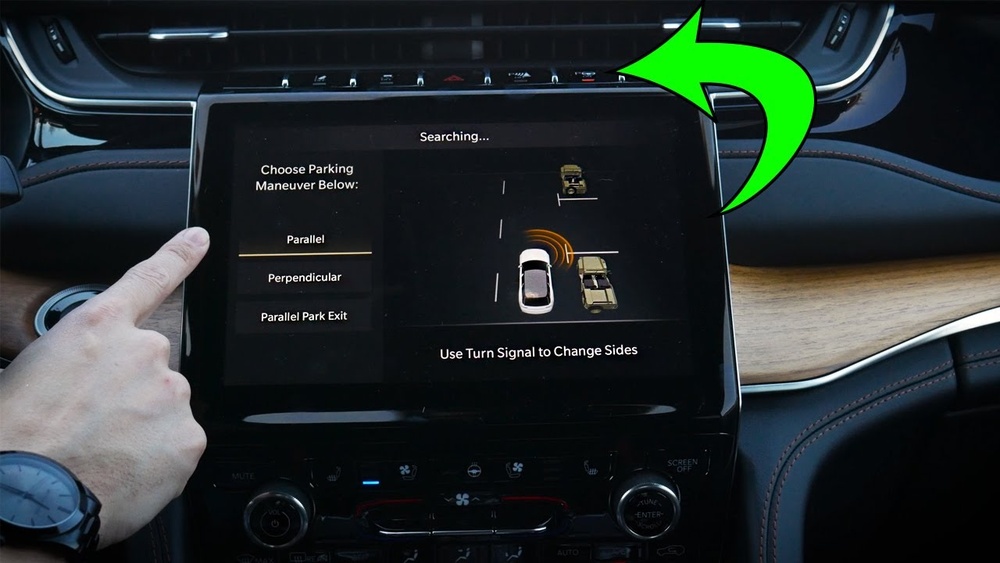
- Parallel Park Assist
- Perpendicular Park Assist
Let’s compare their functions:
| Park Assist Type | Main Use | Steering Control | Sensor Coverage |
|---|---|---|---|
| Parallel Park Assist | Street parking, tight spaces | Automatic | Front, rear, sides |
| Perpendicular Park Assist | Lot parking, regular spots | Automatic | Front, rear, sides |
The system is especially useful for drivers who struggle with depth perception or are new to parking large SUVs.
Step-by-step Guide: Using Park Assist
Activating and using Park Assist is simple, but following each step ensures you get the best results.
- Activate Park Assist
- Press the Park Assist button on your dashboard. The icon usually looks like a steering wheel with a “P”.
- Wait for the system to scan for available parking spaces as you drive slowly (under 15 mph).
- Choose Parking Type
- On the infotainment screen, select either parallel or perpendicular parking.
- The display shows which type the system is searching for.
- Drive Forward
- Move along the row of parked cars. The sensors will scan for a suitable space.
- Watch for visual and audible alerts indicating a detected space.
- Follow Instructions
- When a space is found, the system prompts you to stop and shift to reverse.
- Keep your hands off the steering wheel, but control the speed using the brake and accelerator.
- The system steers automatically while you monitor surroundings.
- Monitor Progress
- Watch the screen for guidance and listen to sensor beeps.
- The system will alert you if you need to stop or shift gears.
- Finish Parking
- Once parked, the system tells you the maneuver is complete.
- Take control of the wheel and check your surroundings before turning off the engine.
Here’s a comparison of manual vs Park Assist parking:
| Parking Method | Estimated Time | Required Driver Skill | Collision Risk |
|---|---|---|---|
| Manual Parking | 60–90 seconds | High | Medium |
| Park Assist | 30–45 seconds | Low | Low |

Practical Tips For Better Park Assist Results
Using Park Assist is not just about pressing a button. Here are tips to improve your experience:
- Keep sensors clean: Dirt or snow can block sensors. Wipe them regularly for accurate readings.
- Drive slowly: If you rush, the system may miss spaces or alert you to stop suddenly.
- Stay alert: Park Assist helps, but you must watch for pedestrians, pets, or unexpected obstacles.
- Check surroundings: Use mirrors and cameras to double-check before completing parking.
- Update software: If your Jeep has updates, install them. New software can improve sensor accuracy and add features.
Two non-obvious insights:
- Park Assist works best in well-lit areas. In very dark or rainy conditions, sensor accuracy drops.
- The system can sometimes misjudge spaces if cars are parked outside the lines or if there are unusual obstacles (like shopping carts).
Common Mistakes And How To Avoid Them
Beginners often make simple errors with Park Assist. Avoid these to park smarter:
- Trying to override steering: Let the system steer; grabbing the wheel can confuse it and cause errors.
- Ignoring sensor warnings: Beeps and alerts matter. If you ignore them, you risk hitting objects.
- Parking too fast: The system needs time to scan and maneuver. Slow down to help it work properly.
- Forgetting to shift gears: The prompts are important; missing a gear change can stop the process.
- Parking in spaces too small: Trust the system’s judgment. If it says the space is too small, move on.
Here’s how Park Assist compares to other brands:
| Brand | Park Assist Accuracy | User Satisfaction (%) | Unique Features |
|---|---|---|---|
| Jeep Grand Cherokee | High | 88 | Dual mode, clear prompts |
| Ford Explorer | Medium | 82 | Basic sensors only |
| Toyota Highlander | Medium | 80 | Single mode |

Safety Features And Limitations
Park Assist is helpful, but not foolproof. Here are its safety features and limits:
- Automatic braking: Some models stop automatically if an obstacle is detected.
- Audible warnings: Alerts get louder as you approach danger.
- Camera integration: Rear-view cameras often work with Park Assist for better visibility.
Limitations:
- Park Assist won’t work if sensors are blocked.
- It cannot detect very low or small objects.
- The system works only at low speeds (usually below 15 mph).
Always remember: You are responsible for the final check. Technology helps, but human attention is vital.
Frequently Asked Questions
Can Park Assist Park The Jeep Without Any Driver Input?
No. The driver must control the brake and accelerator, and follow prompts.
Park Assist steers, but you manage speed and gear changes.
Does Park Assist Work In All Parking Spaces?
No. It works in spaces that are big enough and have clear boundaries.
It may not work if cars are parked poorly or there are unusual objects.
Can Park Assist Detect Moving Obstacles Like People Or Bikes?
It can warn about moving objects, but sometimes reacts late. Always watch for people and bikes yourself.
How Do I Know If Park Assist Is Activated?
The dashboard and infotainment screen show a Park Assist icon and give instructions. If you don’t see these, check the button or settings.
Is Park Assist Available On All Jeep Grand Cherokee Trims?
Not all trims have Park Assist. Check your model’s features or visit the official Jeep site: Jeep Grand Cherokee Official.
Using Park Assist in your Jeep Grand Cherokee boosts confidence and safety. Learning the steps, recognizing limits, and staying alert make parking easier than ever. With practice, you’ll trust your Jeep’s technology and enjoy more convenience every day.