Using your smartphone to control your Jeep is now easier than ever. The Jeep app connects your vehicle and your digital life, giving you remote access, monitoring, and convenience. Whether you want to check your car’s location, start it from your living room, or schedule a service, the app makes it simple. But many owners miss out on its full potential because they’re unsure where to start or how to use all the features. Here’s a practical guide to help you get the most from the Jeep app, even if you’re new to connected vehicles.
Getting Started With The Jeep App
Before you can unlock features, you need to set up the app correctly.
- Download the Jeep app from the Apple App Store or Google Play Store. Make sure it’s the official app from Jeep, not a third-party tool.
- Create a Jeep account. Use your email, set a password, and verify your information.
- Register your vehicle. You’ll need your Vehicle Identification Number (VIN), usually found on your dashboard or registration documents.
- Pair your phone with your Jeep. The app will guide you through connecting via Bluetooth or Wi-Fi, depending on your car model.
Tip: Use a strong Wi-Fi connection for setup. This prevents delays or glitches during registration.
Main Features And How To Use Them
The Jeep app offers a long list of features. Here are the most useful ones and how to use them.
Remote Start And Stop
With remote start, you can warm up or cool down your Jeep before getting in.
- Tap the remote start button in the app.
- Wait for confirmation. The car will run for a set time (usually 10-15 minutes).
- To stop the engine, tap the remote stop button.
Insight: Remote start only works if your Jeep is in “park” and all doors are closed. Some users miss this and think the feature is broken.
Lock And Unlock
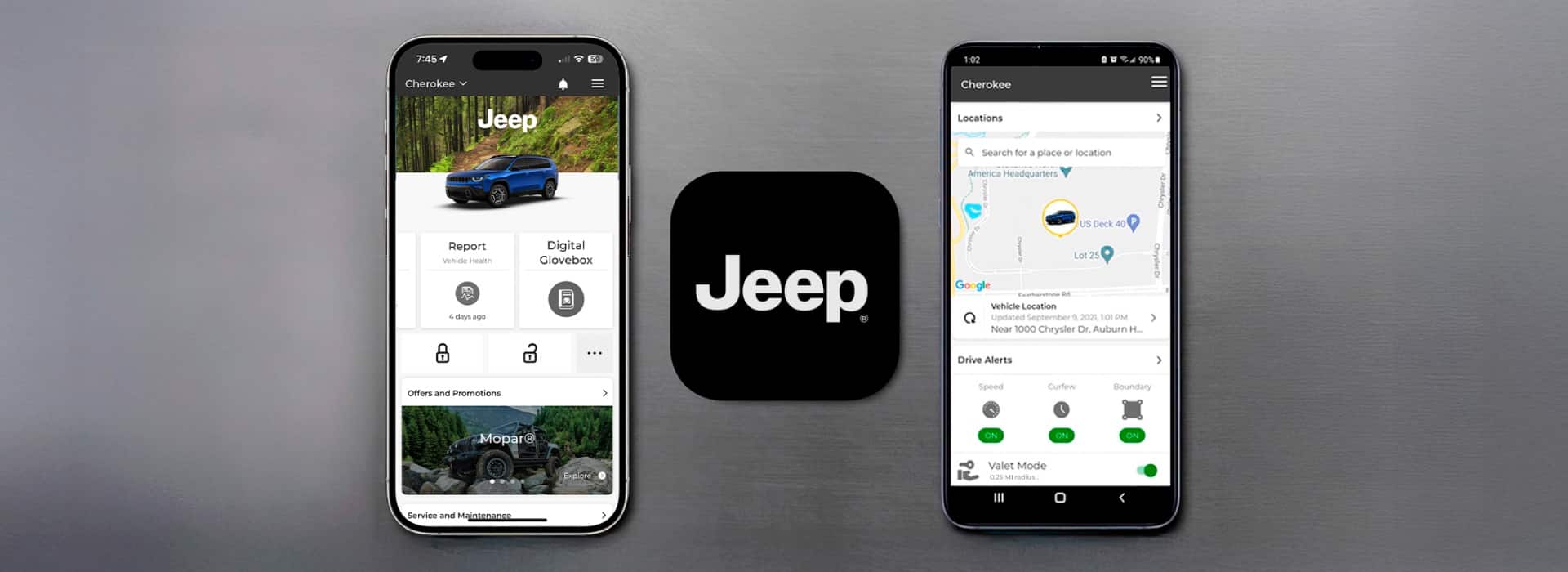
Forget your keys? The app lets you lock or unlock your doors from anywhere.
- Tap the lock or unlock icons.
- You’ll see a status update when the action is complete.
Practical example: If you leave your Jeep in a public lot and forget to lock it, you can secure it from your office.
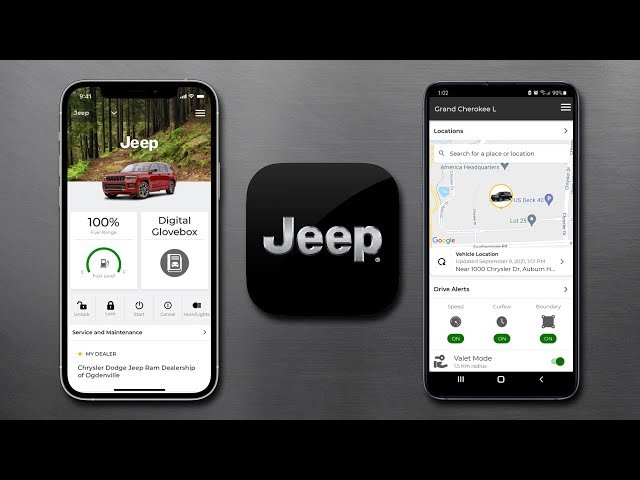
The app’s Find My Car feature shows your Jeep’s location on a map.
- Open the app and select Vehicle Location.
- The map will show your Jeep’s current position.
- Tap Navigate to get directions via your favorite map app.
Non-obvious tip: The app saves your parking location automatically, making it easy to find your Jeep after a concert or sports game.
Maintenance And Service Scheduling
The Jeep app tracks your car’s health and helps you book service appointments.
- Check the Vehicle Health section for alerts on oil life, battery status, and tire pressure.
- Tap Schedule Service to book a visit at your preferred dealership.
Data point: Regular oil changes and tire checks can reduce breakdowns by up to 35% (according to AAA data).
Alerts And Notifications
Stay informed with customizable alerts:
- Low fuel
- Open doors or trunk
- Scheduled maintenance reminders
You can adjust notification settings in the app menu.
Pro insight: Turn on push notifications for critical alerts. You’ll get immediate updates if something needs your attention.
Comparing Jeep App Plans
Jeep offers different app service levels. Here’s a comparison to help you choose:
| Plan | Key Features | Monthly Cost |
|---|---|---|
| Basic | Vehicle location, basic alerts | $0 |
| Remote | Lock/unlock, remote start/stop | $15 |
| Premium | All features, 24/7 support | $25 |
Note: Some new Jeep models include one year of premium service for free.
Troubleshooting Common Issues
Even with a user-friendly app, problems can happen. Here’s how to solve the most frequent issues:
App Not Connecting To Vehicle
- Check your phone’s Bluetooth and Wi-Fi.
- Restart both your phone and your Jeep.
- Make sure the app is updated to the latest version.
Remote Start Not Working
- Confirm all doors are closed and the car is in “park.”
- Check for any error messages in the app.
Notifications Not Appearing
- Go to your phone’s notification settings.
- Allow notifications for the Jeep app.
If you still have trouble, contact Jeep support via the app or visit the official Jeep Owners site for extra help.
Security And Privacy
Worried about your data? Jeep uses encrypted connections to protect your information.
- Your location and driving data are only shared with your consent.
- You can delete your account and data at any time in the app settings.
Insight beginners miss: If you sell your Jeep, always remove the vehicle from your app account to prevent the new owner from accessing your data.
Real-world Examples
Here are ways real Jeep owners use the app:
- Family trips: Parents use vehicle location to check if their teens have arrived safely.
- Cold mornings: Remote start heats up the car before heading out.
- Busy schedules: Service reminders prevent missed appointments.
Each feature saves you time, stress, or worry.
Feature Comparison: Jeep App Vs. Competitors
How does the Jeep app compare to other car brand apps?
| Feature | Jeep App | FordPass | myChevrolet |
|---|---|---|---|
| Remote Start | Yes | Yes | Yes |
| Maintenance Scheduling | Yes | Yes | Yes |
| Find My Car | Yes | Yes | Yes |
| In-App Roadside Help | Yes | Limited | No |
The Jeep app holds its own against top competitors, especially for remote features and roadside help.
Frequently Asked Questions
How Do I Add A New Jeep To My App?
Open the app menu, tap Add Vehicle, and enter your new Jeep’s VIN. Follow the pairing instructions to complete setup.
Is The Jeep App Free To Use?
Basic features are free, but remote start, lock/unlock, and advanced alerts require a paid plan after any free trial.
Can I Use The Jeep App With More Than One Phone?
Yes. You can log in on multiple devices, but you’ll need to verify each phone for security.
What Should I Do Before Selling My Jeep?
Remove the vehicle from your app account and erase all personal data from your Jeep’s infotainment system.
Is My Personal Data Safe With The Jeep App?
Jeep uses strong encryption and privacy controls. You can manage or delete your data anytime in the settings.
Using the Jeep app makes driving and owning your vehicle easier, safer, and more connected. With just a few taps, you control, monitor, and maintain your Jeep from anywhere.
Take a few minutes to explore the app’s settings and try out its features small steps that will save you time and give you more confidence on the road.


















