The Jeep Grand Cherokee 2020 is packed with modern lighting features designed for safety and style. But sometimes, you need to turn off the lights—whether to preserve battery, stay unnoticed at a campsite, or simply because you prefer a dark interior. If you’re not familiar with all the switches, menus, and automatic features, it can be confusing to figure out how to control every light in your Grand Cherokee. This guide will walk you through every step, explain why some lights stay on, and help you customize your lighting for different needs.
Understanding Your Jeep Grand Cherokee 2020 Lighting System
The 2020 Grand Cherokee uses a mix of automatic headlamps, daytime running lights (DRLs), fog lights, and a range of interior lights. Many of these are controlled by sensors and computers, making them more complex than older vehicles. This is good for safety, but it means turning them off isn’t always obvious.
Key Lighting Features
- Automatic headlamps: Turn on/off based on outside light.
- Daytime running lights (DRL): Stay on when the engine runs for visibility.
- Fog lights: Can be switched on/off manually.
- Interior dome/cabin lights: Controlled by doors or switches.
- Cargo and footwell lights: Activate when doors open.
Understanding these features is important before you try to turn anything off. Let’s look at how each can be controlled.
Turning Off Exterior Lights
Exterior lights are the first thing most drivers want to control. Here’s how to switch off each type.
Headlights
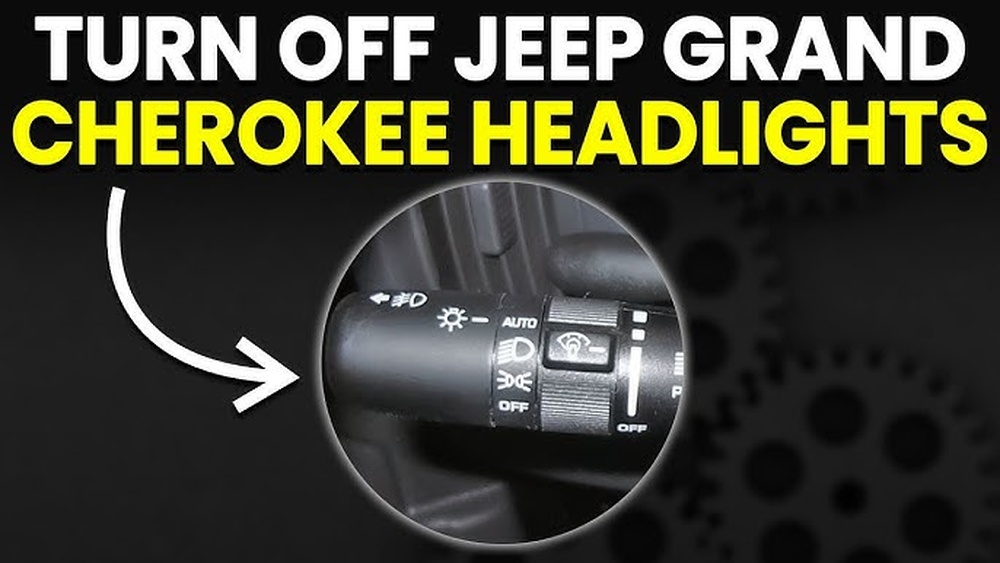
The headlight control switch is found to the left of the steering wheel. It has several positions:
- Auto: Headlights turn on/off based on sensors.
- Off: Turns off headlights, but not always DRLs.
- Parking Lights: Only small lights stay on.
- On: Headlights stay on regardless of outside light.
To turn off headlights:
- Rotate the switch to the “Off” position.
- If it returns to “Auto” by itself, your model has mandatory DRLs—they can’t be turned off while driving in the U.S. due to federal safety rules.
Non-obvious insight: Even if you switch to “Off,” the Grand Cherokee may keep DRLs on. This is not a fault—it’s a regulation.
Daytime Running Lights (drl)
The DRLs are always on when the vehicle is in gear. Some trims let you disable DRLs from the Uconnect settings menu:
- Tap the “Settings” icon on your Uconnect touch screen.
- Go to “Lights.”
- Look for Daytime Running Lights and uncheck the box.
If you don’t see this option, your trim level or region may not allow DRL deactivation.
Fog Lights
To turn off fog lights:
- Push the fog light button (usually in the center of the headlight switch) so it pops out and the indicator on your dashboard goes off.
- Fog lights only work when headlights are on (not on “Off” or “Auto”).
Tail Lights
Tail lights turn off with the headlights. There’s no separate switch, but if you use “Parking Lights” mode, only the tail and parking lights stay on.
Quick Reference: Exterior Light Controls
| Light Type | Switch Location | Can Be Fully Turned Off? | Notes |
|---|---|---|---|
| Headlights | Left dash dial | Yes (except DRL) | “Off” disables at night; DRLs may remain |
| DRL | Uconnect menu or always on | Trim-dependent | Some trims/regions allow off via menu |
| Fog Lights | Center of headlight dial | Yes | Only with headlights on |
| Tail Lights | Linked to headlights | Yes | Off when headlights off |
Turning Off Interior Lights
Interior lights can be distracting at night or drain your battery if left on. The Jeep Grand Cherokee 2020 gives you several ways to control them.
Dome And Map Lights
Located on the ceiling, these can be switched manually:
- Press the light lens: Turns the individual light on/off.
- Main switch (overhead console): Controls all dome lights.
To turn off all dome lights:
- Set the overhead console switch to the “Off” position. It usually slides or presses.
Pro tip: If a door is open, interior lights may stay on for up to 10 minutes, then turn off automatically to save battery.
Ambient And Footwell Lights
These subtle lights help you see at night but can be dimmed or turned off in Uconnect:
- Go to “Settings” > “Lights” > “Ambient Lighting.”
- Adjust the brightness or turn off completely.
Not all trims have this feature, but Limited, Overland, and higher trims usually do.
Cargo Area Light
The cargo light turns on when the tailgate is open. To turn it off:
- Close the tailgate fully.
- If left open, the light will turn off after a few minutes to protect the battery.
Glove Box Light
This tiny light is only on when the glove box is open. Closing it turns the light off automatically.
Using Uconnect To Control Lighting
The Uconnect system is your Grand Cherokee’s main control center for many features, including some light settings. Here’s how to navigate the menus:
- Press the “Settings” button on the touch screen.
- Tap “Lights.”
- Adjust options like:
- Headlight Off Delay: How long headlights stay on after you exit.
- Daytime Running Lights: Enable/disable (if available).
- Ambient Lighting: Adjust brightness or turn off.
- Welcome Lighting: Lights that turn on when you unlock.
Non-obvious insight: Changing settings here doesn’t always override physical switches. For example, if you set a headlight delay, but manually turn the dial to “Off,” the delay won’t work.
Uconnect Lighting Options By Trim
| Trim Level | Ambient Lighting Control | DRL Control | Headlight Delay |
|---|---|---|---|
| Laredo | No | No | Yes |
| Limited | Yes | Some | Yes |
| Overland/Summit | Yes | Yes | Yes |
Not all trims have full lighting controls. Always check your owner’s manual for your specific model.

Why Lights Stay On (and How To Fix)
Sometimes, lights won’t turn off even after you close doors or turn the switches. Here are the main reasons and solutions:
- Door ajar: If any door isn’t fully closed, interior lights stay on. Double-check all doors, including the liftgate.
- Switch left in “On”: If dome or map lights are pressed “on,” they won’t go off with the door.
- Delayed shutoff: Headlights and interior lights may have a built-in delay (up to 10 minutes).
- Faulty switch or sensor: If a light won’t turn off and all doors are closed, there could be a bad door sensor. This usually needs a dealer check.
A common mistake is forgetting the dome override switch above the rearview mirror. If this is on, interior lights ignore the doors.
Customizing Your Lighting Experience
The Grand Cherokee lets you tailor your lighting for different situations:
- Camping/off-roading: Turn off all interior lights for stealth.
- City driving: Use “Auto” so lights adapt to conditions.
- Car shows: Use ambient lights for style.
Pro tip: If you want all lights off for privacy, close all doors, set interior switches to “Off,” and use the Uconnect menu to dim ambient light to zero.

Common Mistakes When Turning Off Lights
Many owners make small errors that keep lights on or make them harder to control:
- Leaving a switch pressed: Interior lights won’t turn off if set to “On.”
- Not checking all doors: Even the liftgate or hood sensor can trigger interior lights.
- Overriding Auto mode: Manually turning off headlights can disable other features, like auto high beams.
- Assuming DRLs can always be disabled: U.S. models often require DRLs to stay on.
Double-check all switches and settings if you’re having trouble.
Quick Troubleshooting Guide
If you’ve followed all steps and a light still won’t turn off, try these actions:
- Turn all light switches to “Off.”
- Make sure all doors, liftgate, and hood are fully closed.
- Wait 10 minutes with the vehicle off—most lights have a timer.
- If lights remain on, check for stuck buttons or switches.
- If problems persist, visit your dealer—there may be a sensor issue.
When Turning Off Lights Matters Most
There are specific times when turning off all lights is important:
- Camping or off-roading: Avoid attracting attention or disturbing wildlife.
- Battery conservation: Leaving lights on drains your battery quickly.
- Privacy or security: Interior lights can make you visible at night.
The Grand Cherokee’s lighting system is designed to protect your battery by turning off most lights automatically after a short period, but it’s always good to double-check.
How Lighting Compares To Other Suvs
The Jeep Grand Cherokee 2020 is similar to other midsize SUVs but stands out with its customizable lighting via Uconnect.
| Feature | Grand Cherokee 2020 | Ford Explorer 2020 | Toyota 4Runner 2020 |
|---|---|---|---|
| Automatic Headlights | Yes | Yes | Yes |
| DRL Disable Option | Some trims | No | No |
| Ambient Light Control | Yes (higher trims) | Yes | No |
| Headlight Delay | Yes | Yes | No |
If you want maximum control, the Grand Cherokee’s Uconnect system gives you more options than many competitors.
Frequently Asked Questions
How Do I Turn Off The Interior Lights When I Open The Door?
Set the main overhead light switch to “Off” (not “Door”). This stops the dome and map lights from coming on when doors open.
For even more control, dim ambient lighting in the Uconnect menu.
Can I Turn Off Daytime Running Lights On The Jeep Grand Cherokee 2020?
Only some trims and regions allow DRL deactivation via the Uconnect “Lights” menu. Most U.
S. models require DRLs to stay on for safety reasons.
If you don’t see the option, it’s not available on your vehicle.
Why Do My Headlights Stay On After I Turn Off The Engine?
The “Headlight Off Delay” feature keeps headlights on for 30 seconds to 3 minutes after you exit, lighting your path. You can change this in Uconnect under “Settings” > “Lights” > “Headlight Off Delay,” or set the headlight switch to “Off” before shutting the car.
What Should I Do If A Light Won’t Turn Off Even After Closing All Doors?
Check all doors (including the liftgate) are fully closed, ensure no interior switches are pressed “on,” and wait up to 10 minutes for the automatic shutoff. If the light stays on, you may have a faulty sensor and should visit a dealer.
How Do I Dim Or Turn Off The Dashboard And Ambient Lights?
Go to Uconnect “Settings” > “Lights” > “Ambient Lighting” to dim or turn off these lights. The dashboard brightness can also be adjusted with the small dial next to the headlight switch.
By understanding and using both physical switches and the Uconnect system, you can fully control your Jeep Grand Cherokee 2020’s lights. For more details on federal lighting regulations, visit the National Highway Traffic Safety Administration.
Whether you’re camping, driving at night, or just want a quieter interior, these steps will help you master your Jeep’s lighting. Enjoy your drive with the perfect lighting for any situation.


















