If you own a Jeep Compass, you already know its lights are essential for safety and comfort. But sometimes, the lights may stay on longer than needed, or you might want to turn them off manually. This can be confusing, especially if you’re not familiar with all the controls. Learning how to turn off the Jeep Compass lights saves battery, avoids distractions, and keeps your car in top shape. In this guide, you’ll discover practical steps to control your vehicle’s lights, plus useful tips for common situations.
Understanding Jeep Compass Light Types
The Jeep Compass uses several types of lights, each with a specific function. Knowing these helps you control them better.
| Light Type | Main Purpose | Common Location |
|---|---|---|
| Headlights | Night driving | Front |
| Daytime Running Lights (DRL) | Visibility during day | Front |
| Interior Dome Lights | Cabin illumination | Ceiling |
| Parking Lights | Parked vehicle visibility | Front & Rear |
| Fog Lights | Low-visibility conditions | Low front bumper |
Some Compass models also have automatic light settings that can turn on or off based on time of day or weather. This automation is helpful, but it can sometimes surprise drivers who want manual control.
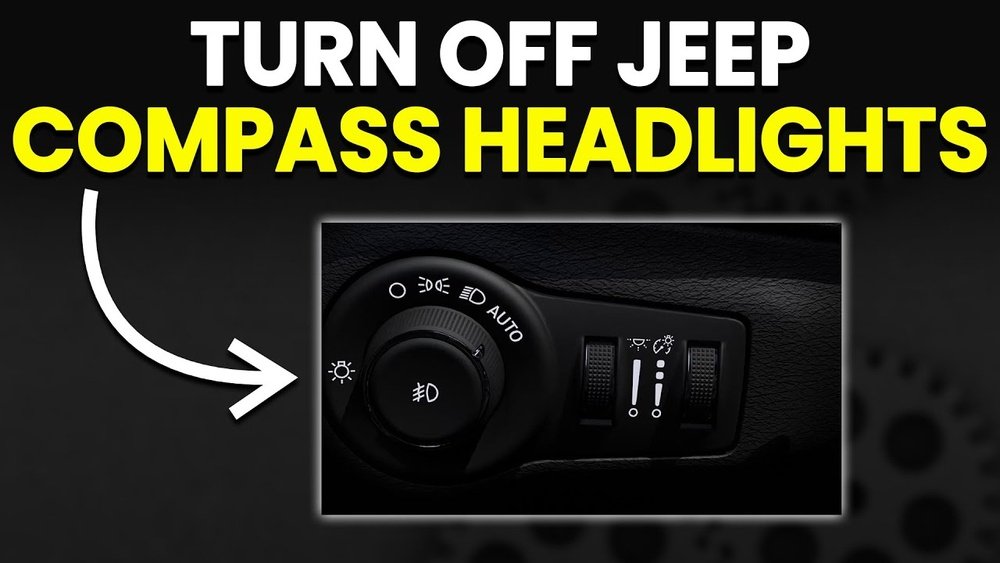
How To Turn Off Exterior Lights
Exterior lights include headlights, DRLs, fog lights, and parking lights. Each has its own control, usually found on or near the steering wheel.
Headlights
- Locate the headlight dial—usually on the left side of the steering column.
- Turn the dial to the “O” or “Off” position.
- If your Compass has automatic headlights, turn the dial from “Auto” to “Off.”
Not all models allow full manual control. Some have DRLs that stay on for safety.
Daytime Running Lights (drl)
- DRLs are designed to stay on when the vehicle is running.
- To fully switch them off, you must engage the parking brake before starting the engine, or change settings in the vehicle’s menu if available.
- Some models do not allow you to turn off DRLs for safety reasons.
Fog Lights
- With headlights on, press the fog light button (often a pull-out or push-in on the main dial).
- To turn off, push or twist the button back to the original position.
Parking Lights
- Turn the headlight dial to the parking light symbol (often a small bulb icon).
- To turn off, move the dial to “O” or “Off.”
Here’s a quick feature comparison:
| Light | Manual Control | Automatic Control |
|---|---|---|
| Headlights | Yes | Yes (Auto models) |
| DRL | Limited | Yes |
| Fog Lights | Yes | No |
| Parking Lights | Yes | No |
Non-obvious tip: If your exterior lights stay on after locking, check your settings for “headlight delay” or “follow-me-home” features. These can keep lights on for 30 seconds to 3 minutes for safety. Adjust this in the vehicle’s display menu.
How To Turn Off Interior Lights
Interior lights can stay on if a door isn’t closed, or the switch is left in the “on” position. This drains your battery if not fixed.
Dome And Map Lights
- Press the light button near the dome or above the mirror.
- Some models have a three-position switch: On, off, and door. Set it to “off” to keep lights off all the time.
- If lights stay on, make sure all doors are properly closed.
Dashboard And Instrument Panel
- The dimmer switch (usually a small roller or dial) controls dashboard brightness.
- Roll it all the way down to dim or turn off the backlight.
Non-obvious insight: If the dashboard brightness won’t dim, check if your headlights are in the “Auto” setting. Sometimes, lights are linked for safety reasons.
Disabling Automatic Light Features
Some Compass owners want full control, not automation. You can adjust or disable automatic headlights and related features.
- Start the vehicle and access the Settings menu on your infotainment screen.
- Look for “Lights” or “Exterior Lights.”
- Change “Auto Headlights” or “Headlight Off Delay” to your preference.
- If you can’t find these options, consult your owner’s manual or ask your dealer.
Tip: Automatic features help prevent accidents, so only disable them if you understand the risks.

Handling Light Issues And Common Mistakes
Turning off Jeep Compass lights isn’t always simple. Here’s how to handle common problems:
- Lights won’t turn off – Check if any doors are open. Inspect the manual override switch near the dome light.
- Battery drains overnight – Make sure all lights are off, and no settings keep them on (like follow-me-home).
- Can’t find controls – Each model year may have different layouts. Refer to your owner’s manual for your specific Compass.
- DRL stays on – For some models, DRLs are always on for safety. This is normal and not a fault.
If you still have issues, a diagnostic check at your dealer can help. In rare cases, a faulty door sensor or relay can leave lights on.
Quick Reference: Light Controls By Model Year
Controls may differ by year. Here’s a simplified guide:
| Model Year | Headlight Control | Interior Light Switch |
|---|---|---|
| 2017-2020 | Dial (left of steering) | Button near dome |
| 2021-2023 | Dial + Touchscreen (some trims) | Button or touchscreen |
For more details, always check the official Jeep Owner’s Manual online.

Final Thoughts
Controlling your Jeep Compass lights is about more than just comfort—it’s about safety and protecting your car’s battery. Learn where each switch is, and understand your model’s features. Small actions, like checking the dome light position or adjusting headlight delay, can prevent big problems. Don’t hesitate to ask your dealer for help if your lights behave oddly. With the steps above, you can confidently manage your Jeep Compass lighting system and avoid common headaches.
Frequently Asked Questions
How Do I Turn Off My Jeep Compass Headlights Completely?
Set the headlight dial to the “O” or “Off” position. For models with automatic settings, switch from “Auto” to “Off.
” Some DRLs may remain on for safety reasons.
Why Won’t My Interior Lights Turn Off When Doors Are Closed?
Check the dome light switch; it may be stuck in the “on” position. Also, verify all doors, including the rear hatch, are fully closed.
Can I Disable Daytime Running Lights On My Jeep Compass?
On most models, DRLs cannot be fully turned off for safety. Some trims allow you to turn them off through the settings menu or by using the parking brake before starting the engine.
What Should I Do If My Compass Lights Stay On After Locking?
Check your settings for headlight delay or follow-me-home features. Adjust the timer or turn off these settings in the vehicle’s menu.
Where Can I Find My Jeep Compass Light Controls?
Most controls are to the left of the steering wheel as a dial or switch. Interior light buttons are usually near the dome or overhead console.
Consult your owner’s manual for your specific model.



















