Getting comfortable in your Jeep Cherokee 2023 is about more than just the drive—it’s about making every trip personal. The vehicle’s memory seat system lets you save your perfect seat and mirror position, so you can return to it with just the push of a button. If you share your Jeep with family or friends, knowing how to set and use memory seats can save you time and hassle every day. Let’s walk through the process step by step, with tips to help you get the most from this smart feature.
What Are Memory Seats In The Jeep Cherokee 2023?
Memory seats let you store and recall different seating positions at the touch of a button. In the 2023 Jeep Cherokee, you can usually save two separate settings. This means two drivers can have quick access to their preferred seat, mirror, and sometimes even steering wheel positions.
This system is especially useful if:
- Multiple people regularly drive your Jeep
- You have a favorite seating position for long trips
- You want to avoid readjusting your seat every time
How The Memory Seat System Works
When you set a memory seat, the system records:
- Driver’s seat position (forward/backward, up/down, recline)
- Side mirror angles
- Optional: Steering column position (if equipped with power steering adjustment)
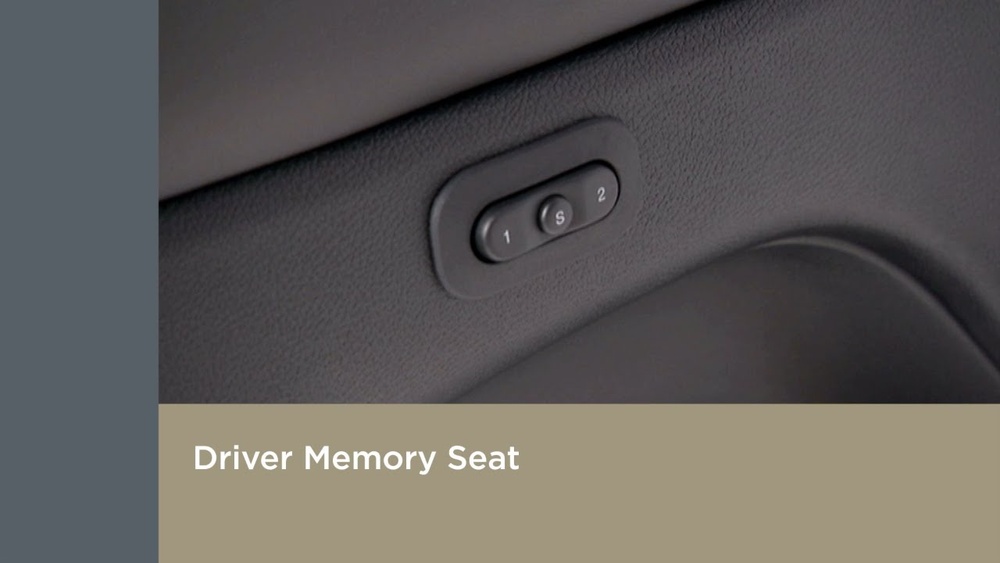
Many Jeep Cherokee 2023 models include memory seat controls on the driver’s door panel. You’ll see numbered buttons, usually labeled “1” and “2,” and a “SET” button.
Main Control Panel Layout
Here’s a quick look at the typical button layout:
| Button | Function |
|---|---|
| SET | Activate memory programming |
| 1 | Recall/Save setting for Driver 1 |
| 2 | Recall/Save setting for Driver 2 |
Step-by-step: Setting Memory Seats
Setting your memory seat in the Jeep Cherokee 2023 is simple if you follow these clear steps:
- Turn on the ignition. The engine doesn’t need to run, but the vehicle should be in “ON” or “RUN” mode.
- Adjust the driver’s seat. Use the power seat controls to get your perfect position. Don’t forget lumbar support if available.
- Set your side mirrors. Adjust both driver and passenger side mirrors to your liking.
- Adjust the steering wheel. If your model has power steering adjustment, set the tilt and distance.
- Press the SET button. Hold it until you hear a beep (usually 1 second).
- Choose memory position. Within 5 seconds, press and hold the “1” or “2” button. Release when you hear a second beep.
Your settings are now saved. Test it by moving the seat and mirrors, then pressing your memory button to see them return to your saved position.
Using Memory Seats With Key Fobs
A great feature of the Jeep Cherokee 2023 is linking memory positions with your key fob. This means when you unlock the car with your key, the Jeep can automatically adjust everything to your profile.
How To Link Memory Seats With A Key Fob
- Save your seat and mirror settings using the steps above.
- Press the “SET” button, then (within 5 seconds) press and hold the desired memory button (“1” or “2”) and the “UNLOCK” button on your key fob at the same time.
- Wait for a beep, then release both buttons.
Now, your seat and mirror position will automatically adjust when you unlock the vehicle with your key fob.
Practical Tips For Using Memory Seats
Getting the most from your memory seat system is about more than just saving settings. Here are some tips many drivers miss:
- Double-check your memory save. After setting, always test by moving the seat away and pressing the memory button. This avoids surprises later.
- Link each key fob. If you and a partner both drive the Jeep, make sure each person’s key is paired with their settings.
- Update for new shoes or seasons. A winter coat or boots can change your preferred seat position. Update your memory as needed.
- Don’t forget mirror angles. Many drivers only focus on the seat. Proper mirror settings make driving safer and more comfortable.
Common Mistakes And How To Avoid Them
Many first-time users run into small issues with memory seats. Here’s how to avoid them:
| Mistake | How to Avoid |
|---|---|
| Forgetting to adjust mirrors before saving | Always set mirrors before pressing the SET button |
| Trying to save while car is off | Make sure the ignition is in ON/RUN mode |
| Not holding buttons long enough | Hold SET and memory buttons until you hear a beep |
| Mixing up key fobs | Label your keys or use different keychains |

When To Reset Or Update Memory Settings
You might need to update your memory settings if:
- Your seat feels uncomfortable after a while
- Someone else used your Jeep and changed the settings
- You buy new glasses or change your driving habits
- You prefer a different position for city vs highway driving
It takes less than a minute to re-save your settings, so don’t hesitate to update as your needs change.
Quick Comparison: Manual Seats Vs Memory Seats
Some Jeep Cherokee trims come with manual seats, while higher trims include memory seats. Here’s a quick comparison:
| Feature | Manual Seats | Memory Seats |
|---|---|---|
| Seat Adjustments | Manual levers/knobs | Power controls |
| Save Positions | No | Yes (2 positions) |
| Mirror Adjustment | Manual/Power, not saved | Saved with seat position |
| Key Fob Linking | No | Yes |
Keeping Your Memory System Working
Memory seat systems are reliable, but a few tips can help keep everything smooth:
- Avoid spilling liquids near door controls
- Don’t force the seat if it feels stuck—check for obstacles
- If the system stops working, try resetting the car’s battery or check the owner’s manual
If you run into issues that won’t go away, contact your dealer or see the official Jeep manuals for more help.
Frequently Asked Questions
How Many Seat Positions Can I Save In The Jeep Cherokee 2023?
You can save two memory positions for the driver’s seat and mirrors. This is handy for two main drivers who want quick access to their favorite settings.
Can I Use Memory Seats If The Car Is Turned Off?
No, the ignition must be in the ON or RUN position to save or recall memory settings. Some features like mirror recall may work with remote unlock, but programming always requires the car to be on.
Is It Possible To Link The Memory Seat To More Than One Key Fob?
Yes, you can link each key fob to a separate memory position. This allows two drivers to have personalized settings that activate when they unlock the Jeep with their own key.
First, check that the vehicle is in the correct mode (ON/RUN). If the problem continues, try resetting the car’s battery or consult the owner’s manual. Persistent issues may need a dealership’s help.
Do Memory Seats Remember Lumbar Support And Steering Wheel Position?
In most Jeep Cherokee 2023 models, lumbar support and steering wheel position (if power adjustable) are included in the memory settings. Check your trim level’s features to be sure.
With these steps, your Jeep Cherokee 2023 can always feel like it’s tailored just for you. Setting your memory seats once means more time enjoying the road and less time fiddling with controls.


















