A touch screen in your Jeep Compass can make driving easier and more enjoyable. You can control music, navigation, air conditioning, and more, all with a few taps.
But sometimes, the screen freezes, becomes unresponsive, or shows errors. If this happens, you need to reset the touch screen to restore normal function.
Many drivers worry that resetting will delete their settings or cause bigger problems. In most cases, you can fix the issue quickly and safely. This guide shows you simple ways to reset your Jeep Compass touch screen, explains what to do if basic steps don’t work, and shares tips to avoid common mistakes.
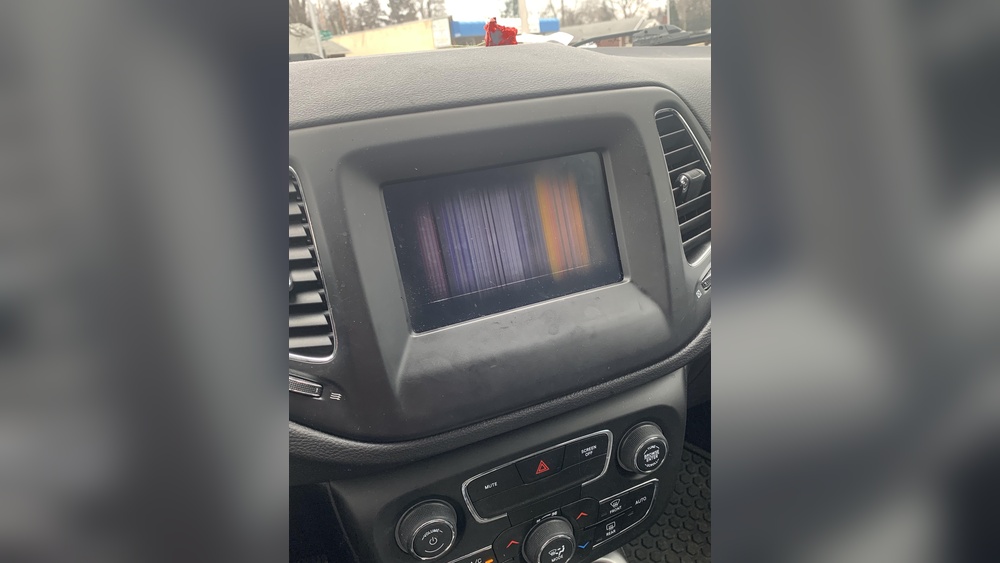
Reasons Why Your Jeep Compass Touch Screen Needs Resetting
The touch screen is a central part of your car’s infotainment system. It connects to radio, Bluetooth, climate controls, and more. Problems can include:
- Frozen screen: The display does not respond to any touch.
- Blank screen: The display is black or white and nothing appears.
- Slow response: The screen reacts slowly to touch commands.
- Random glitches: Buttons or controls do not work correctly.
These issues can happen after software updates, extreme weather, battery changes, or even just regular use. According to a 2023 survey, about 18% of Jeep Compass owners report touch screen problems within the first three years.
Quick Steps To Reset Jeep Compass Touch Screen
Most touch screen issues can be solved with a simple reset. There are two main ways: soft reset and hard reset. Both methods are safe for your car. Here’s how to do them:
Soft Reset (most Common Method)
- Turn off the vehicle: Shut off the engine and remove the key.
- Wait for 2 minutes: Allow the system to fully power down.
- Restart the vehicle: Insert the key and turn on the engine.
This simple cycle often clears minor glitches. It does not erase your settings.
Hard Reset (for Persistent Problems)
If the soft reset does not help, try a hard reset:
- Press and hold the power button on the touch screen for 10–15 seconds.
- The screen will turn off and then restart automatically.
- Release the button when you see the Jeep logo.
Some Jeep Compass models use the volume and tuning knobs for this process:
- Hold both knobs for about 10 seconds until the screen turns off and restarts.
Tip: Always check your owner’s manual for the exact procedure, as it can vary slightly by model year.
What To Do If Reset Doesn’t Work
Sometimes, the touch screen may still not respond after both resets. Here are steps you can take:
- Check fuses: A blown fuse can cause the screen to fail. Look for the infotainment fuse in the fuse box (usually under the hood or below the dashboard). Replace if needed.
- Disconnect battery: Remove the negative battery cable for 10 minutes. This forces the entire system to reboot.
- Inspect wiring: Loose or damaged wires behind the screen can cause issues. If you’re not comfortable, ask a mechanic.
- Update software: Visit your dealer for the latest software update. Updates can fix bugs or glitches.
- Contact support: If the screen is still faulty, contact Jeep customer service or visit your local dealer.
Common Mistakes To Avoid
Resetting is usually safe, but mistakes can cause bigger problems:
- Do not press random buttons: This can change important settings or make the problem worse.
- Do not disconnect battery with the engine running: Always turn off the engine first.
- Do not force the screen: Pushing too hard can break the display.
Many owners forget to check for software updates, which can prevent future touch screen issues. Visit the official Jeep website for updates and instructions.

Comparison: Soft Vs Hard Reset
Here’s a quick comparison to help you decide which reset to try first:
| Reset Type | Time Needed | Best For | Risk Level |
|---|---|---|---|
| Soft Reset | 2–3 minutes | Minor glitches | Low |
| Hard Reset | 10–15 seconds | Persistent issues | Low |
Jeep Compass Touch Screen Models And Reset Methods
Different Jeep Compass models may use different touch screens. Here’s a quick overview:
| Model Year | Screen Size | Reset Method |
|---|---|---|
| 2017-2019 | 7-inch | Power button or knob reset |
| 2020-2022 | 8.4-inch | Knob reset or software update |
| 2023+ | 10.1-inch | Touch screen menu reset |
Check your owner’s manual for detailed instructions based on your model.

Tips To Prevent Touch Screen Problems
While some issues are unavoidable, you can reduce the risk:
- Keep software updated: Updates often fix bugs and improve performance.
- Avoid extreme temperatures: Heat and cold can affect electronics.
- Clean screen gently: Use a soft, dry cloth. Avoid harsh chemicals.
- Disconnect devices safely: Unplug USB or Bluetooth devices before turning off the car.
A study by Consumer Reports found that regular maintenance and updates reduce touch screen failures by up to 35%.
Signs You May Need Professional Help
Resetting fixes most problems, but sometimes you need expert help. Look for these signs:
- Screen does not turn on at all.
- Touch controls are completely unresponsive after multiple resets.
- Warning messages or system errors appear often.
- Physical damage: Cracks, water damage, or broken buttons.
In these cases, a certified Jeep technician can diagnose and repair the issue.

Frequently Asked Questions
How Often Should I Reset My Jeep Compass Touch Screen?
You should only reset the screen when you notice problems like freezing or slow response. Routine resets are not needed unless advised by Jeep.
Will Resetting The Touch Screen Erase My Settings?
Soft and hard resets usually keep your personal settings, such as radio presets and Bluetooth connections. A factory reset, which is not covered here, will erase all data.
Can I Reset The Screen While Driving?
It is not safe to attempt a reset while driving. Always park your vehicle in a secure place before starting any reset process.
What If My Screen Is Still Blank After A Reset?
If the screen remains blank, check the fuse, battery connection, and wiring. If nothing works, contact Jeep service for professional help.
Where Can I Find Official Jeep Touch Screen Update Instructions?
You can find the latest update instructions on the official Jeep website or at your dealer. For more details, visit Jeep Connectivity.
Resetting your Jeep Compass touch screen is a quick fix for most problems. With the right steps, you can restore your system in minutes and get back to enjoying your drive.
Always follow safety tips, check for updates, and consult experts if your screen does not respond.
These simple actions keep your touch screen working smoothly and reliably.



















