If your Jeep Grand Cherokee’s Bluetooth is acting up—music skipping, phone not connecting, or voice commands not working—you’re not alone. Many drivers run into Bluetooth issues, especially as their vehicles age or after updating their phone’s software. The good news is: most Bluetooth problems in the Grand Cherokee can be fixed with a simple reset. You don’t need to be a car expert, and you won’t have to visit the dealership. Let’s walk through everything you need to know to reset Bluetooth in your Jeep Grand Cherokee and get your connection smooth again.
Why Bluetooth Stops Working In Jeep Grand Cherokee
Bluetooth problems often surprise drivers. One day, everything works. The next, your phone refuses to pair. Here are the most common reasons:
- Software bugs: Updates to your phone or the Uconnect system can cause glitches.
- Device memory issues: Too many paired devices can confuse the system.
- Signal interference: Electronics or other Bluetooth devices nearby might disrupt the connection.
- Outdated software: Old versions of Uconnect may not communicate well with newer phones.
These problems happen in both older and newer Grand Cherokees. Resetting Bluetooth is usually the fastest way to solve them.
Quick Steps: How To Reset Bluetooth In Jeep Grand Cherokee
Resetting Bluetooth is simple, but the steps can vary a little depending on your model year and your infotainment system (Uconnect 4, Uconnect 5, etc.). Here’s what works for most models:
- Turn Off Bluetooth on Your Phone
- Go to your phone’s Bluetooth settings.
- Toggle Bluetooth off, wait 10 seconds, then turn it back on.
- Delete Your Phone from Jeep’s Paired Devices
- On your Jeep’s Uconnect touchscreen, tap “Phone” or “Settings.”
- Choose “Paired Devices” or “Phone/Bluetooth Settings.”
- Select your phone and tap “Delete” or “Forget Device.”
- Restart Your Jeep and Your Phone
- Turn off your Grand Cherokee completely. Wait 30 seconds.
- Restart your phone as well.
- Pair Your Phone Again
- On the Uconnect screen, select “Add Device” or “Pair New Device.”
- On your phone, select your Jeep from the list.
- Enter the PIN shown on the Uconnect screen (if asked).
- Test the Connection
- Make a call or play music to confirm everything works.
Tip: If you see “Uconnect” or your Jeep’s name still on your phone’s Bluetooth list, remove it before re-pairing.

Resetting Uconnect System: When Simple Steps Don’t Work
Sometimes, the basic reset doesn’t solve deeper issues. If your system is frozen, or Bluetooth keeps dropping, you may need to reset the Uconnect system itself.
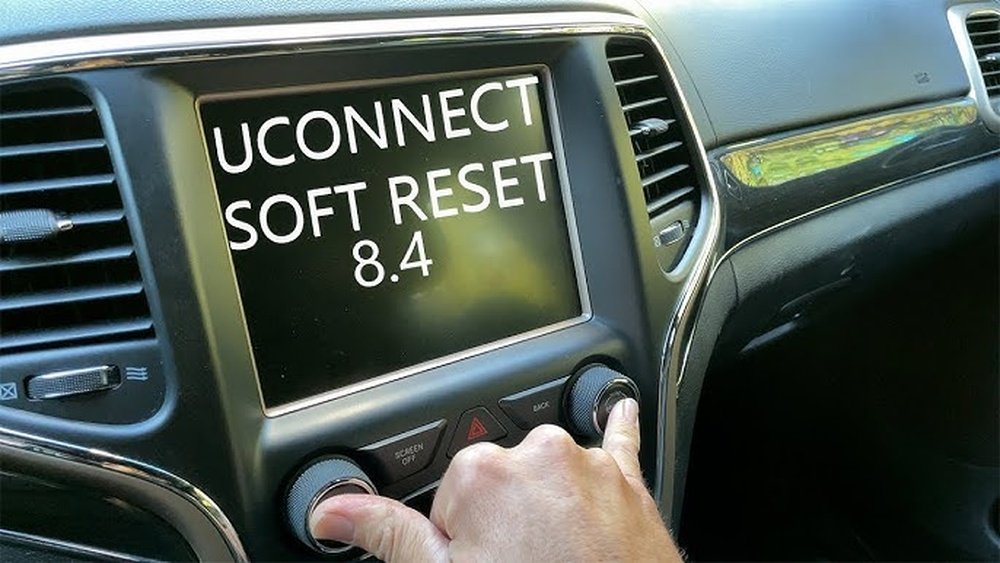
Soft Reset
A soft reset doesn’t erase your data but can solve minor glitches.
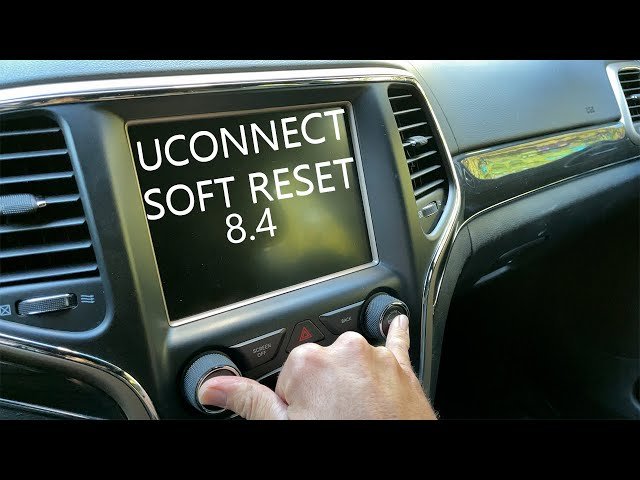
- Press and hold the volume and tune knobs together for about 10 seconds.
- The screen will go black, then the Jeep logo appears as it restarts.
This works for most Grand Cherokee models from 2014 onwards.
Factory Reset
If nothing helps, a factory reset wipes all settings and returns Uconnect to original condition.
- Tap “Settings” on the Uconnect screen.
- Scroll to “System Information” or “Restore Settings.”
- Select “Reset to Factory Defaults.”
- Confirm your choice.
Warning: This removes all saved devices, radio presets, and navigation favorites.
Model Year Differences: What Changes
Jeep Grand Cherokee’s Bluetooth system improved over the years. Here’s how the reset process and features compare:
| Model Year | Bluetooth System | Reset Method |
|---|---|---|
| 2011-2013 | Uconnect 430/730 | Manual device removal, limited reset options |
| 2014-2020 | Uconnect 8.4/4C | Soft and factory reset, improved pairing |
| 2021-present | Uconnect 5 | Faster interface, easier reset steps |
If you’re unsure about your system, check your owner’s manual or the Jeep website.
When To Update Uconnect Software
Outdated software is a hidden cause of Bluetooth problems. Jeep releases updates to fix bugs and add features. Here’s how to check if you need an update:
| Sign | What It Means |
|---|---|
| Frequent disconnects | Software bug likely |
| New phone won’t pair | Compatibility issue |
| Features missing | Old software version |
Visit the official Jeep Uconnect site for update instructions.
Common Mistakes To Avoid
- Skipping the phone restart: Many people forget this step. Restarting clears hidden phone bugs.
- Pairing while driving: Some features are blocked unless the vehicle is parked.
- Not deleting old devices: Too many saved devices cause confusion and errors.
- Ignoring software updates: Outdated systems may never pair correctly.
Extra Tips For Reliable Bluetooth
- Keep your phone’s software up to date.
- Don’t let friends or family pair devices you don’t use.
- Use the main driver’s profile for best performance.
- If you use Android Auto or Apple CarPlay, disconnect USB cables before pairing Bluetooth.
- Reset only when needed—constant resets are not a long-term fix.
Frequently Asked Questions
How Many Phones Can I Pair With My Jeep Grand Cherokee?
Most models let you pair up to seven phones. But only one phone can be active for calls at a time. If you reach the limit, delete unused devices for a smoother connection.
No, deleting Bluetooth devices only removes paired phones. But a factory reset of Uconnect erases all personalized settings, including radio and navigation.
Why Does My Phone Keep Disconnecting Even After A Reset?
Often, the problem is a software mismatch. Check for updates on both your phone and the Uconnect system. If issues continue, try a different phone to see if the problem is with your Jeep or your device.
Can I Reset Bluetooth Without Touching The Uconnect Screen?
You can try deleting and re-pairing from your phone’s side, but full resets usually require using the Uconnect touchscreen. For older models with buttons, consult your manual for button-based resets.
Is There A Way To Reset Bluetooth Remotely Or With A Mobile App?
No, Bluetooth and Uconnect resets can only be done inside the vehicle. Mobile apps like Jeep’s official app allow remote start or lock/unlock, but not system resets.
Getting Bluetooth working in your Jeep Grand Cherokee should not be a headache. By following these steps turning Bluetooth off and on, deleting devices, restarting, and, if needed, resetting Uconnect you’ll fix most issues quickly.
Remember to keep your system and phone updated for the best experience.
If problems persist after several attempts, it may be time for a dealer visit or technical support. With these tips, you can enjoy hands-free calls and music on every drive, just as Jeep intended.