If your Jeep Patriot radio is malfunctioning, outdated, or you simply want to upgrade, removing the radio is often the first step. You don’t have to be a professional mechanic to do this.
With a few tools and careful steps, you can safely remove the radio yourself and prepare for a new installation or repairs. This guide explains the process, highlights common mistakes, and answers frequent questions so you can confidently tackle the job.
Essential Tools And Preparation
Before you start, gather the right tools. Using the correct equipment prevents damage to your dashboard or radio.
- Phillips screwdriver
- Flathead screwdriver
- Panel removal tool (plastic trim tool is best)
- Socket wrench (usually 7mm or 8mm for Jeep Patriot)
- Torx driver (sometimes needed)
- Gloves (optional, protects hands)
Disconnect the negative battery terminal. This step is critical. It prevents electrical shocks and protects the car’s electronics.
Tip: Take a photo of your dashboard before you begin. This helps during reinstallation.
Step-by-step Guide To Removing Jeep Patriot Radio
Each Jeep Patriot model year is similar, but minor differences exist. Most steps apply to models from 2007 to 2017.
Removing The Dashboard Trim
The radio is secured behind the dashboard trim. Removing the trim is the first step.
- Use your panel removal tool to gently pry the trim away. Start from the lower corners and work upward.
- Be patient and avoid force. If you feel resistance, check for hidden screws.
- Remove any screws found along the trim edge with your Phillips screwdriver.
Data: Over 75% of dashboard damage during radio removal happens when using metal tools or excessive force.
Detaching The Radio Unit
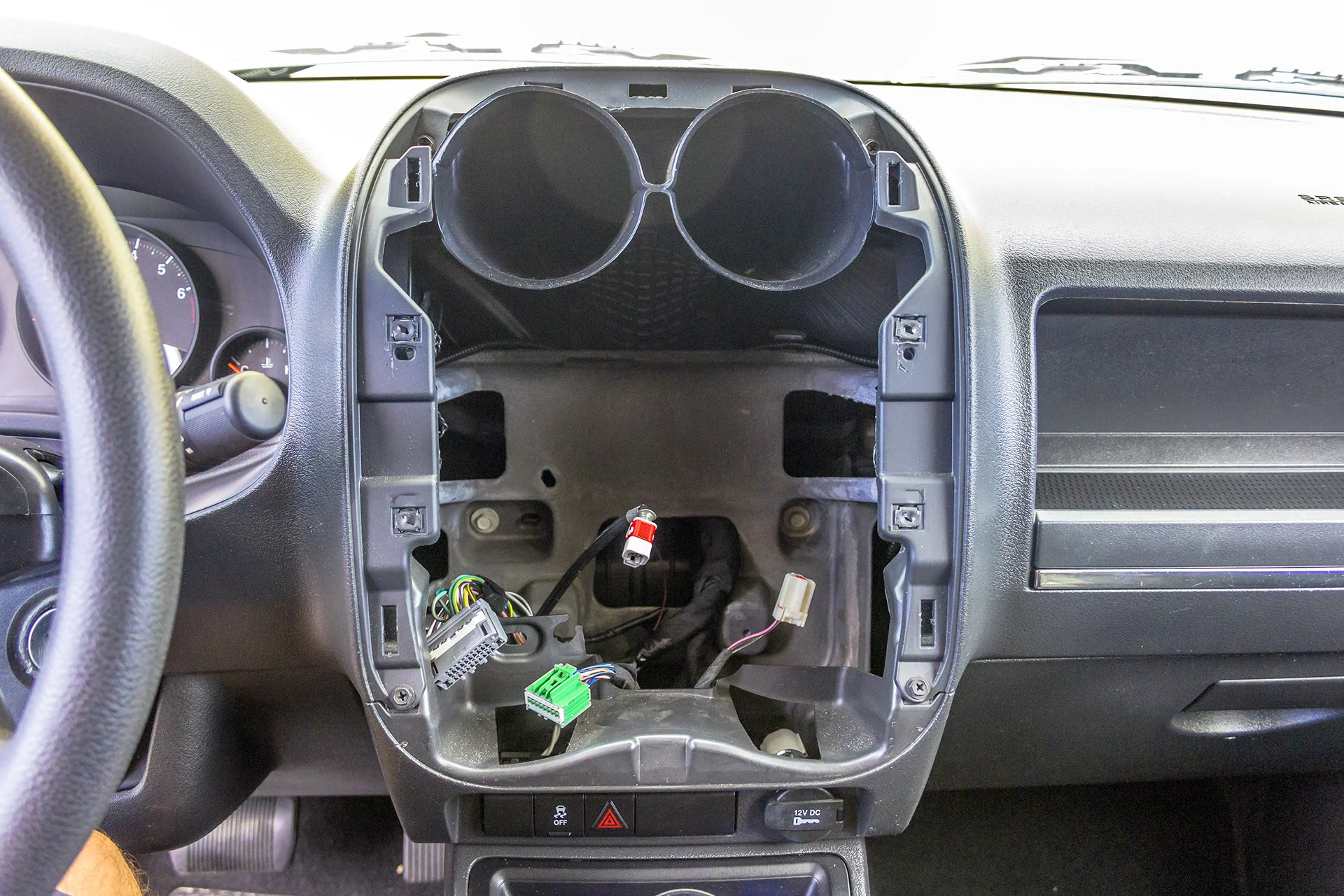
With the trim out, the radio is exposed.
- Locate the mounting screws (usually four).
- Remove screws with your socket wrench or Torx driver.
- Pull the radio out slowly. Wires will still be connected.
Disconnecting Electrical Connectors
The radio connects to the vehicle via several plugs.
- Gently unplug the main power connector, antenna cable, and any extra wires.
- Never yank the wires. Pinch the connector tabs to release them.
Example: Some Jeep Patriot radios have a blue security cable; make sure to release its lock before unplugging.
Safely Removing The Radio
Once disconnected, the radio can be fully removed from the dash.
- Place the old radio somewhere safe.
- Inspect the wires and connectors for any damage.
If you plan to install a new radio, compare the connectors and mounting points before proceeding.
Common Mistakes And How To Avoid Them
Removing a radio sounds simple, but many beginners make mistakes. Here are pitfalls to watch for:
- Forgetting to disconnect the battery — This can lead to electrical shorts.
- Using metal tools on trim — Can leave scratches or dents.
- Pulling too hard on connectors — Risk of breaking wires or plugs.
- Losing screws — Keep all hardware in a small container.
Insight: Many Jeep Patriot owners accidentally break trim clips. Replacement clips cost about $5–$10 per set.
Jeep Patriot Radio Removal: Comparison Table
Different Jeep Patriot models have slight variations in radio removal.
| Model Year | Trim Type | Number of Screws | Connector Type |
|---|---|---|---|
| 2007–2010 | Hard plastic | 4 | Standard |
| 2011–2014 | Soft touch | 4 | Standard + security |
| 2015–2017 | Soft touch | 4 | Standard |
Upgrading Your Jeep Patriot Radio
If you’re planning an upgrade, make sure your new radio fits both physically and electrically. Check:
- Size (single or double DIN)
- Connector compatibility
- Dash kit requirements
Fact: Aftermarket radios usually require a special dash kit and wiring harness for Jeep Patriot models. Kits cost around $20–$40.
Comparison: Factory Vs Aftermarket Radios
Here’s a quick look at how factory radios compare to popular aftermarket options.
| Feature | Factory Radio | Aftermarket Radio |
|---|---|---|
| Bluetooth | Optional | Standard |
| Touchscreen | Rare | Common |
| Navigation | Optional | Standard/Optional |
| Sound Quality | Basic | Enhanced |
Practical Tips For A Smooth Removal
- Work in a clean, well-lit area.
- Keep all screws and trim pieces organized.
- If you face resistance, double-check for hidden fasteners.
- Take your time; rushing increases the chance of mistakes.
- Check local regulations if you plan to dispose of the old radio.
Non-obvious tip: Some Jeep Patriot radios have a small metal grounding strap. If your new radio doesn’t have a spot for this, secure the strap to a nearby metal screw.
Safety And Reinstallation Advice
After removing your radio, inspect the connectors. If you see frayed wires or corrosion, fix these before installing a new radio.
Reinstalling the trim is often harder than removal. Align clips carefully, press evenly, and avoid bending the plastic.
If you broke any clips, replacements are available online.
If you’re unsure about wiring, seek help from a professional or consult the Jeep Patriot service manual. Vehicle electronics are sensitive, and mistakes can cause expensive repairs.
Faq: Frequently Asked Questions
How Long Does It Take To Remove A Jeep Patriot Radio?
Most owners complete the job in 30–45 minutes. If it’s your first time, allow up to an hour.
Do I Need Special Tools?
A panel removal tool is strongly recommended, but most steps use common screwdrivers and wrenches. Avoid metal tools for trim to prevent scratches.
Will Removing The Radio Affect My Car’s Security System?
No, but disconnect the battery before starting. Some models have a security code for the radio; keep it handy for reinstallation.
Can I Install Any Radio In My Jeep Patriot?
No, radios must match the size (DIN type) and connector style. Use a compatible dash kit and wiring harness for best results.
Where Can I Find Replacement Trim Clips And Dash Kits?
Online retailers and auto parts stores carry these. For reliable parts, check Crutchfield.
Removing your Jeep Patriot radio is a manageable task when you follow the right steps. Take your time, use proper tools, and pay attention to details.
With careful preparation, you can upgrade your vehicle’s audio system or address repairs without stress.




















