Programming your 2018 Jeep Grand Cherokee garage door opener is easier than many expect, but small mistakes can cause frustration. Many drivers don’t realize that the system (called HomeLink) can be programmed for most garage doors, gates, and even some home lighting systems. This guide will show you clear steps, highlight common errors, and give tips to make sure your opener works the first time.
Understanding The Homelink System
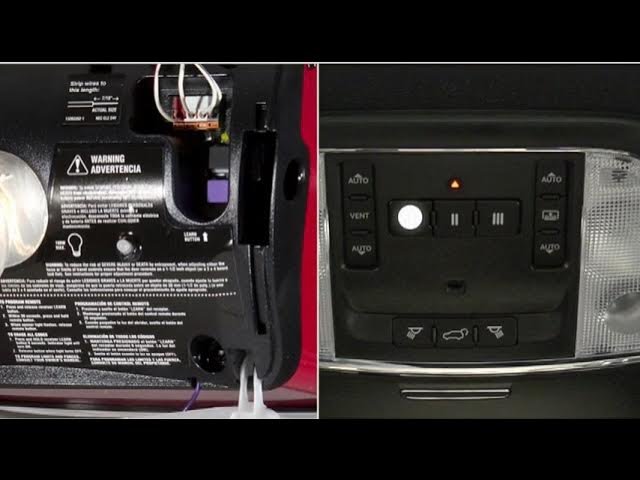
Your Grand Cherokee uses the HomeLink system, which is built into the overhead console near your sunroof controls. HomeLink can control up to three devices, such as garage doors or gates. Most 2018 models support both older and newer garage door technologies, including rolling code systems. If your garage opener was made after 1996, it likely uses a rolling code for better security.
What You Need Before Programming
Before starting, have these items ready:

- Your garage door remote
- The vehicle’s key fob
- A small ladder (if your garage opener’s “Learn” button is out of reach)
- Access to your garage’s power unit
It’s best to park your Jeep just outside the garage, with the ignition in the “Run” position but engine off.
Step-by-step Programming Instructions
1. Clear Existing Codes (if Needed)
If you’ve never programmed the HomeLink buttons, you can skip this. If the buttons were used before, clear old codes:
- Press and hold the two outside HomeLink buttons (1 and 3) until the indicator light flashes rapidly (about 20 seconds), then release. This erases all prior settings.
2. Program Homelink With Your Remote
- Choose which HomeLink button (1, 2, or 3) you want to use.
- Hold your garage door remote 1-3 inches from the HomeLink panel.
- Simultaneously press and hold both the chosen HomeLink button and your garage remote button.
- The indicator light will start slow, then change to rapid flashing. When it flashes quickly, release both buttons.
3. Sync With Garage Door Opener (rolling Code)
Most modern garage openers require this extra step for security:
- Inside your garage, locate the “Learn” or “Smart” button on the garage motor (usually on the back or side).
- Press and release the “Learn” button. You now have about 30 seconds.
- Get back into your Jeep and, within those 30 seconds, press and hold your programmed HomeLink button for 2-3 seconds, then release. Repeat up to three times until the garage door moves.
4. Test The System
Press the programmed button. If your garage door opens or closes, you’re done.
If not, repeat the above steps. Some openers need the final step repeated a few times.
Common Mistakes To Avoid
- Not holding the remote close enough to the HomeLink panel
- Releasing the buttons too early (wait for rapid flashing)
- Not pressing the “Learn” button on the garage opener motor
- Waiting too long after pressing “Learn” (must sync within 30 seconds)
- Trying to program with a weak or dead remote battery
Many people forget the rolling code step, which is required for most openers after 1996.
Comparing Homelink With Other Garage Door Systems
Here’s how HomeLink stacks up against other in-car garage door systems:
| Feature | HomeLink | Car2U | Aftermarket Remote |
|---|---|---|---|
| Number of Devices Supported | 3 | 3 | Usually 1 |
| Rolling Code Support | Yes | Some | Some |
| Integration | Built-in | Built-in | Separate |
| Programming Difficulty | Easy | Moderate | Easy |
Troubleshooting Tips
If your garage door won’t respond, try these solutions:
- Replace the remote battery and try again.
- Make sure the garage opener is not in “Lock” mode (some units have a security feature that blocks remote signals).
- Double check you pressed the HomeLink button within 30 seconds of the “Learn” button.
- For older garage doors (before 1996), you might need to use a special “training” mode. Check your Jeep’s manual or the HomeLink website.
Security And Compatibility Notes
HomeLink is secure, but always clear the system if you sell your vehicle. Most 2018 Jeep Grand Cherokees work with popular brands like LiftMaster, Chamberlain, and Genie. If your garage opener was made in the last 10 years, compatibility is almost certain.
Some very new garage systems (after 2020) use MyQ or Wi-Fi tech, which may need an extra bridge module to work with HomeLink. Check your opener’s manual or visit HomeLink’s official compatibility guide.
Quick Reference: Programming Steps
To help you remember, here’s a summary:
- Clear old codes if needed.
- Hold your remote close to HomeLink.
- Press and hold both buttons until the light flashes rapidly.
- Press “Learn” on your opener, then HomeLink within 30 seconds.
- Test the programmed button.
Feature Comparison: 2018 Jeep Garage Opener Vs. Aftermarket Systems
| Feature | 2018 Jeep HomeLink | Universal Remote Add-on |
|---|---|---|
| Looks/Integration | Factory-installed | Clip-on or visor |
| Programming Steps | 2–3 | 2–3 |
| Number of Doors Supported | Up to 3 | Usually 1 |
| Security | High (Rolling Code) | Varies |
Two Insider Tips Most Owners Miss
- Program with a fresh battery in your remote. Weak batteries often cause failed programming, even if the remote still works with your door.
- You can use HomeLink for gates and home security lights if they use compatible radio frequencies. This adds convenience beyond just garage doors.
When To Seek Help
If you’ve tried all steps and the system still doesn’t work, check your garage opener’s brand and model. Some older or unique brands may require a different process.
In rare cases, your Jeep’s HomeLink module may need a reset at the dealer.
Frequently Asked Questions
How Do I Reset The Homelink System In My 2018 Jeep Grand Cherokee?
Press and hold the two outside HomeLink buttons (1 and 3) until the indicator light flashes rapidly. This erases all previous codes.
Release the buttons and the system is ready for new programming.
Can I Program More Than One Garage Door?
Yes, your Grand Cherokee’s HomeLink can remember up to three devices. Program each button with a different remote or opener using the same steps.
What If My Garage Door Opener Is Very Old?
Older openers (before 1996) without rolling code may need a different method. Sometimes you only need steps 1 and 2.
If it doesn’t work, check your garage opener’s manual or contact the manufacturer.
Is Homelink Safe From Hacking?
HomeLink supports rolling code technology, making it as secure as your garage opener. Always clear codes before selling your vehicle for added safety.
Where Can I Find More Information About Compatibility?
Visit the HomeLink website for a full compatibility list and extra help.
Programming your 2018 Jeep Grand Cherokee’s garage door opener can be done in minutes if you follow these steps and tips. With the right preparation and attention to detail, you’ll enjoy seamless garage access every time you pull in.



















