Pairing your smartphone with Uconnect in your Jeep opens a new level of driving convenience. From hands-free calls to streaming music and accessing navigation, Uconnect can make life easier and safer on the road.
But for many drivers, pairing a device for the first time can feel confusing.
This guide will show you, step by step, how to pair Uconnect Jeep with your phone, what to watch out for, and how to get the most from your system.
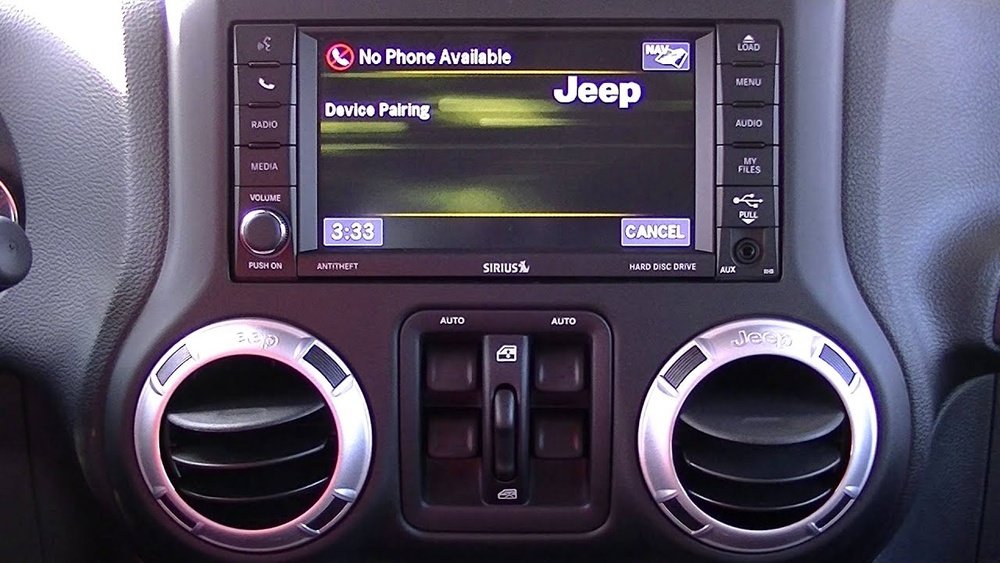
What Is Uconnect In Jeep?
Uconnect is the infotainment system found in most modern Jeep vehicles. It combines navigation, entertainment, communication, and vehicle settings into one touchscreen interface. Uconnect is available in several versions (like Uconnect 4, 4C, 5) and supports both Bluetooth and smartphone integration (such as Apple CarPlay and Android Auto).
Many Jeep owners are surprised by how much Uconnect can do. For example, advanced models even let you start your car remotely or check vehicle health through a mobile app.
But the first step is always pairing your phone.
Preparing For Pairing
Before starting, make sure:
- Your Jeep is in Park with the engine running or in accessory mode.
- Your phone’s Bluetooth is turned on.
- You know where the Uconnect touchscreen is in your Jeep (usually in the center dashboard).
Not all phones or Jeep models have the same options. If your Jeep is from 2013 or earlier, some Uconnect features might be limited.
Common Devices And Compatibility
Uconnect works with most smartphones, but a few models may need extra steps. Here’s a quick look at compatibility:
| Phone Type | Uconnect Version | Compatibility |
|---|---|---|
| iPhone (iOS 13+) | Uconnect 4/4C/5 | Full |
| Android (Android 8+) | Uconnect 4/4C/5 | Full |
| Older Android/iPhone | Uconnect 3 or lower | Partial |
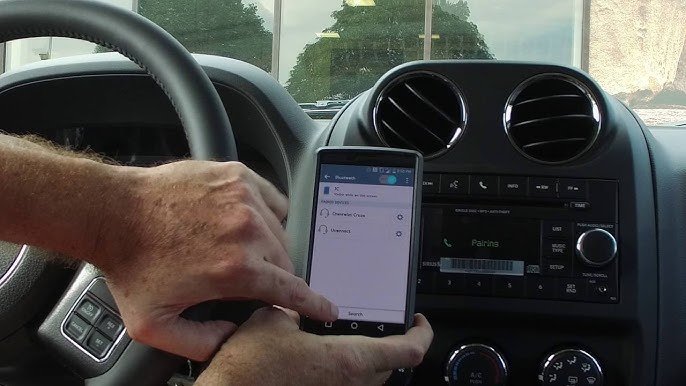
Step-by-step: How To Pair Uconnect Jeep
Follow these steps for a smooth pairing process:
- Open Uconnect Bluetooth Settings: On your Jeep’s touchscreen, tap the “Phone” icon. If no phone is paired, the system will prompt you. Otherwise, select “Settings” or “Add Device.”
- Make Phone Discoverable: On your smartphone, go to Bluetooth settings and make sure it’s discoverable.
- Find Uconnect on Your Phone: Your phone will scan for devices. Look for your Jeep’s Uconnect system (it might show as “Uconnect” plus numbers, like “Uconnect 1234”).
- Initiate Pairing: Tap the Uconnect device name on your phone. The Uconnect screen and your phone will show a PIN code. Make sure the codes match, then press “Pair” on both.
- Allow Access: Your phone might ask for permissions (contacts, messages, media). Allow these for full functionality.
- Finish and Test: Uconnect will confirm pairing. Try making a call or playing music to test the connection.
Troubleshooting Pairing Issues
Sometimes, pairing doesn’t work on the first try. Here’s a comparison of common problems and fixes:
| Problem | Likely Cause | Solution |
|---|---|---|
| Uconnect not showing on phone | Bluetooth off or not discoverable | Restart Bluetooth on both devices |
| Pairing fails repeatedly | Old device memory full | Delete old phones from Uconnect |
| Audio not working | Permissions denied | Allow Bluetooth access to media on phone |
Tips For A Better Uconnect Experience
- Pair only one main phone for best performance. Uconnect can remember several devices, but it connects fastest to the first one paired.
- Update your phone’s software. Out-of-date operating systems may cause glitches.
- Keep Uconnect software updated. Check Jeep’s official site for updates or ask your dealer during service.
- Disconnect and reconnect if you notice delays or drops. Sometimes a quick reset solves minor problems.
A non-obvious tip: If you often switch drivers, set each person’s phone as a favorite in Uconnect settings. This helps the system choose the right device.

Uconnect Features After Pairing
Once paired, Uconnect lets you:
- Make and receive calls hands-free.
- Stream music from apps like Spotify or Apple Music.
- Send and receive texts (depending on your phone).
- Access navigation and traffic updates (in supported models).
- Control some vehicle functions with voice commands.
For Apple CarPlay and Android Auto, connect your phone via USB cable for extra features like map mirroring and app access.
Uconnect Vs. Other Infotainment Systems
How does Uconnect compare with similar systems? Here’s a quick look:
| Feature | Uconnect | Ford SYNC | Toyota Entune |
|---|---|---|---|
| Ease of Pairing | Simple | Moderate | Moderate |
| Apple CarPlay/Android Auto | Yes | Yes | Yes |
| Voice Commands | Strong | Strong | Average |
| Over-the-Air Updates | Available (Uconnect 5+) | Yes | No |
Safety And Privacy Considerations
Pairing your phone means Uconnect can access contacts, messages, and call history. Make sure only trusted devices are paired.
Always unpair your device if you sell your Jeep or visit a repair shop.
A common mistake is forgetting to delete old or unknown devices from the system, which can cause slowdowns or privacy risks.
Frequently Asked Questions
How Many Phones Can I Pair With Uconnect Jeep?
Most Uconnect systems allow up to seven devices to be paired, but only one can be active at a time. You can switch between devices using the Uconnect menu.
Does Uconnect Jeep Work With Both Android And Iphone?
Yes, Uconnect supports both Android and iPhone devices. Features may vary slightly, but calling, music, and messages work for both.
Why Does Uconnect Sometimes Not Connect Automatically?
This can happen if Bluetooth is off on your phone, if another paired device is closer, or if there’s a software glitch. Restarting your phone or Uconnect system usually solves the problem.
Can I Use Uconnect Features Without Pairing?
Some basic features, like radio and navigation, work without pairing. However, to use phone calls, texts, or app streaming, pairing is necessary.
Where Can I Find Official Support For Uconnect Jeep?
You can visit the official Jeep Uconnect support page at Jeep Uconnect for guides, updates, and troubleshooting.
Pairing your Uconnect Jeep is quick once you know the steps. With the right setup, you’ll enjoy safer, more connected driving every day.
Take a few minutes to pair your device, and unlock the full value of your Jeep’s technology.


















