Losing access to your Jeep Cherokee because the key fob stops working can be frustrating. Sometimes, you may need to open the fob to replace the battery, troubleshoot problems, or reprogram it. This guide explains how to open a Jeep Cherokee key fob safely, step by step, so you can solve common issues quickly and avoid costly dealer visits. You’ll also find practical tips, comparisons, and answers to frequent questions.
Understanding Your Jeep Cherokee Key Fob
Jeep Cherokees come with different types of key fobs. Knowing which one you have is important before you start. Most models use a “switchblade” style or a rectangular remote. They are similar, but the opening method can change slightly.
Here’s a quick comparison of popular fob styles:
| Key Fob Type | Year Range | Main Feature |
|---|---|---|
| Switchblade | 2014–2018 | Flip-out key blade |
| Rectangular Remote | 2019–Present | Push-button start, no visible blade |
If your fob has a visible button to release a key, it’s usually the switchblade type. Newer fobs are solid and have only buttons.
What You’ll Need
Before opening your key fob, gather these basic tools:
- Small flat-head screwdriver (precision size works best)
- Plastic pry tool (optional, helps prevent scratches)
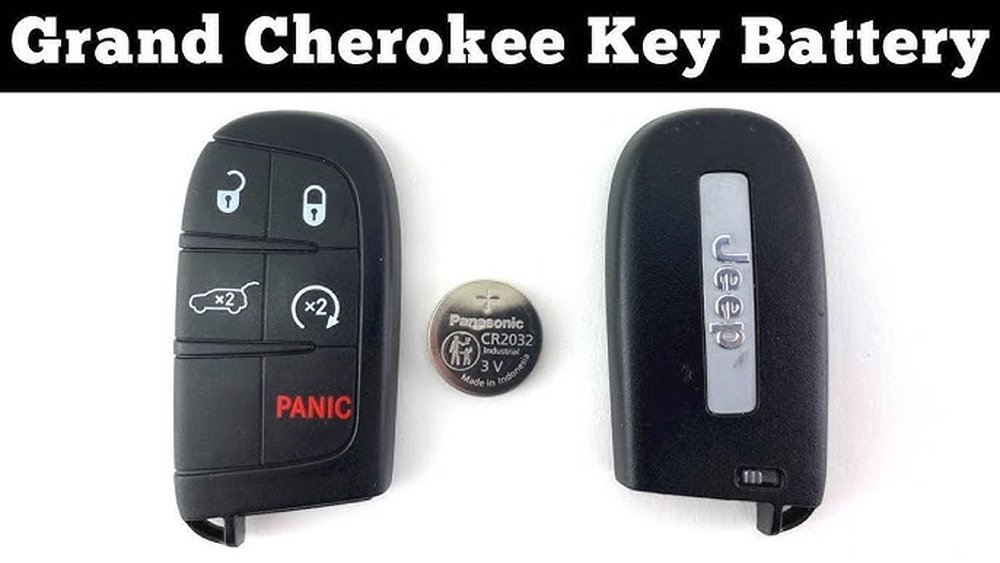
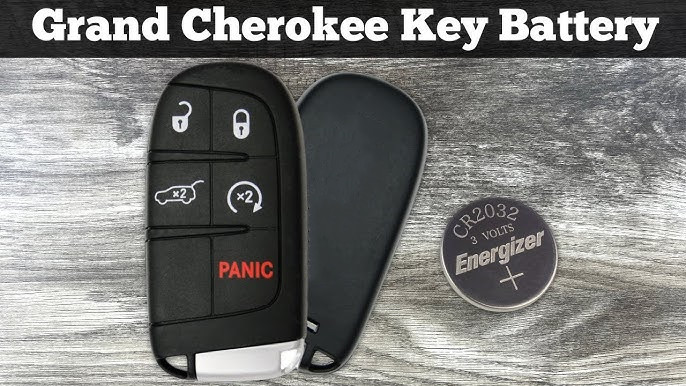
- New CR2032 battery (for most models)
- Clean surface (to avoid losing small parts)
Having the right tools makes the process easier and prevents damage.
Step-by-step: How To Open A Jeep Cherokee Key Fob
Follow these instructions carefully. If you rush, you risk breaking clips or scratching the fob.
1. Remove The Mechanical Key
Most Jeep Cherokee fobs have a hidden metal key inside. Look for a small switch or button on the fob’s side or bottom. Slide or press it, then pull out the key.
This step is important because the hidden key often blocks the two halves of the fob from coming apart.
2. Identify The Seam
Examine the edge of the fob. You’ll see a thin line where the top and bottom pieces join. This is the seam you need to pry open.
Some fobs have a tiny notch along the seam. This is the best spot to insert your tool.
3. Pry The Fob Open
Insert the flat-head screwdriver or plastic pry tool into the notch or seam. Gently twist or push to separate the two halves.
- Tip: Use even, steady pressure. Do not force it, or you may snap the plastic clips.
- For newer fobs, the plastic is softer—use a plastic tool if you have one.
Once the case separates, lift the top half off carefully.
4. Access The Battery Compartment
Inside, you’ll see the circuit board and the battery (usually a round, silver CR2032). Note how the battery is placed, so you can install the new one the same way.
Do not touch the circuit board with your fingers—static electricity can damage it.
5. Replace Or Service Components
If you’re replacing the battery, use the screwdriver to gently lift it out. Slide the new battery in, matching the plus (+) side with the markings.
For cleaning, use a dry cotton swab to wipe away dirt. Avoid liquids, which can cause damage.
6. Reassemble The Key Fob
Align both halves of the case and press them together until you hear a snap. Insert the mechanical key back into its slot.
Test the fob by pressing the lock or unlock button before walking away from your vehicle.
Common Mistakes To Avoid
Beginners often make small errors that can lead to bigger problems. Here are two issues people overlook:
- Forgetting to note battery orientation: If you install the new battery upside down, the fob will not work.
- Losing the tiny spring (in switchblade fobs): Some models have a small spring for the flip-out key. Be careful not to let it fly out when opening the case.

When To Call A Professional
If the fob won’t open easily, or if you see broken plastic, stop. Forcing it can make the problem worse.
In these cases, visit a Jeep dealer or a locksmith.
Also, if your fob still doesn’t work after changing the battery, the issue may be with the circuit board or programming. Professional help might save you time and further damage.
Quick Reference: Battery Types By Model Year
For convenience, here’s a summary of which battery you’ll likely need:
| Model Year | Fob Type | Battery Required |
|---|---|---|
| 2014–2018 | Switchblade | CR2032 |
| 2019–Present | Rectangular Remote | CR2032 or CR2450 |
Always check your owner’s manual to confirm battery type.
Practical Tips For A Long-lasting Key Fob
- Keep your fob dry: Moisture can cause corrosion and short circuits.
- Avoid dropping it: Impact can break internal components.
- Replace the battery every 2–3 years: Even if it seems to work, a weak battery can cause range problems.
- Store a spare battery: It’s a simple way to prevent getting locked out.
Frequently Asked Questions
How Do I Know If My Key Fob Battery Is Low?
Your Jeep Cherokee may show a dashboard warning like “Key Fob Battery Low. ” Other signs are reduced range or needing to press buttons multiple times.
Can I Use Any Coin Cell Battery For My Jeep Key Fob?
No. Use only the recommended battery type (usually CR2032 or CR2450). Using the wrong size or voltage can damage the fob.
What If My Fob Falls In Water?
Remove the battery immediately, dry the parts with a paper towel, and let the fob air out for a day. Do not use heat. If problems continue, see a technician.
Is Opening The Fob The Same For All Jeep Models?
Most Jeep fobs open similarly, but some have unique clips or screws. Always check your specific owner’s manual or look for model-specific instructions.
Can I Program A New Key Fob Myself?
Basic battery replacement does not require programming. If you buy a new fob, most Jeep Cherokees require dealer programming or special equipment. For details, see the Jeep Official Owners Site.
Learning how to open a Jeep Cherokee key fob can save you money and time. With a few tools and careful steps, you can replace the battery, clean the contacts, and keep your key fob working smoothly. Remember, if you’re unsure or something doesn’t look right, it’s best to get help from a professional to avoid costly mistakes.



















