Connecting your phone to a 2016 Jeep Wrangler can make your driving experience safer and more enjoyable. You can stream music, answer calls hands-free, and use your phone’s voice assistant. But many Jeep owners find the first setup confusing. This guide will walk you through each step, explain common issues, and share tips to get the most from your Uconnect system. Whether you have an iPhone or Android, you’ll know exactly what to do.
Why Connect Your Phone To Your Jeep Wrangler?
Pairing your phone isn’t just about convenience. The 2016 Jeep Wrangler offers features that can make your driving both safer and more entertaining. Here’s why it matters:
- Hands-free calls reduce distractions and keep you focused on the road.
- Access to music streaming lets you play your favorite playlists or podcasts.
- Some apps allow navigation through your car’s speakers.
- Using your voice assistant (Siri or Google Assistant) can make tasks easier while driving.
Many drivers don’t realize that connecting your phone can also help with emergency situations by making it easier to call for help quickly.
What You Need Before You Start
Make sure you have the following before trying to connect:
- A 2016 Jeep Wrangler with the Uconnect system (5.0 or 6.5-inch touchscreen models).
- Your smartphone (iOS or Android).
- Your car key (the car must be in park to set up).
- Bluetooth enabled on your phone.
Tip: Check that your phone’s software is up to date. Some older versions may not pair smoothly.

Step-by-step Guide: Pairing Your Phone
Follow these clear steps to connect your phone for the first time.
1. Turn On Your Jeep And Uconnect System
Start your Jeep and make sure the Uconnect screen is on. You can do this with the engine running or in accessory mode.
2. Enable Bluetooth On Your Phone
Go to your phone’s Settings and turn on Bluetooth. Keep your phone visible for new connections.
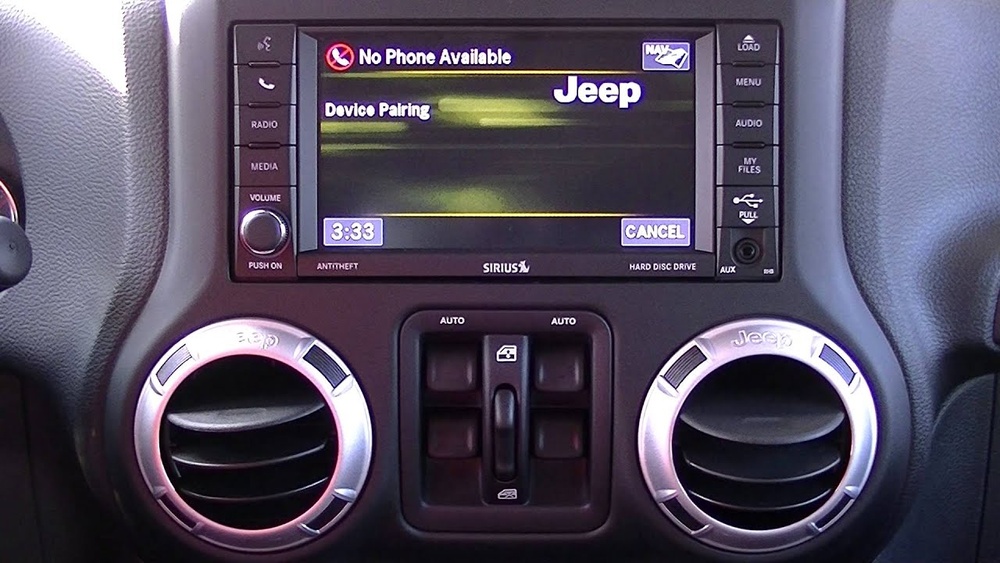
On the Uconnect touch screen:
- Press the Phone button.
- Tap Add Device or Pair a Phone.
The system will begin searching for Bluetooth devices.
4. Pair Your Devices
- On your phone, look for Uconnect in the list of available devices.
- Tap on it. A pairing code will show on both the Uconnect screen and your phone.
- Confirm the code matches, then tap Pair on your phone and Yes on the Uconnect screen.
Non-obvious insight: Some phones may ask for extra permissions. Always allow access to contacts and messages if you want hands-free features.
5. Finalize The Connection
Your phone should now be connected. The Uconnect display will usually show your phone’s name.
You may be asked if you want to make this your favorite or primary device.
6. Test The Connection
Try making a call or playing music to check if sound comes through your Jeep’s speakers.
Troubleshooting Common Problems
Even if you follow every step, you might face some issues. Here’s how to solve the most frequent problems:
| Problem | Quick Solution |
|---|---|
| Uconnect doesn’t see your phone | Restart both your phone and Uconnect system. Try pairing again. |
| Pairing code doesn’t show | Ensure your phone is visible and not paired to another device nearby. |
| Calls connect but no audio | Check the audio source on your phone. Select “Uconnect” for calls. |
| Music won’t play | Open your music app before connecting. Some apps need to run first. |
| Phonebook doesn’t sync | Allow contacts access during pairing. Re-pair if you denied permission. |
Tip: If all else fails, delete the device from both your phone and Uconnect, then pair again from scratch.
Key Features After Connecting
Once your phone is paired, you unlock several helpful features:
- Hands-free calling: Dial or answer without touching your phone.
- Text message reading: Some phones can have messages read out loud.
- Music streaming: Play audio from any app.
- Voice commands: Use Siri or Google Assistant for navigation and calls.
- Emergency calling: Quickly contact help if needed.
Most users miss that you can often connect more than one phone. If you share your Jeep, both you and a family member can set up your devices.
You just need to select the primary device in the Uconnect settings.
Differences: Iphone Vs. Android Connection
Connecting both iPhone and Android is mostly the same, but there are small differences:
| Feature | iPhone | Android |
|---|---|---|
| Contact Sync | Requires permission during pairing | Usually automatic, but check app permissions |
| Music Control | Works with Apple Music, Spotify, etc. | Works with Google Play, Spotify, etc. |
| Text Messages | May require Siri; not all messages read aloud | Often more flexible with Android Auto apps |
Non-obvious insight: Android phones may let you use Google Assistant fully through Uconnect, while iPhones might have some limitations, especially with reading new messages.
Upgrading Your Uconnect System
If your 2016 Jeep Wrangler’s Uconnect version feels outdated, check for software updates. Visit the official Uconnect website and enter your Vehicle Identification Number (VIN) to see if an update is available.
Updates can fix bugs and improve compatibility with newer phones.
For drivers who want even more features (like Apple CarPlay or Android Auto), consider aftermarket upgrades. Some companies offer kits that fit your Wrangler’s dash and add modern features. However, professional installation is recommended.
Using Wired Connections
Not all Jeep Wrangler 2016 models have USB ports for media or charging. If yours does, you can connect your phone with a USB cable for charging.
However, most 2016 Uconnect systems do not support direct phone-to-car media streaming over USB Bluetooth remains the main connection for music and calls.
Keeping Your Connection Secure
Bluetooth connections are generally safe, but there are a few privacy tips:
- Only pair in a secure location.
- Do not connect to unknown devices.
- Regularly delete old devices from Uconnect to avoid confusion or privacy issues.
Frequently Asked Questions
How Many Phones Can I Pair With My 2016 Jeep Wrangler?
You can pair up to seven phones, but only one can be connected at a time for calls and music. You can switch between phones in the Uconnect settings.
Why Can’t My Phone Find Uconnect?
Make sure Bluetooth is turned on and your phone is visible. If it still doesn’t work, restart both your phone and the Jeep’s system, and try again.
Can I Use Apple Carplay Or Android Auto In My 2016 Jeep Wrangler?
The factory Uconnect system does not support these features. You can add them with an aftermarket kit. For more details, see the official Uconnect site.
Why Won’t My Contacts Show Up On Uconnect?
You need to give permission for contacts to sync during the pairing process. If you missed it, delete the device and pair again, accepting all permission requests.
Is Bluetooth Audio Quality Good In The 2016 Jeep Wrangler?
Yes, Bluetooth audio is clear for most users, but wired connections may offer slightly better quality. Keep your phone’s volume at a medium level for best results.
Connecting your phone to your Jeep Wrangler 2016 is a simple process once you know the steps. With the right setup, you can enjoy hands-free calls, music, and more, making every drive safer and more enjoyable.
If you ever upgrade your phone or run into issues, refer back to these tips for a smooth experience.