Connecting your phone to your Jeep’s Bluetooth can make every drive safer and more enjoyable. You’ll be able to take calls hands-free, stream music, and use navigation apps without distraction.
Many Jeep owners don’t realize how easy this process is or the extra features they can unlock.
Whether you drive a newer model or an older Jeep, following the right steps is key. Let’s walk through everything you need to know, from pairing basics to troubleshooting and maximizing your Bluetooth experience.
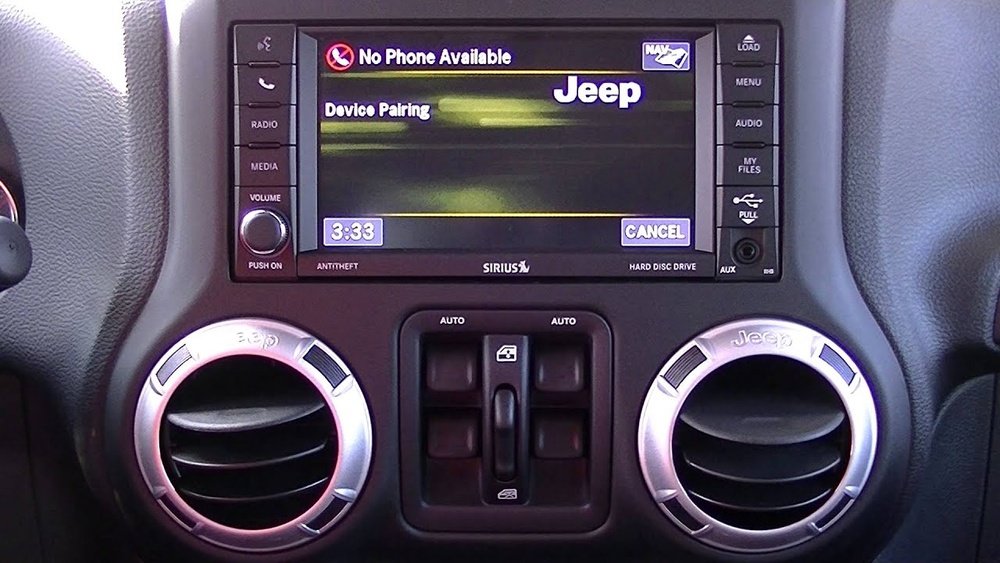
Understanding Jeep Bluetooth Features
Jeep vehicles, especially those from 2012 onwards, come equipped with Uconnect systems. These systems offer Bluetooth connectivity for calls, music, and some app controls. The features you get depend on your model and year.
Here’s a simple comparison of popular Jeep Uconnect versions:
| Jeep Model Year | Bluetooth Calls | Music Streaming | Voice Commands |
|---|---|---|---|
| 2012–2015 | Yes | Limited | Basic |
| 2016–2020 | Yes | Yes | Advanced |
| 2021–2024 | Yes | Yes | Full Integration |
If your Jeep is older than 2012, you may have to use an aftermarket Bluetooth adapter.
Step-by-step Guide: Pairing Your Phone
Connecting your phone is simple, but missing a step can lead to frustration. Here’s how to pair your phone with your Jeep:
- Turn on your Jeep and keep it in Park. Make sure the Uconnect screen is active.
- Open your phone’s Bluetooth settings. For Android, go to Settings > Connections > Bluetooth. For iPhone, go to Settings > Bluetooth.
- On your Jeep’s touchscreen, tap ‘Phone’ or ‘Media’. Select ‘Add Device’ or ‘Pair New Device’.
- Choose your Jeep from your phone’s Bluetooth list. The car should appear as ‘Uconnect’ or your Jeep model.
- Enter the pairing code displayed on your Jeep’s screen (usually a 4-digit number) into your phone.
- Confirm pairing on both devices. Your phone will show a prompt to allow contacts and media sharing—accept this for full functionality.
You should see a ‘Connected’ message. Now, you can make calls, stream music, or use navigation.

Common Issues And Troubleshooting
Pairing is usually easy, but problems can happen. Here are frequent issues and fixes:
- Bluetooth won’t connect: Restart your phone and Jeep. Delete old pairings from both devices and try again.
- Music not playing: Make sure media sharing is enabled. Check volume levels and choose Bluetooth as the audio source.
- Call audio drops: Move your phone closer to the Uconnect system or remove other devices interfering.
- Pairing fails repeatedly: Update your phone’s software and the Jeep’s Uconnect system if possible.
Most problems come from outdated software or multiple paired devices. For persistent issues, check Jeep forums or visit your dealership.
Enhancing Your Bluetooth Experience
Once connected, you can do much more than basic calls. Here are ways to get the most from your Jeep Bluetooth:
- Voice Commands: Use Uconnect voice controls for dialing, navigation, or music. Speak clearly and use short phrases.
- Streaming Apps: Play Spotify, Apple Music, or podcasts directly through your Jeep speakers.
- Multiple Devices: Pair up to 7 devices but only one active at a time. Switch devices in the Uconnect menu.
Here’s a comparison of what you can do with Bluetooth versus USB connection:
| Function | Bluetooth | USB |
|---|---|---|
| Hands-Free Calls | Yes | No |
| Music Streaming | Yes | Yes |
| App Integration | Limited | Full (with Android Auto/Apple CarPlay) |
| Charging | No | Yes |
If you want better sound quality or full app integration, use USB for some tasks.

Tips For Non-obvious Problems
Many Jeep owners overlook these details:
- Bluetooth resets after battery change: If you replace your Jeep’s battery, you may need to re-pair your phone. The Uconnect system loses memory during power loss.
- Hidden Bluetooth settings: Some Jeep models hide extra settings under ‘Settings’ > ‘Phone/Bluetooth’. Here, you can prioritize devices or change connection types.
Also, if your phone connects but doesn’t play music, check the audio source on the Uconnect screen sometimes it defaults to radio or USB.
Data And Compatibility
Bluetooth version matters for speed and reliability. Jeeps from 2016 onwards use Bluetooth 4.0+, which gives faster pairing and better audio. Older Jeeps may use Bluetooth 2.1, which is slower and has fewer features.
Here’s a quick compatibility table:
| Phone Bluetooth Version | Jeep Bluetooth Version | Pairing Success Rate | Features Supported |
|---|---|---|---|
| 4.0+ | 4.0+ | 99% | All |
| 4.0+ | 2.1 | 85% | Calls Only |
| 2.1 | 4.0+ | 90% | Calls, Some Music |
Always check your phone’s Bluetooth version if you have trouble pairing.
Frequently Asked Questions
How Many Devices Can I Pair With Jeep Bluetooth?
Most Jeep Uconnect systems allow you to pair up to seven devices. Only one device can be active for calls and music at any time.
Yes. Once connected, you can use navigation apps like Google Maps or Waze, and the audio directions will play through your Jeep speakers.
Does Bluetooth Drain My Jeep Battery?
Bluetooth uses very little power and does not drain your Jeep’s battery. If your battery is weak, you may have trouble with the Uconnect system, but Bluetooth itself is not the cause.
Can I Connect An Older Phone To A New Jeep?
Most new Jeeps use Bluetooth 4. 0+ and are backward compatible.
However, older phones may only support basic call functions, not music streaming.
Where Can I Find Official Jeep Bluetooth Instructions?
You can find official instructions on the Jeep Uconnect website. It has guides and videos for different Jeep models.
Connecting your phone to your Jeep’s Bluetooth unlocks safer, more convenient driving. With these steps and tips, you’ll avoid common mistakes and enjoy all the features your Jeep offers.
Remember, updating your phone and Uconnect system can fix most problems.
Now you’re ready to hit the road and stay connected.


















