Connecting your phone to a 2016 Jeep Compass unlocks a world of convenience. You can make calls hands-free, stream music, and use navigation apps—all without distractions. Many drivers struggle with pairing their devices, especially if they are not tech-savvy or have never used Bluetooth in a car before. This guide gives you step-by-step instructions and practical advice to help you connect your phone quickly and easily.
Understanding Your Jeep Compass System
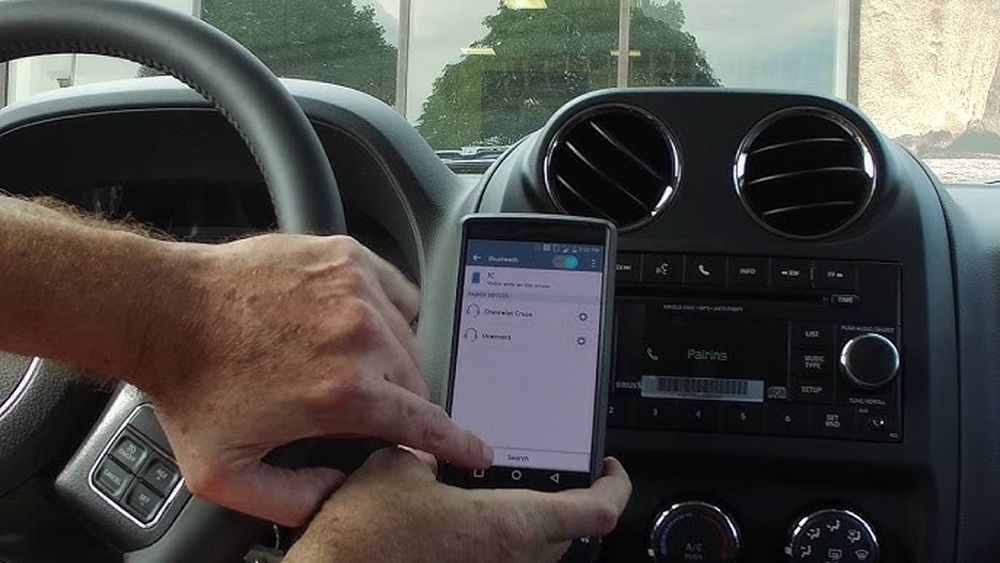
The 2016 Jeep Compass offers several ways to connect your phone: Bluetooth, USB cable, and auxiliary input. Most drivers prefer Bluetooth for wireless convenience. The Uconnect system is the main interface for these connections.
Many people do not realize that the Uconnect system must be in pairing mode before your phone can find it. Also, older phones sometimes require software updates to work smoothly.
If you know these details, you can avoid common mistakes and save time.
Connecting Via Bluetooth
Bluetooth is the most popular method because it allows you to use your phone without wires.
Step-by-step Guide
- Turn on Bluetooth on your phone.
- Start your Jeep and tap the “Phone” button on the Uconnect screen.
- Select “Pair a Device” on the display.
- On your phone, search for available Bluetooth devices.
- Choose “Uconnect” from the list.
- Confirm the pairing code shown on both your phone and the Uconnect screen.
- Accept the connection on your phone.
- Wait for the system to say “Pairing successful.”
If you cannot see Uconnect, make sure your phone is discoverable and close to the system. Some phones need to restart Bluetooth to show new devices.
Common Bluetooth Issues
- Connection failed: Restart both the phone and Uconnect.
- Audio not working: Set Uconnect as the main audio device in your phone settings.
- Frequent disconnects: Update your phone’s software and check for Uconnect updates.
Connecting Via Usb Cable
Using a USB cable is simple and reliable. It is best for charging and playing music.
How To Connect
- Plug your phone’s USB cable into the Compass’s USB port.
- Your phone may show a prompt to allow access.
- Select “Media” or “USB” on the Uconnect screen.
- You can play music directly from your phone.
Some phones do not support calls or text messages through USB. Check your phone’s compatibility if you want full features.
Using The Auxiliary Input
The auxiliary input is a small port for audio only. You need a standard 3.5mm cable.
Quick Steps
- Plug one end of the cable into your phone’s headphone jack.
- Insert the other end into the Jeep’s auxiliary port.
- Select “AUX” on the Uconnect screen.
- Play music or podcasts from your phone.
You cannot make calls or use apps with the auxiliary input. It is useful only for basic audio playback.

Comparison Of Connection Methods
To help you choose, here is a quick comparison:
| Method | Features | Reliability | Ease of Use |
|---|---|---|---|
| Bluetooth | Calls, music, navigation | Medium | Easy |
| USB Cable | Music, charging | High | Very Easy |
| Auxiliary Input | Music only | High | Easy |
Bluetooth offers the most features but sometimes disconnects. USB is stable but limited. Auxiliary is simple but only for sound.
Tips For A Smooth Connection
- Update your phone’s software before pairing.
- Keep your phone’s Bluetooth visible when connecting.
- Remove old devices from Uconnect to avoid confusion.
- Do not drive while setting up—do it when parked.
- If you use Android or iPhone, check for Uconnect app compatibility.
Many drivers forget to remove old phones from the Uconnect memory, which can cause pairing failures. Also, some apps work better with the Jeep system if you download the official Uconnect app.
Data Table: Compatible Phones And Features
Here is a summary of common phones and their features with the 2016 Jeep Compass:
| Phone Model | Bluetooth Calls | USB Music | App Support |
|---|---|---|---|
| iPhone 12 | Yes | Yes | Uconnect app |
| Samsung Galaxy S22 | Yes | Yes | Uconnect app |
| Google Pixel 5 | Yes | Yes | Limited |
| Older Android | Yes | Sometimes | No |
Non-obvious Insights
- Reset Uconnect: If you have trouble, a soft reset of the Uconnect system can clear errors. Hold the power button for 10 seconds until the screen restarts.
- Pairing Limit: The Jeep Compass can remember up to 8 devices. If you reach this limit, remove old devices before adding a new phone.
Most people do not know about the device limit or the reset trick, but these solve many stubborn issues.

Practical Example
Imagine you have a Samsung Galaxy S22. You want to play music and make calls. You turn on Bluetooth, open Uconnect, and select “Pair Device.” After confirming the code, you hear music through your car speakers. If you have trouble, you reset Uconnect, and the phone connects smoothly.
Data Table: Troubleshooting Steps
Here are the most common issues and their solutions:
| Problem | Solution |
|---|---|
| Bluetooth not found | Restart phone and Uconnect |
| Music not playing | Set Uconnect as audio output |
| Old device limit | Remove unused devices |
| App not working | Update phone and app |
Frequently Asked Questions
How Many Phones Can I Connect To My Jeep Compass?
You can store up to 8 devices in the Uconnect system. Only one can be active at a time.
Does Bluetooth Connection Work For Calls And Music?
Yes, Bluetooth handles both calls and music streaming. You need to set Uconnect as the main device for audio.
Can I Use Android Auto Or Apple Carplay In A 2016 Jeep Compass?
No, the 2016 Jeep Compass does not support Android Auto or Apple CarPlay. You can use apps through Bluetooth or USB but not full integration.
What Should I Do If My Phone Does Not Connect?
Try updating your phone and Uconnect system, remove old devices, and restart both systems. Sometimes a soft reset helps.
Is There An App For The Jeep Compass?
Yes, the Uconnect app can help with certain features. Check compatibility with your phone before downloading. For more details, visit the Jeep official website.
Connecting your phone to your 2016 Jeep Compass is simple with the right steps. Whether you use Bluetooth, USB, or auxiliary, each method has its own benefits. With the insights and tips above, you can enjoy your favorite music, make calls safely, and use navigation with ease. Take your time, follow the steps, and drive with confidence.


















