Getting your phone connected to your Jeep Compass via Bluetooth can make every drive more enjoyable and safer. With a Bluetooth connection, you can play music, make hands-free calls, and access your contacts without taking your eyes off the road.
But if you’re not familiar with car infotainment systems, the process can feel confusing at first. Let’s break down the steps and details you need to confidently connect your phone to your Jeep Compass Bluetooth system.
Why Connect Your Phone To Jeep Compass Bluetooth?
Bluetooth pairing does more than play music. Here’s why drivers connect their phones:
- Hands-free calling keeps your focus on driving.
- Audio streaming means your favorite playlists or podcasts play through your car speakers.
- Access to contacts and recent calls directly from your car’s display.
- Navigation voice guidance is heard clearly, making directions easier to follow.
Many states require hands-free devices by law. Connecting your phone helps you meet these regulations and stay safe.
Preparing Your Phone And Jeep Compass
Before pairing, make sure both your phone and the Jeep Compass system are ready.
- Check compatibility: Most smartphones with Bluetooth work with Jeep’s Uconnect system. Both Android and iPhone are supported.
- Update software: Update your phone’s operating system and your Uconnect system (if updates are available).
- Enable Bluetooth: On your phone, go to Settings and turn on Bluetooth.
- Ensure the car is in park: For safety, pairing is only possible when the Jeep Compass is in park mode.
Step-by-step: Pairing Your Phone With Jeep Compass Bluetooth
Follow these steps for a smooth connection:
- Start your Jeep Compass and leave it in park.
- On your Uconnect touchscreen, press the “Phone” button. If no phone is paired, the system prompts you to add a device.
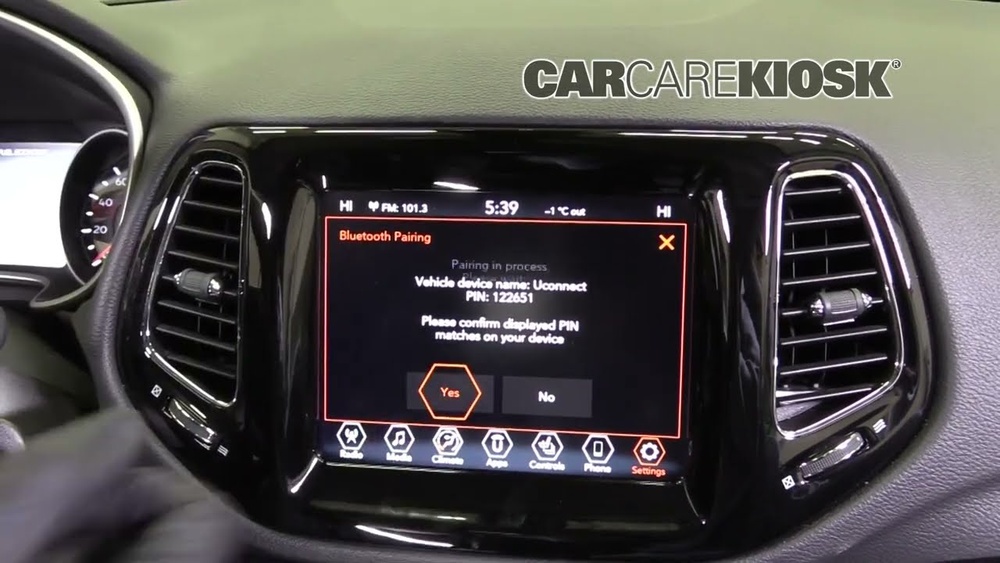
- Select “Add Device”. The system displays a unique PIN and becomes discoverable.
- On your phone’s Bluetooth menu, look for devices. Select “Uconnect” from the list.
- Enter the PIN shown on your Uconnect screen if prompted. Sometimes, your phone auto-connects if the PINs match.
- Approve any prompts to allow access to your contacts and call history.
- Wait for confirmation. The Uconnect screen will say “Phone successfully paired.”
Example Pairing Session
- You start your 2022 Jeep Compass, open the Uconnect screen, and press “Phone.”
- Your iPhone finds “Uconnect” in the Bluetooth list.
- You tap it, enter the PIN, and approve the pairing on your phone.
- Uconnect shows your phone as connected. Now, you can make calls and play music.
Troubleshooting Common Problems
Sometimes, pairing does not work right away. Here are ways to fix common issues.
Bluetooth Not Discovering Uconnect
- Make sure your phone’s Bluetooth is on and set to visible.
- Restart your phone and the Jeep’s infotainment system.
- Delete old paired devices from Uconnect and your phone.
Pairing Fails Or Drops
- Move your phone closer to the center console.
- Delete the Uconnect device from your phone’s paired list, then try again.
- Check for software updates on both your phone and Uconnect.
Contacts Not Showing Up
- On your phone, ensure you allowed Uconnect to access contacts.
- On iPhone: Go to Settings > Bluetooth, tap “i” next to Uconnect, and enable “Sync Contacts.”
- On Android: Bluetooth settings > Paired devices > Uconnect > enable contact sharing.

Quick Comparison: Jeep Compass Uconnect Versions
Not all Jeep Compass models have the same Uconnect system. Features depend on the year and trim.
| Uconnect Version | Screen Size | Bluetooth Features |
|---|---|---|
| Uconnect 4 | 7-inch | Hands-free calls, Audio streaming |
| Uconnect 4C NAV | 8.4-inch | Navigation, Enhanced phone integration |
| Uconnect 5 | 10.1-inch | Multiple device pairing, Faster response |
If you’re unsure which version you have, check your Jeep’s manual or the Uconnect home screen.
Tips For A Smooth Bluetooth Experience
- Keep Bluetooth on: If you turn off Bluetooth on your phone, you’ll need to reconnect each time.
- Limit paired devices: Too many paired phones can confuse the system. Remove old devices you no longer use.
- Set your phone as ‘favorite’: Uconnect lets you mark a phone as primary for auto-connection.
Real-world Example
If you and your partner both drive the Jeep Compass, you can pair both phones. Uconnect connects automatically to the last phone used or your favorite.
This avoids the hassle of manual switching each time.

Data: What Can You Do Once Connected?
Here’s a quick look at what Bluetooth lets you do in your Jeep Compass:
| Feature | How it Works | Notes |
|---|---|---|
| Make/receive calls | Use steering wheel buttons | Hands-free, safer driving |
| Play music | Stream via Spotify, Apple Music, etc. | Volume controlled by car |
| Access contacts | Search and call from Uconnect screen | Requires contact sync |
| Navigation prompts | Directions through car speakers | Works with phone navigation apps |
Advanced: Pairing Multiple Phones
You might want to connect more than one phone. Most Jeep Compass Uconnect systems support up to eight devices, but only one can be active for calls at a time.
- To add another phone, repeat the pairing steps.
- To switch between paired devices, use the “Phone” menu on the Uconnect screen.
- For music, Uconnect 5 allows audio from different phones, but older versions do not.

Security And Privacy Tips
- Unpair old phones before selling or trading in your Jeep Compass. This erases all call logs and contact info from the system.
- Review permissions: Only allow contact and message access if you’re comfortable sharing this data with the car.
- Set a PIN lock on your phone to prevent unauthorized access if it’s paired with your car.
Frequently Asked Questions
How Many Phones Can I Pair With My Jeep Compass?
Most Uconnect systems allow up to eight devices to be paired. However, only one phone can be active for calls at a time. You can easily switch between paired phones in the menu.
Does Bluetooth Pairing Use My Phone’s Data Plan?
Bluetooth itself does not use mobile data. However, streaming music or navigation may use data, depending on your phone’s apps and settings.
What Should I Do If My Phone Won’t Connect?
Try restarting your phone and the Uconnect system. Delete the paired device from both your phone and Uconnect, then try the pairing process again. If issues persist, check for software updates.
Is My Information Safe When My Phone Is Connected?
Your contacts and call history are stored in Uconnect for convenience. Always unpair your phone before selling the vehicle. For more on Bluetooth security, visit the National Highway Traffic Safety Administration.
Can I Play Music From Any App Through Bluetooth?
Yes, any audio from your phone, including Spotify, YouTube, Apple Music, or podcasts, can play through your Jeep Compass speakers via Bluetooth.
Connecting your phone to Jeep Compass Bluetooth offers convenience, better safety, and more enjoyment on the road. With these steps and tips, you’ll have your device paired in just a few minutes, ensuring every drive is smarter and more connected.


















