Changing the language settings in your Jeep is a small action that can make a big difference.
If you drive a Jeep in a country where English is not the main language, or you prefer another language for comfort, understanding how to change your vehicle’s language is important.
This guide will help you do it step by step, and explain key differences between Jeep models. You’ll also learn why correct language settings matter, common mistakes to avoid, and how to troubleshoot if things don’t go as planned.
Why Language Settings Matter In Your Jeep
The language setting controls all the display messages, navigation instructions, and audio prompts. When the language is set incorrectly, you may miss important alerts or have trouble using the infotainment system. This could lead to confusion or even unsafe driving situations. For example, warnings like “Low Tire Pressure” or “Check Engine” are easier to understand in your preferred language.
According to a survey by Statista, over 60% of drivers in Europe prefer their car’s infotainment system in their native language. Jeep offers support for over 20 languages in recent models, including Spanish, French, German, Italian, and Mandarin.
Step-by-step: Changing Language In Jeep Models
The process is straightforward, but it varies slightly based on the year and model of your Jeep. Below, you’ll find clear instructions for both touchscreen models and older, button-based systems.
For Touchscreen Models (2015 And Newer)
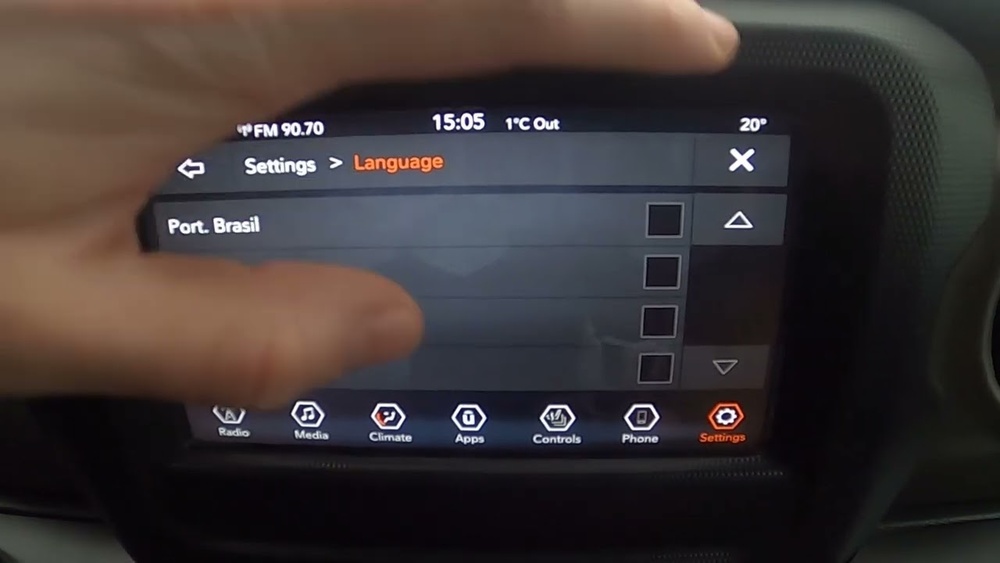
Most modern Jeeps use the Uconnect system. Here’s how to change the language:
- Turn on your Jeep and wait for the Uconnect screen to load.
- Tap the “Settings” icon (usually a gear symbol).
- Scroll down and select “Language”.
- Choose your preferred language from the list.
- Confirm your selection. The system will update immediately.
Older Jeeps use physical buttons and a basic display.
- Turn the key to the “On” position.
- Press the “Menu” or “Setup” button.
- Use the arrow buttons to navigate to “Language”.
- Press “Enter” to select.
- Scroll to your language choice and press “Enter” again.
- Wait for the display to change.
Model Differences: Quick Comparison
Here’s a summary showing how different Jeep models handle language changes:
| Model | Year Range | System Type | Languages Available | Change Method |
|---|---|---|---|---|
| Jeep Cherokee | 2015–2024 | Uconnect Touchscreen | 20+ | Touchscreen Settings |
| Jeep Wrangler | 2010–2014 | Button Display | 8 | Menu Button |
| Jeep Grand Cherokee | 2018–2024 | Advanced Uconnect | 25+ | Touchscreen Settings |

Common Mistakes When Changing Language
Many drivers make simple errors that can be avoided. Here are the top mistakes:
- Not saving changes: After selecting a language, some systems require you to confirm or save. Missing this step keeps the old language.
- Ignoring system restart: In some models, changes only take effect after restarting the vehicle.
- Choosing dialects: For example, Spanish (Mexico) is different from Spanish (Spain). Make sure you pick the right variant.
- Assuming all menus change: Some settings remain in the original language, especially in older models.
Troubleshooting Language Change Issues
If the language does not change or the menu freezes, try these steps:
- Restart the vehicle: Turn off the engine and wait 30 seconds before restarting.
- Reset Uconnect system: Hold the power button for 10 seconds. This can fix display glitches.
- Check for software updates: Outdated systems may have bugs. Visit a Jeep dealer for updates.
- Factory reset: As a last resort, reset the infotainment system. This erases all custom settings.
Quick Troubleshooting Comparison
See the table below for the most common issues and solutions:
| Problem | Possible Cause | Recommended Solution |
|---|---|---|
| Language won’t change | Unsaved changes | Confirm and save selection |
| Display freezes | System glitch | Restart or reset Uconnect |
| Missing language | Outdated software | Update at dealership |

Extra Tips For Smooth Language Change
- Always check your owner’s manual for model-specific steps.
- If you use navigation, confirm the language for both display and voice guidance.
- For rental Jeeps, reset the system to factory settings before changing language.
- If you travel often, add multiple languages in your profile if the system allows.
One insight many beginners miss: setting the language also changes units of measurement in some models, such as miles to kilometers. This can affect navigation and speed alerts.
Another detail: Bluetooth-connected devices may need to be re-paired after a language change, especially if voice commands differ.
Frequently Asked Questions
How Many Languages Does Jeep Support?
Most modern Jeep models support over 20 languages, with premium models like the Grand Cherokee offering up to 25. The available languages depend on the region and software version.
No, your radio stations and navigation favorites will stay the same. Only the display and voice prompts change. However, check units of measurement if you switch from English to a metric language.
Can I Change The Language Back To English Easily?
Yes. You can follow the same steps to return to English. If you can’t read the menu, look for the gear icon (settings) and select the top option, which is usually language.
What If The Language I Want Is Not Listed?
If your preferred language is missing, check for a software update. Some regions may not support all languages. Visit a Jeep dealership for help or check the official Jeep website.
Is Changing Language Safe For The System?
Yes, it is safe. Language changes are built into the system.
If you experience problems, a simple reset or software update can resolve most issues.
Changing the language in your Jeep is simple, but it’s important to follow the right steps for your model. Doing this makes driving safer and more comfortable. If you face any trouble, don’t hesitate to ask a Jeep dealer or check helpful guides like Jeep Official Site. With correct settings, you’ll enjoy every drive with clear instructions in your preferred language.




















