Losing function on your Jeep JL key fob can be frustrating. You press the button, but nothing happens. Often, the problem is a weak or dead battery inside the fob. The good news? Replacing the battery is simple and takes just a few minutes. You don’t need special tools or technical skills. With the right steps, you can save time and avoid a trip to the dealership.
This guide walks you through the process, including what battery to buy, the tools you need, and tips to avoid common mistakes. You’ll also find answers to frequent questions and some extra advice that most owners overlook.
Why Replacing The Key Fob Battery Matters
A working key fob is more than a convenience. It controls door locks, the alarm, and sometimes even remote start. When the battery is low, you might notice:

- Reduced range (you must be closer to unlock)
- Buttons not responding
- An alert on your dashboard
If you ignore these signs, the fob may stop working completely. That can leave you locked out or unable to start your Jeep JL.
What You Need Before Starting
Before you open your key fob, gather the following:
- CR2450 battery (this is the standard for Jeep JL key fobs)
- A small flathead screwdriver or a plastic pry tool
- Clean hands or gloves (to keep the new battery free from oils)
Not all coin batteries are the same. The CR2450 is slightly larger than common types like the CR2032. Double-check the number on your old battery before buying a replacement.
| Battery Type | Diameter | Thickness | Common Use |
|---|---|---|---|
| CR2450 | 24.5 mm | 5.0 mm | Jeep JL key fob |
| CR2032 | 20.0 mm | 3.2 mm | Watches, calculators |
Many stores sell these batteries. You can also find them online or at auto parts shops.
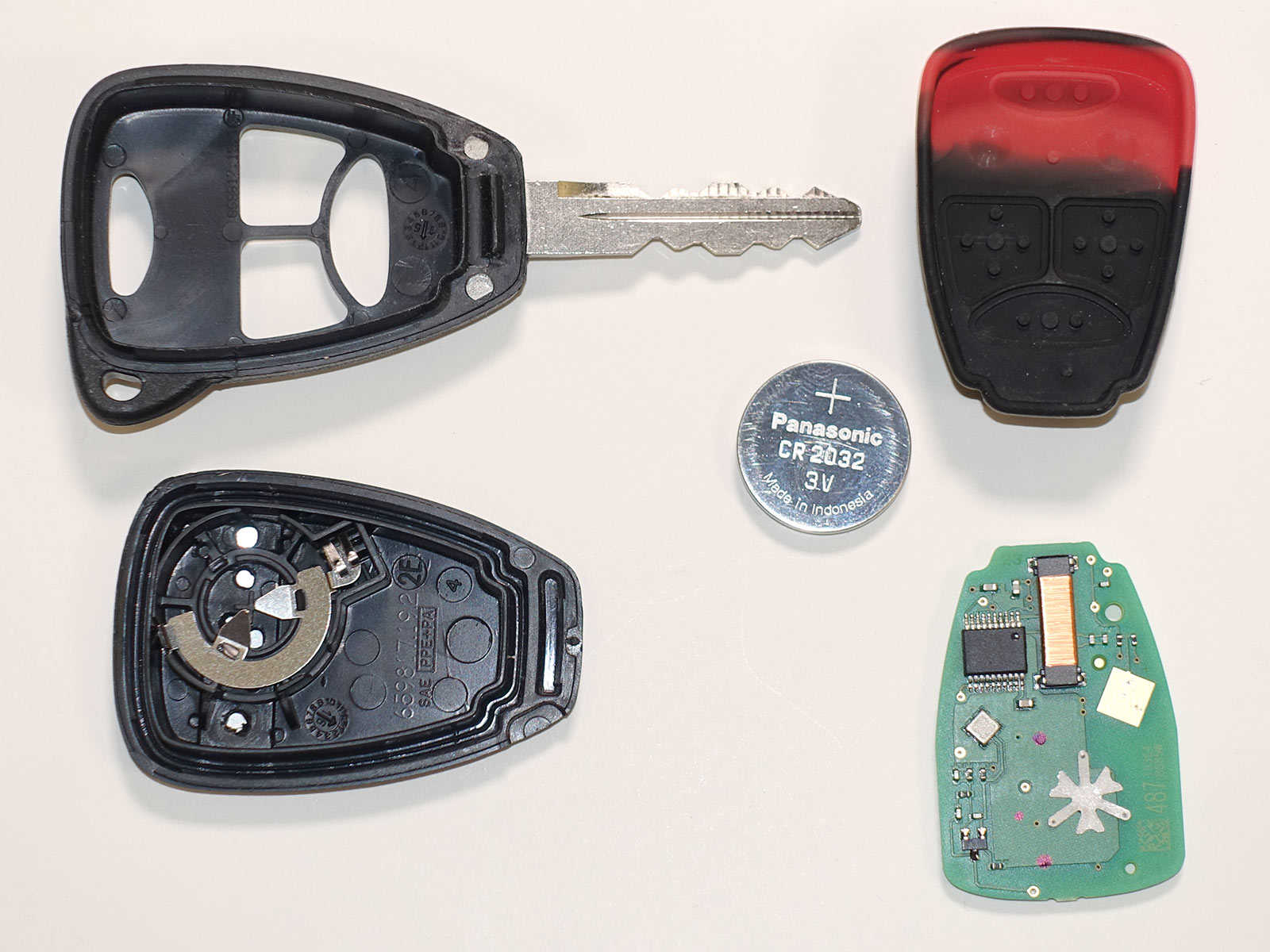
Step-by-step Guide: Changing The Jeep Jl Key Fob Battery
Follow these steps to change the battery safely:
- Remove the emergency key: Slide the small switch on the back of the fob. Pull the mechanical key out and set it aside.
- Open the fob case: Insert the flathead screwdriver or pry tool into the slot where the emergency key was. Gently twist to separate the two halves of the fob.
- Locate the battery: The battery is now visible. Note the direction of the plus (+) side—usually facing up.
- Remove the old battery: Carefully lift the battery out. If it’s stuck, use the tool to pry it up gently.
- Insert the new battery: Place the new CR2450 battery in the same direction. Press it until it clicks into place.
- Snap the case closed: Align the two halves of the fob and press until you hear a snap.
- Reinsert the emergency key: Slide it back into the slot.
Test your fob to make sure the buttons work. If not, check that the battery is installed correctly.
| Step | Action | Tip |
|---|---|---|
| 1 | Remove emergency key | Push switch fully for easy removal |
| 2 | Open fob case | Use plastic tool to avoid scratches |
| 3 | Remove old battery | Note battery orientation |
| 4 | Insert new battery | Avoid touching battery surface |
| 5 | Close case, test | Double-check alignment before snapping |
Tips Most Owners Miss
Many people change the battery but still face problems. Here’s what you should know:
- Clean contacts: If you see dust or corrosion, gently wipe the contacts with a dry cloth. Dirty contacts can stop the fob from working, even with a new battery.
- Avoid bending the battery holder: Don’t force the battery in. If the metal clips bend, the battery may lose contact.
- Don’t mix old and new batteries: Always replace with a fresh battery. Using an old spare can cause quick drain.
- Be gentle with the case: Forcing the fob open can crack the plastic. Use steady, gentle pressure.
- Check for water damage: If your fob got wet, dry it completely before installing the new battery.

Signs Your Key Fob Needs A New Battery
Some symptoms are easy to miss. Watch for:
- Intermittent locking/unlocking
- Needing to press buttons multiple times
- Dashboard warning (“Key Fob Battery Low”)
- Fob works only up close
If you notice any of these, change the battery soon to avoid being stranded.
When A New Battery Doesn’t Fix The Problem
Sometimes, the fob still doesn’t work after replacing the battery. Possible reasons include:
- Battery inserted upside down: Double-check the plus (+) and minus (–) sides.
- Dirty or bent contacts: Clean and realign carefully.
- Faulty fob: Rarely, the circuit board is damaged. You may need a replacement or professional repair.
If your Jeep JL still won’t recognize the fob, try the backup key or contact your dealer. More information is available from the Jeep official customer care page.

Comparing Diy And Dealer Replacement
Many owners wonder if they should do it themselves or go to the dealer.
| Method | Cost | Time Needed | Pros | Cons |
|---|---|---|---|---|
| DIY | $3–$10 | 5–10 minutes | Quick, cheap, convenient | Risk of case damage if rushed |
| Dealer | $20–$50 | 1–2 hours | Guaranteed correct | Higher cost, possible wait time |
For most, DIY is safe and reliable if you follow the steps and handle the fob carefully.
Frequently Asked Questions
How Long Does A Jeep Jl Key Fob Battery Last?
The key fob battery usually lasts 2–3 years, depending on use and climate. Frequent use or very cold weather can shorten battery life.
Can I Use A Cr2032 Battery Instead Of A Cr2450?
No, the CR2032 is smaller and won’t fit or make good contact. Always use a CR2450 for Jeep JL fobs.
What If My Key Fob Doesn’t Work After A Battery Change?
Check if the battery is installed correctly, and the contacts are clean. If it still fails, the fob may need reprogramming or professional repair.
Will Changing The Battery Erase My Jeep Fob Programming?
No. Replacing the battery does not affect the fob’s memory. Your fob will still work with your Jeep JL.
Where Can I Find The Right Battery For My Jeep Jl Key Fob?
You can buy a CR2450 battery at supermarkets, auto parts stores, or online. Always check the packaging to make sure it’s a trusted brand for best results.
A working key fob saves time and stress, especially when you’re in a hurry. With the right battery and a careful approach, you can keep your Jeep JL running smoothly and avoid unnecessary costs.


















