Pairing your phone or device to your Jeep Compass using Bluetooth can make your driving experience smoother, safer, and more enjoyable. With Bluetooth, you can take calls hands-free, stream your favorite music, and use voice commands.
But if you’ve never done it before, the process can feel confusing.
This guide makes it simple. Follow the steps, see the differences between Compass model years, and avoid common mistakes that many drivers make.
Why Connect Bluetooth In Your Jeep Compass?
Bluetooth is more than just a convenience—it’s a safety tool. Using your phone while driving is risky and often illegal. With Bluetooth, you keep both hands on the wheel and focus on the road. The Uconnect system in the Jeep Compass allows you to:
- Make and receive calls without picking up your phone
- Stream music and podcasts wirelessly
- Use voice commands to control apps
- Access your phonebook and recent calls on the touchscreen
These features help reduce distractions and make driving more comfortable, especially on long trips or in heavy traffic.
Step-by-step: Connecting Bluetooth On Jeep Compass
Not all Jeep Compass models have the same infotainment system. However, most 2017 and newer models use the Uconnect system.
Here’s a simple guide for connecting your device.
1. Prepare Your Device
- Make sure Bluetooth is turned on in your smartphone’s settings.
- Remove any old connections named “Uconnect” or “Jeep” to avoid confusion.
- Keep your phone close to the car—within a few feet.
2. Start The Jeep Compass
- Turn the ignition to “Run” or “On.”
- The car must be in Park to pair for the first time.
3. Access The Uconnect System
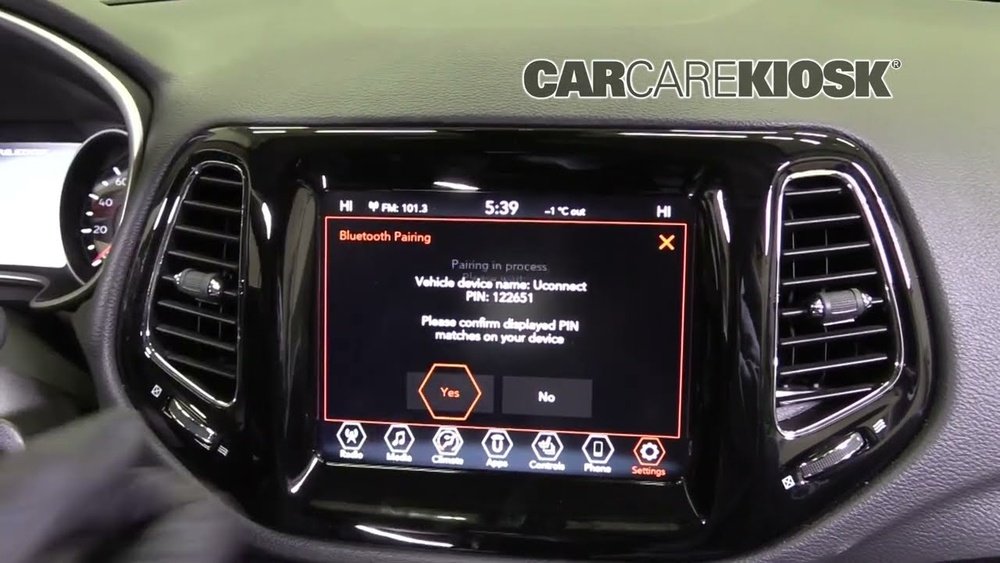
- Tap the Phone icon on the Uconnect touchscreen.
- If this is your first time pairing, the system will prompt you to add a device.
- If not, look for “Add Device” or “Pair a Device” in the Bluetooth settings.
4. Pair Your Phone
- On your phone, scan for available Bluetooth devices.
- Select “Uconnect” or “Jeep” from the list.
- A PIN code will appear on both the car screen and your phone. Make sure they match, then tap “Pair” or “Yes” on both devices.
5. Allow Access And Finish Setup
- Your phone may ask for permission to access contacts and messages. Tap Allow for full features.
- The Uconnect system will confirm when pairing is complete.
- Test by making a call or playing music.
Quick Reference: Pairing Steps
- Enable Bluetooth on your phone.
- Start your Compass and select Phone on Uconnect.
- Choose “Add Device.”
- Select “Uconnect” on your phone.
- Confirm the PIN and allow permissions.

Bluetooth Features By Jeep Compass Model Year
Different Compass models offer different levels of Bluetooth integration. Here’s a look at what you might get, depending on your car’s year.
| Model Year | Infotainment System | Bluetooth Features |
|---|---|---|
| 2017-2018 | Uconnect 4 (7”/8.4” screen) | Hands-free calls, audio streaming |
| 2019-2021 | Uconnect 4/4C | Voice command, phonebook access |
| 2022-2024 | Uconnect 5 | Wireless Android Auto, Apple CarPlay |
Insight: Some older models may require you to use USB for advanced features like text messaging or app control. Always check your owner’s manual if you’re not sure which system you have.
Common Problems And How To Fix Them
Even with a clear guide, you might run into issues. Here are the most common problems and how to solve them.
Bluetooth Not Connecting
- Restart both the phone and Uconnect system.
- Delete previous pairings on both devices and try again.
- Update your phone’s software and the Uconnect firmware if possible.
Poor Audio Quality
- Move your phone closer to the dashboard.
- Turn off other Bluetooth devices nearby.
- Check your phone’s media volume.
Calls Drop Or Don’t Connect
- Make sure your phone is set as the “primary” device in Uconnect.
- Some phones have battery-saving modes that turn off Bluetooth—disable these when driving.
Uncommon Issue: Connection Limit
Uconnect usually allows pairing multiple devices, but only one can be active at a time. If you reach the limit (usually 7-10 devices), remove old devices to add a new one.
Pro Tip: Factory-resetting Uconnect (see your owner’s manual) can solve rare pairing bugs, but this will erase all settings and saved data.

Comparing Bluetooth And Wired Connections
Many drivers wonder if Bluetooth or a wired USB connection is better for their Compass. Here’s a quick comparison.
| Feature | Bluetooth | USB/Wired |
|---|---|---|
| Hands-Free Calls | Yes | Yes |
| Music Streaming | Yes | Yes |
| App Control | Limited | Full (Android Auto/CarPlay) |
| Charging | No | Yes |
| Connection Stability | Good | Excellent |
Tip: For long trips, use wired connection for charging and app control, but Bluetooth is perfect for quick calls and short drives.
Two Insights Most Owners Miss
- Pairing Multiple Phones: Uconnect can remember several phones, but only one can connect at a time. You must manually switch between phones using the touchscreen menu.
- Voice Command Customization: You can train the Uconnect system to recognize your voice for better accuracy. This is found in the system settings under voice training.
Safety And Privacy Considerations
When selling or lending your Jeep Compass, always remove your phone from the Uconnect system. This protects your contacts, messages, and call history from being accessed by others. You can find this option under Bluetooth settings: “Remove Device” or “Forget Device.”
For more details on car infotainment and safety, visit the official NHTSA Technology Page.
Frequently Asked Questions
Can I Pair More Than One Phone To My Jeep Compass?
Yes, you can save multiple phones in the Uconnect system, but only one can be connected at a time. Switch between them using the touchscreen.
Why Isn’t My Music Playing Through Bluetooth?
Check if your phone’s media audio is enabled for Bluetooth. Also, make sure the car’s audio source is set to Bluetooth, not radio or USB.
How Do I Update My Uconnect System?
Updates are sometimes sent over-the-air or require a USB drive. Check your owner’s manual or visit your Jeep dealer for the latest firmware.
Does Bluetooth Work With Both Android And Iphone?
Yes, the Jeep Compass supports both Android and iPhone devices. Some features may work best with newer phone models and the latest Uconnect version.
Is It Safe To Use Bluetooth While Driving?
Bluetooth helps you keep your hands on the wheel, making it safer than using your phone directly. However, always set up devices before driving and avoid distractions.
Connecting Bluetooth in your Jeep Compass is simple once you know the steps. With these tips, you’ll enjoy a safer, more connected drive every time you hit the road.