Apple CarPlay availability in a 2020 Wrangler depends on the installed Uconnect system. A used listing may mention a touchscreen without proving the feature is present.
The quickest check is to identify the radio, connect a compatible phone with a good cable and review the matching Jeep documentation.
Quick Answer
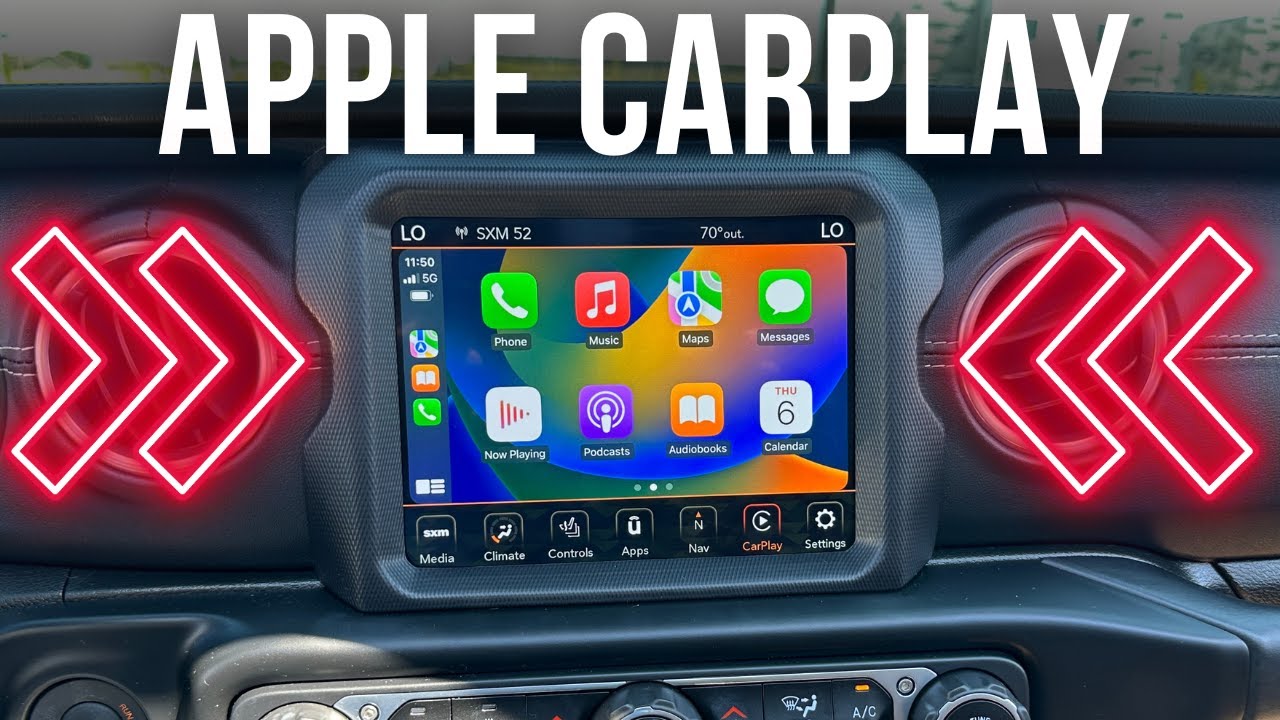
Yes, compatible 2020 Wrangler Uconnect systems support Apple CarPlay. Jeep’s 2020 quick-reference guide says the phone icon changes to the Apple CarPlay icon after a compatible device is connected and recognized. Confirm the radio in the exact Jeep.
Identify the Uconnect System
Screen size alone is not the complete answer. Review the radio information, build sheet and menu options.
Use a Reliable Cable
Jeep’s quick-reference guide warns that aftermarket cables may not work. Start with a known-good cable before diagnosing the vehicle.
Enable the Phone Settings
Unlock the iPhone and confirm Siri and required permissions are enabled.
Clean the USB Port Carefully
Dust, worn connectors and damaged cables can cause intermittent connection trouble.
Separate CarPlay From Bluetooth
Bluetooth audio and phone pairing do not prove CarPlay works. Test the wired app interface directly.
Key Details to Check
| Item | What to verify | Why it matters |
|---|---|---|
| Radio | Uconnect version and menu | Confirms feature support |
| Phone | Compatible iPhone and Siri setting | Completes setup |
| Cable | Known-good data cable | Avoids false diagnosis |
| USB port | Condition and connection stability | Finds intermittent faults |
| Test | CarPlay icon after recognition | Verifies the result |
Step-by-Step Review
- Identify the installed Uconnect system.
- Use a compatible unlocked iPhone.
- Enable Siri and permissions.
- Connect with a known-good data cable.
- Wait for the phone icon to change to CarPlay.
- Test another cable and phone before blaming the radio.
Common Mistakes to Avoid
- Assuming Bluetooth pairing equals CarPlay support.
- Using a charging-only cable.
- Buying a replacement radio before testing another phone.
- Ignoring lint or wear in the USB port.
- Applying advice from a different model year without checking the radio.
Save the Working Setup
Once the system works, note the cable and USB port used. That record helps when an intermittent problem returns.
Test Before Buying a Used Wrangler
Bring your phone and cable to the test drive. A two-minute connection test confirms more than a listing description.
Extended 2020 Wrangler Apple Carplay Support Checklist
The extended 2020 Wrangler Apple CarPlay support review begins with radio and phone. Confirm uconnect version and menu, then compare it with compatible iphone and siri setting before changing anything.
Keep the VIN, model year and one clear photo beside the notes. For 2020 Wrangler Apple CarPlay support, the aim is a verified next step supported by the Jeep in front of you, not a parts order or purchase decision copied from another vehicle.
- Start with radio: verify uconnect version and menu because confirms feature support.
- Move to phone: review compatible iphone and siri setting so the 2020 Wrangler Apple CarPlay support decision reflects completes setup.
- Inspect cable under safe conditions and connect the result with avoids false diagnosis.
- Write down usb port during the 2020 Wrangler Apple CarPlay support review before a repair quote, parts order or used-vehicle offer changes the original evidence.
- Confirm carplay icon after recognition when checking test, since verifies the result.
- Complete this 2020 Wrangler Apple CarPlay support action exactly once and save the result: identify the installed uconnect system.
- Use the model-year guide for 2020 Wrangler Apple CarPlay support while you use a compatible unlocked iphone.
- Photograph the relevant 2020 Wrangler Apple CarPlay support label, component, screen or fastener before you enable siri and permissions.
- Keep the earlier 2020 Wrangler Apple CarPlay support notes beside the Jeep while you connect with a known-good data cable.
- Pause the 2020 Wrangler Apple CarPlay support review and ask for qualified help before you wait for the phone icon to change to carplay.
- Finish the controlled 2020 Wrangler Apple CarPlay support sequence only after you test another cable and phone before blaming the radio.
- Avoid assuming bluetooth pairing equals carplay support. because it can hide the original 2020 Wrangler Apple CarPlay support result.
- Avoid using a charging-only cable. during the 2020 Wrangler Apple CarPlay support review when the next choice involves money, safety or an expensive component.
- Do not continue with buying a replacement radio before testing another phone. in the 2020 Wrangler Apple CarPlay support workflow until the earlier evidence is clear.
- Treat ignoring lint or wear in the usb port. as a sign that the 2020 Wrangler Apple CarPlay support checklist needs to return to the manual.
- Record why applying advice from a different model year without checking the radio. was rejected during the 2020 Wrangler Apple CarPlay support review.
- Keep the VIN, mileage, date and official source URL with the 2020 Wrangler Apple CarPlay support notes.
- Use a second opinion when the 2020 Wrangler Apple CarPlay support evidence conflicts with the dashboard, label, manual or road-test result.
Does 2020 Jeep Wrangler Have Apple Carplay Decision Table
| Checkpoint | Evidence to collect | How to use the result |
|---|---|---|
| Checkpoint 1: Radio | Uconnect version and menu | Use this checkpoint to decide the next 2020 Wrangler Apple CarPlay support action because confirms feature support. |
| Checkpoint 2: Phone | Compatible iPhone and Siri setting | Use this checkpoint to decide the next 2020 Wrangler Apple CarPlay support action because completes setup. |
| Checkpoint 3: Cable | Known-good data cable | Use this checkpoint to decide the next 2020 Wrangler Apple CarPlay support action because avoids false diagnosis. |
| Checkpoint 4: USB port | Condition and connection stability | Use this checkpoint to decide the next 2020 Wrangler Apple CarPlay support action because finds intermittent faults. |
| Checkpoint 5: Test | CarPlay icon after recognition | Use this checkpoint to decide the next 2020 Wrangler Apple CarPlay support action because verifies the result. |
Questions to Answer Before Closing the 2020 Wrangler Apple Carplay Support Review
- Does the 2020 Wrangler Apple CarPlay support answer match the exact model year and VIN?
- Which 2020 Wrangler Apple CarPlay support finding came from a label, measurement, scan result or manual page?
- What changed after the last 2020 Wrangler Apple CarPlay support test, repair or accessory installation?
- Which 2020 Wrangler Apple CarPlay support step belongs with a qualified technician rather than a home garage?
- Does the 2020 Wrangler Apple CarPlay support result support normal use, another controlled test or a workshop visit?
- Have the photos, receipts and source links been saved with the 2020 Wrangler Apple CarPlay support record?
Frequently Asked Questions
Is 2020 Wrangler Apple CarPlay wireless?
The 2020 quick-reference workflow describes connecting the phone through a USB port. Check the exact radio.
Why does the phone charge but CarPlay not start?
The cable may not support data, permissions may be disabled or the port may have a fault.
Does every 2020 Wrangler have the same radio?
No. Verify the installed Uconnect system.
- Does The 2017 Jeep Grand Cherokee Have Apple Carplay
- How To Reset Uconnect Jeep Wrangler 2020
- How To Get Apple Carplay On Uconnect
Final Takeaway
A 2020 Wrangler may support Apple CarPlay through its compatible Uconnect system. Confirm the radio, use a known-good data cable and test the phone settings before replacing hardware.