If your Uconnect system in a 2019 Jeep starts acting strangely—maybe the screen freezes, Bluetooth won’t connect, or navigation stops working—you’re not alone. Many Jeep owners experience glitches that can usually be fixed by resetting the Uconnect. This guide will show you how to reset your Uconnect Jeep 2019, explain when you should do it, and help you avoid common mistakes.
Why Reset Uconnect?
Your Uconnect system controls music, navigation, phone calls, and more. Sometimes, software issues or bad connections can cause problems. Resetting Uconnect can fix:
- Frozen screens
- Bluetooth pairing problems
- Unresponsive touch controls
- GPS errors
A reset often restores normal function without a trip to the dealer. Before you start, it’s good to know which type of reset your system needs.
Types Of Uconnect Resets
There are two main ways to reset Uconnect in a Jeep 2019:
- Soft Reset: This is the easiest and safest method. It simply restarts the system, keeping your settings and data.
- Factory Reset (Hard Reset): This erases all saved data and settings, restoring Uconnect to original factory condition.
The right reset depends on your issue. For minor glitches, a soft reset is usually enough. For serious problems, a factory reset may be needed.
Comparison Of Reset Types
Here’s a simple comparison to help you choose:
| Reset Type | Data Lost? | Time Needed | Common Use |
|---|---|---|---|
| Soft Reset | No | 2-5 minutes | Minor glitches |
| Factory Reset | Yes | 5-15 minutes | Major issues |

How To Do A Soft Reset
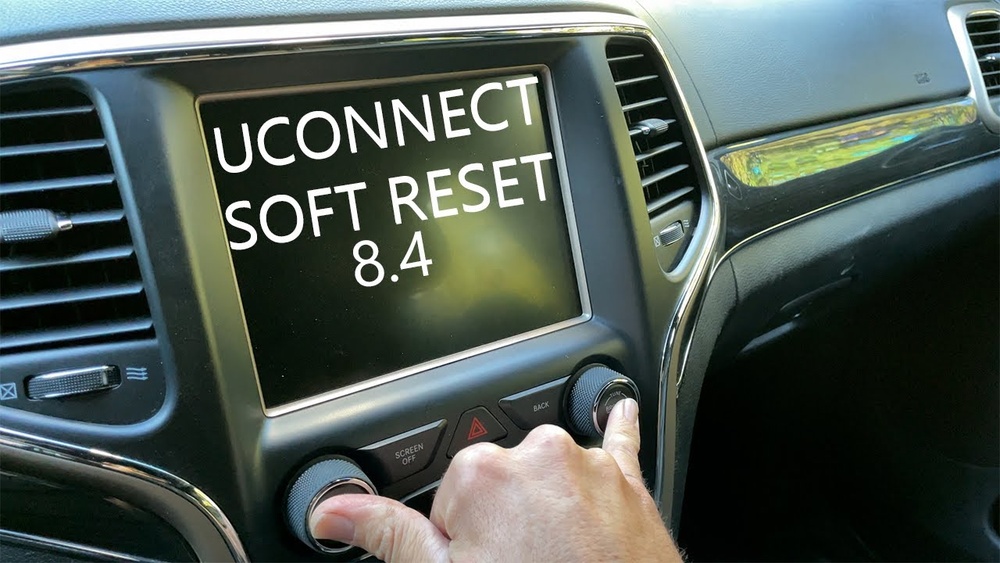
Most drivers start with a soft reset. This method works on Uconnect 4, 4C, or 4C NAV systems found in 2019 Jeeps.
- Turn the ignition on: The car should be in Run mode, but the engine doesn’t need to be running.
- Press and hold the volume and tuner knobs: Find these two knobs under the screen. Hold both for about 10 seconds.
- Wait for the screen to turn off: The Uconnect display will go black.
- Release the knobs: The system will restart and the Jeep logo will appear.
Your settings (radio presets, paired phones, etc. ) Will remain intact. If the issue is gone, you’re finished.
How To Factory Reset Uconnect
If the soft reset doesn’t help, try a factory reset. This will erase all data, so write down important info first.
- Access Settings: Tap “Settings” on the Uconnect touchscreen.
- Find System Information: Scroll down to “System Information” or “System Reset.”
- Select Factory Reset: Tap “Restore Settings” or “Factory Reset.”
- Confirm Action: Follow prompts to confirm. The system will reboot.
After this, your Uconnect will be like new. You’ll need to reconnect your phone, reset radio stations, and re-enter navigation favorites.
Factory Reset Data Comparison
Factory reset wipes your personal data. Here’s what gets erased:
| Data Type | Kept? | Need to Re-enter? |
|---|---|---|
| Radio Presets | No | Yes |
| Paired Phones | No | Yes |
| Navigation Favorites | No | Yes |
| Language Settings | No | Yes |

Common Mistakes To Avoid
Resetting Uconnect is simple, but some mistakes can cause trouble:
- Resetting while driving: Always reset when parked for safety.
- Forgetting your data: Write down your favorite radio stations and navigation points before a factory reset.
- Skipping updates: Sometimes, glitches are fixed with software updates. Check for updates before resetting.
- Holding knobs too briefly: For a soft reset, hold both knobs at least 10 seconds.
When To Visit A Dealer
If your Uconnect still doesn’t work after both resets, professional help may be needed. Problems like hardware failure, faulty wiring, or deep software bugs require a dealer or certified repair shop.
Dealer Vs Diy Reset
Should you try to fix Uconnect yourself or go to a dealer? Here’s a quick comparison:
| Method | Cost | Skill Needed | Success Rate |
|---|---|---|---|
| DIY Reset | $0 | Basic | High for minor issues |
| Dealer Service | $50-$200 | None | High for major issues |
Real-world Example
A Jeep owner named Alex experienced a frozen Uconnect screen after updating his phone. He tried a soft reset, which fixed the problem instantly. Later, he noticed Bluetooth still had issues. A factory reset solved this, but Alex had to re-enter all his radio stations and navigation favorites.
This example shows that both resets can help, but it’s smart to plan for lost data.
Extra Tips For Reliable Uconnect Use
- Update your system regularly: Updates fix bugs and improve performance.
- Avoid connecting too many devices: Too many Bluetooth connections can cause confusion.
- Restart after long trips: If you notice slowdowns, a soft reset can refresh the system.
- Check Jeep forums: Owners share solutions for rare problems. For deep troubleshooting, official sources like Jeep Uconnect can help.
Frequently Asked Questions
How Often Should I Reset Uconnect?
Reset only when you notice problems. Regular resets aren’t necessary and won’t improve performance.
Will Resetting Uconnect Delete My Music Or Maps?
A soft reset won’t delete anything. A factory reset will erase radio presets, paired phones, and navigation favorites, but not factory-installed apps.
Can I Reset Uconnect Without Turning Off The Engine?
Yes, but for safety, it’s best to reset when parked. The system restarts quickly, but avoid distractions while driving.
Does Uconnect Reset Fix All Problems?
It fixes most software issues like freezing or Bluetooth errors. Hardware problems or deep software bugs may need dealer service.
Are There Risks To Resetting Uconnect?
Risks are low. Factory reset erases your data, so make backups. If your system doesn’t restart, contact a dealer.
Resetting the Uconnect Jeep 2019 is quick and simple when you know the steps. Start with a soft reset for small problems, and use a factory reset if issues continue. Remember to back up your data, check for updates, and only reset when parked. With these steps, your Uconnect should work smoothly for years to come.