Pairing your smartphone with your Jeep’s Bluetooth system can make driving safer and more enjoyable. You get hands-free calls, music streaming, and even voice commands.
But for many Jeep owners, the pairing process is confusing, and a few small mistakes can stop everything from working.
This guide will walk you through pairing Jeep Bluetooth step by step, highlight common issues, and offer smart tips that most people miss.
Understanding Jeep Bluetooth: What You Need To Know
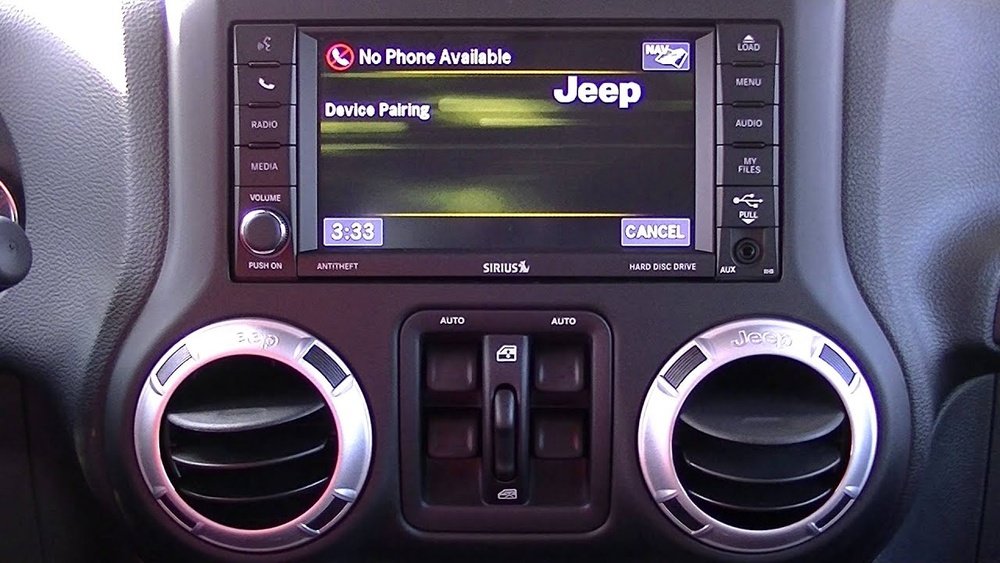
Most newer Jeep models come with Uconnect, Jeep’s infotainment system. Uconnect supports Bluetooth pairing for both Android and iOS devices. Features like hands-free calling, text message reading, and streaming music all rely on Bluetooth.
Not all Jeeps have Bluetooth. If your Jeep is older than 2012, check your owner’s manual or look for the Bluetooth symbol on your dashboard. If you see “Uconnect” on your screen, Bluetooth pairing is likely available.
Popular Jeep Models With Bluetooth
Here’s a quick look at which Jeep models and years usually come with Bluetooth as a standard or optional feature:
| Jeep Model | Bluetooth Availability (Year) |
|---|---|
| Wrangler | 2012 and newer |
| Grand Cherokee | 2011 and newer |
| Cherokee | 2014 and newer |
| Renegade | 2015 and newer |
| Compass | 2017 and newer |
If your Jeep model is on this list, you’re ready to pair!
Step-by-step: How To Pair Jeep Bluetooth
Follow these steps to connect your phone to your Jeep’s Bluetooth system.
- Start your Jeep and park safely. Leave the vehicle in “Park” mode.
- Turn on Bluetooth on your phone. Make your device “discoverable.”
- On your Jeep’s Uconnect screen, press the “Phone” or “Media” button.
- Select “Pair a Device” or “Add Device.”
- On your phone, look for your Jeep’s name (like “Uconnect” or “Jeep”) in the Bluetooth list.
- Tap on it. A PIN number will appear on both your phone and the Uconnect screen.
- Confirm the PIN matches on both devices, then accept/pair on both.
- Wait for the system to finish connecting. You may be asked for permissions (contacts, calls, messages)—agree if you want full functionality.
Quick Comparison: Android Vs Iphone Pairing
| Step | Android | iPhone |
|---|---|---|
| Bluetooth Menu | Settings > Connections > Bluetooth | Settings > Bluetooth |
| Device Name | “Uconnect” or “Jeep” | “Uconnect” or “Jeep” |
| Permissions | May ask for calls, contacts, audio | May ask for sync, notifications |
Tip: If pairing fails, restart both devices. Sometimes, simply turning Bluetooth off and on again fixes the problem.
Common Problems And How To Fix Them
Even with the right steps, pairing can fail. Here are some issues and solutions:
- Bluetooth won’t connect: Delete old devices from Uconnect (it usually supports only 5-7 devices). Try pairing again.
- No sound during calls: Make sure your phone’s “Media” and “Call Audio” are enabled for the Jeep connection.
- Music won’t play: Some phones only connect for calls by default. Go to Bluetooth settings and allow audio/media streaming.
- Pairing not found: Make sure your phone is visible/discoverable. Some phones turn off discoverability after a few minutes.
Advanced Insight: Uconnect Software Updates
Many owners don’t realize that Uconnect software updates can fix Bluetooth bugs. Check the Jeep or Uconnect website using your VIN number for updates. If your system is outdated, Bluetooth features may not work well with newer phones.
What You Can Do With Jeep Bluetooth
Pairing your phone unlocks several features:
- Hands-free calling
- Text message reading
- Streaming music or podcasts
- Voice commands (say “Call John” or “Play music”)
For the best experience, keep your phone’s Bluetooth on and update your phone’s operating system regularly.
Table: Bluetooth Feature Availability By Uconnect Version
| Uconnect Version | Hands-Free Calling | Text Messaging | Music Streaming |
|---|---|---|---|
| Uconnect 3.0 | Yes | No | Yes |
| Uconnect 4.0/4C | Yes | Yes | Yes |
| Uconnect 5.0 and above | Yes | Yes | Yes |
Important: Not all features are available in every country or with every phone.
Extra Tips For Reliable Pairing
- Delete old pairings you don’t use. Uconnect has a pairing limit.
- Keep your phone’s software updated. Old operating systems can cause problems.
- If you switch phones, remove the old device from the Jeep system before pairing the new one.
- USB connection as a backup: If Bluetooth continues to fail, use a USB cable. You’ll still get music and some apps, but not hands-free calls.
Safety Reminder
Always pair your device before you start driving. Setting up Bluetooth while driving is dangerous and illegal in many places.
When To Get Help
If you follow these steps and still can’t connect, visit your local Jeep dealer. Sometimes, the infotainment system needs a professional reset or a software update. You can also get help directly from the official Jeep Uconnect site.
Frequently Asked Questions
Why Does My Jeep Bluetooth Keep Disconnecting?
Bluetooth can drop if your phone’s battery saver is on, or if there are too many devices saved in Uconnect. Try deleting unused devices and keeping your phone charged.
How Many Phones Can I Pair With Jeep Bluetooth?
Most Uconnect systems store up to seven devices. Only one can be active at a time for calls and streaming.
Does Bluetooth Pairing Work With All Phones?
Most modern smartphones work, but very old phones or models with custom software may have problems. Check your owner’s manual for a list of compatible devices.
Can I Pair Two Phones At The Same Time?
Uconnect lets you store multiple phones, but only one connects for calls and audio at a time. You can switch between devices in the settings menu.
What Do I Do If The Pin Doesn’t Match?
If the PIN on your phone and Uconnect screen don’t match, cancel and try again. Double-check you’re connecting to the right Jeep device, especially if there are other Bluetooth cars nearby.
Pairing Jeep Bluetooth is simple when you follow the right steps and keep your system updated. You’ll enjoy safer driving and better convenience every trip.