Connecting your phone to a 2017 Jeep Wrangler can make driving safer and more enjoyable. You’ll get hands-free calling, music streaming, and access to apps without touching your phone. Many owners don’t realize how easy it is to set up Bluetooth or use USB for media. This guide will walk you through every step, highlight common mistakes, and offer tips to make the connection smooth.
Understanding Your Jeep Wrangler’s Connectivity Options
The 2017 Jeep Wrangler offers two main ways to connect your phone: Bluetooth and USB. Bluetooth is best for calls and wireless music. USB is good for charging and playing music directly from your device. It’s important to know which system your Jeep has. The most common is the Uconnect system, which supports both methods.
| Connection Method | Features | Best For |
|---|---|---|
| Bluetooth | Hands-free calls, audio streaming | Wireless convenience |
| USB | Charging, music playback | Stable connection |
How To Connect Your Phone Via Bluetooth
Connecting via Bluetooth is simple, but beginners often miss a few key steps.
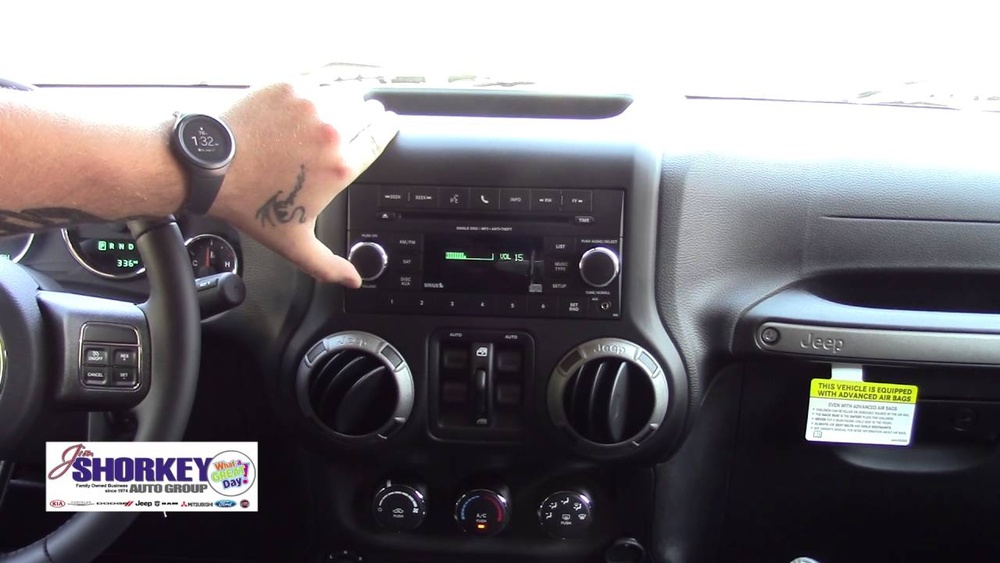
- Turn on Bluetooth on your phone. Find it in Settings, then switch it on.
- Start your Jeep Wrangler and turn on the Uconnect system.
- Press the Phone button on the Jeep’s dashboard or touchscreen.
- Select “Pair a Device” on the Uconnect screen.
- Your Jeep will display a unique PIN number.
- On your phone, look for “Uconnect” under available devices.
- Tap “Uconnect” and enter the PIN if prompted.
- Wait for the confirmation message on both your phone and Jeep’s screen.
Most phones connect in less than a minute. If pairing fails, restart your phone and repeat the steps.
Common Bluetooth Mistakes
- Forgetting to turn on Bluetooth before pairing.
- Trying to pair while the Jeep is in motion.
- Not deleting old devices that cause conflicts.

How To Connect Using Usb
USB is reliable for music and charging. Here’s how to use it:
- Find the USB port in your Jeep. It’s usually under the center console or dashboard.
- Plug your phone into the port using a certified USB cable.
- The Uconnect system should detect your phone. A message will pop up.
- Select “Media” or “USB” on the Uconnect screen to access your files.
- Use the Jeep’s controls to play music or select tracks.
USB is quicker for charging and doesn’t rely on wireless signals. If your phone isn’t recognized, try a different cable or port.
What If Your Jeep Wrangler Doesn’t Recognize Your Phone?
Sometimes, the system doesn’t detect your phone. Here’s how to fix it:
- Make sure your phone’s software is up to date.
- Restart the Uconnect system by turning off the Jeep and restarting it.
- Try a different USB cable. Cheap cables often fail.
- Delete old paired devices from Uconnect memory.
- For Bluetooth, check if your phone is in “discoverable” mode.
If you still have trouble, visit your Jeep dealer or check for updates at the official Jeep support page.
Advanced Tips For Better Connectivity
Many drivers miss these two smart tricks:
- Customize your Uconnect settings. Adjust notification and audio preferences for less distraction.
- If you use navigation apps, enable “Do Not Disturb” on your phone to block calls while driving.
You can also connect multiple phones, but only one can be the main device for calls.
| Feature | Bluetooth | USB |
|---|---|---|
| Music Quality | Good | Better |
| Charging Speed | None | Fast |
| Phone Calls | Yes | No |
How To Disconnect Or Remove Your Phone
If you want to switch devices or remove your phone:
- Go to the Uconnect settings menu.
- Select “Paired Devices.”
- Choose your phone and select “Remove” or “Forget.”
- Confirm removal.
This clears your phone from the Jeep’s memory, making room for new devices.
Keeping Your Connection Secure
Always use a strong screen lock on your phone. Never share your Uconnect PIN with others. Update your phone and Uconnect system regularly to protect against security risks. If you’re worried about privacy, disable automatic sync features.
Troubleshooting: Fast Solutions
Here are quick fixes for common problems:
- Bluetooth won’t connect: Restart your phone and Uconnect. Delete old pairings.
- USB not detected: Try a new cable. Clean the port.
- Audio not playing: Set your phone’s audio output to “Uconnect.”
- Calls drop: Move your phone closer to the Jeep’s dashboard.
For detailed troubleshooting, visit the official Jeep Uconnect support page or check out Jeep Uconnect.

Frequently Asked Questions
How Many Phones Can I Connect To My 2017 Jeep Wrangler?
You can connect up to seven devices to Uconnect, but only one phone can be active for calls at a time.
Can I Use Apple Carplay Or Android Auto In My 2017 Jeep Wrangler?
The 2017 Wrangler does not support Apple CarPlay or Android Auto natively. You can use Bluetooth or USB for basic functions.
Why Does My Bluetooth Connection Drop During Calls?
This happens if your phone is too far from the dashboard or if there’s interference. Keep your phone nearby and avoid other Bluetooth devices.
Does Usb Connection Work For All Phones?
Most modern phones work with USB. If yours isn’t recognized, check for software updates or try a certified cable.
How Can I Improve Music Quality In My Jeep Wrangler?
Use the USB connection for the best audio quality. Bluetooth is convenient, but USB gives clearer sound and faster charging.
Connecting your phone to your 2017 Jeep Wrangler is easy once you know the steps. With Bluetooth and USB options, you’ll enjoy safer driving and better entertainment. Always keep your system updated and follow these tips for the best experience.


















