Connecting your Bluetooth device to a 2016 Jeep Wrangler is easier than most people think. Many drivers are surprised to discover how quickly they can sync their phones and start enjoying hands-free calls, music streaming, and voice commands.
If you’re unsure about the process, you’re not alone—Bluetooth pairing can seem confusing if you’re new to it. This guide will walk you through every step, explain the features, and help you avoid common mistakes.
You’ll also find practical tips to make your connection smooth and reliable.
Understanding Bluetooth In The 2016 Jeep Wrangler
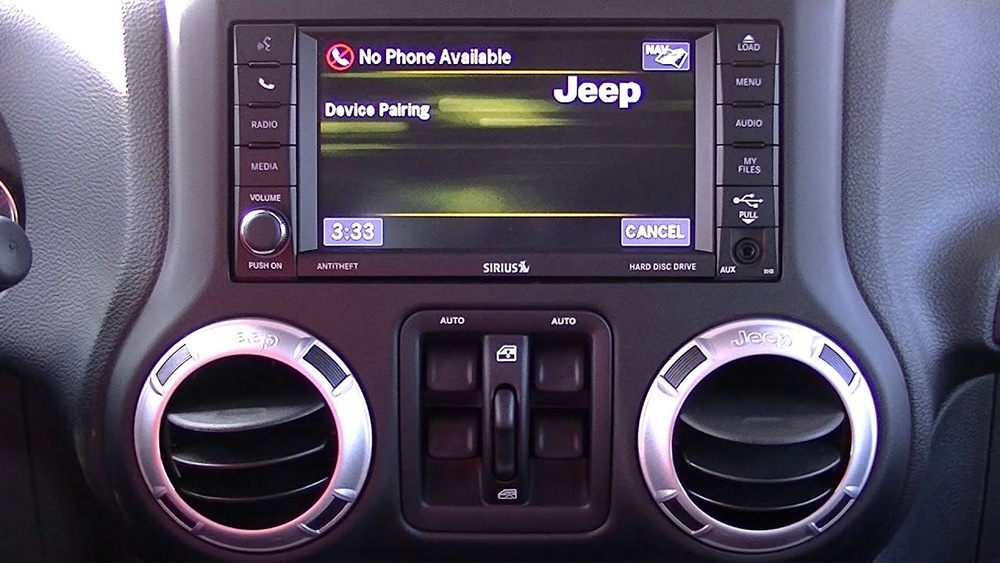
The 2016 Jeep Wrangler comes with a Uconnect system. This system lets you connect your phone or other devices via Bluetooth for audio and communication. Uconnect is built into most Wrangler models, but not all trim levels have the same features. If your Jeep has the touchscreen display, you likely have Uconnect with Bluetooth capability.
Here’s a quick look at Uconnect Bluetooth features:
- Hands-free calling
- Audio streaming
- Voice command functions
- Phonebook access
Some drivers miss that Uconnect only supports certain devices. Always check your phone’s compatibility before pairing.
Step-by-step Guide To Bluetooth Pairing
Pairing your phone with your Jeep’s Uconnect system takes just a few minutes. Follow these steps to connect Bluetooth to your 2016 Jeep Wrangler:
1. Prepare Your Device
- Make sure your phone’s Bluetooth is turned on.
- Delete any old pairings you don’t use. This prevents conflicts.
2. Access Uconnect Settings
- Turn on your Jeep and wait for the Uconnect screen to power up.
- Press the “Phone” or “Settings” button on the display.
3. Start Pairing Mode
- Select “Add Device” or “Pair New Device” on the Uconnect screen.
- Uconnect will show a prompt: “Ready to pair. Please search for Uconnect on your device.”
4. Connect Your Phone
- On your phone, go to Bluetooth settings.
- Find “Uconnect” under available devices.
- Tap “Uconnect” to start pairing.
5. Enter The Pin
- Uconnect will show a PIN on the Jeep’s display.
- Enter the same PIN on your phone (or confirm if it matches).
6. Finalize The Connection
- Wait for confirmation. Your phone should show “Connected.”
- Uconnect will ask if you want to sync contacts. Approve for hands-free calls.
7. Test The Connection
- Try making a call or playing music to check if everything works.
Most problems happen if you miss the PIN step or if your phone’s software is outdated. Updating your phone often fixes issues.

Common Problems And Solutions
Even with clear steps, pairing sometimes fails. Here are some frequent issues and solutions:
- Bluetooth won’t find Uconnect: Restart your phone and Uconnect system. Make sure no other device is connected.
- Connection drops: Move the phone closer to the Jeep’s dashboard. Remove interference like other Bluetooth devices.
- Poor sound quality: Check your phone’s audio settings. Sometimes, turning off Wi-Fi improves Bluetooth stability.
- Contacts won’t sync: Approve all prompts during pairing. If it still fails, re-pair the device.
Many beginners forget to remove old devices from Uconnect. This can block new connections. Always clear unused pairings.
Extra Tips For Reliable Bluetooth
You can improve your Jeep Wrangler’s Bluetooth experience with these tips:
- Keep your phone’s software updated.
- Use high-quality charging cables; poor cables can interfere with Bluetooth.
- Avoid pairing too many devices at once.
- For music, use apps that support Bluetooth streaming.
- If you change phones, remove the old one from Uconnect first.
One insight many drivers miss: Bluetooth range is limited, usually about 30 feet. If you leave your phone in the trunk or a bag, connection may drop.
Comparison: Uconnect Vs. Other Car Bluetooth Systems
Below is a quick comparison of Uconnect and other popular car Bluetooth systems.
| Feature | Uconnect (2016 Jeep Wrangler) | Ford Sync | Toyota Entune |
|---|---|---|---|
| Hands-free calling | Yes | Yes | Yes |
| Audio streaming | Yes | Yes | Yes |
| Voice commands | Basic | Advanced | Basic |
| Contact sync | Yes | Yes | Yes |
| App integration | Limited | Good | Good |
Uconnect is reliable but has fewer advanced voice features than Ford Sync. For music and calls, it performs well.
Supported Devices And Compatibility
Not all phones connect equally well. Here’s a comparison of popular device compatibility with the 2016 Jeep Wrangler.
| Device | Bluetooth Version | Works with Uconnect? | Notes |
|---|---|---|---|
| iPhone 6/7/8/X | 4.2 | Yes | Best performance |
| Samsung Galaxy S6/S7/S8 | 4.0/4.2 | Yes | Occasional contact sync issues |
| Google Pixel | 4.2 | Yes | Stable connection |
| Older phones (pre-2015) | 3.0 | Sometimes | May not support audio streaming |
Always check your phone’s Bluetooth version. Newer versions give stronger connections and more features.

Practical Example: Connecting An Iphone
Let’s use the steps above for an iPhone 7:
- Enable Bluetooth on the iPhone.
- Start Jeep and open Uconnect Phone menu.
- Tap “Add Device.”
- Select “Uconnect” on the iPhone.
- Enter the PIN shown on Jeep’s display.
- Accept contact sync prompt.
- Make a test call.
Most iPhone users report smooth pairing. If your contacts don’t sync, restart the phone and try again.
Data: Bluetooth Usage In Cars
According to a 2023 study, over 78% of US drivers regularly use Bluetooth in their vehicles. The main reasons are hands-free safety and music streaming. The 2016 Jeep Wrangler is part of this trend, helping drivers stay safe and connected.
For more details, see the National Highway Traffic Safety Administration.
Frequently Asked Questions
How Many Devices Can I Pair With Uconnect?
You can pair up to seven devices, but only one can be active at a time.
What Should I Do If My Phone Won’t Connect?
First, restart both your phone and the Uconnect system. Delete unused pairings and try again.
Does Bluetooth Work With All Music Apps?
Most music apps work, but some may need updates. Streaming apps like Spotify and Pandora are reliable.
Is Bluetooth Available In All 2016 Jeep Wrangler Models?
Most models have Bluetooth, but some base trims may lack it. Check your owner’s manual for details.
Can I Use Voice Commands Through Bluetooth?
Yes, but voice command features are basic. You can make calls and use simple functions.
Connecting Bluetooth to your 2016 Jeep Wrangler unlocks safer driving and better entertainment. With the right steps and a few smart tips, you’ll enjoy a dependable connection every time.
If you ever have trouble, remember the solutions and insights from this guide.
Your Jeep is ready to keep you connected wherever you go.


















