If you’re driving your Jeep and suddenly see the brake warning light on your dashboard, it can be worrying. This light often means something needs attention, but sometimes the issue is already fixed and the light just needs to be reset. If you’ve checked your brakes, repaired or replaced parts, and the brake light is still on, resetting it can help. Many Jeep owners want to know how to reset this light themselves, save a trip to the mechanic, and keep their Jeep running safely. In this article, you’ll learn how to reset the brake light on a Jeep, understand what causes it to turn on, and find answers to common questions. This will help you handle the situation with confidence and avoid common mistakes.
Why The Brake Light Comes On
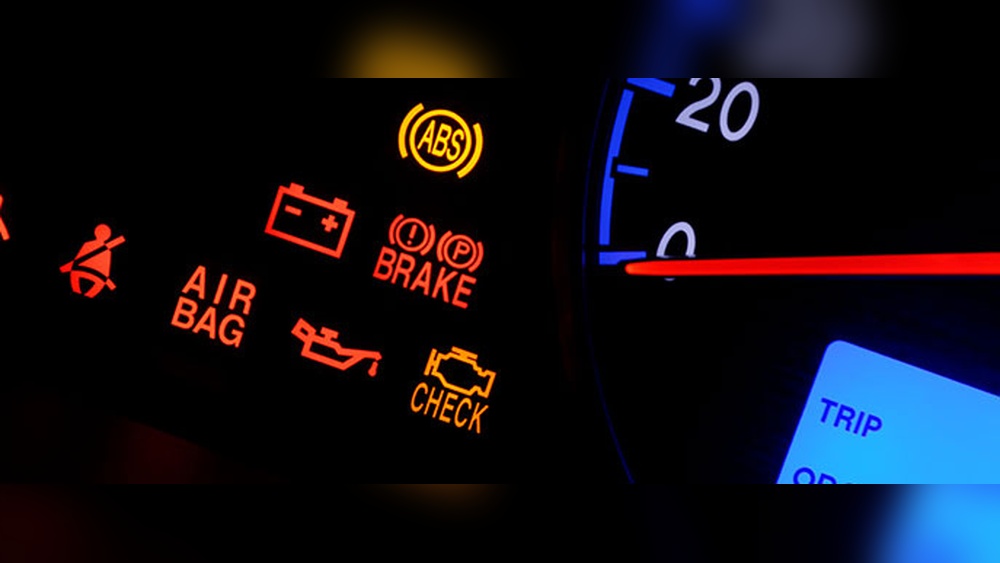
The brake light on your Jeep’s dashboard is an important signal. It alerts you to possible issues with the braking system. Here are the most common reasons:
- Low brake fluid: If the fluid drops below a certain level, the sensor triggers the light.
- Worn brake pads: As pads thin out, some Jeeps have sensors that activate the warning.
- Handbrake engaged: The light stays on if the parking brake isn’t fully released.
- Faulty sensors: Sometimes a bad sensor or wiring problem causes the light to stay on.
- ABS issues: On some models, problems with the anti-lock brake system can trigger the brake light.
Understanding why the light is on is important before you try to reset it. Resetting the warning without fixing the real issue can be dangerous.
When To Reset The Brake Light
Not every situation is right for a reset. The brake warning light is a safety feature. You should only reset it after:
- You’ve fixed the cause (such as adding brake fluid or replacing worn pads).
- You’ve checked for leaks or damage and made repairs.
- You know the system is safe and the light is only on because the car’s computer needs to be updated.
Never ignore the brake warning light or reset it just to make it disappear. Always solve the real problem first.
Resetting The Brake Light: Step-by-step
Resetting the brake light on a Jeep can vary by model and year. Some Jeeps require only a simple process, while newer ones may need a diagnostic tool. Here is a practical guide for most modern Jeep vehicles:
1. Check The Basics
Before starting any reset, check these points:
- Make sure the parking brake is fully released.
- Confirm the brake fluid level is correct.
- Inspect for visible leaks around the wheels and under the vehicle.
2. Disconnect The Battery
This is a common method for resetting warning lights, including the brake light, on many Jeep models.
- Turn off the engine and remove the key.
- Open the hood and locate the negative battery terminal.
- Use a wrench to loosen the nut and disconnect the negative cable.
- Wait for at least 10–15 minutes. This allows the vehicle’s computer to reset.
- Reconnect the negative cable, tighten the nut, and close the hood.
- Start your Jeep and check if the brake light is off.
Insight: Sometimes, only disconnecting the negative terminal works. If you want a deeper reset, disconnect both negative and positive terminals, but always remove the negative first and reconnect it last.
3. Use An Obd-ii Scanner
Modern Jeeps (especially after 2010) often store brake system issues in their computer (ECU). An OBD-II scanner can clear these codes.
- Plug the OBD-II scanner into the port under the dashboard, near the pedals.
- Turn the ignition to the “ON” position (don’t start the engine).
- Follow the scanner instructions to read codes.
- If you find a brake system code, select “Clear” or “Erase” to remove it.
- Turn off the ignition and remove the scanner.
- Start your Jeep. The brake light should reset if the issue is fixed.
Pro tip: Not all basic code readers can clear brake/ABS codes. A more advanced scanner may be needed for some Jeep models.
4. Manual Reset For Older Jeeps
If you have an older Jeep (before 2005), sometimes the light can be reset manually:
- With the ignition off, press and hold the brake pedal.
- Turn the ignition to “ON” (not start).
- Hold the pedal for 10–15 seconds.
- Release the pedal and turn off the ignition.
- Start the vehicle to check if the light is gone.
This method doesn’t work on all models but is worth trying for older vehicles.
5. Aftermarket Repair Or Replacement
If you’ve changed the brake pads or brake sensors, sometimes the light stays on. Double-check that:
- All sensors are plugged in correctly.
- Replacement parts match your Jeep’s model.
- No wires are loose or pinched.
Common mistake: Forgetting to reset the car computer after repairs. Always clear codes if you used a scanner.
Comparing Reset Methods For Different Jeep Models
Different Jeep models may require different reset procedures. Here’s a comparison of popular models and their typical reset needs:
| Jeep Model | Common Reset Method | Special Tools Needed |
|---|---|---|
| Jeep Wrangler (2007–2018) | Battery disconnect or OBD-II scanner | Optional (scanner for ABS codes) |
| Jeep Grand Cherokee (2011+) | OBD-II scanner reset | Advanced scanner |
| Jeep Cherokee (2014+) | OBD-II scanner | Scanner required |
| Jeep Patriot/Compass (2007–2017) | Battery disconnect/manual pedal method | No |
| Jeep Liberty (2002–2012) | Manual pedal method/battery disconnect | No |
Knowing which method suits your Jeep saves time and avoids frustration.

Preventing Brake Light Issues
Resetting is only a short-term fix if the real problem isn’t solved. Here’s how to avoid brake light warnings in the future:
- Check brake fluid regularly. Top up if it’s low.
- Replace brake pads before they wear out completely.
- Inspect brake lines and hoses for leaks or cracks.
- Test the parking brake—make sure it’s not sticking.
- Have the system checked by a mechanic if you notice spongy brakes or strange noises.
Non-obvious tip: Even small air bubbles in the brake lines can trigger the warning light. If you’ve recently done brake work, bleed the brakes to remove air.
Common Mistakes To Avoid
Many Jeep owners make simple mistakes that keep the brake light on or lead to unsafe driving. Here’s what to watch out for:
- Ignoring the warning: Never drive with the brake light on unless you know it’s a sensor issue.
- Not double-checking repairs: After replacing parts, check all connectors and sensors.
- Using the wrong brake fluid: Always use the type specified in your owner’s manual.
- Forgetting to bleed brakes: Air in the lines can keep the warning light on.
- Skipping regular maintenance: Worn components trigger warnings and can cause brake failure.
Extra insight: Some Jeeps have sensitive electronics. Disconnecting the battery may reset radio or clock settings, so be prepared to reprogram them.

Signs That The Reset Didn’t Work
Sometimes, you try all the steps and the brake light still won’t reset. This may mean:
- There is still a real problem (leak, worn part, or low fluid).
- A sensor or electrical connector is faulty.
- The car’s computer needs a more advanced reset (dealer-level tool).
If the light stays on after all attempts and checks, it’s smart to visit a certified Jeep mechanic for a full diagnostic.
Data: How Often Do Brake Lights Need Resetting?
Based on repair data from Jeep service centers, brake warning lights are most commonly reset after:
| Reason for Reset | Percent of Cases |
|---|---|
| Brake pad replacement | 42% |
| Low brake fluid refill | 28% |
| Parking brake adjustment | 17% |
| Sensor or wiring repair | 9% |
| ABS module or computer reset | 4% |
Most resets happen after simple maintenance, but a small number need deeper repairs.
When To Seek Professional Help
DIY resets are fine if you’re comfortable and the problem is solved. However, see a mechanic if:
- The light comes back after reset.
- Brakes feel weak, spongy, or make noises.
- You notice fluid leaks.
- You’re unsure of the problem’s cause.
Remember, brakes are a critical safety system. Don’t take risks with your Jeep or your life.
A Note On Jeep Warranties And Dealer Visits
If your Jeep is under warranty, or you’re unsure about the repair, visiting a Jeep dealership is a good idea. Dealers have advanced diagnostic tools to quickly find and reset warning lights. Sometimes, a software update or recall can trigger brake system warnings—dealers can check for these issues and fix them for free if your Jeep qualifies.
For more technical details about Jeep’s brake warning system, you can check the official Jeep Maintenance Guide.
Frequently Asked Questions
Why Does My Jeep’s Brake Light Come On After Changing The Brake Pads?
Sometimes, the system needs to recognize the new pads. If the light stays on, double-check all sensors and wires. Resetting the light using the battery disconnect or OBD-II scanner usually solves the problem.
Can I Drive My Jeep With The Brake Warning Light On?
No, unless you’re sure it’s just a sensor error. Driving with the brake light on can be risky, as it may mean a real problem. Always check fluid, pads, and brakes before driving.
What Type Of Brake Fluid Should I Use For My Jeep?
Most Jeeps use DOT 3 or DOT 4 brake fluid. Check your owner’s manual for the exact type. Using the wrong fluid can damage the system and trigger the warning light.
Will Disconnecting The Battery Always Reset The Brake Light?
Not always. On newer Jeeps, the computer can store codes even after a battery disconnect. In these cases, you’ll need an OBD-II scanner or a mechanic’s help.
How Can I Tell If The Brake Light Is A Real Problem Or Just A Sensor Error?
Check for symptoms: soft pedal, poor braking, or fluid leaks mean a real problem. If brakes feel fine and fluid is full, it may be a sensor or computer issue.
Taking care of your Jeep’s brakes keeps you safe and prevents bigger problems. If you follow these steps and pay attention to warning lights, your Jeep will keep running strong for years to come.