Connecting your phone to a 2016 Jeep Wrangler may seem simple, but many drivers run into problems with setup, compatibility, or unclear instructions. Whether you want to take calls hands-free, stream music, or use navigation apps, a proper connection makes your ride safer and more enjoyable.
With a few easy steps and clear understanding, you can connect your device quickly and avoid common mistakes.
Understanding Your 2016 Jeep Wrangler’s Connectivity Options
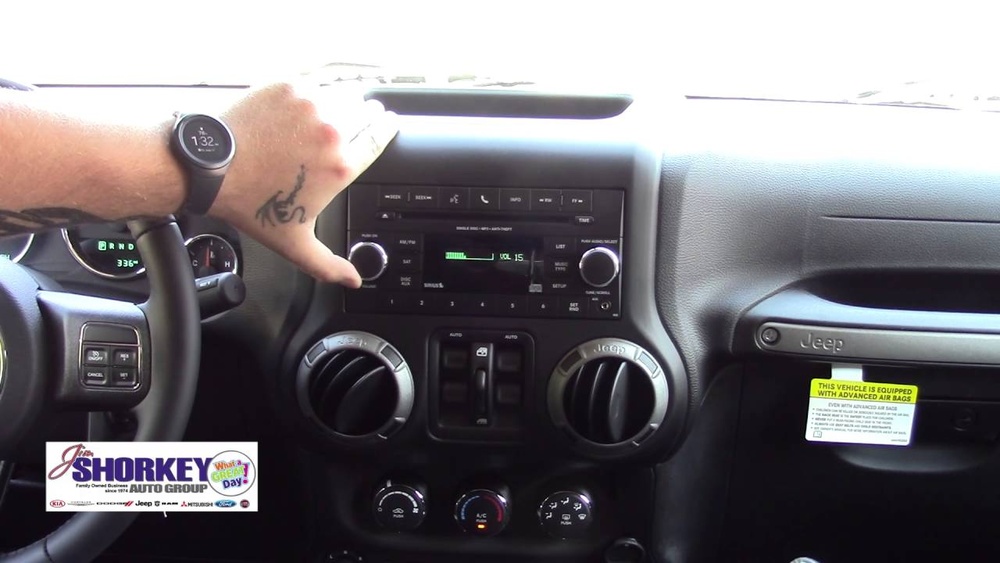
The 2016 Jeep Wrangler usually comes with the Uconnect infotainment system. Depending on the trim, you may have basic Bluetooth or the more advanced Uconnect 430 or 430N with a touchscreen. Most models support Bluetooth pairing, but not all have Apple CarPlay or Android Auto, as these features became common in later years. Knowing your system helps you follow the right steps.
Key Features Supported
- Hands-free calling
- Wireless audio streaming
- Phonebook access
- Voice commands (on select trims)
If you’re not sure which version you have, check your vehicle manual or look for a Uconnect logo on your dashboard.
Preparing Your Phone For Connection
Before you start, make sure your phone supports Bluetooth and that it’s updated to the latest software version. Both Android and iPhone devices work, but older phones may have compatibility issues. Delete old pairings you no longer use to avoid confusion.
Pro Tip: Turn off Wi-Fi during pairing if you experience trouble—sometimes, Wi-Fi can interfere with Bluetooth signals in cars.
Step-by-step: Pairing Your Phone Via Bluetooth
- Start Your Wrangler: Turn on your vehicle and keep it in park.
- Enable Bluetooth: On your phone, go to settings and activate Bluetooth.
- Access Uconnect: On your Jeep’s radio or touchscreen, press the ‘Phone’ button. If no phone is paired, the system will prompt you to add one.
- Begin Pairing: Select ‘Add Device.’ The system will display a PIN.
- Pair Devices: On your phone, look for ‘Uconnect’ in available Bluetooth devices. Select it and enter the PIN shown on your Jeep screen.
- Allow Permissions: Accept any requests to access contacts, call history, or messages for full functionality.
- Confirmation: The system will confirm pairing, and your phone’s name should appear on the Jeep’s display.
Troubleshooting Common Problems
- Pairing fails: Restart both your phone and the vehicle. Try again.
- No sound: Make sure media and call audio are enabled under Bluetooth settings on your phone.
- Can’t find Uconnect: Check if your Jeep’s system is in discoverable mode and not already paired with another device.
Using Phone Features Through Uconnect
Once paired, you can access several features:
- Make or receive calls using steering wheel buttons or the dashboard
- Stream music from apps like Spotify, Apple Music, or YouTube Music
- Voice commands for calling or playing music (if supported)
- View contacts and recent calls on the display
Some older Android devices may not show contact names. In such cases, try deleting and re-pairing the device, or update your phone’s software.
Connecting With Usb (for Charging And Music)
While the 2016 Wrangler doesn’t offer Apple CarPlay or Android Auto, you can connect your phone via USB for charging and, sometimes, music playback.
- Plug your phone into the USB port (usually in the center console or dash)
- Select ‘Media’ on your Jeep’s radio
- Choose ‘USB’ as the source
- On some phones, you may need to select ‘File Transfer’ or ‘Media’ mode
Note: Music playback via USB works better with iPhones than many Androids, since the system is optimized for Apple devices.
Comparison: Bluetooth Vs Usb Connection
Here’s a quick look at how Bluetooth and USB compare in your 2016 Jeep Wrangler:
| Feature | Bluetooth | USB |
|---|---|---|
| Hands-free calls | Yes | No |
| Audio streaming | Yes | Limited |
| Phone charging | No | Yes |
| Contact sync | Yes | No |

Tips For A Smooth Connection
- Only pair your phone while parked for safety.
- Keep your phone’s Bluetooth visible during pairing.
- If you switch phones, remove old devices from Uconnect to avoid confusion.
- Don’t overload your Jeep’s system with too many paired devices.
If audio quality is poor, check both your phone’s volume and the Jeep’s audio settings. Sometimes, interference from other wireless devices can cause drops—turn off extra devices if you notice problems.
What To Do If Pairing Still Fails
Some vehicles have software bugs that affect Bluetooth. If you have followed all steps and your phone still won’t connect:
- Check if there are Uconnect software updates for your Jeep. Visit the Jeep/Uconnect website or ask your dealer.
- Try pairing with a different phone to see if the issue is with your device or the Jeep.
- Reset the Uconnect system (instructions are in the manual).
If all else fails, a dealership technician can often solve stubborn Bluetooth issues.

Data Table: Supported Phones And Features
Some phones have better compatibility than others. Here’s a comparison for common devices:
| Phone Model | Hands-free Calls | Music Streaming | Contact Sync |
|---|---|---|---|
| iPhone (iOS 12+) | Yes | Yes | Yes |
| Samsung Galaxy S8+ | Yes | Yes | Yes |
| Older Android (pre-2016) | Yes | Sometimes | No |
For the latest compatibility lists, visit the official Jeep Uconnect page.
Safety And Privacy Considerations
When you pair your phone, your contacts, messages, and call history may be accessible to anyone using your vehicle. Always remove your device from the Jeep system before selling or lending your car. You can do this in the Uconnect ‘paired devices’ menu.
Frequently Asked Questions
How Many Phones Can I Pair With My 2016 Jeep Wrangler?
You can pair up to seven devices with Uconnect, but only one can be actively connected for calls and media at a time.
Does My 2016 Wrangler Support Apple Carplay Or Android Auto?
No, the 2016 model does not support CarPlay or Android Auto. You must use Bluetooth or USB for phone integration.
Why Can’t My Contacts Sync?
Some phones require you to allow contact access during pairing. Check Bluetooth settings on your phone and make sure ‘sync contacts’ is enabled for Uconnect.
Can I Connect Multiple Phones At The Same Time?
You can pair several devices, but only one will be connected for calls and music. Switch between them in the Uconnect menu.
What Should I Do If Music Skips Or Cuts Out?
Try keeping your phone close to the dashboard and turn off other Bluetooth devices nearby. Make sure your phone’s software is up to date.
Connecting your phone to your 2016 Jeep Wrangler is simple with the right steps and a little patience. Enjoy safer, more convenient driving with hands-free features and your favorite music on the road.