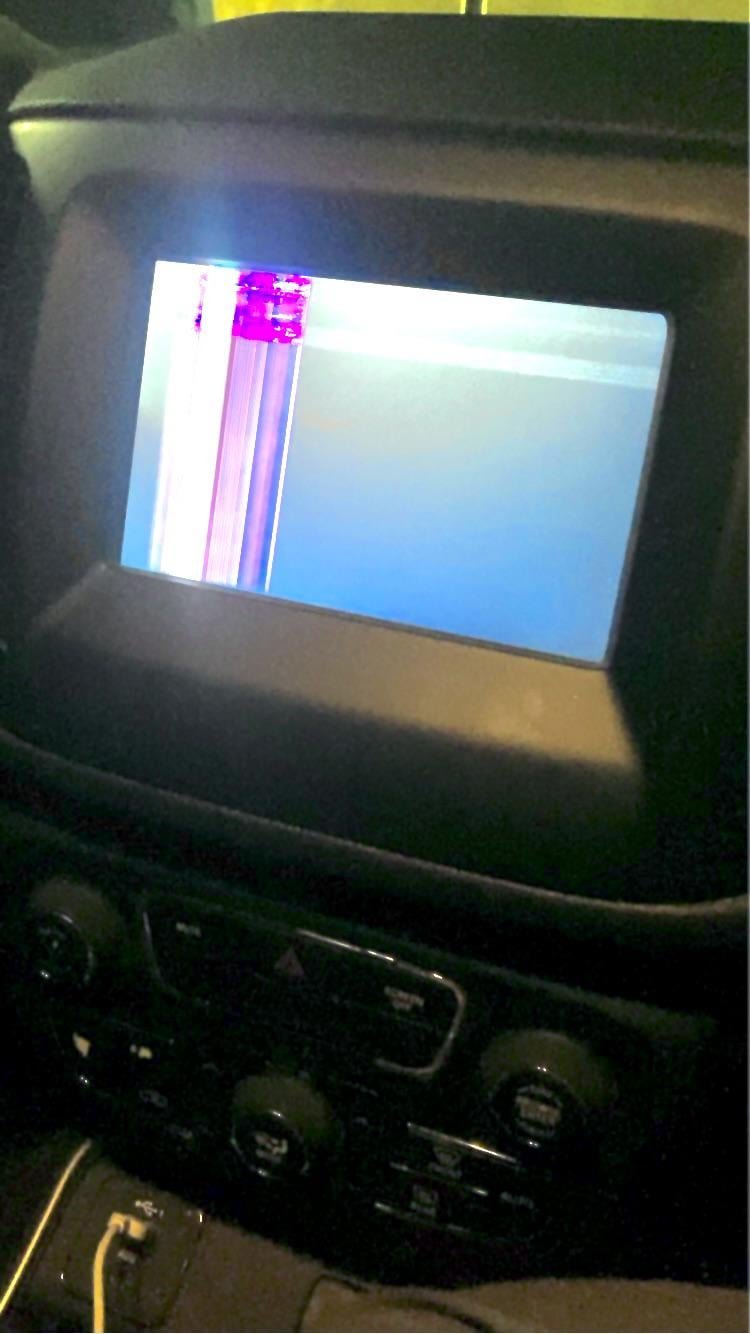
A glitching Jeep screen may freeze, restart, lag, lose touch response or disconnect a phone. The right first step is to record the exact symptom and the installed Uconnect system, because software, cables, phone settings, voltage and hardware faults can look similar.
Quick Answer
Start with a symptom log, vehicle voltage check, phone isolation and the correct Uconnect guidance for the exact Jeep. Do not replace the screen before testing whether the problem occurs with no phone connected.
Record the Pattern
Note whether the screen fails at startup, after heat exposure, only with a phone, or during one app.
Separate Phone Problems From Radio Problems
Disconnect the phone, try another cable and test the native radio menus.
Low Voltage Can Create Strange Behavior
A weak battery or poor connection may affect multiple electronic modules.
Check for Updates and Recalls
Use official Jeep and Mopar resources for the VIN and installed system.
Use a Shop for Persistent Reboots
Repeated black screens, overheating or electrical smell deserve qualified diagnosis.
Key Details to Check
| Item | What to verify | Why it matters |
|---|---|---|
| Symptom | Freeze, reboot, lag or blank screen | Defines the fault |
| Phone | Connected or disconnected test | Separates device issues |
| Cable | Known-good data cable | Finds simple failures |
| Voltage | Battery and charging test | Rules out low supply |
| VIN | Recall and service lookup | Connects the exact Jeep |
Step-by-Step Review
- Film the glitch with a phone.
- Test the screen with the phone disconnected.
- Try another compatible cable and device.
- Check battery and charging voltage.
- Review official Uconnect resources.
- Arrange qualified diagnosis when reboots persist.
Common Mistakes to Avoid
- Replacing the display after one glitch.
- Testing only one cable.
- Ignoring battery symptoms.
- Installing unofficial software from random sites.
- Resetting settings without saving the original symptom.
Test After a Cold Start and a Hot Cabin
Temperature can reveal an intermittent display issue. Note when the fault appears.
Save the Radio Details
Photograph the system-information screen. The version helps a dealer or technician understand the installed unit.
Extended Jeep Uconnect Screen Glitch Troubleshooting Checklist
The extended Jeep Uconnect screen glitch troubleshooting review begins with symptom and phone. Confirm freeze, reboot, lag or blank screen, then compare it with connected or disconnected test before changing anything.
Keep the VIN, model year and one clear photo beside the notes. For Jeep Uconnect screen glitch troubleshooting, the aim is a verified next step supported by the Jeep in front of you, not a parts order or purchase decision copied from another vehicle.
- Start with symptom: verify freeze, reboot, lag or blank screen because defines the fault.
- Move to phone: review connected or disconnected test so the Jeep Uconnect screen glitch troubleshooting decision reflects separates device issues.
- Inspect cable under safe conditions and connect the result with finds simple failures.
- Write down voltage during the Jeep Uconnect screen glitch troubleshooting review before a repair quote, parts order or used-vehicle offer changes the original evidence.
- Confirm recall and service lookup when checking vin, since connects the exact jeep.
- Complete this Jeep Uconnect screen glitch troubleshooting action exactly once and save the result: film the glitch with a phone.
- Use the model-year guide for Jeep Uconnect screen glitch troubleshooting while you test the screen with the phone disconnected.
- Photograph the relevant Jeep Uconnect screen glitch troubleshooting label, component, screen or fastener before you try another compatible cable and device.
- Keep the earlier Jeep Uconnect screen glitch troubleshooting notes beside the Jeep while you check battery and charging voltage.
- Pause the Jeep Uconnect screen glitch troubleshooting review and ask for qualified help before you review official uconnect resources.
- Finish the controlled Jeep Uconnect screen glitch troubleshooting sequence only after you arrange qualified diagnosis when reboots persist.
- Avoid replacing the display after one glitch. because it can hide the original Jeep Uconnect screen glitch troubleshooting result.
- Avoid testing only one cable. during the Jeep Uconnect screen glitch troubleshooting review when the next choice involves money, safety or an expensive component.
- Do not continue with ignoring battery symptoms. in the Jeep Uconnect screen glitch troubleshooting workflow until the earlier evidence is clear.
- Treat installing unofficial software from random sites. as a sign that the Jeep Uconnect screen glitch troubleshooting checklist needs to return to the manual.
- Record why resetting settings without saving the original symptom. was rejected during the Jeep Uconnect screen glitch troubleshooting review.
- Keep the VIN, mileage, date and official source URL with the Jeep Uconnect screen glitch troubleshooting notes.
- Use a second opinion when the Jeep Uconnect screen glitch troubleshooting evidence conflicts with the dashboard, label, manual or road-test result.
Why Is My Jeep Screen Glitching Decision Table
| Checkpoint | Evidence to collect | How to use the result |
|---|---|---|
| Checkpoint 1: Symptom | Freeze, reboot, lag or blank screen | Use this checkpoint to decide the next Jeep Uconnect screen glitch troubleshooting action because defines the fault. |
| Checkpoint 2: Phone | Connected or disconnected test | Use this checkpoint to decide the next Jeep Uconnect screen glitch troubleshooting action because separates device issues. |
| Checkpoint 3: Cable | Known-good data cable | Use this checkpoint to decide the next Jeep Uconnect screen glitch troubleshooting action because finds simple failures. |
| Checkpoint 4: Voltage | Battery and charging test | Use this checkpoint to decide the next Jeep Uconnect screen glitch troubleshooting action because rules out low supply. |
| Checkpoint 5: VIN | Recall and service lookup | Use this checkpoint to decide the next Jeep Uconnect screen glitch troubleshooting action because connects the exact jeep. |
Questions to Answer Before Closing the Jeep Uconnect Screen Glitch Troubleshooting Review
- Does the Jeep Uconnect screen glitch troubleshooting answer match the exact model year and VIN?
- Which Jeep Uconnect screen glitch troubleshooting finding came from a label, measurement, scan result or manual page?
- What changed after the last Jeep Uconnect screen glitch troubleshooting test, repair or accessory installation?
- Which Jeep Uconnect screen glitch troubleshooting step belongs with a qualified technician rather than a home garage?
- Does the Jeep Uconnect screen glitch troubleshooting result support normal use, another controlled test or a workshop visit?
- Have the photos, receipts and source links been saved with the Jeep Uconnect screen glitch troubleshooting record?
Frequently Asked Questions
Can a weak battery affect Uconnect?
Yes. Low voltage may cause unusual electronic behavior.
Why does CarPlay disconnect while charging continues?
The data connection, cable or USB port may be unreliable.
Should I install an update from an unknown download site?
Use official Jeep or Mopar resources only.
- Why Jeep Wrangler Is The Best
- How To Reset Uconnect Jeep Wrangler 2020
- Why Do They Put Rubber Ducks On Jeeps
Final Takeaway
A glitching Jeep screen needs a controlled test. Record the pattern, isolate the phone, verify voltage and use official guidance before replacing hardware.