If you drive a Jeep, you may have heard of Uconnect. This advanced system connects your vehicle, your smartphone, and even the internet. But many drivers wonder: Where exactly is Uconnect on a Jeep? How do you access it, and what can it do? This guide will help you find Uconnect in your Jeep, understand its features, and use it with confidence.
What Is Uconnect?
Uconnect is Jeep’s infotainment system. It controls music, navigation, phone calls, climate, and even some vehicle settings. Uconnect comes standard on most new Jeep models, but the version and features can change depending on the trim and year.
For example, the Uconnect 4C NAV offers navigation and a larger screen, while the Uconnect 3 has basic features. Some models have Apple CarPlay and Android Auto, making it easy to link your phone.
Where To Find Uconnect In Your Jeep
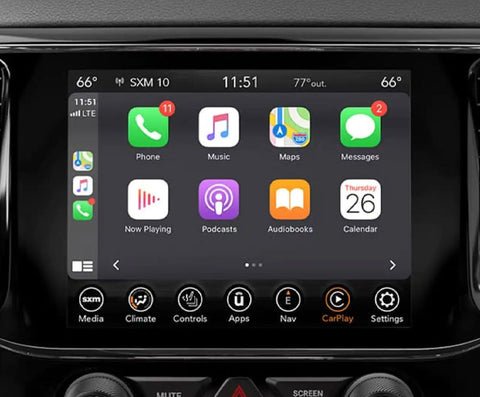
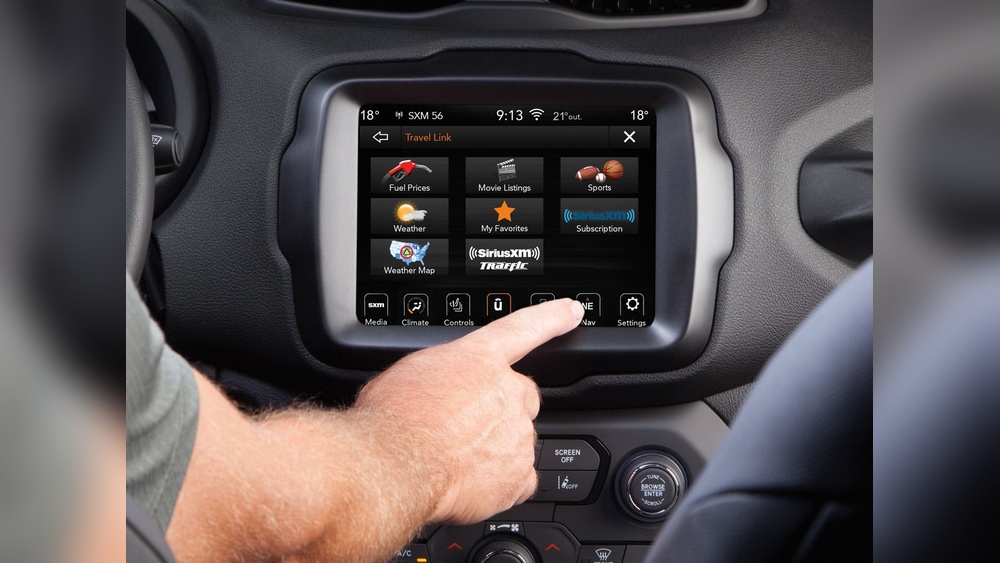
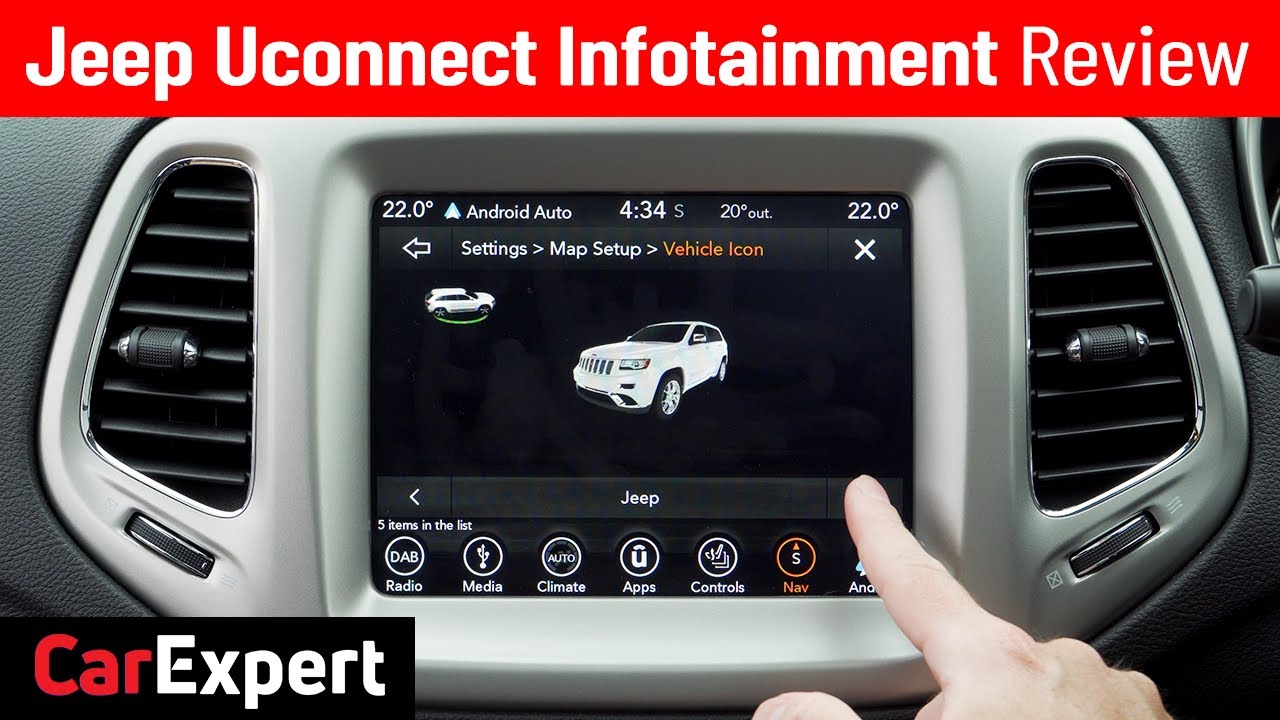
Most Jeep owners discover Uconnect on the main touchscreen in the center of the dashboard. This touchscreen is sometimes called the infotainment display. Its size can range from 5 inches to more than 10 inches, depending on your model.
Typical Uconnect Locations By Jeep Model
Here’s a quick look at where you’ll find Uconnect in popular Jeep vehicles:
| Model | Screen Size | Uconnect Version | Location |
|---|---|---|---|
| Jeep Wrangler | 7″ or 8.4″ | Uconnect 4 or 4C NAV | Center dashboard |
| Jeep Grand Cherokee | 8.4″ or 10.1″ | Uconnect 5 | Center dashboard |
| Jeep Compass | 7″ or 8.4″ | Uconnect 4 | Center dashboard |
| Jeep Renegade | 5″ or 7″ | Uconnect 3 or 4 | Center dashboard |
No matter which Jeep you own, the Uconnect screen is always on the central dashboard. You can’t remove it easily, as it’s built into the vehicle’s main console.
How To Access Uconnect
To use Uconnect, first turn on your Jeep and press the power button on the touchscreen. The system will load, showing the Uconnect logo. If your model has a physical “Media” or “Apps” button, pressing it also launches Uconnect features.
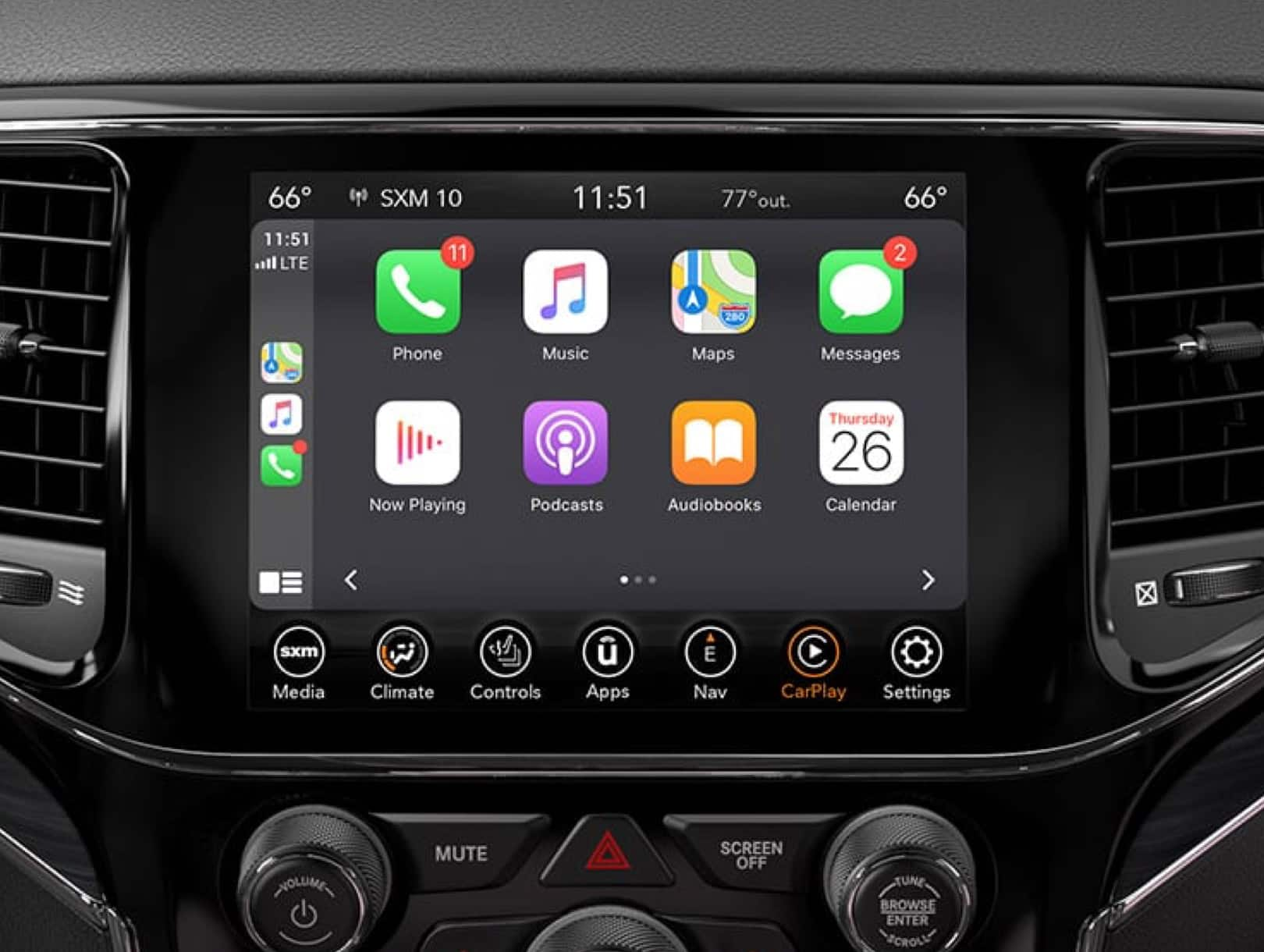
You’ll see several icons on the home screen:
- Radio for AM/FM/SiriusXM
- Media to play music from USB, Bluetooth, or SD card
- Phone to make calls or send texts hands-free
- Navigation (if equipped)
- Apps for features like Apple CarPlay, Android Auto, or Uconnect Market
Simply tap the icon you want. The menu and layout may change slightly from one version to another, but the core functions are similar across Jeeps.
Some Jeep models have physical shortcut buttons below the touchscreen. These let you quickly access radio, navigation, or climate controls. On others, everything is on-screen.
For voice controls, press the microphone button on your steering wheel. This activates Uconnect’s voice command system, allowing you to call contacts, set destinations, or change music with simple voice prompts.
Main Features Of Uconnect
Uconnect is more than a radio. Here’s what you can do:
- Hands-Free Calling: Connect your phone with Bluetooth to make or receive calls safely.
- Navigation: Some models have built-in maps, real-time traffic, and turn-by-turn directions.
- Music and Audio: Stream music from your device, use satellite radio, or play from USB/SD cards.
- Climate Control: Adjust temperature and fans directly from the screen (on some models).
- Vehicle Settings: Change door locks, lighting, or driver assistance settings.
- Smartphone Integration: Use Apple CarPlay or Android Auto for your favorite apps.
Here’s a quick comparison of features across Uconnect versions:
| Feature | Uconnect 3 | Uconnect 4 | Uconnect 5 |
|---|---|---|---|
| Touchscreen Size | 5″ | 7″/8.4″ | 10.1″ |
| Apple CarPlay/Android Auto | No | Yes | Yes (Wireless) |
| Navigation | Optional | Optional | Standard/Optional |
| Voice Commands | Basic | Improved | Advanced |
Common Questions About Using Uconnect
Many drivers miss some useful details about Uconnect. Here are two insights beginners often overlook:
- Uconnect can be updated over-the-air (OTA) on newer models. You don’t always need to visit a dealer for software updates.
- If your Jeep has multiple user profiles, each driver can save their seat, mirror, and radio settings. This is especially useful for families.
Another tip: If your Uconnect screen is frozen or unresponsive, you can usually reset it by holding the power and volume buttons together for about 10 seconds. This quick reboot solves many common glitches.
Troubleshooting Uconnect Issues
Sometimes, Uconnect may not work as expected. Here are a few tips:
- If Bluetooth won’t connect, delete the old pairing on both your phone and Uconnect, then reconnect.
- If navigation doesn’t load, check if your subscription or map update is current.
- For touchscreen problems, a soft reset (as above) often helps.
For serious issues, contact your local Jeep dealer. Some problems need a professional technician.
Uconnect Subscription And Costs
Some Uconnect features are free, but others need a subscription. For example, SiriusXM radio and some connected services (like remote start from your phone) require payment. Prices change by region and model, so check with your dealer for current rates.
Here’s a quick overview of what’s free vs. paid:
| Feature | Free | Paid Subscription |
|---|---|---|
| Bluetooth Phone/Audio | Yes | No |
| Apple CarPlay/Android Auto | Yes | No |
| SiriusXM Radio | Trial Only | Yes |
| Remote Start/Lock via App | No | Yes |
| Navigation Updates | No | Yes |
For more details, visit the official Jeep Uconnect page.
Frequently Asked Questions
There isn’t a single “Uconnect” button. You access Uconnect through the center touchscreen or with shortcut buttons below the screen. Voice commands start with the microphone button on the steering wheel.
Can I Add Uconnect To An Older Jeep?
Most older Jeeps cannot be upgraded to Uconnect easily because it needs special hardware and software. Some aftermarket radios offer similar features, but they are not official Uconnect systems.
How Do I Reset My Uconnect System?
To reset, hold down the power and volume buttons on the touchscreen for about 10 seconds. The screen will go black and restart. This works for most soft glitches.
Does Uconnect Work Without A Subscription?
Basic features like Bluetooth and Apple CarPlay are free. Premium services, such as remote start or Wi-Fi, need a paid subscription.
Is Uconnect Available Outside The Us?
Yes, but some features (like SiriusXM radio or certain apps) may be limited depending on your country. Always check local Jeep websites for exact details.
If you know where to look, Uconnect is easy to find and use in any Jeep. It’s a powerful tool for comfort, connection, and safety right at your fingertips.