Buying or selling a used Jeep Patriot can feel confusing, especially when you want to know the vehicle’s true history and features. Every Jeep Patriot has a unique code called a VIN (Vehicle Identification Number) that holds important information.
If you use a Jeep Patriot VIN decoder, you can uncover hidden details about the car, like its engine type, where it was made, and whether it has been in any accidents. Understanding how to use a VIN decoder can help you make smarter decisions and avoid costly mistakes.
What Is A Jeep Patriot Vin Decoder?
A VIN decoder is a tool—usually online—that translates the 17-character VIN into easy-to-understand details about the vehicle. The Jeep Patriot’s VIN is like its fingerprint; no two vehicles have the same one. This code tells you about the car’s build, specs, and sometimes its history.

Using a VIN decoder is simple. You enter the VIN on a trusted website, and it shows you information such as:
- Model year and engine type
- Country and plant where it was built
- Transmission and trim level
- Safety features and options
Some decoders even show accident history, recalls, and past ownership if connected to larger databases.
Where To Find The Jeep Patriot Vin
You can find the VIN in several places on your Jeep Patriot. The most common locations are:
- Dashboard: Look through the windshield on the driver’s side, near the bottom corner.
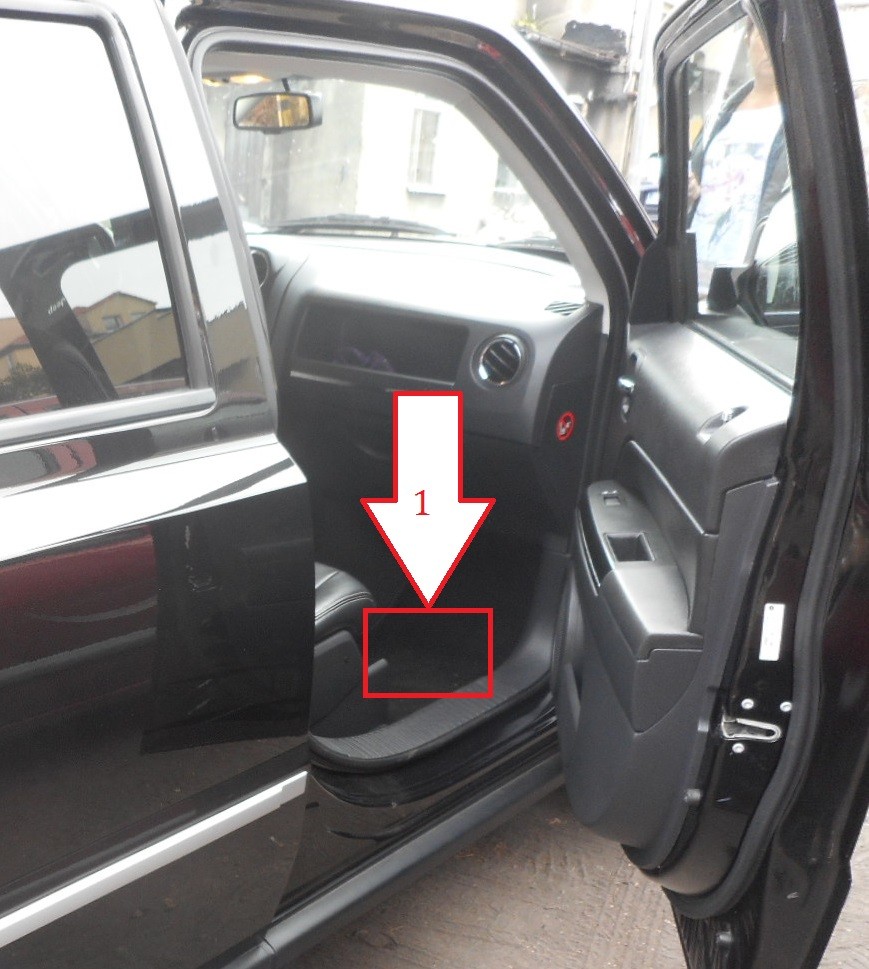
- Driver’s door frame: Open the door and check the sticker or metal plate.
- Registration and title documents: The VIN is printed on official paperwork.
- Insurance card: Insurers use the VIN to identify your vehicle.
Always double-check the VIN from the car and the documents to make sure they match. If they don’t, it could be a sign of tampering or errors.

Decoding The Jeep Patriot Vin: What Each Character Means
The 17 characters in a VIN are not random. Each one reveals a specific detail. Here’s a breakdown to help you understand what you see when you use a decoder:
| VIN Position | What It Shows | Example |
|---|---|---|
| 1 | Country of Origin | 1 = USA |
| 2 | Manufacturer | J = Jeep |
| 3 | Vehicle Type | 4 = SUV |
| 4-8 | Features (model, body, engine) | FT74G = Patriot, 2.4L |
| 9 | Check Digit (for security) | 5 |
| 10 | Model Year | D = 2013 |
| 11 | Assembly Plant | D = Belvidere, IL |
| 12-17 | Serial Number | 123456 |
A non-obvious tip: The ninth digit is a “check digit” that helps prevent VIN fraud. It’s calculated using a special formula, so any mismatch often means the VIN was changed.
Why Decode A Jeep Patriot Vin?
Decoding the VIN is more than just curiosity. Here’s why it matters:
- Confirm vehicle specs: Make sure the car you’re buying matches its advertised features. For example, a VIN decoder will tell you if it’s a 4×4 or front-wheel drive.
- Spot hidden issues: A VIN can reveal if the Jeep Patriot was salvaged, flooded, or rebuilt, even if the seller does not mention it.
- Check recall status: You can see if the vehicle has any open recalls that need fixing.
- Avoid scams: Matching the VIN on the car with the documents helps prevent buying a stolen or cloned vehicle.
Many buyers miss that a VIN decoder can show factory-installed options. This helps you know exactly what equipment is original and what might be aftermarket.

How To Use A Jeep Patriot Vin Decoder
Using a decoder is quick and often free. Here’s how you do it:
- Find the VIN: Use the locations listed above.
- Go to a trusted VIN decoder site: Examples include the National Highway Traffic Safety Administration (NHTSA) or the official Jeep website.
- Enter the VIN: Type all 17 characters carefully—errors will lead to wrong results.
- Review the results: Compare the details to the car in front of you. If anything does not match, ask questions or walk away.
Here’s a quick comparison of what you get from basic vs. comprehensive VIN decoders:
| Feature | Basic Decoder | Comprehensive Decoder |
|---|---|---|
| Year, Make, Model | ✔️ | ✔️ |
| Engine Type | ✔️ | ✔️ |
| Transmission | ❌ | ✔️ |
| Recall History | ❌ | ✔️ |
| Accident Reports | ❌ | ✔️ |
| Ownership Records | ❌ | ✔️ |
A useful insight: Sometimes, the free decoders only show basic info. For full history, you may need to pay for a detailed report.
Common Mistakes When Using Vin Decoders
Even experienced buyers sometimes make mistakes. Here are a few to avoid:
- Typing errors: One wrong letter or number gives wrong results.
- Trusting only one source: Use at least two sites if something looks odd.
- Ignoring the check digit: If it doesn’t match, the VIN might be fake.
- Not checking for updates: Older decoder databases might miss recent recalls or changes.
Double-checking everything saves you from buying a car with a hidden past.
Jeep Patriot Vin Decoder And Vehicle History
A VIN decoder is not the same as a full vehicle history report, but they work together. The decoder tells you the specs, while a history report (like Carfax or AutoCheck) shows accidents, title problems, and maintenance records.
Here’s a side-by-side look at what each offers:
| Detail | VIN Decoder | History Report |
|---|---|---|
| Vehicle Specs | ✔️ | ✔️ |
| Accident History | ❌ | ✔️ |
| Ownership Records | ❌ | ✔️ |
| Recall Info | ✔️ (sometimes) | ✔️ |
| Title Problems | ❌ | ✔️ |
For most buyers, using both tools is the best way to protect your money.
Frequently Asked Questions