If you own a Jeep Compass, you may have seen the “Speed Limit Exceeded” warning pop up on your dashboard or touchscreen. For many drivers, this alert can be distracting or even annoying, especially if you know the road conditions and prefer to manage your speed yourself. The good news is that you can usually turn off this feature, or adjust it, depending on your Jeep Compass model and regional settings. In this guide, you’ll discover how to disable the speed limit exceeded warning, what to consider before you do it, and how to handle related alerts in your vehicle. If you want a quieter, less intrusive driving experience, read on for step-by-step guidance.
Why Does The Jeep Compass Show “speed Limit Exceeded”?
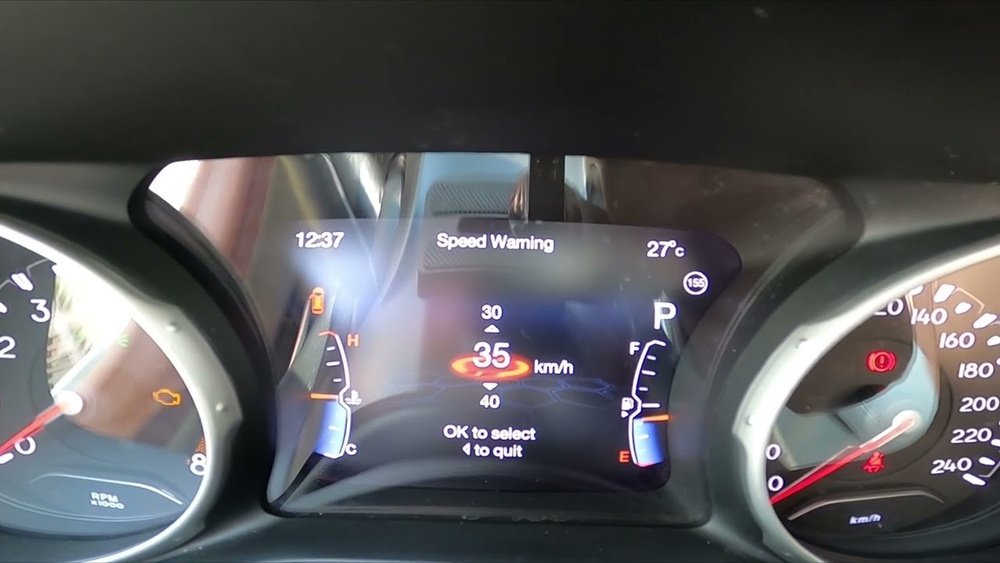
Modern cars like the Jeep Compass come with driver assistance features that help keep you safe. One of these is the speed limit warning. The system uses GPS data or traffic sign recognition to detect the speed limit of the road you’re driving on. If you exceed that limit, you’ll see a message—sometimes with a beep or chime—on your instrument cluster or infotainment screen.
Manufacturers like Jeep include this feature to:
- Remind drivers to stay within legal speed limits
- Reduce the risk of speeding tickets
- Help prevent accidents
But these alerts can sometimes trigger even when you’re just a few miles over the limit, or if the car misreads a sign. That’s why many owners want to know how to adjust or turn off this setting.
How The Speed Limit Warning System Works
The speed limit warning system on the Jeep Compass is usually part of the vehicle’s Uconnect infotainment suite. Depending on your model year and country, it may get speed limit data from:
- The car’s built-in navigation system
- Road sign recognition cameras
- Maps connected to your GPS
When you exceed the detected limit, the system triggers a warning. On recent Jeep Compass models (especially after 2018), the system is more accurate because it combines several data sources.
Here’s a quick comparison of where the data comes from in different Jeep Compass trims:
| Model Year | Base Trim | High Trim (Limited/Trailhawk) |
|---|---|---|
| 2017–2019 | Navigation only | Navigation + Camera |
| 2020–Present | Navigation + Some Camera | Navigation + Advanced Camera |
Key insight: Some owners notice more false alerts on base trims because camera-based detection is not as advanced.
Is It Safe To Turn Off Speed Limit Alerts?
Before you turn off this warning, consider your driving habits. The alert is there to protect you, your passengers, and others on the road.
Disabling it means you’ll need to pay extra attention to posted limits. Also, in some countries, turning off safety features may affect your insurance in the event of an accident.
That said, many experienced drivers find these alerts unnecessary, especially if they regularly check their speed and know local laws. If you choose to disable the warning, be sure you’re comfortable driving without this digital reminder.
How To Turn Off Speed Limit Exceeded Warning
The process to turn off or adjust the speed limit warning depends on your Jeep Compass model and your infotainment software version. Below are the main ways to do it.
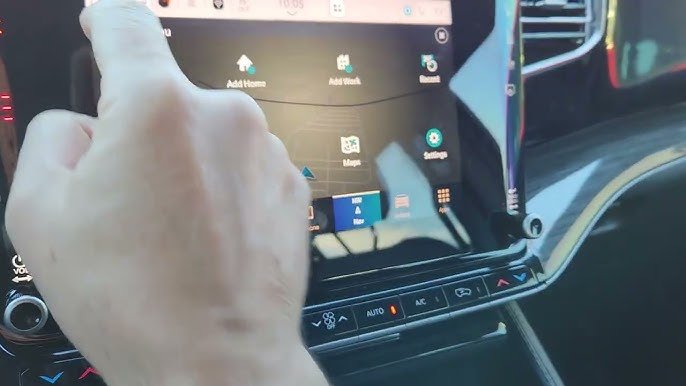
1. Using The Uconnect Infotainment System
Most Jeep Compass models from 2017 onward use the Uconnect system. Here’s how to adjust the warning:
- Start your vehicle and make sure the infotainment screen is on.
- Tap the Settings icon on the home screen.
- Scroll down and select Safety & Driving Assistance.
- Look for an option called Speed Warning or Speed Limit Warning.
- You can usually set the alert to Off, or adjust the speed threshold (for example, only alert if you exceed the limit by 10 mph).
- Save your changes and exit the menu.
Tip: On some models, you must have the car in “Park” to change these settings.
2. Adjusting From The Instrument Cluster
If your Jeep Compass has a digital display between the speedometer and tachometer, you may be able to adjust the alert here:
- Use the steering wheel buttons (usually left or right arrows) to navigate to the Vehicle Info or Driver Assistance menu.
- Find the Speed Warning section.
- Set the alert to Off or change the trigger speed.
Insight many miss: Even if you turn the alert off in the Uconnect menu, some versions require you to confirm the change in the cluster menu as well.
3. Deactivating Road Sign Information (for Camera-based Models)
On some higher trims, the warning is tied to the road sign recognition system. You may need to turn this feature off:
- Go to Settings in the Uconnect system.
- Select Driver Assistance or Road Sign Information.
- Toggle the feature off. This will stop both the sign display and the speed alert.
Note: Disabling road sign recognition also turns off other features, like showing the current limit on your dashboard.
4. Adjusting With The Jeep App (if Supported)
Some recent models let you control vehicle settings using the official Jeep mobile app:
- Open the app and connect to your Jeep Compass.
- Go to Vehicle Settings.
- Look for Speed Alerts or similar.
- Adjust or disable the alert as preferred.
Not all regions support this—check your app for available settings.
5. Dealer Assistance
If you can’t find the option to turn off the speed warning, or if your menus look different, visit your Jeep dealer. Some regional models lock this setting and require a technician to change it.
- Dealers may charge a small fee for this service.
- In some countries, law requires the alert to stay on for safety reasons.
Common Issues When Turning Off The Alert
Many Jeep Compass owners run into problems when trying to turn off speed warnings. Here are the most frequent issues and how to handle them:
- Missing menu option: Some regions do not allow you to turn off this feature due to local laws.
- Settings won’t save: If the setting returns after restarting the car, your software may need an update.
- Multiple drivers: If you share the car, each driver profile may have its own alert settings.
- False alerts: The system may show a warning even if you’re under the limit; this usually happens if the GPS or camera misreads signs.
Pro tip: Keeping your Uconnect system up to date can fix many bugs with speed limit warnings. Visit your dealer or check the Jeep website for the latest software.
Real Owner Experiences And Insights
Many Jeep Compass owners share their tips and experiences online. Here’s a summary of what works for most people:
- US models usually let you turn off or adjust the speed warning easily through Uconnect.
- European and some Asian models often have the warning permanently enabled, due to road safety regulations.
- Owners who use aftermarket navigation systems sometimes see fewer false alerts.
- If you can’t turn off the warning, setting it to a higher threshold (like 10 mph or 15 km/h over the limit) reduces distractions.
Here’s a comparison of menu locations for speed limit warnings in different regions:
| Region | Menu Location | Can Disable? |
|---|---|---|
| USA | Uconnect & Cluster | Yes |
| Europe | Uconnect only | Usually No |
| Asia (India) | Cluster only | Sometimes |
Tips For Managing Alerts And Staying Safe
If you decide to turn off the speed limit warning, consider these tips:
- Check your speed regularly. Without an alert, it’s easy to miss speed changes, especially in unfamiliar areas.
- Use cruise control on highways to maintain a steady speed.
- Update your navigation maps often, as old data can cause incorrect speed limits to display.
- Watch for local laws. In some places, disabling safety features can affect your insurance or even result in a fine.
Less obvious tip: Sometimes, setting the warning to a higher threshold is better than turning it off. That way, you still get a reminder if you drive much faster than allowed, but you won’t get constant alerts for minor speed changes.
What If The Warning Won’t Turn Off?
There are cases where the speed limit alert can’t be disabled, or it comes back after you try to turn it off. Here’s what to do:
- Check for software updates. An outdated infotainment system may not save your preference.
- Try a hard reset. Power off the vehicle, lock it, and wait a few minutes before restarting.
- Contact your dealer. They may be able to change regional settings or update your software.
- Consider a professional coder. In some countries, auto specialists can reprogram the system, but this may void your warranty.
When To Leave The Speed Limit Alert On
For some drivers, it’s better to keep the alert active. If you:
- Often drive in new or unfamiliar places
- Tend to lose track of your speed
- Share your car with younger or less experienced drivers
…keeping the warning on may help avoid accidents and tickets. Remember, safety features are there to support you, not to annoy you.
Real-world Example
John, a Jeep Compass owner in the US, found the speed limit alert distracting on his daily commute. He followed the steps in Uconnect to set the warning threshold to 10 mph over the limit. This way, he only hears a warning when he’s truly speeding. John’s experience shows that adjusting the alert, rather than turning it off completely, can be a smart compromise.
Frequently Asked Questions
How Do I Know If My Jeep Compass Supports Turning Off The Speed Limit Exceeded Warning?
Check your owner’s manual or look in the Uconnect settings under Safety & Driving Assistance. US models usually allow it, while some international models may not.
Will Turning Off The Speed Limit Warning Affect My Vehicle Warranty?
No, disabling this alert does not void your warranty. However, making software changes outside of official Jeep updates or modifications by third-party coders might affect it.
What If The Warning Comes Back After I Turn It Off?
This can happen if your system is not updated, or if your region has safety laws requiring the alert. Try updating your Uconnect software, or ask your dealer for help.
Can I Set The Warning To A Higher Speed Instead Of Turning It Off?
Yes, many Jeep Compass models allow you to set the warning to trigger at a certain amount over the limit (for example, +5 or +10 mph). This reduces false alerts.
Where Can I Find More Detailed Information Or Updates About Jeep Compass Features?
Visit the official Jeep Compass website for the latest manuals, software updates, and support.
Turning off the “Speed Limit Exceeded” warning in your Jeep Compass is possible for most owners, especially in the US. Always check your model’s menus, consider your personal safety, and stay informed about updates.
Whether you adjust, disable, or keep the alert, make your choice with confidence and enjoy a more personalized driving experience.


















